Welcome Guest ( Log In | Register )

Bump Topic Topic Closed RSS Feed
10 Pages « < 5 6 7 8 9 > » Bottom

Outline · [ Standard ] · Linear+

Unifi Official TM UniFi High Speed Broadband Thread V36, READ 1ST PAGE FOR TURBO SPEED INFO!

views
     
JohnLai
post Dec 7 2018, 08:20 PM

Skeptical Cat
*******
Senior Member
3,669 posts

Joined: Apr 2006
QUOTE(mmohdnor @ Dec 7 2018, 07:45 PM)

Test using Unifi speedtest website I managed to get :
LAN (cat6) = 320Mbps++
Wifi AC = 150Mbps++

Saw several posts about AC55UHP has beta firmware so I tested that.
The firmware worked well.
LAN (cat6) = 440Mbps++
Wifi AC = 150-300Mbps++

With Ookla Speedtest on Starhub Singapore also about the same reading as above.

Yay ... but still not maxed out till 500Mbps  cry.gif  .. hehe.  tongue.gif

Latest bill I got recently still same amount like before : RM274.55 with all SST in.
*
What 'are' your PC/Laptop details connected to the CAT6 cable?
JohnLai
post Dec 11 2018, 04:40 PM

Skeptical Cat
*******
Senior Member
3,669 posts

Joined: Apr 2006
QUOTE(lolo0o @ Dec 11 2018, 03:49 PM)
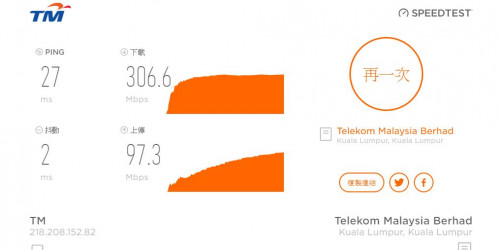
Hello Sifus recently i have turbo-ed to 500mbps and i found out that my internet speed is not stable and it never reach 500mbps on lan test and it varies around 300mbps.
My current router is dlink -dir 882 and i even replace all the internet cable to urgreen cat7 cable, may i know what could be my problem ? Could it be i am still in pilot phase or my modem is failing? Please help T_T
user posted image
*
QUOTE(lolo0o @ Dec 11 2018, 04:04 PM)
Hello Sifu, the device i am using is my old desktop, it has a Realtek PCIe GbE Family Controller (RTL 8167 chipset)

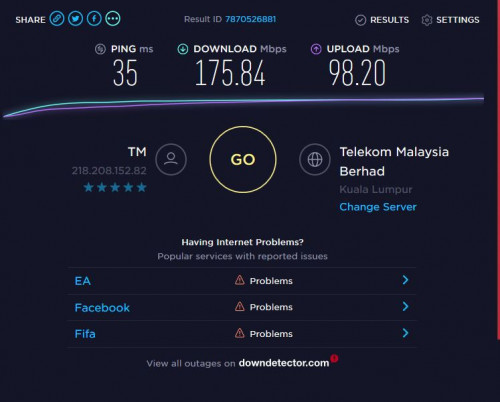
Below is the speed test i get from ookla, i dont know what happen to my internet, please help
user posted image
*
Old Sandy to Haswell architecture on Win10?
Just disable Spectre protection and ensure your CPU is not throttling its clock due to overheating.


QUOTE(AVFAN @ Dec 11 2018, 04:19 PM)
likely yr OLD desktop not so capable...
better wait for the PC sifus to explain to u...

any other laptop, tv box u can use to test?
using ct5, cat5e or cat6 LAN cable?
*

=.=
JohnLai
post Dec 12 2018, 12:54 AM

Skeptical Cat
*******
Senior Member
3,669 posts

Joined: Apr 2006
QUOTE(lolo0o @ Dec 12 2018, 12:47 AM)
Sifu, my old desktop cpu is core 2 duo e7500, its like an antique , will that bottleneck the speed?
*
e7500? There is no microcode 'mitigation' for that cpu generation

Download HWmonitor, check your CPU temperature and CPU clock while running the speedtest. Verify if it can clock consistently at 2.93 GHz.


JohnLai
post Dec 12 2018, 07:51 PM

Skeptical Cat
*******
Senior Member
3,669 posts

Joined: Apr 2006
QUOTE(uexpress @ Dec 12 2018, 07:50 PM)
Did check the adapter no problem.
Now tiba tiba i need to pay extra RM53 for on-site support charges to replace the BTU.  doh.gif  doh.gif  doh.gif  doh.gif
*
You kena tipu lah.

If you got charged RM53 to replace BTU in your bill, file a complaint and claim back the rebate.

BTU replacement = free.
JohnLai
post Dec 13 2018, 09:56 PM

Skeptical Cat
*******
Senior Member
3,669 posts

Joined: Apr 2006
blacktubi

What are 5ghz channel range available for TP-Link C6 v2 which you had tested?
JohnLai
post Dec 15 2018, 12:46 AM

Skeptical Cat
*******
Senior Member
3,669 posts

Joined: Apr 2006
QUOTE(toytoy @ Dec 15 2018, 12:05 AM)
Thx for the suggestion. I'm using a laptop which just started up and CPU usage is low. I have done over 5 speedtests and the results hover around 300 to 370Mbps
*
You misunderstood, he was asking if you have 1 cpu core / thread being maxed only. Change the task manager graph into logical view. 😑


Note: for your other question, NAT Boost must be enabled.
JohnLai
post Dec 15 2018, 01:02 AM

Skeptical Cat
*******
Senior Member
3,669 posts

Joined: Apr 2006
QUOTE(toytoy @ Dec 15 2018, 12:58 AM)
Multi core and none of the core / thread were maxed out.

Now all of a sudden my speed is back to 100Mbps. I am not getting anything over 100...

Also, is the Default Gateway IP Correct?
*
hmm.gif Are you really sure you don't have the legendary 1 core/thread being maxed only issue? The less known spectre + microcode issue?

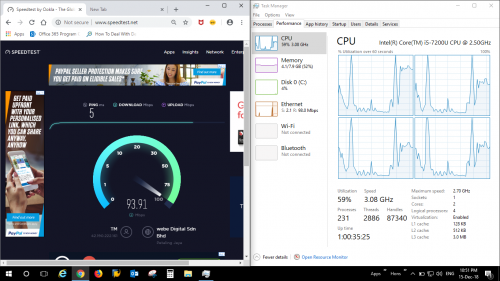
10.233.33.60 = this is a private IP range = carrier grade NAT.

Never heard Unifi users got allocated with private IP range. =.=
JohnLai
post Dec 15 2018, 07:13 PM

Skeptical Cat
*******
Senior Member
3,669 posts

Joined: Apr 2006
QUOTE(toytoy @ Dec 15 2018, 03:55 PM)
Talked to live chat, reset my port, and I am still not passing the 500Mpbs mark.

I believe they wrongly turboed me to 500Mbps instead of 800Mpbs. But my account info is showing 800Mbps.

Also, before upgrade I was paying RM199. What should the perpetual discount be? I only have Ruby Pack. Currently my package is showing RM100 + RM60 perpetual discount. Have to wait until next bill only know the actual amount.

user posted image
*
......what exactly is your laptop cpu model?

JohnLai
post Dec 15 2018, 10:47 PM

Skeptical Cat
*******
Senior Member
3,669 posts

Joined: Apr 2006
QUOTE(toytoy @ Dec 15 2018, 10:41 PM)
Dell Latitude 7480. smile.gif
*
-.- Check your windows 10 version.

http://catalog.update.microsoft.com/v7/sit....aspx?q=4346084 = win10 1803 ---> Note: might need to uninstall KB4100347 before installing this.
http://catalog.update.microsoft.com/v7/sit....aspx?q=4465065 = win 10 1809

Reboot is required.

Next, try to test* other speedtest servers: InNet, Extreme Broadband, Macro lynx and TIME

This post has been edited by JohnLai: Dec 15 2018, 10:49 PM
JohnLai
post Dec 15 2018, 11:00 PM

Skeptical Cat
*******
Senior Member
3,669 posts

Joined: Apr 2006
QUOTE(toytoy @ Dec 15 2018, 10:56 PM)
Haven't done any of your suggestion and did this test. CPU usage seems evenly distributed.

user posted image
*
You call that evenly distributed? doh.gif

To determine if you need microcode update, simple = reboot into "safe mode with networking" and run speedtest on those few servers I listed (including TM).
You will see what I mean (assuming if TM capped your account correctly, which I think TM did......judging from your 200Mbps upload speedtest).


edit:
http://catalog.update.microsoft.com/v7/sit....aspx?q=4346086 = win 10 1703 ---> Might need to uninstall KB4091663 before installing this.

This post has been edited by JohnLai: Dec 15 2018, 11:00 PM
JohnLai
post Dec 16 2018, 12:14 AM

Skeptical Cat
*******
Senior Member
3,669 posts

Joined: Apr 2006
QUOTE(toytoy @ Dec 16 2018, 12:09 AM)
You were right. In safe mode i am getting around 800Mbps.

I installed the windows update but still getting around 500Mbps only.

I used an older laptop with 4300 CPU to test and i still get around 400Mbps only. Weird...
*
Well......cause in safe mode.....none of spectre + meltdown protection are active.

Strange, did you install the new microcode correctly?
Download http://rweverything.com/downloads/RwPortableX64V1.7.zip
Go to 'Access' --> 'CPU MSR', what is your PATCH ID version? You should get version 0X0000008E.
hmm.gif


edit: dude, that 4300 CPU refers to which CPU?

amd fx4300?
intel i5-4300u?
intel core 2 duo e4300?


This post has been edited by JohnLai: Dec 16 2018, 12:18 AM
JohnLai
post Dec 16 2018, 12:22 AM

Skeptical Cat
*******
Senior Member
3,669 posts

Joined: Apr 2006
QUOTE(chocobo7779 @ Dec 16 2018, 12:19 AM)
Might be the Killer Networking Manager messing with networking - also Killer networking is just terrible when compared to more mainstream brands like Intel/Realtek sweat.gif
*
True....or some third party firewall messing up with the networking too. Kaspersky Firewall actually half-ed the available bandwidth of 1Gbps if the host CPU isn't fast enough.
JohnLai
post Dec 16 2018, 12:29 AM

Skeptical Cat
*******
Senior Member
3,669 posts

Joined: Apr 2006
QUOTE(toytoy @ Dec 16 2018, 12:23 AM)
Dell Latitude 7480 = 7200 --> Patch ID 0000008E

HP EliteBook 850 = 4300

Actually Dell is comp latptop.

Anyway to get full speed with HP?

Really appreciate ur help. U just saved me RM53. Need to cancel the TM appointment tongue.gif
*
hmm.gif
Seem like the microcode is updated properly for your Dell Latitude 7480.
Guess it might be antivirus or firewall or some sort of networking software is limiting your bandwidth as suggested by chocobo7779.
You have to disable one by one for finding out which one is causing problem.


About your HP EliteBook 850 = 4300, can you get 800Mbps (via lan cable) in safe mode too?

Cause microsoft hasn't release intel latest microcode 0x00000024 for I5-4300U yet.
You probably have problematic 0x00000023 installed.
If the speed problem is really caused by microcode, you have to disable spectre mitigation and I don't recommend it.
JohnLai
post Dec 16 2018, 12:57 AM

Skeptical Cat
*******
Senior Member
3,669 posts

Joined: Apr 2006
QUOTE(toytoy @ Dec 16 2018, 12:47 AM)
Thanks again for your reply.

Nothing much can be done for the Dell Latitude.

HP wise, i just ran a speedtest in safe mode and got 855Mbps...

Seems like both my computers also can't get the full speed. I need to buy new computers?  cry.gif
*
=.=......err... why nothing can be done for your Dell Latitude? Company software blocked you from disabling Mcafee antivirus and firewall?
Speaking of which, you didn't connect to your office VPN server via Cisco AnyConnect when doing speedtests....did you? Otherwise, you are benchmarking your office VPN server network performance instead of your unifi 800Mbps performance.


For your HP laptop.....you can disable Spectre mitigation via registry method. Reboot is required.....
https://support.microsoft.com/en-us/help/40...rabilities-prot
Scroll down to section Manage the mitigation for CVE-2017-5715 (Spectre Variant 2)
Are you sure it is not your antivirus/firewall/networking software fault for the HP laptop too?
JohnLai
post Dec 16 2018, 07:47 PM

Skeptical Cat
*******
Senior Member
3,669 posts

Joined: Apr 2006
QUOTE(SzeMeng76 @ Dec 16 2018, 07:33 PM)
My new laptop Asus x505b, CPU AMD A9-9425, did ask my laptop supplier he said it's gigabits lan Port. But I try speed test cat 6 cable, the speed around 220 Mbps only, any solution?
*
Enter "safe mode with networking" and run speedtest benchmark, report back here.
JohnLai
post Dec 16 2018, 07:58 PM

Skeptical Cat
*******
Senior Member
3,669 posts

Joined: Apr 2006
QUOTE(SzeMeng76 @ Dec 16 2018, 07:51 PM)
Sorry very noob in IT. how to run safe mode with networking in window 10? And how to run speed test benchmark ya?
*
Sigh, there are many potential reason for your slow speed ;

1) third party antivirus + firewall = especially kaspersky and mcafee
2) cpu clock throttling due to overheating or battery saving power mode.
3) insufficient RAM resulting in ram to hdd/ssd swapping which skewed the speedtest result.

If you can't even spend an effort to search on how to enter safe mode for win10.......I'm out. console.gif
JohnLai
post Dec 16 2018, 08:03 PM

Skeptical Cat
*******
Senior Member
3,669 posts

Joined: Apr 2006
QUOTE(SzeMeng76 @ Dec 16 2018, 08:00 PM)
I did search. But speed test benchmark can't search. I did Google. Don't know which one is belong to ur mentioned one.
*
doh.gif

Generic speedtest.net

List of mandatory servers for benchmark:
TM, InNet, Extreme Broadband, Macro lynx and TIME

Reason to enter safe mode = verifying if the slow speed is caused by antivirus/firewall/spectre+meltdown mitigation.

Then we can move to next step of troubleshooting.
JohnLai
post Dec 16 2018, 08:27 PM

Skeptical Cat
*******
Senior Member
3,669 posts

Joined: Apr 2006
QUOTE(SzeMeng76 @ Dec 16 2018, 08:24 PM)
Hi just now do as per instructed on my desktop first,
Intel i3-4150, using newly purchased wireless adapter ASUS USB AC68 with 4 bar signal (full signal 5 bar),
I got only 220 M download & 160 M upload only. Is this normal?

Btw, later I will report back for the laptop & LAN speedtest.
*
-.-
Did you set 80Mhz only for 5ghz band on C1200 router?


JohnLai
post Dec 16 2018, 11:48 PM

Skeptical Cat
*******
Senior Member
3,669 posts

Joined: Apr 2006
QUOTE(SzeMeng76 @ Dec 16 2018, 11:43 PM)
Thanks for guide, I did search in this post, guidance by shawty about set 80mhz and n/ac only mixed setting. Did not have much improvement, from 220 download 160 upload increase to 250 download 180 upload only.
Thanks for reminder, just change my adapter port to USB 3.0, still getting same result. Pening sweat.gif  rclxub.gif
*
Don't expect too much on wireless. Guess your obstruction such as wall, distance or different floor might play a strong factor here.
Remember to orient the antenna correctly for both router and adapter.

Beside, Malaysia firmware for C1200 doesn't have beamforming enabled.

How about your wired result in safe mode?
JohnLai
post Dec 17 2018, 01:19 PM

Skeptical Cat
*******
Senior Member
3,669 posts

Joined: Apr 2006
QUOTE(FlamingR @ Dec 17 2018, 01:13 AM)
So.. I just got my Turbo from Unifi Pro 100Mbps RYE 2017 to 800Mbps 2 days ago, didn't receive any SMS notification but just noticed by checking my Unifi Care account.

My setup is currently:
Modem: HuaWei HG8240H
Router: Dlink DIR 880L (Gigabit on LAN and WAN port, AC1900)
Switch: TP Link TLSG108E (Gigabit Unmanaged Smart Switch)
Cables: Generic Cat5e cable

user posted image
I have a generic Cat5e cable running from Modem > Router, Router > Switch, Switch to Desktop PC
After some Googling it seemed that this router supports LAN and WAN on Gigabit speeds and I can't seem to reach the target.
What I have did:
- Ordered Cat6 cables from Ugreen and Dintek and will post another Speed Test results later.
- Speedtest in Safe Mode with Networking
- Power off modem and router for 10 mins before power up again
- Disabled QoS (on both Router and Switch)

Any advice on this?
*
So....you got that same slow speed in safe mode too?
Any sign of cpu clock throttling due to lack of power (if using laptop) or overheating?

10 Pages « < 5 6 7 8 9 > » Top
Topic ClosedOptions
 

Change to:
| Lo-Fi Version
0.2207sec    0.81    7 queries    GZIP Disabled
Time is now: 9th December 2025 - 03:15 PM
