QUOTE(koaybl @ Dec 16 2020, 02:09 PM)
jjj2Thanks, they TIME technician came, however i do not see they use any power meter to test, end up they say everything is okay from their riser.
they said there are 2 possibility
1. Time Riser -> Management Riser
2 Management Riser -> My Unit
Contacted the management and they say will send someone to check it out, management will only cover if the issue is between time riser to management riser, i need bare the fixing cost if the issue is on the fiber between my unit to management riser.
Headache i dont think is gonna be cheap to fix if the issue is between my unit to the management riser... since still can get 100mbps speed maybe need to downgrade if the issue is between my unit to the management riser
Hi Koay,
I'm not sure what is said by TIME riser & Management Riser, normally there is one riser dedicated for Internet & telephony services.
The technician should troubleshoot section by section. If they said eveything is ok at the riser, that means they already gotten the fibre reading, else it would simply mean they are simply doing nothing.
They should show it to you & explain to you.
Please give me more details :
1) Is your building prelaid with fibre infrastructure (in layman term it means your house already furnished with fibre port when the moment you take your keys) ?
If you are unsure, try to take some pics to show me.
2) If your building is prelaid with fibre infra, is it still under DLP ? If so, the developer/appointed management should rectify for you FOC with condition there is no tampering on the said infra.
TIME SI will only check your fibre reading at your unit, what is the fibre reading they got ? Do note that they are not responsible for the troubleshooting at the riser.
3) If your building is prelaid with fibre infra and the DLP is over, what is the fibre reading you got at the FTB located at the riser ? And also in your unit ?
4) The TIME SI (technician) should also verify what is the fibre reading out from the TIME splitter located at the MDF/SDF/TR/Riser.
If the above troubleshooting is too much hassle for you, try to request TIME to reset your profile.
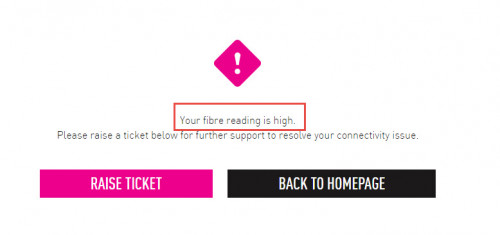
I'm not sure how accurate the detection method in the selfcare. There are cases where we on-site gotten good readings but detected as high reading & vice versa.
In short, get the fibre reading first. Then only proceed with more detailed troubleshooting.
Thanks.
This post has been edited by jjj2: Dec 17 2020, 09:14 AM 

 Nov 5 2020, 09:15 PM


 Quote
Quote



 0.0411sec
 0.56
0.56
 7 queries
 GZIP Disabled