Welcome Guest ( Log In | Register )

5 Pages « < 2 3 4 5 >Bottom

Outline · [ Standard ] · Linear+

TIME [OFFICIAL] TIME Fibre Broadband™ v4, Experience the ONE TRUE 2Gbps

views
     
voncrane
post Jan 6 2020, 07:01 AM

Noir et fier!
*******
Senior Member
7,120 posts

Joined: Oct 2011
From: Wakanda


QUOTE(pakji @ Jan 5 2020, 08:27 PM)
unifi is very best i using unifi 100mbps fibre never had problem i always getting full speed and almost smooth
my home is landed so i never try time fibre my home don't have time fibre
so unifi is very best i will upgrade 800mbps soon because i am waiting unifi launch 800mbps then can be upgrade
*
QUOTE(sai2 @ Jan 5 2020, 04:51 PM)
No it is a new building with less than 10% occupancy rate.
I think when they detected you use more than 30mbps speed they will slow you down to 4mbps hell.
They promise 100mbps but you are not allow to use it.

Worst ISP, don't subscribe to this shit company.
Use Unifi more than 10 years and never have this kind of problem.
user posted image
*
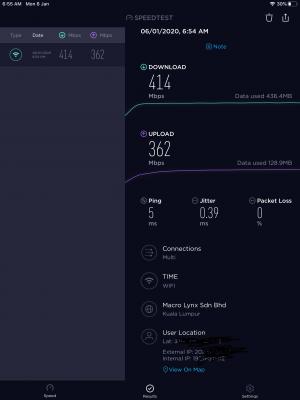
Former TM Unifi user here.. And nope, TIME is much better. TM refused to come upgrade infra so I was stuck on 30Mbps for years while others get to enjoy up to 800Mbps and I still paid more or the same amount as they did. Now enjoicing my 500Mbps speeds. See below for SS taken just now on an iPad two rooms away from the router.

Attached Image
Nevertheless, you need to complain and get your network fixed.. Hopefully, it's one that can be easily rectified.

QUOTE(anderu87 @ Jan 5 2020, 06:11 PM)
Hi, I am a noob here. Any sifu can help me with my newly installed TIME internet. Installed some China app on android box to watch China channels. Before moving to new house, using unifi was very smooth to watch. But in new house with time 100mbps, lag every 2 seconds. Buffering speed less than 90KB/s. I troubleshoot by trying installing android box with VPN trial version, become very smooth and blazing fast. So confirm not TIME speed issue but is their throttling which I have no knowledge of.

So the problem is I don’t want to pay VPN. So any Sifu knows how to solve this? Appreciate those willing to help PM me.
*
Hi...I replied you in the other thread.

This post has been edited by voncrane: Jan 6 2020, 07:03 AM
voncrane
post Jan 11 2020, 07:50 AM

Noir et fier!
*******
Senior Member
7,120 posts

Joined: Oct 2011
From: Wakanda


QUOTE(jjj2 @ Jan 10 2020, 08:53 PM)
Already moved to Apps-based for Rewards claiming.

Thanks.
*
Just installed the app.. Logged in and can't see the section for rewards claiming.. Mind sharing where it is? Or does it only activate on the 15th?
voncrane
post Jan 12 2020, 02:31 PM

Noir et fier!
*******
Senior Member
7,120 posts

Joined: Oct 2011
From: Wakanda


QUOTE(jjj2 @ Jan 12 2020, 01:53 PM)
Hi, it will be activated on the 15th of the month.

Thanks.
*
Thanks and noted.
voncrane
post Jan 15 2020, 03:23 AM

Noir et fier!
*******
Senior Member
7,120 posts

Joined: Oct 2011
From: Wakanda


QUOTE(kombeng7 @ Jan 13 2020, 04:19 AM)
Can anyone advise if using auto debit, when is the exact date TIME is going to  charge the credit card? Thank you.
*
As shared... Depends on your dates... Mine gets charged on the 13/14th of the month. Despite the due date being the next month. Also, It seems, it doesn't take into account manual payments done a few days earlier on the website. System still went ahead and charged me again yesterday.. Zzz

QUOTE(sheeva86 @ Jan 13 2020, 10:58 AM)
Hi guys need a bit of feedback for those on TIME fiber. Is there torrent throttling and got block websites according to MCMC?
*
No throttling.. However FUP applies.

Yes, those sites are blocked..

QUOTE(kombeng7 @ Jan 13 2020, 03:26 PM)
There's a bill date and due date. So which one of these?
*
Neither.. Just need to wait and see.

QUOTE(lopqtx @ Jan 14 2020, 03:14 PM)
for condo, drilling process will make my house messy?
*
Nope.. Not a lot at least.. Just a little dust that's swept away..

QUOTE(INGfusion @ Jan 15 2020, 12:25 AM)
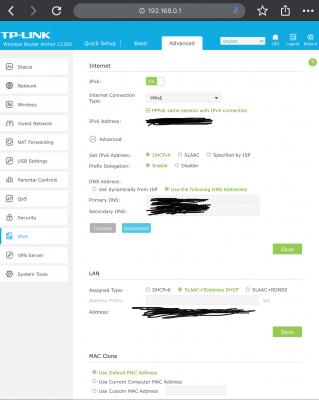
hi any TP-Link c1200 user can guide how to setup ipv6?
*
Here you go... See the attached screenshot below.. Basically, you login to the router.. Go to the Advanced tab, scroll down to IPv6. Feel free to use the default DNS server.
Attached Image

voncrane
post Jan 16 2020, 02:28 AM

Noir et fier!
*******
Senior Member
7,120 posts

Joined: Oct 2011
From: Wakanda


QUOTE(INGfusion @ Jan 15 2020, 09:47 AM)
hmm.gif  hmm.gif i have the same setup, but hor , ipv6 test keep failed. issit because im connect using access point wifi ?
*
No it shouldn't matter. I've got an AP as well and no such issue. Not sure what else to recommend besides ensuring the settings are saved and waiting for a bit before ipv6 tests. Perhaps reboot the modem & router too.
voncrane
post Jan 16 2020, 10:11 PM

Noir et fier!
*******
Senior Member
7,120 posts

Joined: Oct 2011
From: Wakanda


QUOTE(raimy_m9 @ Jan 16 2020, 04:02 PM)
my building has been upgraded to time fiber, but too bad my unifi contract 16 months left. i would have terminate it in a heartbeat and get time. current unifi always gaves me problem, and that's only 30mbps vdsl at 119 permonth. demn.
*
Try seeking someone who wants Unifi and the same package deal.. Transfer to them. Then you are free to sign up with TIME.. Tis what I did back then.. Though contract period much shorter than yours and had a good package deal.. Well, good for the new sub.. I preferred TIME's speed bump.. sweat.gif
voncrane
post Jan 25 2020, 04:55 AM

Noir et fier!
*******
Senior Member
7,120 posts

Joined: Oct 2011
From: Wakanda


QUOTE(jimbet1337 @ Jan 24 2020, 01:16 PM)
My contract has ended. Can I sell the Archer C1200?
Taking up space. Haven't used it since the start as I use my own router.
*
Don't see why not, seeing as it fully belongs to you now.
voncrane
post Feb 15 2020, 03:44 PM

Noir et fier!
*******
Senior Member
7,120 posts

Joined: Oct 2011
From: Wakanda


QUOTE(cba5566 @ Feb 15 2020, 09:03 AM)
Time fiber cover for landed house ?
*
Only a few developments.. Typically more recent builds where they are allowed to run their own cables.
voncrane
post May 25 2020, 09:49 AM

Noir et fier!
*******
Senior Member
7,120 posts

Joined: Oct 2011
From: Wakanda


QUOTE(#Victor @ May 25 2020, 02:13 AM)
just done installed TIME, technician said only 6 metres cabling for fiber standard installation, but had chit-chat with technician and finally he gave 10 metres fiber cable without additional charges biggrin.gif
» Click to show Spoiler - click again to hide... «

*
The power of chitchatting with the right persons.. rclxms.gif .. Wah, even your shelving has holes for the antennas.. thumbup.gif
voncrane
post Aug 15 2020, 09:11 PM

Noir et fier!
*******
Senior Member
7,120 posts

Joined: Oct 2011
From: Wakanda


Here's a video I made on how to setup IPv6 on TP-Link's Archer C1200 router. I also spent some time talking about internet protocols, IPv4, differences between it and IPv6. Also why you might want to enable IPv6 on your router, pros, cons, & bla bla.. Basically bunch of stuffs those who don't already know, can now know. IMO, and having had mine enabled for about a year? I haven't ran into any major issues using it. I mean, there's a fallback to IPv4 & all.. So yup, it's pretty much enabled 99.99% of the time on my network. I hope it's an easy enough video to follow. Show some love yeah... Thanks.


voncrane
post Aug 15 2020, 11:28 PM

Noir et fier!
*******
Senior Member
7,120 posts

Joined: Oct 2011
From: Wakanda


QUOTE(Tongkat Ali @ Aug 15 2020, 11:14 PM)
Wait where do you get that info? 1 year 1 voucher? Not every 1 month who fast they get it?
*
You can only claim one reward per TIME account per year. So each month, have to check and if the offered reward seems worth it to you? Claim it.. But that's it for the year.. not eligible or can't claim any more till next year.
voncrane
post Aug 15 2020, 11:41 PM

Noir et fier!
*******
Senior Member
7,120 posts

Joined: Oct 2011
From: Wakanda


QUOTE(FusionXY @ Aug 15 2020, 11:33 PM)
Bingo bro, only claim if got restaurant/cinema elgible near your area.
Best to check the Terms and Conditions regarding which outlet to avoid claiming the voucher while none of the outlets is near your area.

Thanks.
*
Yeah!!...This is so important. Later get stuck with a voucher you can't redeem or have to give away.. Wasted.
voncrane
post Sep 6 2020, 08:32 PM

Noir et fier!
*******
Senior Member
7,120 posts

Joined: Oct 2011
From: Wakanda


QUOTE(jasonws @ Sep 4 2020, 11:21 AM)
My 24 months contract is ending next month.
It is better to renew another 24 months (free router?). Or just let it be without contract?
*
IMO, normally I’ll ask you to get your own router instead. But “free” is still “free”. I’m currently using 2 “free” C1200 routers.. They aren’t the best but after a few tweaks here there. Got the whole house covered. So if you believe that TIME works superb and you won’t change locations for the next 2 years? Renew the contract and get the free router to expand your network.

Else, get your own router. Especially if you have other needs that can’t be met with the current free routers.

QUOTE(peri peri @ Sep 6 2020, 12:59 AM)
dear all,

currently im using maxis fiber, thinking to migrate to Time.

may i ask, the 100mbps and 500mbps using the same router provide by Time?

Currently im using Tenda ac18 router, for my maxis. It is advisable to use it as Time router later?

Thx
*
Try both out as the primary.. Use the best one and the other as an extension if supported.
voncrane
post Sep 21 2020, 11:01 AM

Noir et fier!
*******
Senior Member
7,120 posts

Joined: Oct 2011
From: Wakanda


QUOTE(chineu6 @ Sep 18 2020, 12:09 PM)
Hi guys,I just bought a Mi Box S last week. I have TIME broadband at home with the given TP Link C1200 router. It seems like I'm having issues connecting my Mi Box S to my router. Tried both 2.4Ghz and 5GHz able to detect and connect, however it shows "no internet". The rest of the devices at home able to connect and browse internet without any issues. I tried set all my wireless router settings to auto but it doesn't help either. If i were to disable the wifi encryption then it works. Another thing that I noticed is that, if it shows connected no internet, I have to manually go Mi Box S setting change to the correct date and time, then it works, but I have to do it everytime when i power on the Mi Box S which is very troublesome. Can anyone please shed some light on my issues?
*
Double check that you are on the latest firmware update. Perform a factory reset. Hopefully, it resolves the issue.

QUOTE(chrischiang @ Sep 19 2020, 03:58 PM)
Hi.. i searched china keyword as i aso having similar issue.. but i couldnt the other thread.. could you help on this??
*
Hi... You quoted a post of mine from January.. I can't recall that far.. What issue are you facing?

QUOTE(chineu6 @ Sep 20 2020, 01:14 PM)
Hi everyone, need some help here. It's been quite a few years that I subscribe to TIME broadband 100mbps package with the given TP Link Archer C1200 router. Having no issues with connection speed all this while until lately, here are some problems that I encountered.

1. When laptop connected to 5GHz network, both download and upload speed able to get 100+- mbps which is normal. However, when my Honor 20 Pro phone, Mi Box S and Ipad connected to 5GHz network, download gets only 30-40 mbps but upload able to get 90-100 mbps.
2. During the test, my devices show connected to 5GHz network with excellent signal strength. Stand right in front of router and do speedtest still the same issue.
3. Rebooted router, same issue. Go into TP Link and restore all settings back to default, same issue.
4. Called up TIME tech support, they did a so called "reset" from their side and ask me use my phone browse to testyourspeed.time.com.my. Did a speedtest from TIME website using my phone and result shows 100+mbps on both download and upload. TIME considered this issue solved and close the ticket.
5. After hang up the call, open my Ookla speedtest app using my phone and re-test again, again it shows download 30+mbps and upload 100+ mbps. Tested on 2.4GHz network, download shows 20+ mbps and upload 90+ mbps.
6. I can see that my Mi Box S is loading Netflix videos slowly and even when playing videos, I can see pixelation which I believe Netflix is optimizing the video quality based on my connection speed.

I've been using the same phone and did speed test using Ookla speedtest app all this while and I get actually get 100+ mbps on both download and upload.

Sorry if my explanation causes any confusion. I hope someone could help me to solve my connection issues.

Thank you very much!
*
Yeah, switch channels and test again during off peak hours. Install a wifi analyzer app on your phone and walk around your place to find the "best" channels for both 2.4 & 5Ghz networks. I use best in quotes because, what works today may not work as efficiently in a couple months or next year. Due to your neighbors, etc, changing network environment. I can consistently get 2xxMbps up & down over WiFi using either of my C1200s.
voncrane
post Sep 21 2020, 12:21 PM

Noir et fier!
*******
Senior Member
7,120 posts

Joined: Oct 2011
From: Wakanda


QUOTE(chrischiang @ Sep 21 2020, 11:53 AM)
i having similar problem with anderu87.. just moved to new condo using TIME..
*
Oh....Try changing your DNS servers if you haven't already done so. Do cold boots in-between changes (overkill but I prefer la)..Hopefully, the issue isn't from that particular service at this time.
voncrane
post Sep 21 2020, 03:26 PM

Noir et fier!
*******
Senior Member
7,120 posts

Joined: Oct 2011
From: Wakanda


QUOTE(chrischiang @ Sep 21 2020, 01:39 PM)
i using google dns.. or should i use china dns? any recommendation?
*
I haven't used Google's in years... Been primarily using OpenDNS. So far so good. Set on router and forget till run into any major issue.. Personally, I wouldn't simply trust just any Chinese DNS servers. But if that's where the content you mostly or want to consume comes from? You may get better performance in exchange for your data, etc...

I'm unsure how to help further unless you are willing to share further more concrete info.. PM me if you have to, I can help you test on my box & network if experiencing the same issue.
voncrane
post Sep 21 2020, 04:34 PM

Noir et fier!
*******
Senior Member
7,120 posts

Joined: Oct 2011
From: Wakanda


QUOTE(chineu6 @ Sep 21 2020, 03:44 PM)
Finally sort out Mi Box S issues. Tested tons of method none of them works, finally have to change from DHCP to Fixed IP then it solves the problem. Guess Mi Box has some compatibility issues with TP Link Acher C1200 router.

As for slow dl speed, yeah will give it a try tonight when get back to home. Thanks bro!
*
Great... At least it works now... rclxms.gif
voncrane
post Oct 16 2020, 03:21 AM

Noir et fier!
*******
Senior Member
7,120 posts

Joined: Oct 2011
From: Wakanda


QUOTE(FusionXY @ Oct 15 2020, 08:58 PM)
Does TM Unifi have offer for existing user? hmm.gif
*
By asking such sarcastically, seems you are implying that if TM doesn’t care about its existing customers, means TIME doesn’t have to do so either.. Wanna follow some people thinking who says look Singapore cars are so much more expensive, so cukur ours not so expensive.. Meanwhile, got other places where cars are so much cheaper and conveniently not referenced? That’s the wrong mentality fam... I understand that you are affiliated with TIME and all. But that doesn’t mean that you should turn a blind eye to certain injustices. By that logic, TIME or any other TM “competitor” shouldn’t exist then.. We all just kneel and take it up where the sun don’t shine. Some of us willingly switched from TM to TIME and I’m sure so many just like me did so...NOT because we weren’t getting a reasonably stable internet connection, but because we felt undervalued & unappreciated as existing TM customers. Don’t think for a second that we would have switched so willingly if TM was offering the same or lower pricing packages as TIME + UnifiTV, VOD, etc.
voncrane
post Oct 19 2020, 06:23 AM

Noir et fier!
*******
Senior Member
7,120 posts

Joined: Oct 2011
From: Wakanda


QUOTE(onthefly @ Oct 17 2020, 11:00 AM)
can i use tplink 1200ac from TIME to be a repeater/wifi extender?
*
Yes you can.. As JJJ2 implied. Officially the feature is probably disabled. However, you can flash a different firmware (still for the C1200) and enable Wired/Wireless AP mode. I recommend going the wired route for best results. I’m using 2 TPLink C1200s. One primary and the other as wired AP. Different SSIDs so I know when connected to which. But you can use the same SSIDs for both for a more “seamless” connection between devices and the routers as you move around the house.

QUOTE(boxsystem @ Oct 18 2020, 09:56 AM)
I am dreading for TIME to expand its coverage to my area. Doesn't look like they are coming here coz covered by TM?
*
Unless their MO has changed, here’s how I understand TIME’s expansion. If your place is a high rise building, easier to come in because, the residents and Management have the power to invite them in. No such thing as cuz TM is there they can’t. Such monopoly has now been properly made illegal, basically your place can’t have an exclusive contract with only one provider. TIME would be eager to enter if enough interest has been shown by occupants to sub/switch to them. Cuz it’s high rise, cost of installation is cheaper as they “just unroll the cables upwards & inwards”.

For landed? That’s a more difficult job... Have to apply this that, dig more all over the place to hide the cables, etc.. And all that makes it a harder entry for TIME.

QUOTE(Fr3eStyL3r @ Oct 18 2020, 11:56 PM)
Hi guys, I have been using the DIR850L router for the 100Mbps package and no longer under any contract with TIME.

My house is only 950 sqft and the router is located at my living room, but have been experiencing some dead zone in my master bedroom and also weaker connection in the middle room (tried both 2.4Ghz & 5.0Ghz).

Have also tried Mi Wi-Fi Range ExtenderPro in my master bedroom, it works but not sure why the speed is less than 10Mbps  doh.gif

Saw that TIME is offering the TP-Link EC230 router for Free with 24-month contract renewal, would like to check is this router better than DIR850L and able to improve/resolve above issues? If not, any other recommendation to improve the Wifi coverage in the room?

Thanks!
*
I would recommend getting a better single router from say ASUS OR TPLink. Full coverage with a single router over 950sqft is very much achievable with a single router. Perhaps later I’ll update with particular models.
voncrane
post Oct 20 2020, 08:24 PM

Noir et fier!
*******
Senior Member
7,120 posts

Joined: Oct 2011
From: Wakanda


QUOTE(Candy12 @ Oct 19 2020, 03:57 PM)
This is no longer the case for LANDED in years to come for fibre deployment.It is more ECONOMICAL and EASIER to serve landed properties/small townhomes apartments called "mansions" in the near future because the ISP does not need to approach the building's JMB/management/developer to get things sorted out for approvals.

Japan is a good case study to look at this approach now. Their higher tiered plans and exclusive ISPs such as the country's FASTEST rated ISP, Sony NURO only serves landed and small townhomes(mansions) no more than 3-5 storeys high. If your building is HIGHER than 5 storeys, they will NOT come and UNLIKELY you will get to subscribe to the higher tiered 10G plans with less contention ratio. These kind of higher tiered plans are also catered to more richer segment of societies who can afford their own landed homes with more privacy.

Sony NURO has a dark fibre leasing agreement with NTT to rent their unused spare fibre cables which they mostly serve the Tokyo Metropolitan areas.

We have local companies such as TNB(Tenaga) now willing to do the same by building new fibre networks around the country for landed properties and renting spare cables as dark fibres for interested ISPs. The wholesale approach which TM does using layer 3 routing instead is not favored by some ISPs because they want more control over their own network/pricing.

Fibre optic cables are going to get 10X much cheaper due to manufacturing process improvements, advanced cheaper passive splitters and cable pulling methods.

When "apartments" and small mansion homes in Japan it is these kind of buildings which they're referring to:

In Malaysia/Singapore, when we mention about apartments/condos, the general impression is a 20+ storey high rise building. These kind of buildings are much more harder to re-wire with fibre once they get old. You need to find enough of spaces for your conduits to route the fibre cables and the trouble of getting the approvals with the building management.
*
In all above.. You forgot to factor in one thing. Malaysia and our politics. You should try getting approvals to rollout cabling in Raman’s that have existed for decades. Places where even TM despite milking for years, still refuse to upgrade the area. Typically ONLY NEW landed developments can have that near guaranteed luxury of being pre-setup with TIME and or other ISP. Most well-established (read older) landed developments are a pain to get into and expand. It’s a simple business decision. TIME cant simply go through the hassle to roll out only for few people to take them up. Why?

Lastly, unless there’s some “politics” involved. It’s easy to get approval from residents and building management of older condos and apartments. Give you example, we were paying TM RM139 for 30Mbps up & down. In walks TIME who says for RM149 I can get symmetrical 500Mbps up and down, PLUS they will pay the early termination fee for switching from TM.. As one who worked directly with TIME, residents and the building management.. The TIME deal was a no-brainer, so getting signatures and approvals was a “walk in the park”. That would not have been possible if I was living in some similarly aged or older landed area. Don’t believe? Hit up someone in TIME that handles such. sweat.gif

QUOTE(Green_lemontea @ Oct 20 2020, 04:29 PM)
Does anyone has a picture of how exposed or how the technician glue the Fibre cable inside the condo unit? Is it at the ceiling or on the floor? Pictures will be great to better understand it.

I've scheduled for next week but I'm really concern about the cable being exposed in my unit.
*
No pic but it’s a relatively tiny white cable. Skirtings are white as well, so had ours ran along the top of the skirting. After awhile you forget it’s there. IIRC, just glue was used.. so far so good.

QUOTE(karising @ Oct 20 2020, 06:14 PM)
Just switch from Maxis to TIME 100Mbps since last Friday, was given the new router TP-LINK EC230, tested with iphone on 5Ghz wifi speed and stability were excellent, very stable 100Mbps during speedtest. However, when using SmartTV, tvbox, desktop using the 2.4ghz wifi, connection not stable and will have sudden drop, never experience it during Maxis. The router firmware is the latest 20200827 and i have check this thread history but couldnt find a real solution. Anyone can solve this problem? Please share. Thanks!
*
Switch to 5Ghz network or move your devices closer to the router or vice versa. As for the desktop? If critical, gaming etc... I strongly recommend that you just run a dedicated cable to it.

QUOTE(Candy12 @ Oct 20 2020, 07:19 PM)
If possible I'd rather use nail in clips than hot glue. They look neater and last longer. Removal also easier and holes can be patched back easily with wall plasters.
*
True.... However, I can see renters being reluctant to poke holes in someone else’s wall. Later kena landlord/agent from hell.. Say bye bye to your deposit. whistling.gif


5 Pages « < 2 3 4 5 >Top
 

Change to:
| Lo-Fi Version
0.0351sec    0.45    7 queries    GZIP Disabled
Time is now: 8th December 2025 - 02:08 PM