Welcome Guest ( Log In | Register )

23 Pages < 1 2 3 4 5 > » Bottom

Outline · [ Standard ] · Linear+

TIME [OFFICIAL] TIME Fibre Broadband™ v4, Experience the ONE TRUE 2Gbps

views
     
westlife
post Jan 16 2024, 11:15 PM

10k Club
********
All Stars
14,248 posts

Joined: Jan 2011
QUOTE(kmrdeva @ Jan 16 2024, 11:13 PM)
What's difference between the pro and non pro models?

https://www.asus.com/networking-iot-servers...s-zenwifi-bq16/

4K+ ok la, I already had 3.5K set aside for the Wifi 6 Zenwifi Pro XT12 (it was going for 3.1K on lazada sale) but upon reading that the Wifi 7 standard has been ratified a few days back, I decided to hold back.
*
i am glad that i spent less than rm1k for my wifi 5 mesh and i am happy with the speed. no need to upgrade to wifi 6 or 7. a good wifi 6 and 7 mesh systems are ex...
westlife
post Jan 17 2024, 12:13 AM

10k Club
********
All Stars
14,248 posts

Joined: Jan 2011
QUOTE(ChenKaiWen @ Jan 16 2024, 11:20 PM)
Yea lol. I use my other node to connect a PC to my AP. No way to disable it broadcasting wifi fully. Only can disable 2.4G. 5G I can only hide the SSID and set to low power, unfortunately. My area 5G channels are very populated now too.
*
i can disable both 2.4ghz and 5ghz wifi on the huawei ONT. no issue at all.
westlife
post Jan 17 2024, 12:14 AM

10k Club
********
All Stars
14,248 posts

Joined: Jan 2011
QUOTE(IamNOT @ Jan 16 2024, 11:29 PM)
If upgrade to 500M from 100M under the loyalty program, what mesh setup they will give? Any choice given? I still prefer Standalone ONU then connect with proper separate Router.
*
yes, standalone ONU is still better... lion city is having this kind of setup.
westlife
post Jan 17 2024, 03:28 PM

10k Club
********
All Stars
14,248 posts

Joined: Jan 2011
QUOTE(NovaPrime @ Jan 17 2024, 02:51 PM)
Call Time customer service ask them to turn your huawei unit to become bridge mode, then use your Asus TUF ax3000 to dial the PPPOE
*
yes, correct. i just did it yesterday only. called the CS, 15 minutes technication called to change to bridge and do the dialing of PPPoE on my wifi router, settled.

now i enjoy low latency internet connection with full speed in my room.

for anyone who still use the stock huawei ONT + mesh node (dual-band), please throw them away for god sake.. tongue.gif

tri-band mesh ftw...
westlife
post Jan 17 2024, 06:43 PM

10k Club
********
All Stars
14,248 posts

Joined: Jan 2011
QUOTE(INGfusion @ Jan 17 2024, 06:35 PM)
they remote change on the spot or take 1-2 working days?
*
remotely change it...

less than 10 minutes process...
westlife
post Jan 17 2024, 09:13 PM

10k Club
********
All Stars
14,248 posts

Joined: Jan 2011
QUOTE(eugene66 @ Jan 17 2024, 07:36 PM)
Hi guys, I have a few questions:

1. If i were to get Time turn my ONT to bridge mode, can i still use the LAN port of the ONT to connect to my smart TV?
2. I'm planning to buy a 2 or 3 mesh router which is able to support internet speed of 300mbps with tri band functions. Any decent model with affordable price of such router to intro? TIA everyone.
*
1. cannot. the ONT is technically useless to connect anything after switched to bridge mode.

2. i love my linksys MR8300 wifi 5 mesh. low latency and good for gaming.

QUOTE(INGfusion @ Jan 17 2024, 08:48 PM)
oh, that's fast
*
yeah... very fast. indeed.

i am glad that i had switched it becos i was not satisfied with the time broadband previously using the trash stock huawei mesh.
westlife
post Jan 19 2024, 03:13 AM

10k Club
********
All Stars
14,248 posts

Joined: Jan 2011
QUOTE(INGfusion @ Jan 18 2024, 03:36 PM)
just sold my full set linksys velop, will fully stick with fttr system now  brows.gif
*
i see. nice. that's the best system already.

ur velop is dual-band or tri-band?

urs is how many speed plan? 1Gbps? so all ur desktop/laptop device can get full speed with low latency? they really lay fibre cable to link from the parent node to all ur chid nodes inside your room? but are those chid nodes tri-band?

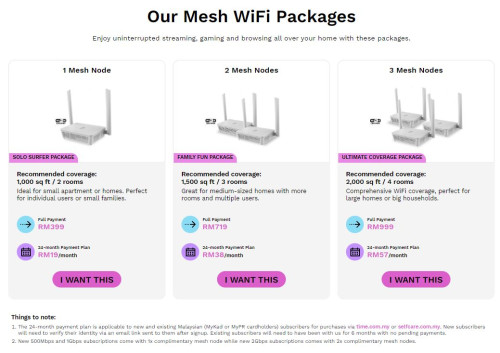
which package did u go for? seriously latest networking wifi mesh system (wifi 6/7) good one with tri-band is not cheap also. i am glad that i got my linksys mr8300 wifi - 3 units at quite cheap price. one at sgd150++ with 1 x velop dual-band node free, the rest of 2 x mr8300 i got them at about sgd50 each second hand from carousell. at least they can meet my need for speed and coverage which i am happy. tongue.gif

user posted image

even time the trash hxxwei mesh node is selling at so expensive price.

user posted image

This post has been edited by westlife: Jan 19 2024, 03:57 AM
westlife
post Jan 19 2024, 05:21 AM

10k Club
********
All Stars
14,248 posts

Joined: Jan 2011
besides, most of u guys here subscribe to which plan for time broadband?


westlife
post Jan 19 2024, 12:16 PM

10k Club
********
All Stars
14,248 posts

Joined: Jan 2011
QUOTE(kmrdeva @ Jan 19 2024, 10:44 AM)
500mbps.
*
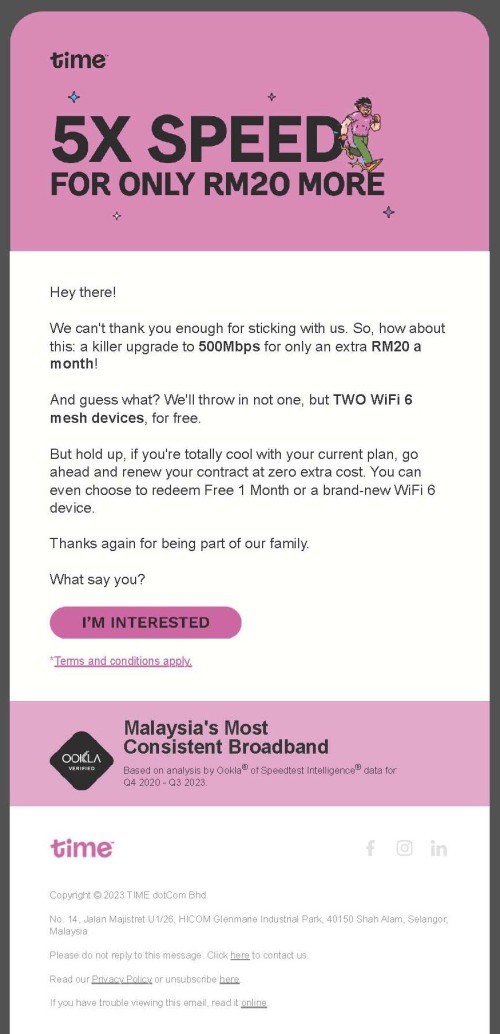
icic. yeah. i also think that it is the plan with the highest CP value, it is rm40 more but one get 5x speed.

with the current promo (6 months rm99, subsequent rm139) comparing to 100mbps plan at rm99. both have 1 month free.
the average monthly fee is about rm129 for 24 months which is rm30 extra comparing to rm99 100 mbps plan for 5x speed which is not bad also.

QUOTE(kmrdeva @ Jan 19 2024, 10:54 AM)
IMHO, tri-band mesh wifi is really important if the backhaul link (mesh unit to mesh unit) is wireless.

I'm guessing that FTTR is a wired backhaul solution so dual-band mesh will work just as good if not better.

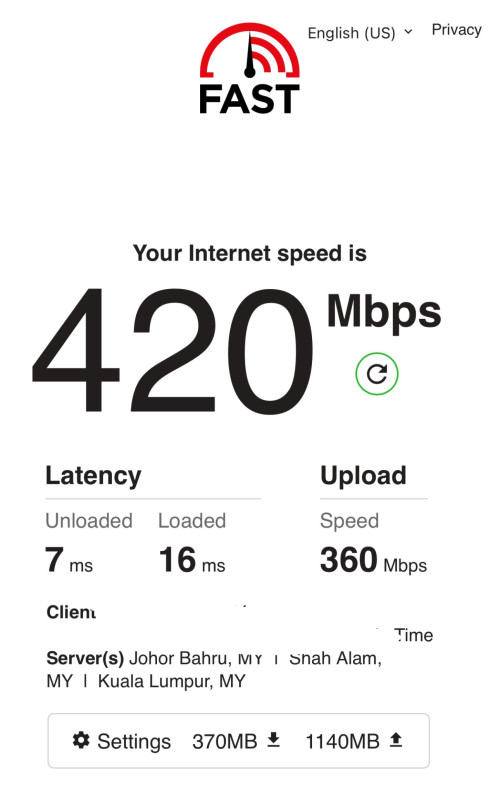
This is the speedtest result on my iphone while connected using wifi 6 to my secondary mesh node (study room).
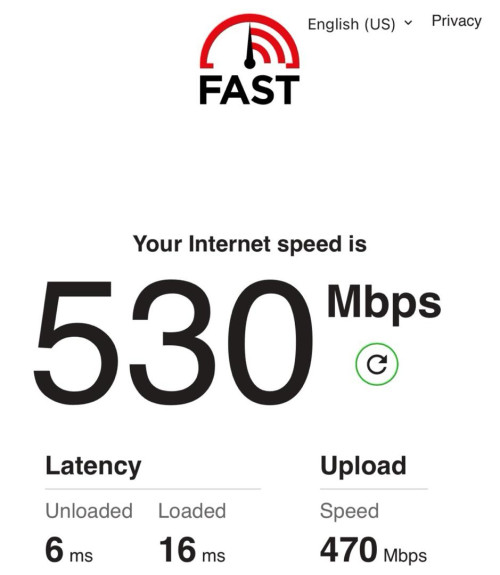
user posted image

The wireless backhaul between my 2 x ZenWifi XT8 units is a 4 stream 160Hz wide WIFI 6 connection, approx 1.5Gbps down / 2.5Gbps up. Stable and fast.
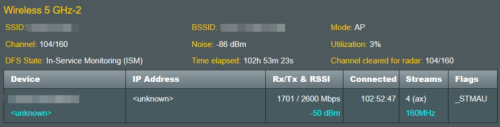
user posted image
*
yes, tri-band is very very crucial for wireless backhaul. it is a day and night difference for the speed and latency comparing to dual-band.

yes FTTR is using fibre-optic to connect between nodes (wired backhaul), meaning all should get full speed so even dual-band may not be bad via wifi.

ur lantecy is so good. power. meaning this mesh system not bad. expensive? it is wifi 6 with 4 streams no wonder so good. is ur main node and child node far apart or nearby?

i notice that from my trial and error, if the parent node is too near to the child node, the child node gets actually lower speed and higher latency comparing to be further away or with a wall in between. within light of sight it is even performing poorer. funny. my child node signal strength with parent node is -60 dBM and i am getting quite good speed and latency comparing to -40 dBM.

QUOTE(eauyong @ Jan 19 2024, 11:41 AM)
user posted image
*
wah.. good deal. nice to stay in lower plan so that they offer better carrot. too bad i had signed 500Mbps at the start. sad.gif

how much are u paying now for ur current plan before this offer?

This post has been edited by westlife: Jan 19 2024, 12:17 PM

westlife
post Jan 19 2024, 12:35 PM

10k Club
********
All Stars
14,248 posts

Joined: Jan 2011
QUOTE(INGfusion @ Jan 19 2024, 12:22 PM)
was using ax4200 with whw02

i on 500mbps plan, all my wifi devices can get 4xxmbps & 3-5ms ping on speed test, my smart home is stable now no more lag and disconnect but this fttr system only have dual-band

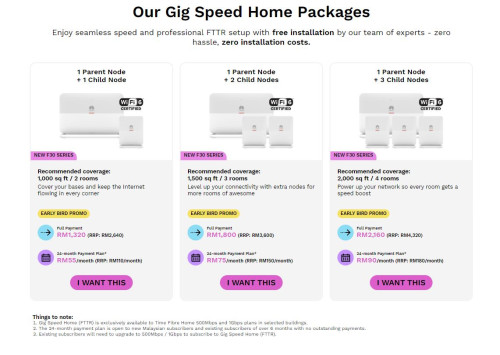
package i using 1 + 4  brows.gif bought 1 more child node unit from them
*
icic. so they really lay fibre-optic cables from ur main node to all ur child nodes? like this isn't that the fibre optics will be exposed and visible within the entire house? confused.gif
westlife
post Jan 19 2024, 12:45 PM

10k Club
********
All Stars
14,248 posts

Joined: Jan 2011
QUOTE(INGfusion @ Jan 19 2024, 12:43 PM)
yup but not so obvious la still ok for me, i going to paint it let's see will it look more invisible after painting or not
*
Icic. Ok. the cable they use is black colour one or between the nodes they use the yellow colour fibre-optic cable?
westlife
post Jan 19 2024, 12:48 PM

10k Club
********
All Stars
14,248 posts

Joined: Jan 2011
QUOTE(kmrdeva @ Jan 19 2024, 10:54 AM)
IMHO, tri-band mesh wifi is really important if the backhaul link (mesh unit to mesh unit) is wireless.

I'm guessing that FTTR is a wired backhaul solution so dual-band mesh will work just as good if not better.

This is the speedtest result on my iphone while connected using wifi 6 to my secondary mesh node (study room).

user posted image

The wireless backhaul between my 2 x ZenWifi XT8 units is a 4 stream 160Hz wide WIFI 6 connection, approx 1.5Gbps down / 2.5Gbps up. Stable and fast.

user posted image
*
user posted image

This is the average speed I can get from my child node in my study room (wireless backhaul).

It is not too bad. I can get about the same latency as ur wifi 6 one although my speed is lower (think Becos wifi 6 have wider channel?) but my main concern is latency since I am not going to download on my iPhone.

Given that my linksys mr8300 only cost as low as sgd50 per unit, I find it at high CP value too. 🤪
westlife
post Jan 19 2024, 01:15 PM

10k Club
********
All Stars
14,248 posts

Joined: Jan 2011
QUOTE(INGfusion @ Jan 19 2024, 12:50 PM)
transparent cable from splitter to terminal, from terminal use patch cord and connect to child node

[attachmentid=11489386]
*
Icic…
westlife
post Jan 19 2024, 03:04 PM

10k Club
********
All Stars
14,248 posts

Joined: Jan 2011
QUOTE(eauyong @ Jan 19 2024, 02:30 PM)
Service Charges 99.00
Discount(s) -2.00
Sub Total 97.00
Service Tax (6% on Taxable Amount of MYR 97.00) 5.82
------------------------------------
Total Current Charges 102.82
------------------------------------
*
nice.

with only rm20 more to get 5x speed while normally rm40.

for me i paid extra rm10 for 2 years and subsequently rm20 after no contract.
westlife
post Jan 20 2024, 09:35 AM

10k Club
********
All Stars
14,248 posts

Joined: Jan 2011
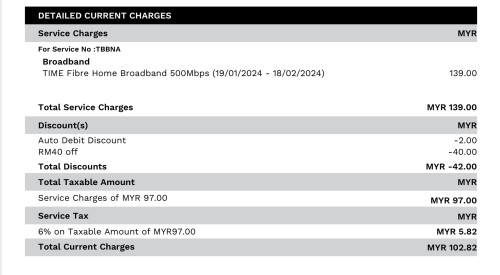
2nd month bill.

user posted image
westlife
post Jan 20 2024, 03:52 PM

10k Club
********
All Stars
14,248 posts

Joined: Jan 2011
QUOTE(eauyong @ Jan 20 2024, 02:12 PM)
The email recontract offer will be:-

RM119.00 - RM2.00 = 117.00 *1.06 (SST 6%) = RM 124.02 per month
24 months total: RM2,976.48
*
good deal. tongue.gif

i just wonder if 2 years later after my contract is over. if i cancel the line and resign another 2 years contracts will it be better?
any cool down period between cancelling and signning a new line again?

or possible to negotiate with time for better deal after 2 years contract?

anyone with no contract for 500Mbps plan get offer from time to recontract?
westlife
post Jan 20 2024, 03:55 PM

10k Club
********
All Stars
14,248 posts

Joined: Jan 2011
QUOTE(eauyong @ Jan 20 2024, 02:31 PM)
However, due always travelling, user 2 person and Times 100mbps can do the following and no latency problems:-

1. Access to NAS in overseas.
2. Netflix, youtube , facebook videos, Live sports, security video cams etc
3. All communications, emails, video conferencing etc.
4. BT
5. VPN

Considering Umobile-Times 100Mbps fibre
RM 79.00 + 6% SST RM 4.74 = RM 83.74 per month
RM 83.74 x 24 = RM 2,009.76
*
indeed if low usage u mobile using time infra is cheaper. but i dun like u mobile one becos it has the same termination scheme like tm or others. which u pay full of the remaining tenure of contract no matter when u terminate. while time is anytime termination rm500 only.

for example if i used finished tm the rm99 month for 500Mbps for 6 months and 1 month free for first month and cancel by paying rm500 also not lugi alot...

i am renting unit so this flexibility to me is important.
westlife
post Jan 20 2024, 08:59 PM

10k Club
********
All Stars
14,248 posts

Joined: Jan 2011
QUOTE(ichigo kawasaki @ Jan 20 2024, 07:22 PM)
2 days into subscribing time home fibre. everyday got issues . i am finished .

big mistake , web page loading slow upload slowest far away from what they advertise. damn!
*
i had been using time for 1 month+. so far so good.

did u even encounter this prob when u are next to the main node? if no but only at the child node then likely the position of where u place the child node that caused the prob.
westlife
post Jan 20 2024, 09:14 PM

10k Club
********
All Stars
14,248 posts

Joined: Jan 2011
QUOTE(ichigo kawasaki @ Jan 20 2024, 09:10 PM)
My connection is confirm by customer service pending repairing works something like that. TOday, Morning refresh by time staff and restart modem router, afternoon confirm by time customer service still problem repeating need 4 hours to repair.
WE REQUIRE MORE TIME TO RESTORE
Sorry you could be experiencing service disruption for service TBBNA53 .......7G
Sorry you could be experiencing service disruption ....
"got issue still pending their work to "bring up the service" . ...

4 TIMES IN TWO DAYS FOR NEW 2 DAYS ACCOUNT.
i guess the backend problem for the whole  taman area?
*
ic. then it is unlucky for this case. no choice but to wait for time to fix this then.

my apartment has only time broadband and no unifi. funny thing is that the sister apartment next to mine by the same developer has both. (that one is older apartment than mine though)

luckily the only choice for me which is time gives me no prob. i can get quite good speed with my own mesh system (not huawei one given by time). so overall is happy with this. previously i was paying rm129 before tax for 500Mbps speed on my unifi. but upload speed is only 100Mbps comparing to the symmetric speed by time.
westlife
post Jan 24 2024, 06:04 PM

10k Club
********
All Stars
14,248 posts

Joined: Jan 2011
QUOTE(INGfusion @ Jan 24 2024, 10:07 AM)
just changed huawei router regulatory domain from malaysia to us,  can get more stable speed, can give a try on your huawei router
*
What it means by regulated domain? U mean the wifi region?

23 Pages < 1 2 3 4 5 > » Top
 

Change to:
| Lo-Fi Version
0.0291sec    0.66    7 queries    GZIP Disabled
Time is now: 4th December 2025 - 09:16 AM