Welcome Guest ( Log In | Register )

23 Pages « < 2 3 4 5 6 > » Bottom

Outline · [ Standard ] · Linear+

TIME [OFFICIAL] TIME Fibre Broadband™ v4, Experience the ONE TRUE 2Gbps

views
     
westlife
post Jan 24 2024, 08:21 PM

10k Club
********
All Stars
14,259 posts

Joined: Jan 2011
QUOTE(INGfusion @ Jan 24 2024, 07:05 PM)
on huawei name as regulatory domain, on linksys will be wifi region
*
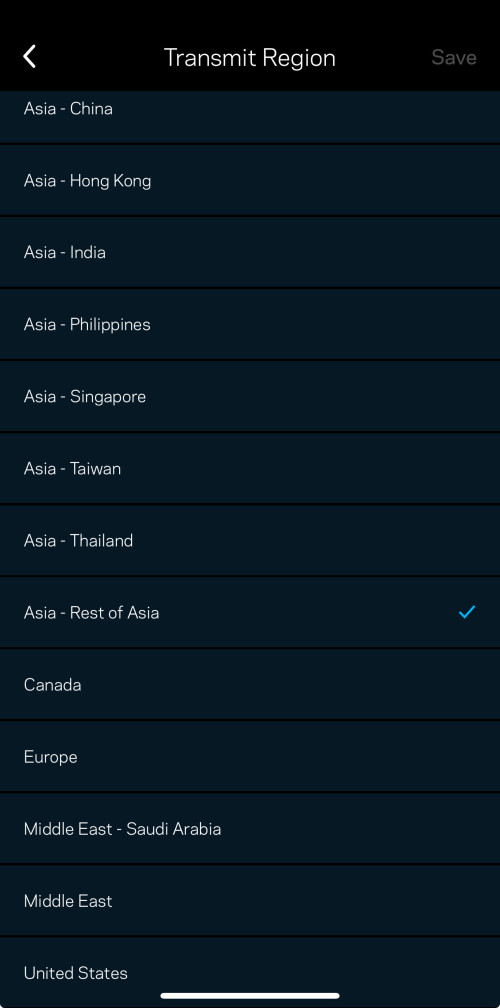
Yeah. Linksys calls it transit region.

I did ask in forum here on which one is the best but could not get any response.

Huawei also has this setting? I searched thru the UI page but could not find it before I switched to linksys.

user posted image
westlife
post Jan 29 2024, 01:18 AM

10k Club
********
All Stars
14,259 posts

Joined: Jan 2011
Time broadband based on my experience comparing to the unifi I had been using previously is really so so only. Nothing really impressive to be frank.
westlife
post Jan 29 2024, 07:56 AM

10k Club
********
All Stars
14,259 posts

Joined: Jan 2011
QUOTE(jack2 @ Jan 29 2024, 05:14 AM)
termination fee is 500.

so regret to extend the warranty when they offer free upgrade of modem and mesh which are so so only.
*
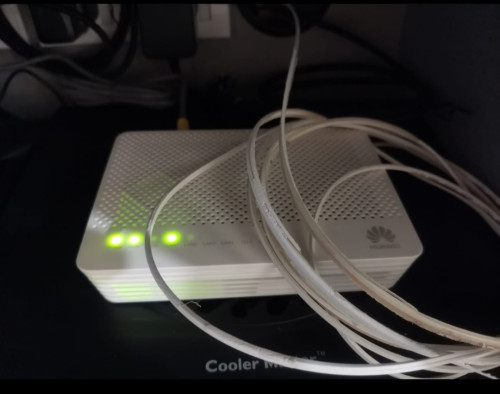
The stock Huawei mesh is totally trash. Buy any other brand of tri-band mesh will work better than it.

QUOTE(kmrdeva @ Jan 29 2024, 07:36 AM)
Is it worse than unifi, though? My condo is covered by both but I’ve been on Time for years now (since it was first offered here) and always wondered if I should try unifi.
*
Personally I had used time broadband for 1.5 months now. I would say that comparing to unifi, I get more consistent experience.

I had a few times of experience so far that when I was playing mobile game the latency can suddenly shoot up to 1000ms and cause me losing the game. Wtf.
I am on 500Mbps and I am the only one who uses the internet at home.

The only bad part of unifi is the upload speed which 500Mbps plan also only has 100Mbps but to be frank come to real life experience the maximum upload speed u can utilise is very minimum. My experience of uploading photos and videos to Facebook are the same with time broadband of 5x more upload speed. Even I upload video to YouTube also same. The reason has nothing to do with time broadband but just simply the destination servers where u can do the upload is the cause of the bottleneck. They just have limited upload bandwidth that u can tap on.

However, this is solely my experience and may not be urs.
If u are happy with time broadband just dun change anything. In addition, time is charging solely rm500 for termination anytime while unifi charge in full for the remaining months of contract (as good as no termination). With this point alone, time broadband is still good for those who worries about contract which I am one of them.


westlife
post Jan 30 2024, 10:54 AM

10k Club
********
All Stars
14,259 posts

Joined: Jan 2011
QUOTE(Chengi @ Jan 30 2024, 01:04 AM)
removed my name and the writer's name

think 10 times if you decide to subscribe to time; this response is after i not lesser than 20 phone conversation within weeks.

===========================

Thank you for reaching out to us regarding the latency and packet loss issues you are experiencing in your P2P game/connection. We understand that this is causing inconvenience for you, and we are committed to resolving this matter the soonest.

We require both the source IP and destination IP for the traceroute in order to effectively troubleshoot the high latency and packet loss. Please let us have the destination IP for us to proceed with investigation and resolving the issues that you are encountering.

Additionally, we would like to address your concern regarding slowness when conducting speed-test on international servers such as the USA and Canada. Speed-test to international servers will yield best-effort results only as there are no committed guarantees on throughput to overseas servers. We can only guarantee speed test via local server.

We sincerely apologize for the delay and any inconvenience caused.

We hope this clarifies.

Thank you for your understanding and cooperation.

===========================
Speed test:
US (bad)
https://www.speedtest.net/result/15669890405
https://www.speedtest.net/result/15669896144
https://www.speedtest.net/result/15669928852

Canada (bad)
https://www.speedtest.net/result/15669917247
https://www.speedtest.net/result/15669921376

Germany (good)
https://www.speedtest.net/result/15669900419

Australia (good)
https://www.speedtest.net/result/15669912267

Singapore (good)
https://www.speedtest.net/result/15669908685
*
I also shared that I had experienced the same on the latency portion when I play the mobile game. So indeed time broadband is having the issue since others also experienced this.
westlife
post Jan 30 2024, 01:46 PM

10k Club
********
All Stars
14,259 posts

Joined: Jan 2011
QUOTE(x-1o8-x @ Jan 30 2024, 12:50 AM)
huh, 500mbps is also on cgnat now? anyone know what about 1gbps onwards?
*
500Mbps confirmed is having public ip. i just subscribed 1.5 months ago and using it now.
westlife
post Feb 2 2024, 12:02 AM

10k Club
********
All Stars
14,259 posts

Joined: Jan 2011
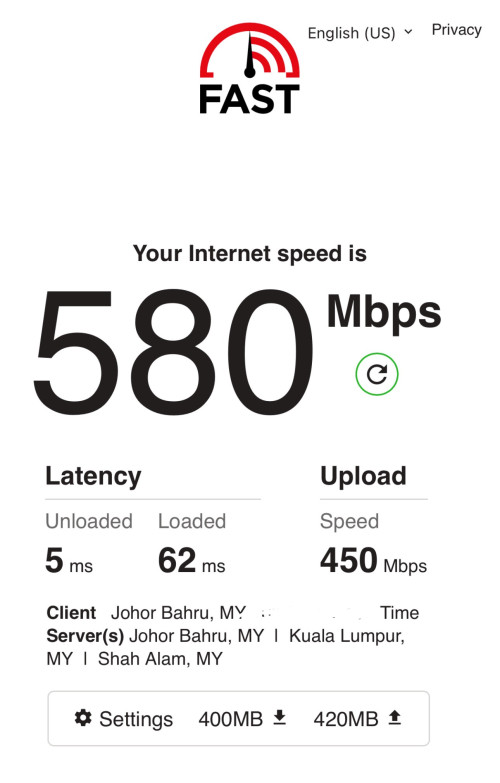
Managed to get this speed on my iPhone inside study room (child node).

user posted image
westlife
post Feb 2 2024, 08:18 AM

10k Club
********
All Stars
14,259 posts

Joined: Jan 2011
QUOTE(ChenKaiWen @ Feb 2 2024, 08:16 AM)
fast.com is not that accurate btw. Sometimes I can even get more than a gigabit, when it's not possible
*
My pt is not on the exceeded speed.

I just wanted to say that I can finally attain full speed at the child node after finding the right position of both main and child nodes eventually.
westlife
post Feb 2 2024, 04:51 PM

10k Club
********
All Stars
14,259 posts

Joined: Jan 2011
QUOTE(contestchris @ Feb 2 2024, 12:45 PM)
Guys I recall last yeah Minster Fahmi announced there will be decrease in broadband prices. What happened? I do not believe Time Fiber reduced their prices one bit.
*
I think Becos based on per GB speed cost, time is already considered cheaper?
westlife
post Feb 2 2024, 06:27 PM

10k Club
********
All Stars
14,259 posts

Joined: Jan 2011
QUOTE(ChenKaiWen @ Feb 2 2024, 04:59 PM)
Yes, time is cheaper. I think those area covered by Maxis NGBB, it's even cheaper compared to TIME but the upload speed cannot compete with TIME.
*
maybe this is the reason? After all if comparing middle plan of 500Mbps time is still cheaper. Not to mention that the upload speed is higher.
westlife
post Feb 3 2024, 12:30 AM

10k Club
********
All Stars
14,259 posts

Joined: Jan 2011
QUOTE(liquid.D @ Feb 2 2024, 09:22 PM)
Oh Time will use drainage yea.. I see... this is new at my area since Unifi use telephone pole, hope that time really bring in symmetrical fibre,
would love to try their service ... RM139 (500/500) RM199 (1G/500M) .. hehe... maybe I just day dreaming tongue.gif
*
i switched from unifi to time (landed to highrise).

from 500Mbps to 500Mbps

if u ask me, is there any real-life difference actually answer is no.

although unifi has 100Mbps upload speed only while time is symmetric. but one does not really lose out so much for upload part. becos most of the destination server has limitation on the upload which one cannot really enjoy speed beyond 100Mbps, at least for facebook and youtube upload speed i dun see a difference. maybe other servers will.

unless u are hosting as a server urself for others to upload to ur server, then it may make difference.

other than that, it only looks nice when doing speedtest and that's it.
westlife
post Feb 4 2024, 02:07 PM

10k Club
********
All Stars
14,259 posts

Joined: Jan 2011
QUOTE(CounterRealm @ Feb 4 2024, 01:31 PM)
I have one question about speed. My current plan is 100mbps and if I take 500mbps plan, will my speed load certain browser faster or video faster? Or it is totally based on their server speed in regardless of my own speed?
*
seriously, i dun think u can even feel a difference if it is just purely loading web pages or youtube videos...

if ur speed is always faster than ur destination server's speed, then ur speed is not a bottleneck.

if u do not encounter issues with ur current plan, seriously no pt to switch to 500Mbps unless u does encounter congestion becos too many users in ur house etc.

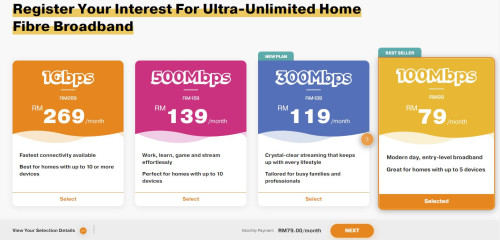
if not becos i am a new user and the 500Mbps plan is more worth becos of the 6 months discounted price at rm99 and one mth free for online sign-up, i would consider to sign the 100Mbps plan instead.

u mobile comes in to time fibre infra too late only a few days after i signed time fibre so suck thumb that i cannot switch to u mobile unless after 2 years later. or unless i terminate my time now by paying rm500 to switch to u mobile 100Mbps.
i find that 100Mbps is sufficient for my usage since most of the time there is only 1 person which is me in my apartment that uses the internet. i hardly download stuff so 100Mbps is totally sufficient. not to mention that time fibre is symmetric speed. upload is also 100Mbps.

many on lower end plan like 100Mbps they always wanted to switch to higher plan just purely to enjoy faster upload speed. becos 100Mbps plan the upload speed is only 50Mbps only.

rm79/mth for 100Mbps plan with symmetric speed is a steal.

i am paying effective rate of rm129 for 500Mbps under time fibre (after considered the first 6 months rm99 and one month free).
i can save rm50/mth for something i did not fully utilise.

user posted image

This post has been edited by westlife: Feb 4 2024, 02:17 PM
westlife
post Feb 4 2024, 05:29 PM

10k Club
********
All Stars
14,259 posts

Joined: Jan 2011
QUOTE(CounterRealm @ Feb 4 2024, 04:36 PM)
Thanks for your opinion. I am wondering if umobile is stable or not. Anyone using this?
*
yeah. interested to know also. but i think the experience should be similar to maxis/celcom/digi that uses tm infra also for fibre broadband.

if time fibre infra is stable, i think u mobile one should be as stable as well.

i had used time fibre broadband for almost 2 months now. so far so good.
westlife
post Feb 4 2024, 05:59 PM

10k Club
********
All Stars
14,259 posts

Joined: Jan 2011
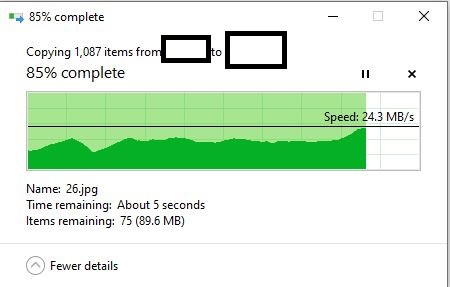
my two PCs which are connected to the same child node via wired can get this transfer speed. much better than wireless.

user posted image
westlife
post Feb 4 2024, 07:26 PM

10k Club
********
All Stars
14,259 posts

Joined: Jan 2011
QUOTE(contestchris @ Feb 4 2024, 07:08 PM)
UMobile use Time infra?

If switch to them, need to change router / lay new cable etc?
*
u mobile now also has the coverage for highrise using time infra.

i think need to change btu i guess.

no need to lay cable for highrise, most of the highrise nowadays has built-in fibre port in the living room, just plug in fibre cable to the BTU can work already. of course need PPPoE username and password.
westlife
post Feb 6 2024, 10:26 PM

10k Club
********
All Stars
14,259 posts

Joined: Jan 2011
QUOTE(eugene66 @ Feb 6 2024, 07:56 AM)
I'm uisng U mobile fibre for a week plus now. So far no complain, installer is from TIME. If TIME pulled fibre optic cable to your house previously, basically there's no need to repull again. Speedtest can get average of 95-103mbps download and 90-105mbps upload using wireless.

user posted image
user posted image
*
u mobile fibre (on time infra) never uses ONU (modem + wifi) like time broadband?
westlife
post Feb 7 2024, 07:10 AM

10k Club
********
All Stars
14,259 posts

Joined: Jan 2011
QUOTE(jjj2 @ Feb 6 2024, 11:28 PM)
Currently using ONU + Router, not 2-in-1 (ONT).
*
U are using u mobile fibre broadband?
westlife
post Feb 7 2024, 07:26 AM

10k Club
********
All Stars
14,259 posts

Joined: Jan 2011
I am on time fibre broadband 24 months contract for 500Mbps plan and this is my 2nd month of usage.

I had enjoyed one month free subscription so far due to online sign up promotion and I am paying rm99 for the remaining 5 months so about rm40 savings per month from the original price of rm139.

If assume I used finished until 6th month and cancelled the line, I would had already enjoyed rm139 + rm40 x 5 of savings for 500Mbps plan = rm339.

If I terminate the line at 6th month I will be paying rm500 one time termination fee.

Rm500 - rm339 = rm161 exact loss I had incurred.

My plan is to sign the u mobile rm79 100Mbps instead.

So for this case, is it worth this move? Becos rm79 per month even consider just 2 years of usage if assume I also used time broadband for complete 2 years due to contract, I still save quite a bit.

westlife
post Feb 7 2024, 07:35 AM

10k Club
********
All Stars
14,259 posts

Joined: Jan 2011
QUOTE(eugene66 @ Feb 7 2024, 07:22 AM)
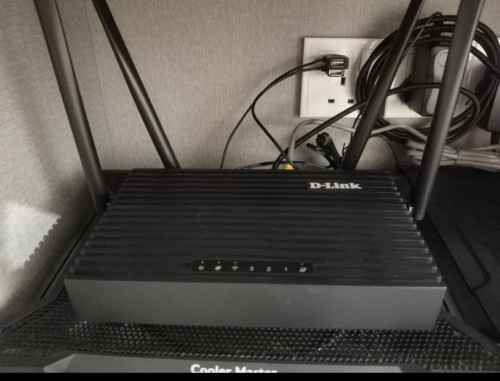
I'm setting up a mesh router D Link X300Z just right in front of my room. Distance from mesh router to room study table is around 3-4 meters only. Previously before setting up mesh, signal only one to two bars with d/l and u/l around 16-20mbps. After setting up mesh, signal bar improve but still not full bar, d/l can get around 70-90mbps, u/l sometimes only 50mbps. Just wondering why the mesh router is just few meters away yet still cannot get full bar signal.

My mesh and main router also quite close, around 6 meters away but I'm keeping my main router inside tv cabinet.
*
1) First of all what standard is ur wifi mesh? Wifi 5 I assumed? If wifi 5 no issue to get 500Mbps and above if the coverage and signal are good
2) u likely can check the signal strength from yr child node to the master node via the wifi router GUI. Check it to see what is the signal strength.
3) if signal strength from ur child node to master node is good, check if ur device such as yr phone is connected to child node or still connected to the master node when u roam around. How intelligent ur node to switch between the master and child node depending on the devices and ur wifi mesh. There are features like node steering which the node will redirect ur devices to the node with strongest signal but this feature even both node and device support it, it may not work well in real.

Since ur master and child node are too close to each other, the device may still connect to master node which is further and result in slower speed while u are actually physically closer to master node.
4) for mesh system it requires a lot of trial and error before u found the best locations to place ur master and child nodes.
5) besides ur plan is 100Mbps only? Becos given that u are in front of master node and again get such slow speed, it indicates big prob.
westlife
post Feb 7 2024, 04:13 PM

10k Club
********
All Stars
14,259 posts

Joined: Jan 2011
QUOTE(eugene66 @ Feb 7 2024, 03:24 PM)
Thanks for your reply bro.. I'm not really familiar with IT stuff but let me try my best to answer as much as I can.

1. Main router is D-Link DIR-X1860Z AX1800 Wifi 6 router. Mesh router is D-link DIR-X3000Z AX3000 Wifi 6 router as well
2. I tried login once and yes I remembered there's such option to check on the signal strength, let me check that again tonight.
3. Child node means "secondary MESH router" and master node means "main router" I guess? Is there a way to check whether is our device connected to which router since both are sharing the same SSID? My main and secondary router are connected to each other using 5Ghz network, but when I scan for network, it shows one 5GHz SSID which i assumed it is correct, but there are two 2.4GHz SSID which sounds a bit strange to me, not sure if this is something normal.
4. Ok got it, have to try from one place to another place then  rolleyes.gif
5. Yes, I'm on U mobile fibre 100mbps plan. When I'm right in front of my main router, it gets quite a decent speed in between  95-103mbps on both d/l and u/l. However when I'm in my room which I have the secondary mesh right in front of the room, it shows me signal drop to half with speed fluctuates. Anyway, I should have test the secondary router in few places to see which location works the best. Thanks anyway. smile.gif
*
1. If u model is dual-band and not tri-band, even with good signal between the master and child nodes. The speed will still not be maximum when u are connected to child node. So tri-band or not does make a difference.

2. Ya normally the portal of the mesh wifi routers should allow u to check the strength of the child node to master node.

3. Yes. That’s the meaning of master and child node.

The same portal u can access for the mesh wifi router should also allow u to see which node ur device is connected to, be it master or child.

SSID depending u are using the same name for 5GHz and 2.4GHz or u will use the same name for both. Ideally u should use different name so that u can ensure that ur device is connected to 5GHz always for fastest possible speed. So if separate u should only see two networks one is 5Ghz and one is 2.4Ghz when u do the scanning.

4 & 5. Yes location u placed the child node very important, it affects speed u can get. Ideally it should be within the coverage of the master node.

Like my child node, the signal strength is full bar so my speed while connected to the child node is not bad and latency is low. Ensure that no more than 1 wall between ur child and master node. But also be cautious that ur master and child node also cannot be too close to each other Becos ur device may not switch to the child node that may be physically closer but instead connect to ur master node that is further away and result in slow speed and high latency.

I had made the trial and error of the positioning of the nodes to get the most optimised result now. I am using 3 nodes (including master) for my apartment unit of 882 sq ft. Now everywhere in the apartment I can get perfect speed and latency.

Besides, my mesh system is tri-band so it can archive this if not it is impossible.
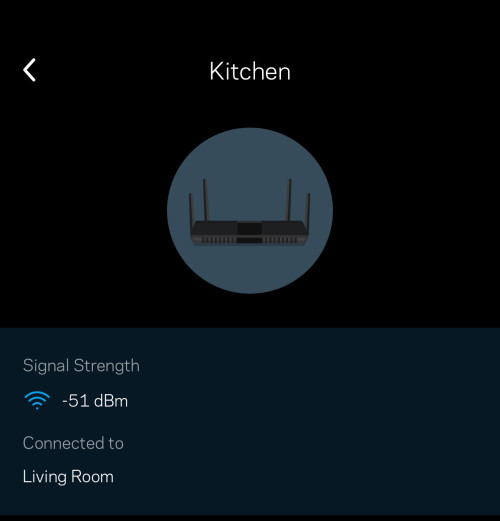
user posted image
westlife
post Feb 18 2024, 04:25 AM

10k Club
********
All Stars
14,259 posts

Joined: Jan 2011
QUOTE(LA773 @ Feb 16 2024, 08:18 AM)
Just stay with TIME, but request downgrade to 100mbps recontract 24 mths, no penalty

Time Rm99/ mth, u save only Rm20 if use u mobile

20x24 = 480
But u dont have to pay the RM500 TIME termination fee

Still cheaper

U Hutang me 1 coffee
*
but i am paying rm99 only for 1st 6 months and 1st month is free.

so technically i pay rm400 penalty since i had one month free on 1st month.

so saving of rm480 - rm400 = rm80 so in long run it is still a saving... tongue.gif

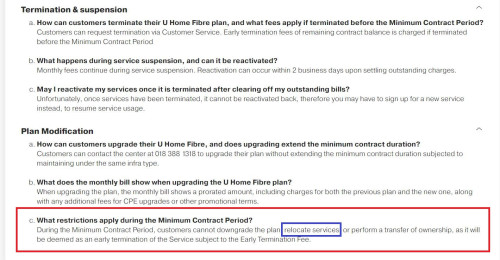
but saw one killing tnc under the faq.. it said that during the contract period cannot even relocate the service (wtf), else need to pay penalty.

user posted image

i think like that, i may opt to downgrade my plan to rm99 100Mbps after 6th month of my current plan... while remaining under time fibre..


This post has been edited by westlife: Feb 18 2024, 04:30 AM

23 Pages « < 2 3 4 5 6 > » Top
 

Change to:
| Lo-Fi Version
0.0322sec    0.59    7 queries    GZIP Disabled
Time is now: 7th December 2025 - 09:28 PM