


TIME [OFFICIAL] TIME Fibre Broadband™ v4, Experience the ONE TRUE 2Gbps
TIME [OFFICIAL] TIME Fibre Broadband™ v4, Experience the ONE TRUE 2Gbps
|
|
 Nov 18 2023, 01:33 PM Nov 18 2023, 01:33 PM
Return to original view | IPv6 | Post
#41
|
 
Junior Member
385 posts Joined: May 2019  
|
TIME website just underwent maintenance. Seems like the new FTTR has been added. No price reduction yet.
|
|
|
|
|
|
Nov 21 2023, 07:29 PM
Return to original view | Post
#42
|
|
Junior Member
385 posts Joined: May 2019
|
QUOTE(Seng89 @ Nov 21 2023, 07:00 PM) Haiz. Sad. The only way are change to other isp. Then they will feel the heat perhaps. Honestly, even without price reduction, it's still cheaper than others. |
|
|
Nov 21 2023, 09:58 PM
Return to original view | Post
#43
|
|
Junior Member
385 posts Joined: May 2019
|
QUOTE(Seng89 @ Nov 21 2023, 08:38 PM) Correct, but now TM price not bad d. Siapa tak mao cheaper ? 😂😂😂 Siapa mao lower upload speed 😂 and TM 2gbps is 1+1 gbps, not like time. |
|
|
Dec 1 2023, 11:45 PM
Return to original view | Post
#44
|
|
Junior Member
385 posts Joined: May 2019
|
QUOTE(Chrono-Trigger @ Dec 1 2023, 11:08 PM) any problem with Time these few days? Nope. Penang Area.Connection seems a bit slow. even my maxis 4G is faster and more responsive. |
|
|
Dec 5 2023, 10:18 PM
Return to original view | Post
#45
|
|
Junior Member
385 posts Joined: May 2019
|
QUOTE(leezhijiang @ Dec 5 2023, 09:44 PM) I got Time internet installed in my new house last week. To my surprise the Huawei HG8145X6 has superb performance, even the mesh node. I place the router in the living room and the mesh node on my study desk in the other room. Speed Test via LAN cable plugged into the Mesh node able to achieve full speed. Wi-Fi can get close to full speed as well. TIME is known to block customers who used their own GPON stick btw.I think I wasted money buying two units of Asus AX TUF4200M and AX3000 which I planned to link them up using AI Mesh. Since I already bought them, I am going to do the below when budget is available. 1. Get a soft router with SFP+ port and plug in GPON module. Fiber from Time will be plugged directly into the GPON Module. 2. One of the Asus routers will be connected with DHCP disabled, hence converting it into an AP. The other one will link using AI Mesh. 3. Change the uplink of the ONU to LAN1 and connect it to the soft router and changed to DHCP mode. As such every corner of my home will be covered. |
|
|
Dec 17 2023, 11:58 AM
Return to original view | IPv6 | Post
#46
|
|
Junior Member
385 posts Joined: May 2019
|
QUOTE(westlife @ Dec 17 2023, 10:41 AM) ok will try it to ask the CS. Yes that is how it looks. Link speed between AP looks good. I live in landed and had the main unit floor above mesh. I could get 200mbps with around 400 link speed. I think it's something else that's affecting your wifi speed.yes, absolutely tough, it is even harder to get good coverage and system with the wifi mesh at my double storey landed house previously. damn.. besides, are these settings even correct in the first place? why mesh wifi is using AP mode? 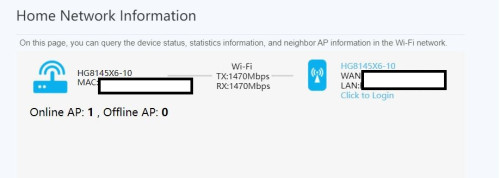 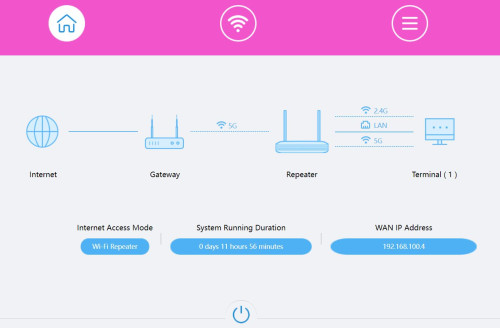 |
|
|
|
|
|
Dec 20 2023, 12:07 AM
Return to original view | Post
#47
|
|
Junior Member
385 posts Joined: May 2019
|
QUOTE(SNHY693 @ Dec 19 2023, 08:07 PM) Is there any difference in uptime and stability between TIME vs UMobile or CelcomDigi other than their cust support? Since all running on the same infra and backbone. If compare with UMobile pricewise is cheaper for the 100mbps and seems no benefit to renew contract with TIME. TIME provides the fibre infrastructure. If something happens to the fibre, then none will work. After that, umobile/celcomdigi manages the routing. They might suck at routing or they might be better at it. PRSXFENG liked this post
|
|
|
Dec 21 2023, 08:41 PM
Return to original view | Post
#48
|
|
Junior Member
385 posts Joined: May 2019
|
QUOTE(x-1o8-x @ Dec 21 2023, 08:09 PM) hi guys, wanna ask, is TIME rewards still even a thing? Yes. They updated it now every 15th I check, I only see the same old KFC voucher that was released in July 2023. I think it's been more than a year since I last redeemed one   |
|
|
Dec 23 2023, 12:27 AM
Return to original view | Post
#49
|
|
Junior Member
385 posts Joined: May 2019
|
QUOTE(blacktubi @ Dec 22 2023, 10:48 PM) This fiber can bend 90 degree? the typical white fibre with 2 strand inside they use can bend like that based on my house. Just a 90 curve bend so should be fine.What about going through door? |
|
|
Dec 26 2023, 04:35 PM
Return to original view | Post
#50
|
|
Junior Member
385 posts Joined: May 2019
|
Is self care down for y'all? Can't seem to reach self-care website and the app doesn't work
|
|
|
Dec 30 2023, 10:02 AM
Return to original view | Post
#51
|
|
Junior Member
385 posts Joined: May 2019
|
QUOTE(westlife @ Dec 29 2023, 07:12 PM) Icic. I first time using time, I would say that it is not exactly good as what ppl used to say when comparing to unifi. Unifi I get more consistent experience. Honestly, I feel no difference for normal usage. But the ping is definitely lower than when I was using Maxis(TM infra). I only switched because it's cheaper, symmetrical and give public IP. |
|
|
Dec 31 2023, 05:07 PM
Return to original view | Post
#52
|
|
Junior Member
385 posts Joined: May 2019
|
QUOTE(westlife @ Dec 31 2023, 03:15 PM) Reposition my ONT to be even more centred and nearer to my study room and master bedroom. The position of the antenna matters a lot. You gotta account for the shape of the radio waves. When I do speedtest near my TP-Link Eap610, it wasn't so good, but after I mount it on the ceiling, it improved significantly.The speed and coverage are ok but loaded lantecy to be frank it is still high, between 50 to 100ms (loaded) when testing using fast app. Unifi is having much lower latency. Then I tested connecting to the child node which is placed super close to the main node, the speed is bad, I can only get 300Mbps speed, latency is high at 150ms (loaded) plus minus. Quite bad for a wifi 6 mesh comparing to my wifi 5 Linksys mesh for sure. Totally trash… |
|
|
Jan 2 2024, 10:48 PM
Return to original view | Post
#53
|
|
Junior Member
385 posts Joined: May 2019
|
QUOTE(blizzardcarl92 @ Jan 2 2024, 10:18 PM) Hey guys, I just bought a new ASUS router model RT-AX53U and I'm using the existing TP LINK AC1350 as a repeater in my office room. Normal usage is fine but when I started gaming I'm getting packet losses. Don't think they can mesh due to different standards. Packet loss with wifi is probably expected. I have my hg8145x6 set to bridge mode and use my old rt ac66u as a router. Then I have TP-Link omada EAP610 for wifi. I use the other hg8145x6 node as a repeater(lowered transmission power, disabled 2.4g, hidden 5g can't disable for some reason) to connect a PC.I recently found out that TIME is giving new promo for upgrade. Had to upgrade anyways because current package no more discount. TIME is giving Huawei HG8145X6 router + 1 mesh. Now my question is Can I still maintain ASUS RT-AX53U as main and use the HG8145X6 as mesh? Understandable different brands can "mesh" it together but would I get optimum and stable speed? I have other thoughts to solve this problem but would like to avoid spending as I just bought the ASUS Router Here's my other 2 solutions: 1. Resort to homeplugs - Uncle old liao, last time use homeplug was relatively okay 2. buy a new wifi card Archer TXE75E P/S: my main router and 2nd room is probably less than 20 meters a part but still the repeater is not stable Please help uncle on this! Thank you! My suggestion is, buy a good quality Ethernet cable to connect the PC to the router. Or you can buy a fibre media converter and then buy transparent fibre cable to run around your house if you don't like Ethernet cable being seen |
|
|
|
|
|
Jan 3 2024, 04:09 PM
Return to original view | Post
#54
|
|
Junior Member
385 posts Joined: May 2019
|
QUOTE(blizzardcarl92 @ Jan 3 2024, 01:09 PM) its a rented condo so limited options for the time being. ALL IT did suggested me to buy another RT-AX53U act as a mesh to connect with my existing RT-AX53U router tho Yes, you can mesh multiple Asus router. But you cannot mesh Asus with Huawei. |
|
|
Jan 8 2024, 05:15 PM
Return to original view | Post
#55
|
|
Junior Member
385 posts Joined: May 2019
|
QUOTE(UbuntuClient @ Jan 8 2024, 05:04 PM) Does time fiber is stable? MIne now Unifi and notice in a month ip change without me to restart router. I'm using for a few months now. 0 downtime. IP changing is very normal. |
|
|
Jan 8 2024, 06:44 PM
Return to original view | Post
#56
|
|
Junior Member
385 posts Joined: May 2019
|
QUOTE(UbuntuClient @ Jan 8 2024, 06:04 PM) Need to addon iptv or it's already included? Don't have iptv for time. Just internet and VoIP(per min) |
|
|
Jan 15 2024, 10:05 PM
Return to original view | Post
#57
|
|
Junior Member
385 posts Joined: May 2019
|
QUOTE(jex-koi @ Jan 15 2024, 09:04 PM) I relocated my Time-router today. Switched the router off. I disconnected the fiber cable, moved my router, then reconnected the fiber cable. Plug in your fibre cable properly. Make sure there's no bend. If still not working then you've broken the fibreNow, it can't connect to the internet. Router LOS-light is blinking RED. ONT info (in Admin webpage) also shows blank. How to fix it ? https://pictr.com/image/EyDIoI |
|
|
Jan 16 2024, 03:43 PM
Return to original view | Post
#58
|
|
Junior Member
385 posts Joined: May 2019
|
QUOTE(westlife @ Jan 16 2024, 10:39 AM) Did u guys opt in for auto debit for rm2 rebate monthly? Yes |
|
|
Jan 16 2024, 11:20 PM
Return to original view | Post
#59
|
|
Junior Member
385 posts Joined: May 2019
|
QUOTE(westlife @ Jan 16 2024, 11:14 PM) icic. thanks for the info. Yea lol. I use my other node to connect a PC to my AP. No way to disable it broadcasting wifi fully. Only can disable 2.4G. 5G I can only hide the SSID and set to low power, unfortunately. My area 5G channels are very populated now too.i will disable the wifi. else having a useless wifi on very irritating and may cause interference to my wifi.  |
|
|
Jan 20 2024, 01:04 PM
Return to original view | Post
#60
|
|
Junior Member
385 posts Joined: May 2019
|
QUOTE(Seng89 @ Jan 20 2024, 11:25 AM) Where did you get this ? Most likely email for old customers Seng89 liked this post
|
| Change to: |  0.0434sec 0.0434sec
 0.96 0.96
 7 queries 7 queries
 GZIP Disabled GZIP Disabled
Time is now: 19th December 2025 - 12:29 PM |
 Quote
Quote