Welcome Guest ( Log In | Register )

45 Pages « < 16 17 18 19 20 > » Bottom

Outline · [ Standard ] · Linear+

TIME [OFFICIAL] TIME Fibre Broadband™ v4, Experience the ONE TRUE 2Gbps

views
     
FusionXY
post Aug 6 2019, 08:06 PM

LAZZIE ON VACATION
*******
Senior Member
3,834 posts

Joined: Aug 2016

QUOTE(ameeyn @ Aug 6 2019, 06:24 PM)
Time is coming to install on Thursday..can i give my own router for them to install?

I'm using Asus uhp1300

Will they charge I want to use my own router during Installation?
*
Hi, they will charge you if you request them to install.

The best is to setup your router by yourself after the installation.
Make sure the technician write the PPPoE ID Login Details to the Work Completion Form.
It is very easy to setup your own router.
I may guide you if you need further assistance.

Thanks.
FusionXY
post Aug 6 2019, 10:20 PM

LAZZIE ON VACATION
*******
Senior Member
3,834 posts

Joined: Aug 2016

QUOTE(SzeMeng76 @ Aug 6 2019, 10:07 PM)
Heard they will charge.
So i just let them to install with stock router themselves.
After they leave, I just took out my own router to install myself.
The work completion form they will write PPPoe details, but in my case,
I cannot see it clearly as their terrible handwriting doh.gif
But then immediately I did receive email from TIME which indicate my PPPoe login details there also.
Just login ASUS router page and key in PPPoe details and save,
make sure IPTV/VLAN tagging choose NONE, then ur internet good to go.
(for my case because i came from unifi, so my router already pre-choose VLAN tagging previously, so must choose NONE again to make sure there is active internet connection)
*
Thanks for helping to explain further details.

rclxms.gif rclxms.gif
FusionXY
post Aug 13 2019, 02:28 PM

LAZZIE ON VACATION
*******
Senior Member
3,834 posts

Joined: Aug 2016

QUOTE(rae0724 @ Aug 13 2019, 02:24 PM)
hi all, i am using 500mbps plan now. however, the speed test NEVER reach 500mbps, mostly at around 100mbps. may i know how u guys achieve full speed?
*
Hi. You tested via Wi-Fi or LAN Cable?

Thanks.
FusionXY
post Aug 22 2019, 12:56 AM

LAZZIE ON VACATION
*******
Senior Member
3,834 posts

Joined: Aug 2016

QUOTE(senscents @ Aug 22 2019, 12:48 AM)
user posted image
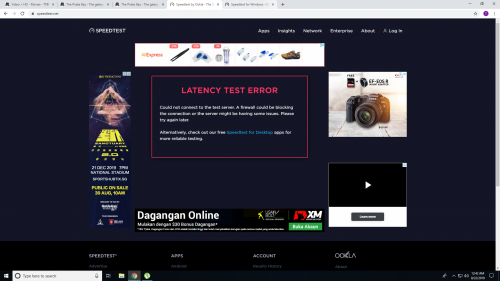
Tonight problem with the speedtest. Tried a few times, it say problem with Latency test
*
Hi, no problem on my side.

Thanks.
FusionXY
post Aug 24 2019, 12:55 PM

LAZZIE ON VACATION
*******
Senior Member
3,834 posts

Joined: Aug 2016

QUOTE(xSean @ Aug 24 2019, 12:41 AM)
u ask the installer change on the spot for tenda ac18?
*
TIME doesn't provide other routers rather than the stock type.

He setup the 3rd party router by himself after the technician went home.

Thanks.
FusionXY
post Sep 9 2019, 01:15 AM

LAZZIE ON VACATION
*******
Senior Member
3,834 posts

Joined: Aug 2016

QUOTE(miyakochan89 @ Sep 8 2019, 10:25 PM)
Hey all, I have a DLink AC2600, how do I set it up for my TIME? I'm not very good at this.
*
Hey sistar, do refer to your PM.

Thanks.
FusionXY
post Sep 10 2019, 05:26 PM

LAZZIE ON VACATION
*******
Senior Member
3,834 posts

Joined: Aug 2016

QUOTE(paogeh @ Sep 10 2019, 11:09 AM)
want to ask,

i always see TIME at the main login ,
grab your reward 15th .
what is the reward actually ?
does it really worth it ? Thanks
*
Some offer(s) is/are worth it.

You can only redeem once in 1 year.
Make sure to open the Self Care on the 14th midnight of the month to redeem it.
While stock last.

I redeemed a food voucher.
It was very nice. Save money for a single person.

Thanks.
FusionXY
post Sep 14 2019, 06:08 PM

LAZZIE ON VACATION
*******
Senior Member
3,834 posts

Joined: Aug 2016

QUOTE(lordcraptor @ Sep 14 2019, 05:53 PM)
it was so sad and frustrated that a new installed 500mbps line had issue several hours after completed.

I made a call to the hotline and was informed that there was a sudden high reading on the fiber line and due that, the download speed suffered a downgrade.

Time need to send technician on next week. Meanwhile, anything I can potentially do on my end to fix this?

[attachmentid=10314742]
*
Are you using Wi-Fi or via LAN Cable connection?

Thanks.
FusionXY
post Sep 21 2019, 11:50 AM

LAZZIE ON VACATION
*******
Senior Member
3,834 posts

Joined: Aug 2016

QUOTE(antt00 @ Sep 21 2019, 11:00 AM)
Hi. Can someone recommend a good reliable router? My ori time router is acting strange lately. No need too canggih as my apartment only 700sqft. Thanks
*
Hi, may I know what's your plan and your budget?

Thanks.
FusionXY
post Sep 21 2019, 12:25 PM

LAZZIE ON VACATION
*******
Senior Member
3,834 posts

Joined: Aug 2016

QUOTE(antt00 @ Sep 21 2019, 11:58 AM)
Current plan is 500Mbps budget around rm200 - 300.
*
Hi, you may get this router.

Grab it quickly before it changes the price to original price.
If you wish to top up, get this TP-Link C2300 via OOKAS for RM 500.

Thanks.
FusionXY
post Sep 21 2019, 01:03 PM

LAZZIE ON VACATION
*******
Senior Member
3,834 posts

Joined: Aug 2016

QUOTE(antt00 @ Sep 21 2019, 12:52 PM)
Thanks for the info
*
You're welcome. biggrin.gif biggrin.gif
FusionXY
post Sep 30 2019, 05:39 PM

LAZZIE ON VACATION
*******
Senior Member
3,834 posts

Joined: Aug 2016

QUOTE(TreasonWei @ Sep 30 2019, 05:32 PM)
i am using Maxis one prime, due to my maxis home fibre always disconnect, i plan to move to time since i see the TIME fibre is newly installed in my condo.
how much should i pay to if i want to apply TIME 100mbps?
*
Hi, installation is free for 24 months contract.

Is your Maxis Home Fibre still under contract?

Thanks.
FusionXY
post Oct 2 2019, 08:38 PM

LAZZIE ON VACATION
*******
Senior Member
3,834 posts

Joined: Aug 2016

QUOTE(DarkNite @ Oct 2 2019, 06:08 PM)
What's the definition of 'is support by' Time Fibre?
*
This means that your building or your area is covered with TIME. With the port ready there.

Thanks.
FusionXY
post Oct 19 2019, 05:20 PM

LAZZIE ON VACATION
*******
Senior Member
3,834 posts

Joined: Aug 2016

QUOTE(Ash55 @ Oct 19 2019, 05:13 PM)
hi guys,
for ipv 6, what configuration type i need to choose ?
*
Hi, try SLAAC first, if no IPv6 Address, then choose DHCP6.

Mine works on SLAAC.

This post has been edited by FusionXY: Oct 19 2019, 05:21 PM
FusionXY
post Oct 31 2019, 06:28 PM

LAZZIE ON VACATION
*******
Senior Member
3,834 posts

Joined: Aug 2016

QUOTE(Xflkekw @ Oct 31 2019, 05:56 PM)
Just wondering.... Anyone experienced frequent disconnection using the TP-LINK C1200 router? I am on Time 500 Mbps plan and my internet would drop at least once per day. I have called up Time CS multiple times and still unable to resolve the issue. Apparently, it may have something to do with the CPU of the router not being good enough or me using too much data over a single day (Which doesnt make sense since Time plans are supposed to be unlimited in data?). I do notice via the router page that the CPU load spikes up to 100 or a very high number from time to time.
*
TIME Stock Router C1200 is very bad.

You may change the router.
I tried this 500Mbps with this C1200 Router. Not very stable.
This router specification is suitable to use with 100Mbps.

You may upgrade to TP-Link C2300 or A9.

Thanks.
FusionXY
post Oct 31 2019, 08:25 PM

LAZZIE ON VACATION
*******
Senior Member
3,834 posts

Joined: Aug 2016

QUOTE(Xflkekw @ Oct 31 2019, 06:32 PM)
The technician that came by did say he can upgrade my router at RM200+ to EC230 model or for free if I renew the 2 year contract. What about that model? is that good?
*
This router almost the same specification, not sure about the quality.

My best suggestion to get your own router instead. Stock router is not 100% good.
Get the C2300 or A9.
Get it during 11.11 Sales.

You won't regret after getting own router.

Thanks.
FusionXY
post Nov 7 2019, 11:17 PM

LAZZIE ON VACATION
*******
Senior Member
3,834 posts

Joined: Aug 2016

QUOTE(justinlee7892 @ Nov 7 2019, 10:49 PM)
I'm a 500mpbs user looking to upgrade WiFi router. I heard that Archer A9 and D-Link DIR-878 is quite good to utilize full 500mpbs wireless speed. What would you guys recommend over these two? Or any other model recommended within similar price range(RM200-300)?
*
Hi, get the TP-Link A9 instead due to firmware.

Thanks.
FusionXY
post Nov 10 2019, 10:52 AM

LAZZIE ON VACATION
*******
Senior Member
3,834 posts

Joined: Aug 2016

QUOTE(ritzkaizer @ Nov 10 2019, 08:11 AM)
user posted image

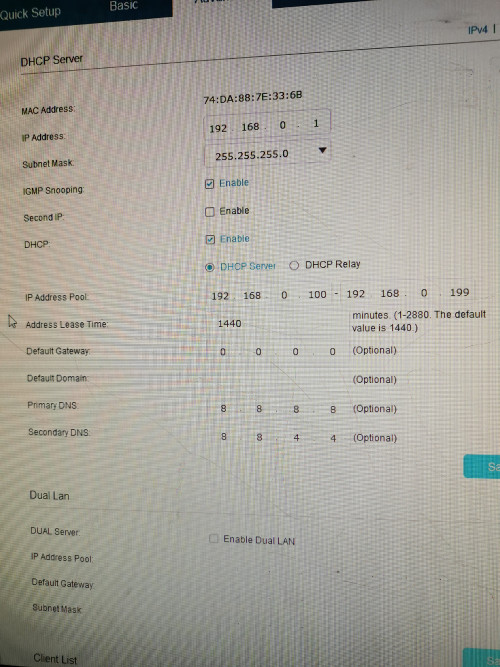
Already did buat still not working... Anything i did wrong?

Ty
*
Hi, could you remove the default gateway. Remove all the zeros and try and see.

Thanks.
FusionXY
post Nov 10 2019, 12:47 PM

LAZZIE ON VACATION
*******
Senior Member
3,834 posts

Joined: Aug 2016

QUOTE(ritzkaizer @ Nov 10 2019, 11:45 AM)
user posted image
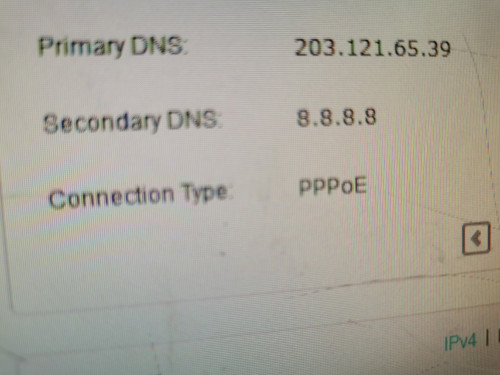
Its show my google dns is secondary... But i already put primary 8.8.8.8
*
Have you tried restarting your router?
Or check in info page.

Thanks.
FusionXY
post Nov 11 2019, 10:36 PM

LAZZIE ON VACATION
*******
Senior Member
3,834 posts

Joined: Aug 2016

QUOTE(solsekuin44 @ Nov 11 2019, 10:29 PM)
I'm going to move out to a new place. Thinking of trying Time internet for a change after 6 years of Unifi.. Is it better?
*
You won't regret it. TIME is definitely better than TM and Maxis.

Do refer to your PM for more info about TIME.

Thanks.

45 Pages « < 16 17 18 19 20 > » Top
 

Change to:
| Lo-Fi Version
0.0300sec    0.45    7 queries    GZIP Disabled
Time is now: 3rd December 2025 - 11:58 PM