Welcome Guest ( Log In | Register )

45 Pages « < 17 18 19 20 21 > » Bottom

Outline · [ Standard ] · Linear+

TIME [OFFICIAL] TIME Fibre Broadband™ v4, Experience the ONE TRUE 2Gbps

views
     
FusionXY
post Nov 11 2019, 10:46 PM

LAZZIE ON VACATION
*******
Senior Member
3,834 posts

Joined: Aug 2016

QUOTE(PowderBug @ Nov 11 2019, 04:56 PM)
Hello, I'm an IT noob. Can someone advise how to setup Google Nest WiFi for TIME? Can it be used with TIME? I plan to subscribe to TIME, can any agent here help with Google Nest WiFi setup too? sweat.gif
*
Thanks for the interest on TIME Fibre.

Do refer to your PM for more information.
So far never seen one of the members use Google Nest Wi-Fi.

Thanks.
FusionXY
post Nov 11 2019, 11:04 PM

LAZZIE ON VACATION
*******
Senior Member
3,834 posts

Joined: Aug 2016

QUOTE(604weekendwarrior @ Nov 11 2019, 10:52 PM)
Hello Everyone

I'm a foreigner here from Canada and don't really know too much about the local ISP's.  The internet was here when I arrived and I took it over.

I'm currently on TM's unifi advance 30Mbps plan and since my apartment building doesn't have Fiber yet I'm not eligible for their Turbo Speed boost to 300Mbps.
So I'm looking at other options, specifically the Time 500Mbps plan.  (It's actually cheaper than my crappy 30Mb TM plan lol.. Will happily pay the RM500 fee to leave)
How's the installation time when it comes to getting Time installed?  I can't be without internet so I'm just worried about the transition plan from TM to Time.  Are the technicians
usually on time or are there typically delays?

I see the 500Mb plan comes with a TP-Link EC 230 router.  Is this sufficient or am I better to get an aftermarket router?
Also I gather Time is way better than TM?
Thanks in advance for helping this foreigner out everyone.
*
Hi, thanks for the interest on TIME Fibre.

There won't delays. If you're using on LAN, won't be a problem.
It depends on the receiving device as well. If the stock router don't suite you well.
You may setup 3rd party router. I recommend the TP-Link C2300.
Foreign are required to pay one time deposit of RM 500.
You may refer to your PM for more information about TIME FIBRE.

Thanks.
FusionXY
post Nov 11 2019, 11:32 PM

LAZZIE ON VACATION
*******
Senior Member
3,834 posts

Joined: Aug 2016

QUOTE(604weekendwarrior @ Nov 11 2019, 11:24 PM)
Thanks for the quick reply.  Ok good to know.  I'll evaluate the stock router and determine after.
Silly question but what's an SI? lol. 
Thanks for the PM as well.
*
You're welcome.

Hope you understand it.

Thanks.
FusionXY
post Nov 12 2019, 08:20 PM

LAZZIE ON VACATION
*******
Senior Member
3,834 posts

Joined: Aug 2016

QUOTE(ritzkaizer @ Nov 12 2019, 07:10 PM)
restart many time but still the same... very weird.... hmm
which info page u talking about?
*
Let's discuss this in WhatsApp.

Thanks.
FusionXY
post Nov 18 2019, 09:48 PM

LAZZIE ON VACATION
*******
Senior Member
3,834 posts

Joined: Aug 2016

QUOTE(jimbet1337 @ Nov 18 2019, 09:41 PM)
my 2 years contract is nearing to end. very happy with the service.

will continue using it for years to come.
*
I'm glad that you're happy with TIME Fibre.

biggrin.gif biggrin.gif
FusionXY
post Nov 28 2019, 01:09 PM

LAZZIE ON VACATION
*******
Senior Member
3,834 posts

Joined: Aug 2016

QUOTE(EatApple @ Nov 28 2019, 12:06 PM)
Hi Guys,

I'm using TIME 500M ISP with stock router TPlink C1200. The stock router very troublesome with 2.4G wifi and keep disconnecting, while 5G is quite stable and able to get 300M+- on my devices.

Any suggestion if I want to upgrade my router for better wifi speed and coverage? My house is condo and around 1100sqf with 3 bedrooms... Thank you in advance...
*
Hi, I would like to recommend you TP-Link C2300.

It depends on receiving devices to achieve 500Mbps.

Thanks.
FusionXY
post Nov 28 2019, 03:51 PM

LAZZIE ON VACATION
*******
Senior Member
3,834 posts

Joined: Aug 2016

QUOTE(EatApple @ Nov 28 2019, 02:32 PM)
Firstly appreciated your suggestion.
Just from my opinion, C2300 will it overkill for 500M? What is the different between Archer A9?
Coz the price differeciate around RM100, just to see will it worth to buy...

Thank you.
*
Hi, C2300 won't be an overkill. Most of them use C2300 on 500Mbps without any issues.

You can consider TP-Link A9.
Just to inform you that if you wish to have full 500Mbps speed, you need to near the router, and your receiving can support 500Mbps speed.
Mostly 5G Laptops can achieve. Not every phones can.

Thanks.
FusionXY
post Dec 11 2019, 02:01 PM

LAZZIE ON VACATION
*******
Senior Member
3,834 posts

Joined: Aug 2016

QUOTE(zhenzo @ Dec 11 2019, 12:36 PM)
Hello, i line in nilai area
I just bought a new router TP-Link C3150
I have trouble to connect this router into TIME internet (100MBb plan)

The previous router was C1200 by TIME  and no problem at all, i just want to upgrade coverage and signal, so i bought new one.

When i plug the C3150, and follow all tp-link instruction from youtube
The internet is not connecting

*PPoE
Username & password follow the one engineer given
_____________________

Edit, connect already. Forgot to use @time on ID
*
Hi, regarding your issues with TIME Fibre.
Did you connect to same port of the router?
Make sure you select others when set up.
Make sure you disable IPTV.

QUOTE(sai2 @ Dec 11 2019, 12:42 PM)
I saw a time fibre banner at my apartment.
What is the difference apply directly online or thru banner Dealer ?
*
Thanks for the interest on TIME Fibre.

Do refer to your PM for more information.


FusionXY
post Dec 18 2019, 09:50 AM

LAZZIE ON VACATION
*******
Senior Member
3,834 posts

Joined: Aug 2016

QUOTE(xngjn @ Dec 18 2019, 08:50 AM)
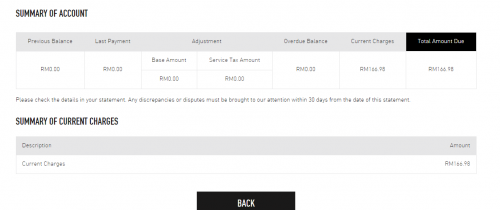
Installation of 500Mbps on 10/12. then network down since 14/12 until today 18/12.
How come suddenly received bill of RM 166.98? Cant see itemize bill also. My package is no include phone and Pay as you used. but I no install phone.
*
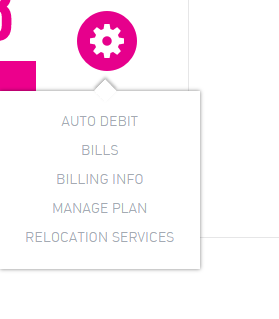
Hi, you may check the itemize in Bills under the pink gear icon, you may view or download.
If it mentioned 'statement not ready'. Check again on the next day.

Thanks.
FusionXY
post Dec 20 2019, 04:50 PM

LAZZIE ON VACATION
*******
Senior Member
3,834 posts

Joined: Aug 2016

QUOTE(xngjn @ Dec 20 2019, 12:03 PM)
I only got this

user posted image

user posted image
*
Is this your first bill?
If yes, during the first bill have extra charges which is stamp duty and some other charges.

Last time I subscribed TIME, first bill is higher than normal monthly bills.

For 500Mbps will be RM 147.34 including 6% SST.

Thanks.
FusionXY
post Dec 20 2019, 07:11 PM

LAZZIE ON VACATION
*******
Senior Member
3,834 posts

Joined: Aug 2016

QUOTE(xngjn @ Dec 20 2019, 05:47 PM)
yes first bill. But no place to see the details how they charge.
*
After you click bill. Got option to download before that?
Got View and Download button.

As bro rc2x mentioned. Got download button or only got view option?

Thanks.
FusionXY
post Dec 23 2019, 12:37 PM

LAZZIE ON VACATION
*******
Senior Member
3,834 posts

Joined: Aug 2016

QUOTE(xngjn @ Dec 23 2019, 11:06 AM)
Thanks. Is after received email then only got the option to see details. Now i can see the details already.
*
Yes. Normally statement will be available after the activation date.

For example. Activated on the 5th of the month will receive the statement monthly on the 5th.
FusionXY
post Jan 3 2020, 11:45 PM

LAZZIE ON VACATION
*******
Senior Member
3,834 posts

Joined: Aug 2016

QUOTE(tartputat @ Jan 3 2020, 11:24 PM)
The random frequent disconnection is driving me crazy...contacted their customer service but shitty answer to restart my equipment..am I alone having this disconnection issues? Location: Bangsar

Never had this issue before Dec'19
*
Hi, may I know which router that you currently using?

Thanks.
FusionXY
post Jan 28 2020, 10:33 AM

LAZZIE ON VACATION
*******
Senior Member
3,834 posts

Joined: Aug 2016

QUOTE(skincladalien @ Jan 28 2020, 09:58 AM)
I am moving out of my current place. Checked that the new place have time also.

Would it be better if I do relocation or do ownership transfer to new tenant?
*
Hi. Is your line still under contract?

Thanks.
FusionXY
post Jan 28 2020, 01:12 PM

LAZZIE ON VACATION
*******
Senior Member
3,834 posts

Joined: Aug 2016

QUOTE(skincladalien @ Jan 28 2020, 11:53 AM)
nope, my contract ends at 2016
*
In that case. You may terminate it.
And sign up a new line to avoid relocation charges.
It will be convenient for you.

Thanks.
FusionXY
post Feb 1 2020, 11:35 AM

LAZZIE ON VACATION
*******
Senior Member
3,834 posts

Joined: Aug 2016

QUOTE(fox_shinoda @ Feb 1 2020, 02:09 AM)
Just installed Time yesterday. Speed is awesome for 500mbps. Over 400mbps on wifi and over 600mbps on lan. Just realized there is no dect phone provided. The default router seems good. Gonna use it for a week and monitor the performance, else will swap it with Tenda AC18
*
Hi, welcome to TIME Family.
You may swap router if the stock router doesn't suit you well.

By default, Voice Plan is Pay-Per-Use. Without DECT Phone.
You may upgrade to TIME Voice Home Lite/Max in the Self Care if you wish to have free calls for few minutes.
Free DECT Phone will be given once you upgrade to Voice Home Lite/Max.

QUOTE(siles1991 @ Feb 1 2020, 06:17 AM)
I live in a condo supporting TIME, now stuck using UniFi 50Mbps VDSL connection from few years back paying RM180+. I can't upgrade or downgrade because now UniFi all using fibre, so I'm paying more for lower speed and no option to change unless I go fibre.

My family against wires being pulled across the ceiling and stuff. So was wondering if anyone have experience with TIME in new high rise buildings where they need to pull from the box outside the house unit.

Preferred if can pull into the middle room instead of to the living room. Can there be an installer come to help scout and help make decisions before I choose to jump to TIME?
*
Yes, you can request the technician to install in the middle room.

TIME will provide 20 Meters Free Fibre from the entrance door of your house. Cable outside the premise is covered under TIME.
Once after the free 20 Meters, extra cable length will be charged at RM10/m.

QUOTE(Calvin871989 @ Feb 1 2020, 11:11 AM)
Does Time provide static IP ?

I'm trying to connect my tv box and wireless router to the Huawei modem but realise that I cannot connect both at the same time using PPOE

It's either I connect my tv box to modem using PPOE or I connect the wireless router to modem using PPOE. I cant do both.

I have another option on my TV box which is static IP if I want to connect straight to modem but will it work together example ,

Wireless router connect to modem using PPOE and tv box connect to modem using static IP ?
*
Hi, TIME only allow one PPPoE at one time. Only one session per time.

Either you connect one of two only.

Thanks.

FusionXY
post Feb 1 2020, 12:04 PM

LAZZIE ON VACATION
*******
Senior Member
3,834 posts

Joined: Aug 2016

QUOTE(Calvin871989 @ Feb 1 2020, 11:53 AM)
Ok understood thanks man smile.gif
*
I think this applies to other ISP as well to prevent someone stealing and use your line.
FusionXY
post Feb 1 2020, 02:27 PM

LAZZIE ON VACATION
*******
Senior Member
3,834 posts

Joined: Aug 2016

QUOTE(Jjuggler @ Feb 1 2020, 01:53 PM)
The thing you requested only can be done via the router and not modem (only can be configured by the technician only). Modem only function as a converter from analog to digital to be used by the router to route the traffic to the clients.

https://techcyn.com/tech-guide/what-is-a-mo...rentiates-them/
*
Thanks for helping bro.

Appreciate your efforts.

Thanks.
FusionXY
post Feb 6 2020, 11:31 PM

LAZZIE ON VACATION
*******
Senior Member
3,834 posts

Joined: Aug 2016

QUOTE(Twenty-Fifth Baam @ Feb 6 2020, 11:17 PM)
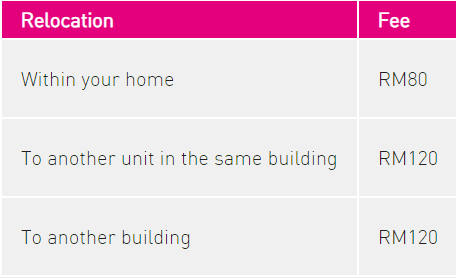
Hi, I just want to ask if there's any relocation fee for TIME?
*
Yes, refer below for more information.
user posted image
FusionXY
post Feb 7 2020, 08:09 AM

LAZZIE ON VACATION
*******
Senior Member
3,834 posts

Joined: Aug 2016

QUOTE(Twenty-Fifth Baam @ Feb 7 2020, 01:23 AM)
I see. Thanks!
*
You're welcome.

Have a nice day.

45 Pages « < 17 18 19 20 21 > » Top
 

Change to:
| Lo-Fi Version
0.0291sec    1.05    7 queries    GZIP Disabled
Time is now: 2nd December 2025 - 10:23 PM