Welcome Guest ( Log In | Register )

100 Pages « < 76 77 78 79 80 > » Bottom

Outline · [ Standard ] · Linear+

TIME [OFFICIAL] TIME Fibre Broadband™ v4, Experience the ONE TRUE 2Gbps

views
     
jjj2
post Feb 3 2023, 04:00 PM

Look at all my stars!!
*******
Senior Member
3,608 posts

Joined: Feb 2006
QUOTE(tartt @ Feb 1 2023, 11:48 AM)
So, no free upgrade to 2Gbps? The provided modem/router is not even good I read and they charge us. I have zenwifi xt12 and wondering if their lousy device will impact the performance of my own device. Any feedback on 2Gbps performance?
*
Hi, please stick to your own device... save your hassles with those poor performance devices. Not much feedback on 2Gbps yet.
jjj2
post Feb 8 2023, 09:20 AM

Look at all my stars!!
*******
Senior Member
3,608 posts

Joined: Feb 2006
QUOTE(eviltoaster @ Feb 6 2023, 10:36 AM)
Can someone guide me on how to port forward on my Time HG8145V5?
Over the years, I managed to successfully 'agak-agak' on other routers but this time I can't seem to get it working even after requesting Time to switch my connection to public IP.
I'm also on Discord, if any helper prefers that; Eviltoaster#0001

Thanks in advance!
*
Hi, please try Advanced > Forward Rules > IPv4 Port Mapping

* Note : It may/may not work as the ONT firmware has been modified & built for telco specific.

Thanks.
jjj2
post Feb 9 2023, 10:36 PM

Look at all my stars!!
*******
Senior Member
3,608 posts

Joined: Feb 2006
QUOTE(LHY89 @ Feb 9 2023, 10:33 AM)
Hi all, newly subscribed to TIME package and was given the huawei Hg8145x6. I realized it combines the modem + router (mean the optical cable also connect to same unit)
Can anyone advise if i want a modem + router setup what is needed?
Can this huawei unit set as just modem (similar to TM/Maxis) then i attach my own router? or i need to buy a separate modem to achieve this?
Many thanks!
*
Hi, what you need to do is configure the X6 as Bridge Mode, and get your own router to perform the PPPOE dialing & handle all routing.
Connect your router to LAN1 of the X6.

Thanks.
jjj2
post Feb 9 2023, 10:44 PM

Look at all my stars!!
*******
Senior Member
3,608 posts

Joined: Feb 2006
QUOTE(GameFr3ak @ Feb 9 2023, 02:20 PM)
Just got my "mesh" network configured by TIME. It was done with 2x HG8145X6 routers.

1 x became the main router
1 x became the AP

Once everything was configured, I wanted to turn off all 2.4g as it's not necessary. I connected through 192.168.100.1 and turned off the 2.4g wifi but I noticed that it's still being transmitted through the AP. I tried turning off the main router and connecting a PC to the AP via LAN but it wouldn't let me in.

I tried to turn off the 2.4g wifi via the main router, I unticked the 2.4g (refer to the screenshot) and clicked on apply but it pops back up. And I couldn't directly configure the AP as it wouldn't let me in. Any clues?

[attachmentid=11415447]
*
When the 2 units are meshed together, both bands are being utilized.
This is a bug, the 2.4GHz keeps coming back after a while even though you managed to turn it off.


jjj2
post Feb 9 2023, 10:58 PM

Look at all my stars!!
*******
Senior Member
3,608 posts

Joined: Feb 2006
QUOTE(victor87 @ Feb 9 2023, 06:25 PM)
Hello,

I am existing TFBB user and was given HG8145X6 modem router.

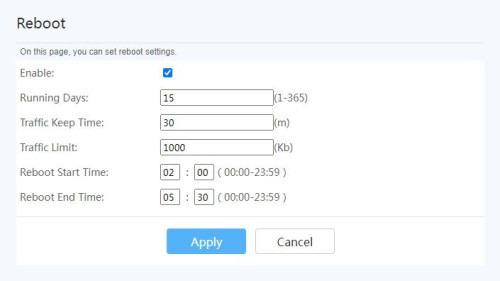
Any idea how to set a scheduled reboot on the router itself?

I noticed that the speed is greatly reduced after a several days, and a reboot will bring back the reboot speed. Tried logging onto the router to find this function, but to no avail, I believe it was removed by the carrier Time itself.

Anyone running custom / stock Huawei firmware on these?
*
Hi Bro, try this.

user posted image

Go to Advanced > Maintenance Diagnostic > Reboot

*Again, not guarantee it will always work on all version of firmware, as it has been modified for telco-specific.

jjj2
post Feb 12 2023, 04:08 PM

Look at all my stars!!
*******
Senior Member
3,608 posts

Joined: Feb 2006
QUOTE(LHY89 @ Feb 11 2023, 03:55 PM)
<a href='https://pictr.com/images/2023/02/11/EzlcGO.md.png' target='_blank'>https://pictr.com/images/2023/02/11/EzlcGO.md.png </a>
is this the setting? just change from GPON to AP? any other setting needed?
if needed i can further snap shot the pages within this router for better discussion.
Thanks in advance!
*
Not this, you need to click on your Internet connection profile & change PPPOE to Bridge Mode.

Please call TIME CS to request for the Bridge Mode Profile to be pushed over as we are not allowed to release the SuperAdmin login to customers/public.

Thanks.
jjj2
post Feb 15 2023, 04:25 PM

Look at all my stars!!
*******
Senior Member
3,608 posts

Joined: Feb 2006
QUOTE(hihihehe @ Feb 15 2023, 02:48 PM)
also, does 500mbps will be overkill for my usage below?
mostly on youtube, streaming movie/anime, WFH, light gaming, 2 users
This is broadband, 500Mbps wont be always guaranteed at full speed & moreover we will be on wireless... Promo of RM40 rebate/month for 6 months makes it a considerable option. You can downgrade to 100Mbps with contract reset on the 7th month.

or just go for 100mbps and buy a better router so the other rooms can get a better wifi coverage?
If want better performance, buying your own router will be a wiser option rather depending on the poor crappy devices stock routers.
*
jjj2
post Feb 15 2023, 04:59 PM

Look at all my stars!!
*******
Senior Member
3,608 posts

Joined: Feb 2006
QUOTE(hihihehe @ Feb 15 2023, 04:35 PM)
the promo plan for 500mbps really tempting but also heard downgrading the plan will be hard compare to upgrade.
*
Not that hard,
You may login to your selfcare portal, click on Manage Plan > Change Broadband Plan
jjj2
post Feb 21 2023, 08:37 AM

Look at all my stars!!
*******
Senior Member
3,608 posts

Joined: Feb 2006
QUOTE(e_mc_square @ Feb 19 2023, 11:26 PM)
I wonder if 1 unit of Huawei HG8145X6 Wifi 6 router is enough to cover a 1100 sqft house?
Signal may be able to reach the other end of the unit but performance wise is compromised. Depends on your expectation. It's still advisable by getting yourself a decent router.
My fiber optic point is at far most of living room wall and my master room opposite of it.
*
jjj2
post Feb 21 2023, 08:39 AM

Look at all my stars!!
*******
Senior Member
3,608 posts

Joined: Feb 2006
QUOTE(Boldnut @ Feb 17 2023, 03:53 PM)
wuah... time got serve landed prop one kah?

I just receive a flyer from my mail box, ask me to sign up

I dont have memory that they lay cables infront my house. What fiber network they use?
Couple of ways, via drains behind your house, or via the pits if your development has that prepared by the developer.
*
jjj2
post Feb 22 2023, 09:45 AM

Look at all my stars!!
*******
Senior Member
3,608 posts

Joined: Feb 2006
QUOTE(e_mc_square @ Feb 21 2023, 04:13 PM)
VERYYYY SAD!!!!
Today TIME come to install, they use their optical meter test and said my fiber optic signal tak cantik. -68db.
Then they said I need to find my condo contractor to fix the fiber optic connector.

I played around with the connector and found that nothing special, I can just buy one in shopee for few ringgit and replace it.

But what bugging me is, "Is it really the connector problem? Or I need to cut the wire?"
If cut the wire, I need special tools.

So, usually is cable problem or connector problem?  doh.gif
*
Hi, usually Installer will only check by using power meter & if reading is not optimum, they cannot proceed with activation. It could be caused by cable or connector or a bad splice etc. On-site diagnostic can tell you the exact problem.
You cant do it yourself unless you have the proper tools & skills.

Refer to your management, if it's under warranty, then they will repair for free under terms & conditions. Else, after warranty, you will have to pay for it.
My team is in Penang now, if your house is here, then we could assist.

Thanks.

This post has been edited by jjj2: Feb 22 2023, 09:47 AM
jjj2
post Feb 22 2023, 09:50 AM

Look at all my stars!!
*******
Senior Member
3,608 posts

Joined: Feb 2006
QUOTE(edkmho @ Feb 21 2023, 05:48 PM)
Hi Guys,

How to check if my HG8145x6 is bridge mode or not?
*
Login to your ONT, look at the Internet profile connection, Bridge / PPPOE.
Usually in bridge mode, only 1 port (generally LAN1) is bind for you to connect to your Router.

jjj2
post Feb 22 2023, 09:57 AM

Look at all my stars!!
*******
Senior Member
3,608 posts

Joined: Feb 2006
QUOTE(hantugonjeng @ Feb 21 2023, 11:40 PM)
Hello, i need assistance with my Time wifi.
Recently my desktop wifi keeps disconnecting when using Time. This only happens on desktop and when im connected to Time. Other devices do not have any issue and i can use my phone's hotspot on desktop, the connection is good, no dc.

Ive tried resetting my network card, reinstalling drivers, the same thing still happens on my desktop. How do i deal with this? Do i need to reset my router? Is there any documentation i can follow? Sked i fkup the wifi details end up kaput the whole thing. Im using hg8145x6
*
Try check your ONT (HG8145X6) whether the bandsteering is enabled, if so, disable it & test again.
jjj2
post Feb 23 2023, 11:27 AM

Look at all my stars!!
*******
Senior Member
3,608 posts

Joined: Feb 2006
QUOTE(e_mc_square @ Feb 23 2023, 09:04 AM)
Wow, that is great to hear that.
Can you PM me your number and what is the charges?
*
Sent smile.gif
jjj2
post Feb 23 2023, 11:30 AM

Look at all my stars!!
*******
Senior Member
3,608 posts

Joined: Feb 2006
QUOTE(ronnie @ Feb 23 2023, 09:59 AM)
does TIME broadband allows free Public IP address for using with CCTV ?
*
Hi, if you are referring to FTTH (Home Broadband), it's with public IP (except 100Mbps where you need to request).
If you are referring to FTTO (Business Broadband) Fixed IP, then you will need to pay additional RM200/month for 1 Fixed IP on top of the package subscription price.

This post has been edited by jjj2: Feb 23 2023, 11:30 AM
jjj2
post Feb 23 2023, 12:45 PM

Look at all my stars!!
*******
Senior Member
3,608 posts

Joined: Feb 2006
QUOTE(hantugonjeng @ Feb 23 2023, 11:10 AM)
Brought my pc next to the router, still the same thing. Tried using a wifi dongle, same issue... but the next guy's suggestion fixed it!
Thanks man, this fixed the issue!
But what's with the bandsteering function? Is it important? And why did this suddenly happen? Been using Time for few months never had this problem...
It's basically a feature that will automate the steering of 5GHz supported client devices towards 5GHz. The Time ONTs are very poor in this & by enabling Bandsteering causes lots of connectivity issues to devices like Smart TVs, Speakers, Floor Cleaning Bots, Smart Home devices etc.

*
jjj2
post Feb 23 2023, 12:45 PM

Look at all my stars!!
*******
Senior Member
3,608 posts

Joined: Feb 2006
QUOTE(ronnie @ Feb 23 2023, 12:33 PM)
Is the request For FREE ? Yes at this moment. Do note that this public IP is not Fixed.
*
This post has been edited by jjj2: Feb 23 2023, 12:45 PM
jjj2
post Feb 23 2023, 05:27 PM

Look at all my stars!!
*******
Senior Member
3,608 posts

Joined: Feb 2006
QUOTE(edkmho @ Feb 22 2023, 12:08 PM)
Anyway, thanks for your prompt respond.  Does that mean the hg8145x6 is install as modem only, is that correct?

Is this hg8145x6 possbile to use as AP only without the router and modem function?

I have the installer here just few minutes ago and they claimed that it it not possible.

My current setting as follow :

1. old huawei ont connect to fiber,
2. lan connect from huawei ont to mikrotik router (only 5 port)
3. dlink switch connect to mikrotik router (16 port)
4. 2 x wifi AP connect to switch (Asus)

Plan is to replace the 2x Asus to hg8145x6 as AP only, any sifu can help ?

Thanks.
*
Press & hold the WPS button of your X6 (HG8145X6) ONT for 15s, until you see all lights are on, release it & let the device reboot.
Login to the ONT via 192.168.100.1, after login, when you see a screen with Internet Connection type (PPPOE, DHCP, WiFi-Relay), choose DHCP.
And then proceed to configure your wireless.

Note : Don't expect this X6 to work like proper enterprise APs, you will be disappointed.

jjj2
post Feb 25 2023, 06:57 PM

Look at all my stars!!
*******
Senior Member
3,608 posts

Joined: Feb 2006
QUOTE(H2O3 @ Feb 25 2023, 11:56 AM)
Hi all. Currently using huawei WA8021v5 as router after upgrade to 300 mbps. Will it work if I buy another huawei WA8021v5 to mesh with the existing router to boost the coverage?
*
Yes it can mesh, but strictly not recommended.
This device is a crap, intermittent connection drop & auto reset issues.
Better get yourself a more decent mesh routers like Decos etc.

jjj2
post Feb 27 2023, 05:49 PM

Look at all my stars!!
*******
Senior Member
3,608 posts

Joined: Feb 2006
QUOTE(e_mc_square @ Feb 27 2023, 05:42 PM)
I wonder what is the benefit if I set the Wifi name of 2.4Ghz and 5Ghz with same name?

Or best practice is actually set the separately?
*
If you have good mesh systems that can handle Bandsteering well (Eg. Asus etc), then you dont have to manually switch between the freq band...
But if you have those poor bandsteering handling devices like Time Huawei devices, then setting bandsteering will result some smart devices like smart tvs, floor sweeping robot, speakers, smart electrical switch etc. not able to connect to Internet.


100 Pages « < 76 77 78 79 80 > » Top
 

Change to:
| Lo-Fi Version
0.0335sec    0.42    7 queries    GZIP Disabled
Time is now: 15th December 2025 - 12:04 AM