Welcome Guest ( Log In | Register )

Bump Topic Topic Closed RSS Feed
17 Pages « < 2 3 4 5 6 > » Bottom

Outline · [ Standard ] · Linear+

Unifi Official TM UniFi High Speed Broadband Thread V35, READ 1ST PAGE FOR TURBO SPEED INFO!

views
     
TSSilentVampire
post Sep 21 2018, 05:28 PM

Networking Enthusiast
*******
Senior Member
5,714 posts

Joined: Mar 2007


QUOTE(eamhoys @ Sep 21 2018, 03:04 PM)
my condo max speed is only up till 30Mbps and i doubt the management would upgrade the building infra.
so i thought to get the all in 1 modem router to replace the TM provide Huawei HG655a and the orange D-Link 615(which is from the VIP 5)
since this d-link have VOIP option which can connect for the phone.
*
You don't need the D-Link bro, that VoIP on the D-Link is only for poor Maxis subscribers, who need that VoIP RJ11 port. You already have the Hauwei BTU. Just change your router to something more powerful from 1st page, and throw that OLD D-Link-615 which has multiple vulnerabilities and easily hacked.

QUOTE(meejis01 @ Sep 21 2018, 04:02 PM)
Hi,

I moved house from Flat to a condo just 100 meter away.. Nowadays my wifi sucks big time.. I'm on 50 mbps.. Wifi will drop to 1 mbps or 2 mbps even close to router.. I'm not using any microwave at house.. Need to restart my whole BTU and Asus router to enjoy 50 mbps speed..

Any idea why this happen? Router heats up? Condo uses FTTH.. My router is Asus RT-N12HP with the 9dBi antenna.. Tried playing with changing the wifi channel but still the same..
*
CHANGE YOUR ROUTER. The RT-N12HP is old and doesn't support 5GHz AC. Refer to 1st page, 1st post, green text, for list of compatible routers.

QUOTE(cse.my @ Sep 21 2018, 04:28 PM)
congrats!
TURBO-speed
of 500Mbps*
is now yours!

but still same 50 mbps  dry.gif  dry.gif
*
Refer to 1st post, 1st page, green text, for troubleshooting help and links.

TSSilentVampire
post Sep 21 2018, 05:39 PM

Networking Enthusiast
*******
Senior Member
5,714 posts

Joined: Mar 2007


QUOTE(figure8 @ Sep 21 2018, 05:34 PM)
bro. i ordered c3150 from lazada, unfortunately, the router are on hold due to defected units. do you know other alternative to this model which as good as c3150?.
*
Defected units? Sounds serious. No problems for my unit and for my in-laws unit. Try Lelong, where there is plenty still for sale.

Alternative would be the C2300. Not sure if they manage to fix the firmware for UnifiTV though. They previous firmware is not optimal for viewing UnifiTV, probably multicast implementation issue. If you don't watch UnifiTV, you can get the C2300.
TSSilentVampire
post Sep 21 2018, 05:45 PM

Networking Enthusiast
*******
Senior Member
5,714 posts

Joined: Mar 2007


QUOTE(figure8 @ Sep 21 2018, 05:41 PM)
they said 20 units in hand need a revision. so they resent back to supplier.

how about 5400?.
*
Damn, wonder what revision they meant. You know what they meant?

5400 is good, but a bit overkill. For the price you are paying for that, it would be better if you just get the Asus RT-AC86U.
TSSilentVampire
post Sep 21 2018, 06:33 PM

Networking Enthusiast
*******
Senior Member
5,714 posts

Joined: Mar 2007


QUOTE(dickybird @ Sep 21 2018, 06:31 PM)
Almost the same boat as you. If you don't think you'll need the speed or don't want to invest in gear to maximise your user experience just upgrade to the 100 Mbps plan.
If your current setup is sufficient, they may not even change your setup or suggest you buy new equipment i.e. buy the router from them ( according to the Twitter CS).
*
It is better to buy it yourself than buying from them.
TSSilentVampire
post Sep 21 2018, 08:31 PM

Networking Enthusiast
*******
Senior Member
5,714 posts

Joined: Mar 2007


QUOTE(luminaryxi @ Sep 21 2018, 08:19 PM)
nope just verbal. lets see next month bill.

but my router (C1200) can only reach 100mbps, so i cant check ive been turbo anot
*
It can achieve much higher speeds than that. Refer to your Unifi account to see if you have been upgraded.

QUOTE(ycs @ Sep 21 2018, 08:21 PM)
i just fired up my old DIR615, still running DD-WRT laugh.gif

[attachmentid=10034143]
*
Lol, I wouldn’t use it though, but flashing it with DD-WRT is a great idea though. Too bad DD-WRT does not support VLAN tagging though, and you need to manually configure it, for it to support that.

QUOTE(set @ Sep 21 2018, 08:23 PM)
after using the dlink 842 for a while, actually not bad considering it is foc from tm, wireless not full speed but coverage distance is quite decent
*
It is not bad actually, and although the TP-Link C1200 is better in terms of hardware, the Dlink 842 has a more stable firmware.
TSSilentVampire
post Sep 21 2018, 09:22 PM

Networking Enthusiast
*******
Senior Member
5,714 posts

Joined: Mar 2007


QUOTE(shahie @ Sep 21 2018, 09:08 PM)
Luckily the Tplink RE450 can be configured as an wireless AP too. managed to pull the cat5e cable from router dir-842 to this RE450 on my bedroom.
*
Good move. Configuring it as a wired AP is much better than range extender mode for sure.
TSSilentVampire
post Sep 21 2018, 10:48 PM

Networking Enthusiast
*******
Senior Member
5,714 posts

Joined: Mar 2007


QUOTE(adliazaddin @ Sep 21 2018, 10:07 PM)
yo guys,

just got sms that im turboed.. however my standard dlink 850l could go up more than 100mbps

since Tenda AC18 is the cheapest.. is it good enough for 4k movie streaming?
*
It might, but just remember you get what you pay for.

TSSilentVampire
post Sep 21 2018, 10:53 PM

Networking Enthusiast
*******
Senior Member
5,714 posts

Joined: Mar 2007


QUOTE(cse.my @ Sep 21 2018, 10:51 PM)
Lol confirm change haha
*
See recommended routers on 1st page, 1st post, green text.
TSSilentVampire
post Sep 22 2018, 08:13 AM

Networking Enthusiast
*******
Senior Member
5,714 posts

Joined: Mar 2007


QUOTE(tsmin1989 @ Sep 21 2018, 11:33 PM)
My unifi also upgrade to 800mbps but I can't get full speed even I change all my network cable to Cat 6.

My router is TP-Link AC1200 provide by TM
]
*
Could be the settings in your router, or the fact your router could not handle the full speed.

QUOTE(adliazaddin @ Sep 21 2018, 11:41 PM)
? tenda sucks ?  confused.gif  confused.gif
*
Nah, it is good, but don’t expect too good of a performance, like those expensive routers.

QUOTE(Scissorshand @ Sep 21 2018, 11:45 PM)
Sifu..

Am using rtn12hp with latest firmware, have been expriencing intermittent drop in connection since few months back and its getting worse. Almost everyday since last Sun am having the issue during the evening

Have called CS and they have reset the connection incl the port however it doesnt help. What else should be asking TM to do to diagnose the problem?

When the connection goes bad, i'll get abt 2-3mbps of the 50mbps subs.

TIA
One advice for you. CHANGE ROUTER. Refer to 1st page, 1st posy, green text. TM should not do anything. It is your router that is the issue. Sounds like your 2.4GHz band, which is the only band available for your router, is congested or full of interference. Refer to 1st page, 1st post, green text, and get a new dual band router, and go on the 5GHz AC band and your problem will be solved.

QUOTE(Chrizalix @ Sep 22 2018, 12:17 AM)
Guys, I have some questions regarding this.  (500mbps user here)

Eversince my Unifi got turbo-ed, I have changed my PC from using wifi adapter to full network cable (cat6), then i found out my router got bottleneck-ed at 100mbps (capped). So i went on to get a new cheap router, DIR-842.
I have done speedtest with my phone via 5.0Ghz speed, it can go up to almost 500mbps, but when it comes to PC with cat6, the speed just got stuck at between 120 - 200mbps, while uploading speed is rather stable.

Anyone know what is the issue?
*
The Killer NIC on your PC could be the issue. Uninstall Killer Networking Suite, and only get the basic drivers for it.

QUOTE(zhuoyang @ Sep 22 2018, 04:47 AM)
Why everyone is jumping to cat6 ? isn't cat5e is good enough for gigabit connection?
*
It is, but Cat 6 is better, and less low quality shit out there compared to Cat5e.

TSSilentVampire
post Sep 22 2018, 10:34 AM

Networking Enthusiast
*******
Senior Member
5,714 posts

Joined: Mar 2007


QUOTE(AmyDazz @ Sep 22 2018, 09:04 AM)
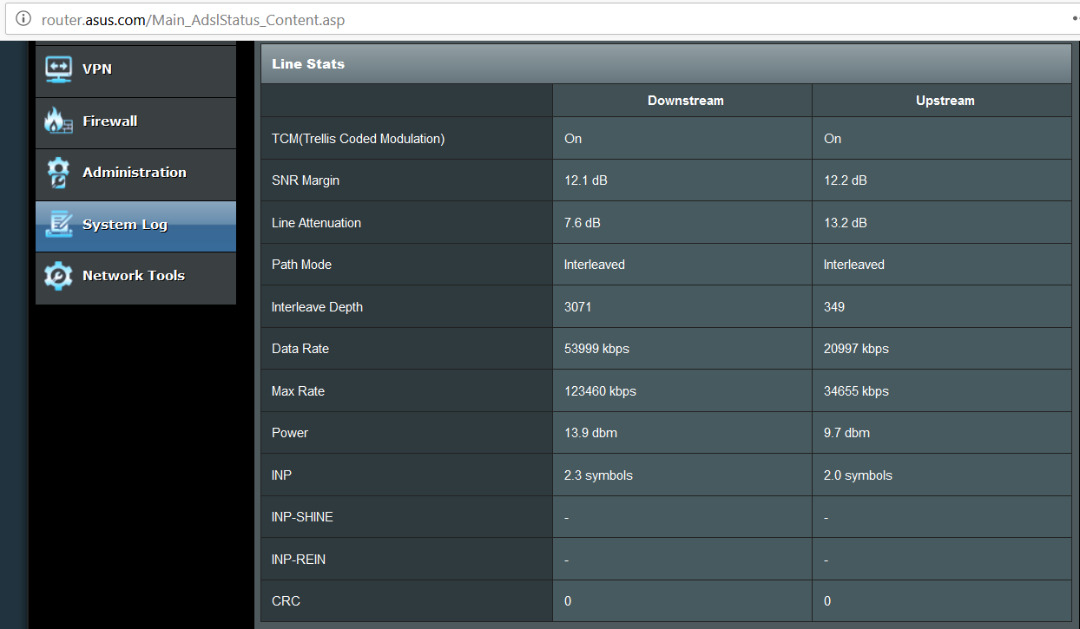
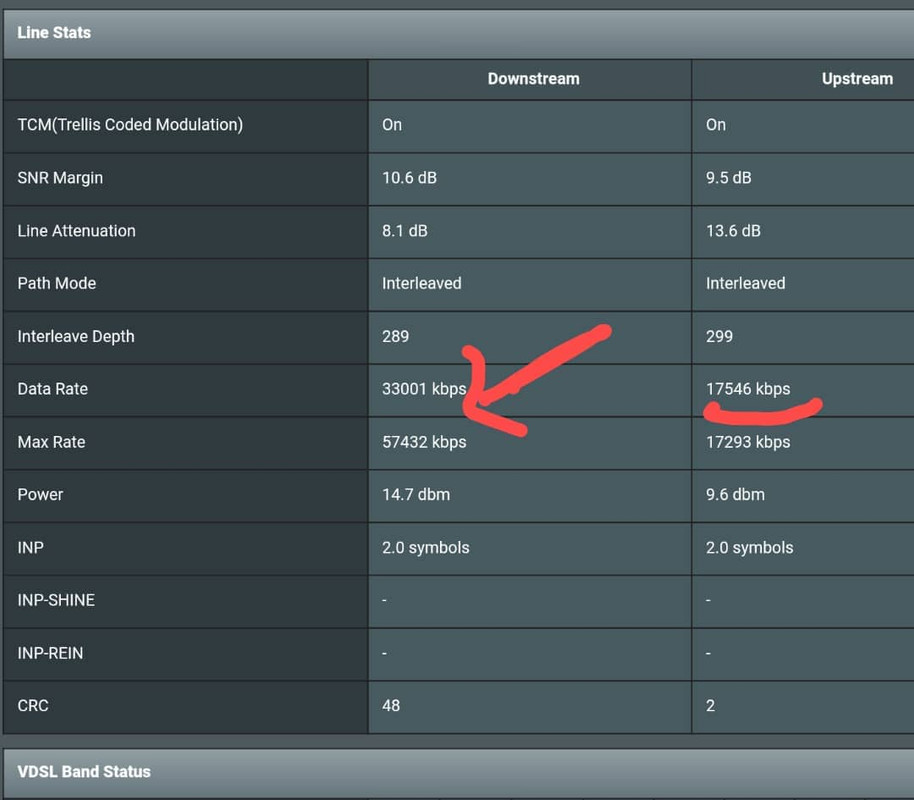
Hi all.... I am on VDSL2 and gladly to inform that my line now supports 100Mbps.

user posted image

Previously, my VDSL2 only supports about 50Mbps++ (see screenshot below) .. maybe TM did some upgrade at the cabinet outside my apartment.

user posted image

I was thinking to just switch to Maxis RM89/mth for unlimited 30Mbps, but I guess now I can maintain with Unifi 100Mbps for RM129.  rclxm9.gif
*
Not surprising. VDSL2 can support up to 100Mbps.

QUOTE(tsmin1989 @ Sep 22 2018, 09:42 AM)
TM call me today say that it was no issue from their site, if the problem of modem or router, they will come to change it for free. Just wait for the technician come over.
*
Okay, but still better to buy your own.

QUOTE(empigid @ Sep 22 2018, 10:20 AM)
TM turbo-ed me to 300Mbps. My best speed after checking using LAN cable cat6 is 70Mbps and I'm still using router D'link DIR 850L provided by TM. Should I change router to achieve greater speed coz I read 850L does support 300Mbps, and should I use cat6 cable from router to my laptop only or even from the ONU box to router? Thanks
*
Ideally, you want to use both.

QUOTE(Mazda9 @ Sep 22 2018, 10:30 AM)
Finally, received the turbo upgrade today. No sms / no email. Received call from TM 5 mins ago that I was upgraded and unifi portal confirmed it. I’m blessed to enjoy 800mbps + ultimate pack + free calls at RM159 finally.

Will go back home and try out the new speed and share the speed test results here.
*
Congrats. Hope all your equipment and cables are ready to support the new speed.
TSSilentVampire
post Sep 22 2018, 11:34 AM

Networking Enthusiast
*******
Senior Member
5,714 posts

Joined: Mar 2007


QUOTE(Xiia0Ban @ Sep 22 2018, 11:17 AM)
TM has turbo-ed my speed to 500mbps but I'm receiving only 250mbps max even on my 5Ghz network. I'm suspecting the BTU might be bottlenecking. Can I ask TM to replace a newer version of BTU since mine was many years ago.

BTU: Alcatel-Lucent I-240G-P
Router: Asus AC55UHP
Range Extender: TP-Link RE450

Tested on iPhone 7+ right in front of my router as I don't have any gadgets with Ethernet port at the moment.
*
Did you even read 1st page, 1st post, green text? Your BTU is not bottlenecking your connection. It can support gigabit speed and you are getting good speed. They will not replace your BTU. You have several issues. First, your router does NOT support 500Mbps, look at 1st page, 1st post, green text, for recommended routers. Second, you don’t expect your iPhone to hit the max speed, it is only 2x2 MIMO. Third, your range extender is affecting your throughout as well.


TSSilentVampire
post Sep 22 2018, 11:35 AM

Networking Enthusiast
*******
Senior Member
5,714 posts

Joined: Mar 2007


QUOTE(vez @ Sep 22 2018, 11:25 AM)
hi sifus here, is transferring UniFi ownership difficult? j

current UniFi is my mother name, just bring my mother go TMPoint and myself will do right??
*
Yes, but contract might be renewed for further 24 months.
TSSilentVampire
post Sep 22 2018, 11:50 AM

Networking Enthusiast
*******
Senior Member
5,714 posts

Joined: Mar 2007


QUOTE(clinton1984 @ Sep 22 2018, 11:39 AM)
Hi.. my home is experiencing unifi tv okay but no access to intermet.. and the internet led light in the tp link c5 router appear to be orange in colour.. any sifu know thw reason of this
*
Log into your router and check if VLAN tag is set correctly.

QUOTE(vez @ Sep 22 2018, 11:43 AM)
change owner will renew contract??  blink.gif
*
Yes, it might. Go to TM Point and check.

QUOTE(Mazda9 @ Sep 22 2018, 11:44 AM)
Just perform speedtest using Cat5e cable on both ends (BTU to Router) & (Router to desktop). The results as below:-

Cat5e cables on both ends
[attachmentid=10034457]
Cat7 cables on both ends
[attachmentid=10034458]
Router: Asus RT-AC87U
Location: Gombak, Kuala Lumpur.

** Cat7 cable has slight advantage in network performance speed compare to 5e looking at my speedtest results above.
*
No surprises, better shielding for Cat 7 and support higher frequency, so that might translate to better performance.
TSSilentVampire
post Sep 22 2018, 01:32 PM

Networking Enthusiast
*******
Senior Member
5,714 posts

Joined: Mar 2007


QUOTE(vamfire @ Sep 22 2018, 01:10 PM)
Tested wifi on 5ghz ac performance with my Redmi Note 5 speed at best can reach around 200mbps +/- only, cannot fully get 300mbps...

Is this result normal for or what?

p/s - my router is Asus RT-AC87R
*
Yes, normal. Don't expect the phone to hit full speed on Wi-Fi.

QUOTE(woe.com @ Sep 22 2018, 01:12 PM)
wow cool, thanks @fnixirix, that's good enough to have such speed... now is my time to go study and compare on these new router, duhh... long time no do gadget study liao  sweat.gif
*
Refer to 1st page, 1st post, green text, to learn more.

QUOTE(cse.my @ Sep 22 2018, 01:21 PM)
biggrin.gif  never dreaming. question is if they renew the subscription that means they need to provide those shit. if no provide then why bother go renew the subscription. plus also the speed upgrade is TMNut them self who automatically upgrade it.
*
Nope. They only promise you get full speed on wired LAN connection. They don't promise full speed on wireless. You are on your own on that part.
TSSilentVampire
post Sep 22 2018, 02:04 PM

Networking Enthusiast
*******
Senior Member
5,714 posts

Joined: Mar 2007


QUOTE(ohman @ Sep 22 2018, 01:47 PM)
got my new router after getting new package, rm129 100mbps.

was on rm229 50mbps.

after changing new router, still not getting new speed, still at 53mbps.

the technician can only help to log a report.

so now i am still stuck at old package, rm229 until i can get the new speed, then only im on the new package rm129.

wtf??? anyone facing this issue?

why cant they just activate my new package with new price , i am happy to pay rm129 for old speed ( 50mbps ). they can only change my package once i get the new speed. doh.gif
*
Did you try to troubleshoot by reading 1st page, 1st post, green text?
TSSilentVampire
post Sep 22 2018, 02:20 PM

Networking Enthusiast
*******
Senior Member
5,714 posts

Joined: Mar 2007


QUOTE(ycs @ Sep 22 2018, 02:05 PM)
is Dintek cat5e good quality? i have some left over in a box, can crimp some short cables?
*
See 1st page, 1st post, green text.
TSSilentVampire
post Sep 22 2018, 03:01 PM

Networking Enthusiast
*******
Senior Member
5,714 posts

Joined: Mar 2007


QUOTE(raemon @ Sep 22 2018, 02:55 PM)
user posted image

Did not receive any email prior to checking on account status on 17th Sept.

user posted image

Received this email and sms yesterday

Initially I also did not achieve 300Mbps. As I had read through the thread v34, I did some troubleshooting from all the tips given to people in the same boat and found our that it was my LAN cable problem. It was rated as Cat 6 but I bought that cable many years ago. Got a new one this morning and voila....  rclxm9.gif turbo-ed!  drool.gif

Thank you all who contributed the troubleshooting tips.  rclxms.gif

It took me many days reading to catch up but it was worth it!  thumbup.gif  thumbup.gif

I'm still catching up in v35.  laugh.gif
*
Congrats, but you should have just read the 1st page, 1st post, green text, and that would be much better than reading though V34.
TSSilentVampire
post Sep 22 2018, 03:18 PM

Networking Enthusiast
*******
Senior Member
5,714 posts

Joined: Mar 2007


QUOTE(koba76 @ Sep 22 2018, 03:01 PM)
Just Upgrade from 50 to 100mbps...My old btu and router innatech brand..my router rg4332 confirm not support 100mbps...test both dl and ul speed both just stuck at 40+ mbps...cant go up more than that...😅
*
Not surprising at all. Change your router. Refer to 1st page, 1st post, green text, for list of compatible routers and other general info.

This post has been edited by SilentVampire: Sep 22 2018, 03:18 PM
TSSilentVampire
post Sep 22 2018, 04:55 PM

Networking Enthusiast
*******
Senior Member
5,714 posts

Joined: Mar 2007


QUOTE(Cha3m @ Sep 22 2018, 04:53 PM)
Bro, I already bring my dad to TMpoint asking to downgrade from RM215 to RM129, but TM ppl reject the downgrade to RM129 and can only downgrade to RM159 because apparently some technician once come and change the BBU unit and that extendeds for another 2 year. Weird, because based on what i read in this thread TM allows to downgrade without any penalty and will just renew the contract.
*
Go to another TMpoint and ask if it is possible to downgrade to RM129. BTU is lifetime warranty, so no reason for them to ask you to replace it and resign another two year contract.
TSSilentVampire
post Sep 22 2018, 08:34 PM

Networking Enthusiast
*******
Senior Member
5,714 posts

Joined: Mar 2007


QUOTE(nikrizal @ Sep 22 2018, 08:06 PM)
New routers coming next year by TM. Hopefully better than current ones
*
Hopefully, Asus routers and not some shitty TM brands.

17 Pages « < 2 3 4 5 6 > » Top
Topic ClosedOptions
 

Change to:
| Lo-Fi Version
0.2271sec    0.67    7 queries    GZIP Disabled
Time is now: 15th December 2025 - 07:34 AM