Outline ·
[ Standard ] ·
Linear+
Home Networking WiFi Router Discussion Thread, Updated for 2023
|
kk131
|
 Jan 12 2021, 01:55 PM Jan 12 2021, 01:55 PM
|

|
QUOTE(Ichibanichi @ Jan 12 2021, 07:24 AM) Yes for asus TF AX3000. Others brand and model not sure. My initial asus ac68u have problem with voip. Even with latest firmware also fail. Then I changed to TF Ax3000 and the phone voip function as normal. Did you set SIP passthrough under NAT? 
|
|
|
|
|
|
kk131
|
Jan 19 2021, 12:23 PM
|
|
|
QUOTE(zalezale @ Jan 19 2021, 12:20 PM) Old laptop still can upgrade this wifi card AX200? My laptop is lenovo x230 i5 3rd gen Lenovo limits approved Wifi cards in the BIOS, you have to search for a whitelisted BIOS and flash it. |
|
|
|
|
|
kk131
|
Jan 19 2021, 10:17 PM
|
|
|
|
|
|
|
|
|
kk131
|
Jan 22 2021, 05:45 PM
|
|
|
QUOTE(zalezale @ Jan 22 2021, 03:32 PM) Technician computer shop usually can do ? If you don't feel confident to do it yourself, maybe you could ask on the Thinkpad forums here. I've never set foot in a PC shop for years and I don't have a very high opinion of their capabilities. One of my laptops is a X220, it was straightforward to flash a whitelisted BIOS, the X230 seems to be more involved. |
|
|
|
|
|
kk131
|
Jan 26 2021, 09:18 AM
|
|
|
Just a heads-up on the dnsspooq security flaws with dnsmasq https://www.welivesecurity.com/2021/01/20/d...ache-poisoning/I know that Asus is working on patching their firmware for the vulnerability. |
|
|
|
|
|
kk131
|
Jan 27 2021, 10:14 AM
|
|
|
QUOTE(taqu @ Jan 26 2021, 04:53 PM) OpenWRT, Tomato, even Cisco & Ubiquiti use dnsmasq since it's very efficient DNS forwarder. dnsmasq is disabled on my Edgerouter as I rely on my Adguard Home server, which doesn't need dnsmasq. Besides, my Adguard Home only uses DOT upstreams, no DNS upstream at all. So I'm safe here? 😬 DoT is most likely using Stubby with DNSMasq local caching. |
|
|
|
|
|
kk131
|
Jan 30 2021, 10:00 AM
|
|
|
You need to compare the overall package offered -
Asus - generally good support for firmware updates, especially the popular models and 3rd party firmware
TP-Link - I don't have much experience, but from what I read not the same level of support as Asus
|
|
|
|
|
|
kk131
|
Jan 30 2021, 10:53 AM
|
|
|
QUOTE(wirelessbuyer @ Jan 30 2021, 10:37 AM) Yeah agree with you. Hardware specs alone don't give the bigger picture here, tplink always win in providing value for money for the specs. I was a tplink user and actually love their simplified web/app interface, but it's a bit limiting in feature set. For example, the opnvpn server is just a passwordless and doesn't support user/password connection, doesn't have built-in vpn client, etc. Then I upgrade to ax56u, it was a culture shock to see soooo much advance feature available and very fast and snappier to load, it is quite overwhelming at first and after couple of days starting to get used to it. It's just the web/app interface IMO a bit messy for my liking. Maybe for normal day-to-day user, this feature set is not really matter for them anyway, in that case perhaps tplink maybe a clear choice?  Asus has Trend support for malware protection and QOS classification, does TP-Link have something simiilar? The Trend Licence cost is included in the Asus package. |
|
|
|
|
|
kk131
|
Jan 30 2021, 12:09 PM
|
|
|
QUOTE(blacktubi @ Jan 30 2021, 12:05 PM) If you just need a simple router that works reliably and very stable, the AX73 is a good choice. The WiFi performance is really good. The parental control on the AX73 is also really robust and it does offer the Avira antivirus. However, I don't recommend enabling those antivirus feature these days. Not only they slow things down, they are pointless as all browsers already block malicious URL by default now. The C3150 V2 does not have a built-in repeater mode, you will need to pull a LAN cable if you want to use it as AP. There's a lot more devices on my network besides PC's running Windows! |
|
|
|
|
|
kk131
|
Feb 24 2021, 12:33 PM
|
|
|
QUOTE(syafri88 @ Feb 24 2021, 12:39 AM) Hello all, Wanna seek your recommendation on wifi setup at my house House type: 2 bungalow with bridge link Area of each house : 2500 per floor Budget: 2-2.5k Wanna install Maxis Fibre when the connection reach the house. As of now, my plan is to install 1 router at each floor, whilst connecting the upper floor router with a LAN cable run. should be around 50 meter distance, using the bridge as a cable tray. I'll also install 1 router at the ground floor at each house, and connecting all through Asus Ai Mesh. Currently looking at 2 RT-AX3000 and 2 RT-AX55 or 2RT-AC86 Any comment on this setup? It would be easier to understand your plan if you could make a simple block diagram. What I understand is that you will have 1 BTU (supplied by Maxis) and linked to your router, you will have 3 mesh nodes linked to the router with ethernet backhaul. Your plan sounds good to me, max length of a CAT 6 cable is 100 m. I would aim to connect you smart TV's, NAS, desktop PC's etc on ethernet as well if possible. |
|
|
|
|
|
kk131
|
Feb 24 2021, 01:24 PM
|
|
|
QUOTE(syafri88 @ Feb 24 2021, 01:02 PM) 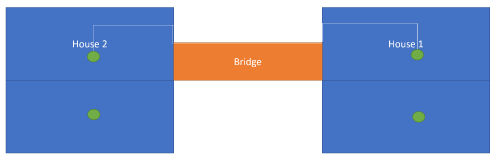 I think that image is a simple representation of it. What model do you recommend for the router with backhaul, and the other 2 wireless? Is 2 AX3000 for the backhaul and 2 AX 55 enought for it? If the area of each floor is around 2,500 ft^2 you might not get complete coverage on the 5Ghz band as it doesn't penetrate brick walls so easily. If you want complete coverage you might need an additional mesh node. It's a bit trial-and-error, you may need to move the nodes around within the limitations of power sockets etc. AX is the WiFi6 standard so theoretically higher throughput, it depends what your plans are and if you plan to buy WiFi PC's, phones, etc in the future and how much bandwidth you want. if you want to save cost the AC66U B1 is known to be a good value and trusted router. Seems like there are a few people on here with better knowledge of the router market. The AC86U had a high failure rate back in 2018 but I think Asus has solved the problem now. |
|
|
|
|
|
kk131
|
Mar 8 2021, 07:01 AM
|
|
|
QUOTE(gx_azam @ Mar 7 2021, 10:10 AM) hi all sifu, im currently looking for routers with vpn client capabilities so that all my devices at home connected to vpn. can suggest the recommended routers available on market now? my budget within below rm500. also, any mesh wifi routers support vpn client? thanks in advance sifu Check out Merlin's firmware for supported Asus routers https://www.snbforums.com/threads/about-asu...s-routers.7846/ . There are also some add-ins available to assist with vpn setup & management. |
|
|
|
|
|
kk131
|
Mar 12 2021, 11:49 AM
|
|
|
QUOTE(weixiong91 @ Mar 12 2021, 01:05 AM) Hi all! I've just encountered something and hope sifus here can advice. Hardware: 1) Tp-Link AX20 (5GHz, Channel 149, 80MHz width) 2) DLink Dir868l (5GHz, Channel 149, 80MHz width) 3) Samsung Galaxy S7 When I connect to the AX20, I get a link speed of 433Mbps, however when I connect to the 868L, I can get a link speed of 867Mbps. Why does this happen? Why are you operating both routers on the same channel? |
|
|
|
|
|
kk131
|
Mar 18 2021, 06:04 AM
|
|
|
QUOTE(gc68 @ Mar 17 2021, 03:46 PM) House Type : Semi-D (new) Size : approx 3500 sqft Cabling : fibre into the ground floor store room; the house comes with Cat6 cables to living room (G), family room (first floor) and master bedroom. Internet : Planning to sign up for Time Broadband 500MBps Devices : A. up to 4 video streaming / gaming (smartTV, gaming console) B. about 10 PC/Mobile devices C. about 15 other IoT devices (smart aircond, fridge and washer) Question : Want to ask if this configuration correct ? Will it deliver the best possible performance using Dlink products ? Appreciate all your inputs and advice. Thanks! [attachmentid=10813453] The WAN port of the router should connect to the ONT. Check how many LAN ports provided on your proposed router, is the switch necessary for your installation, are you planning to add more ethernet connections not shown? |
|
|
|
|
|
kk131
|
Mar 18 2021, 08:01 AM
|
|
|
QUOTE(gc68 @ Mar 18 2021, 07:33 AM) Thanks for the advice. You mean the AX5400 should connect to the ONT ? The AX5400 only has 4 Ethernet ports - do I then connect the switch to the router via the uplink port ? Would the AX5400 be the bottleneck ? [attachmentid=10813762] Yes your new diagram is correct. According to the dlink website the AX5400 has '4 Gigabit Ethernet LAN ports and 1 Gigabit Ethernet WAN port provide optional wired connectivity'. The router's primary purpose is to route packets on your network so all data between your LAN and the internet has to go through the the router, it's also providing security (firewall services) to protect your network and network address translation (NAT) for IPV4 (amongst other services). According to the spec it should not be a bottleneck. I'm wondering if your storeroom is the best place for the router however, if it has brickwork walls the WiFi signal will be drastically attenuated (especially 5Ghz band). This post has been edited by kk131: Mar 18 2021, 08:04 AM |
|
|
|
|
|
kk131
|
Mar 18 2021, 08:54 AM
|
|
|
QUOTE(gc68 @ Mar 18 2021, 08:45 AM) Oh one more thing - I plan to get DLink switch model DGS-1010P-E, which has 8+2 ports. 8 POE ports + 2 uplink ports The router will connect to to 1 of the uplink ports - which will give better performance right ? [attachmentid=10813766] I'm not an expert on switches but I think you're correct. Where is the incoming FTTH located, also in the store room? |
|
|
|
|
|
kk131
|
Mar 18 2021, 09:32 AM
|
|
|
QUOTE(gc68 @ Mar 18 2021, 09:03 AM) Yes, the fibre terminates right next to the LAN cable box. You could test coverage with the router inside the storeroom, otherwise I would locate the router in a convenient position outside the room, wall mount the switch in the storeroom adjacent to the box in your photo (not inside the box or it won't be ventilated), route 2 ethernet cables: - ONT to router - router to switch This post has been edited by kk131: Mar 18 2021, 10:40 AM |
|
|
|
|
|
kk131
|
Mar 19 2021, 08:45 AM
|
|
|
QUOTE(Punish @ Mar 19 2021, 06:56 AM) Hi guys ive got a tight budget between RM400 to RM600...i wanted to find the best reliability router....i dont need the speed as much as i think im gonna end up using cheapskate 30mbps unifi connection anyway.....but i wanted something reliable...im sick of needing to restart my tplink router everyday just to get a fresh performance out of it...fyi my house just around 3000sqf double story terrace house... My shortlist is here: 1. Refirbish china Asus AC86u 2. Asus AX3000 3. Dlink ax5460 4. Tp Link AX73 (is hard to trust this brand but the price is tempting) Iwouldn't recommend the old AC86U router they have known thermal problems that causes cracking of the solder joints. This post has been edited by kk131: Mar 19 2021, 09:04 AM |
|
|
|
|
|
kk131
|
Apr 18 2021, 05:02 PM
|
|
|
QUOTE(IntensiveBytes @ Apr 18 2021, 04:38 PM) Hi guys, my gf’s family is using Maxis Fibre. They also have a phone line and because of that they provided a crappy white color router with a telephone port. I want to get a new router for her but most routers I see (i.e the Asus AC88u I use) does not have a telephone port. Is it possible for me to set it up so that the ori Maxis provided router stays so they can use the telephone, while I plug a 2nd ethernet cable from the modem to the 2nd router? Are you sure the phone is connected to the router? The fibre terminates in an ONT box with ethernet port for the router and a phone port. You can change the ISP provided router for your own. There's no 'modem', that's what we used to have in the dial-up days. |
|
|
|
|
|
kk131
|
Apr 18 2021, 08:28 PM
|
|
|
QUOTE(IntensiveBytes @ Apr 18 2021, 07:54 PM) Yup you are exactly right.. such a nuisance. Anyway yes I got an AC86u for my gf to connect to the Maxis router as an AP. The Maxis provided router is shite (the one they give if you need VOIP). I'm glad that I haven't taken a contract with Maxis, this arrangement prevents you from running a proper firewall and QOS on the router and makes things more difficult for DNS and ad-blocking. |
|
|
|
|



 Quote
Quote
 0.1505sec
 0.14
0.14
 7 queries
 GZIP Disabled