Outline ·
[ Standard ] ·
Linear+
Home Networking WiFi Router Discussion Thread, Updated for 2023
|
kk131
|
 Mar 22 2022, 12:45 PM Mar 22 2022, 12:45 PM
|

|
Be aware of a new threat that's affecting some routers - Cyclops Blink https://www.trendmicro.com/en_us/research/2...-routers--.htmlThis post has been edited by kk131: Mar 22 2022, 12:46 PM |
|
|
|
|
|
kk131
|
May 27 2022, 01:18 PM
|
|
|
QUOTE(lightonokira @ May 26 2022, 05:12 PM) Looking for the most reliable WiFi router with <50 devices. In the vicinity there are a lot of radio equipment. Currently on Asus RT-AC86U and experience major connection drops. The place is a Guard House/Guard Post. The AC86U is reckoned to be one of the best routers produced by Asus (if it doesn't overheat). Check you have the latest firmware as a start and check what temperature it's reporting (I don't know if the Asus firmware reports the temperatures in the web interface, Merlin's firmware does). |
|
|
|
|
|
kk131
|
Jul 4 2022, 10:49 PM
|
|
|
QUOTE(coolguy_0925 @ Jul 4 2022, 03:55 PM) Did you guys set up your LAN on DHCP or static IP? I use static IP as an additional layer of barrier if someone was able to hack my wifi pwd But troublesome as new device setup has additional step to configure the wifi settings As you note, it's much easier to assign by DHCP. If you're concerned about someone guessing your password, you could use an additional mac address filter. This post has been edited by kk131: Jul 4 2022, 10:49 PM |
|
|
|
|
|
kk131
|
Jul 5 2022, 06:18 PM
|
|
|
QUOTE(Oltromen Ripot @ Jul 5 2022, 04:44 PM) Before you do that, make sure to take into account of "private address" feature on apple devices, or of any other manufacturer. in case your dhcp server will refuse your future restricted MAC addresses.
Yes - Android actually had this before IOS. I disable the random address for my home network. |
|
|
|
|
|
kk131
|
Aug 9 2022, 06:32 PM
|
|
|
QUOTE(Bi-bimbap @ Aug 9 2022, 03:45 PM) I wanted to upgrade the network card but later found that my laptop comes with only 1 antenna cable which limits the network card options. After some research, I found that the Realtek RTL8821CE 802.11b/g/n/ac (1x1) is the only AC card that works with one antenna cable. Would this be a good upgrade? Or should I get USB adapters like TP-Link T9UH instead? Another option would be to add an additional antenna cable which then I am able to pick newer/better network cards, but that is pretty technical and complicated for me so i'm not really considering that approach. Thanks in advance. Check that whatever wifi card you decide on can be supported by the laptop, some vendors whitelist cards in the BIOS, for instance Lenovo does this. |
|
|
|
|
|
kk131
|
Aug 11 2022, 05:25 PM
|
|
|
QUOTE(Bi-bimbap @ Aug 11 2022, 12:02 PM) Does this only happen with HP laptops? Or is there any other brand that does this as well? Just for my own knowledge so I can avoid these brands in the future. Lenovo, usually you can find a modified bios where the whitelist has been removed. |
|
|
|
|
|
kk131
|
Sep 23 2022, 12:36 PM
|
|
|
QUOTE(Bi-bimbap @ Sep 23 2022, 12:28 PM) Ok so if i understand correctly, you are suggesting to disable IPV6 here right? 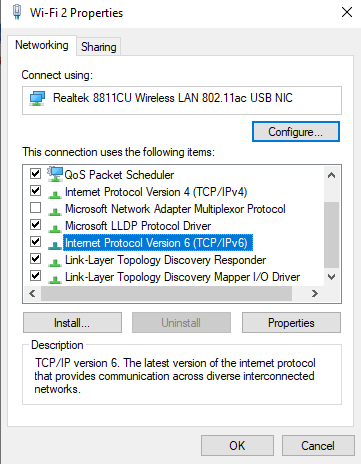 and from router side it seems disabled by default: 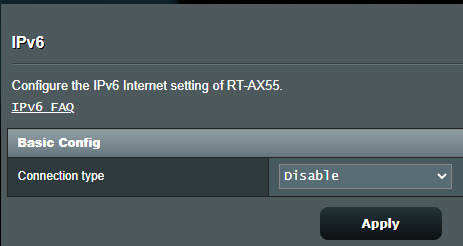 I enabled IPv6 a few years ago and have never had any problems with routing. I'm on a 100 MBPs plan and stuck behind the Unifi CGNAT and run my home web sites on IPV6. No harm in enabling IPV6 to test. |
|
|
|
|
|
kk131
|
Sep 23 2022, 05:31 PM
|
|
|
QUOTE(soonwai @ Sep 23 2022, 04:14 PM) So ipv6 on router confirmed is disabled and MTU adjustment not helping. By any chance, do you have another wifi router (old TM router is disconnected?) on the network? Check for multiple DHCP servers. Also check for devices manually set to the same IP addresses. So first week was ok then next week xboleh? Weird. A quick check would be to look at the router routing table; in the router web interface available in system log | routing table |
|
|
|
|
|
kk131
|
Sep 23 2022, 07:05 PM
|
|
|
QUOTE(soonwai @ Sep 23 2022, 05:57 PM) And what would Bi-bimbap look for in the routing table? 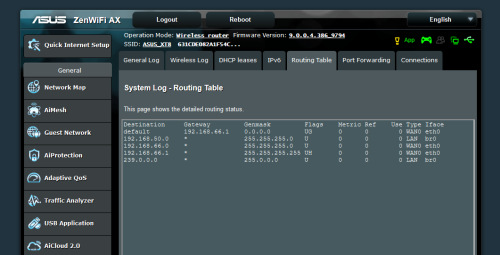 Default route should be the Unifi gateway, e.g. 100.74.127.254 |
|
|
|
|
|
kk131
|
Sep 24 2022, 12:41 PM
|
|
|
QUOTE(Bi-bimbap @ Sep 24 2022, 10:13 AM) hmm, my default route is 58.27.111.166. is there any issues with that? 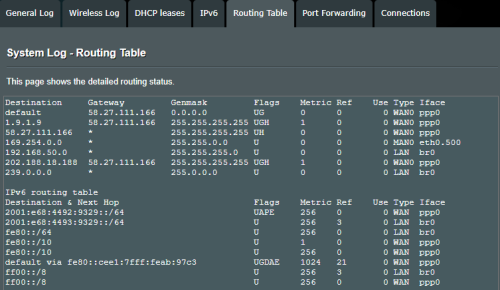 Looks OK, you must be on a 300 MBps package & not behind CGNAT. Assume that interface eth0.500 is the VLAN for IPTV but it's not been assigned an ip address, maybe someone else knows more about this. Any feedback after enabling ipv6? |
|
|
|
|
|
kk131
|
Sep 28 2022, 12:33 AM
|
|
|
QUOTE(Bi-bimbap @ Sep 27 2022, 11:10 PM) ok so after using a few days, it seems enabling ipv6 somehow fixed the issue. (i enabled it only last friday evening), didn’t face any issues on my devices anymore and things load way faster. i didn’t get to try the above suggestions yet as i was away, after came back realised that everything is working fine again and the only changes i made so far were - changing MTU & MRU from 1492 to 1480 (which had no effect when i changed it) and enabling IPV6 in router settings. i do have some follow up questions though - are there any implications with keeping it enabled? will it cause any incompatibility or such? and curious why it’s disabled by default by Asus if it’s actually needed? It could be argued that IPV6 introduces a security issue as every device on your home network is reachable directly from the internet (no NAT) however you have a firewall active in the router. Additionally check that AIProtection is enabled. I haven't found any problems running dual stack IPv4 & IPv6 on my router. |
|
|
|
|
|
kk131
|
Sep 29 2022, 03:57 PM
|
|
|
QUOTE(Bi-bimbap @ Sep 28 2022, 12:39 PM) ok, will enable that as well, by default it is disabled. i left all the settings by default just to ensure basic functionality works fine before i add on the rest. also - is there a way to know whether IPV6 needs to be enabled? (let's say i do change to another brand router in the future) or only by trial and error? It seems that there's something wrong with the IPv4 configuration, how did you initially configure the router? IPv6 shouldn't be required as many networks rely on IPv4 and NAT/CGNAT but adoption is growing due to the IPv4 address space becoming exhausted, I guess it's your choice. |
|
|
|
|
|
kk131
|
Nov 7 2024, 06:24 AM
|
|
|
Heads-up for anyone with an Asus AX router and running AiCloud Malware killing ASUS routers? https://www.snbforums.com/threads/malware-k...752/post-932257 post #8 summarises the situation. This post has been edited by kk131: Nov 7 2024, 06:26 AM |
|
|
|
|
|
kk131
|
Nov 7 2024, 01:25 PM
|
|
|
QUOTE(blacktubi @ Nov 7 2024, 10:18 AM) Looks like only the older, discontinued models are affected and only affect a small group of customer. I suspect it's because these customers are running on much older firmware and didn't update their router firmware frequently. Hopefully ASUS can come out with a solution soon. Asus hasn't released an update for the AX routers, amazingly they've updated the RT-AC66U firmware https://www.asus.com/my/supportonly/rt-ac66u/helpdesk_bios/ |
|
|
|
|
|
kk131
|
Nov 8 2024, 01:28 PM
|
|
|
What do you anticipate you will gain with a static IP address? additionally most of the ISP provide a dynamic private address for ip4. QUOTE(eternity4av @ Nov 8 2024, 09:23 AM) Hi seniors, I'm still researching & I was watching TP Link Malaysia YouTube channel on how to link XE75/BE65 to Unifi using Dynamic IP, does this mean, I would not utilise the capable hardware of XE75/BE65 when its using Dynamic IP mode? |
|
|
|
|
|
kk131
|
Sep 28 2025, 11:35 AM
|
|
|
QUOTE(lokgotz @ Sep 27 2025, 10:09 PM) After reading a few pages from this thread, it looks like the consensus is that the ASUS RT-AX86U Pro is a good router. And since my original Unifi TP Link AC1200 looks like it's dying soon (Frequently reboots itself, sudden speed drops), I placed an order for the ASUS. I just hope that it solves my problems and hopefully this is a good enough deal. Please ignore the mousepad. Lol  I can confirm the AX86u pro is a good choice, I've been using one for more than 2 years. You can flash it with Merlin firmware, which adds several more features including add blocking for your local network. |
|
|
|
|



 Quote
Quote

 0.0268sec
 1.30
1.30
 7 queries
 GZIP Disabled