Welcome Guest ( Log In | Register )

301 Pages « < 2 3 4 5 6 > » Bottom

Outline · [ Standard ] · Linear+

Home Networking WiFi Router Discussion Thread, Updated for 2023

views
     
zher4883
post Sep 19 2018, 03:12 PM

Look at all my stars!!
*******
Senior Member
4,490 posts

Joined: Oct 2014


QUOTE(silver311 @ Sep 19 2018, 03:07 PM)
How about this one from TP-Link? Planning to buy this for my unifi 800mbps usage.

https://www.tp-link.com/my/products/details...A8630P-KIT.html
*
If you really want to utilize your connection well then don't consider any powerline.
SilentVampire
post Sep 19 2018, 03:24 PM

Networking Enthusiast
*******
Senior Member
5,714 posts

Joined: Mar 2007


Just realized that AN5506-04-BG, the BTU that is currently being issued by TM for some users, are capable of gigabit speeds as well, so you might want to add it to your list. Blacktubi
TSblacktubi
post Sep 19 2018, 04:23 PM

-
Group Icon
Elite
8,401 posts

Joined: Jul 2008

QUOTE(silver311 @ Sep 19 2018, 03:07 PM)
How about this one from TP-Link? Planning to buy this for my unifi 800mbps usage.

https://www.tp-link.com/my/products/details...A8630P-KIT.html
*
I reviewed this before. Peak speed is around 300Mbps even at super optimal condition.

https://www.blacktubi.com/review/tp-link-tl...30p-kit-review/
QUOTE(SilentVampire @ Sep 19 2018, 03:24 PM)
Just realized that AN5506-04-BG, the BTU that is currently being issued by TM for some users, are capable of gigabit speeds as well, so you might want to add it to your list. Blacktubi
*
Added, thanks!
BlackJackE3
post Sep 20 2018, 09:12 AM

Getting Started
**
Junior Member
91 posts

Joined: May 2010


QUOTE(mujinkun @ Sep 19 2018, 11:47 AM)
I have the same BTU as this.

My speed lagi kiok...On WLAN (AC-1200 router) MAX is 100MBs only (speed ugraded to 500).

On LAN, not yet confirm
*
260Mbps is the result of first day i test after i got the sms sweat.gif after that my speed cant never go beyond 170Mbps already
BlackJackE3
post Sep 20 2018, 09:13 AM

Getting Started
**
Junior Member
91 posts

Joined: May 2010


QUOTE(justin78 @ Sep 19 2018, 03:06 PM)
I am using the same BTU, as for the wifi router i using TPlink Archer C7 v2. 
After upgraded to 500mbps, i test the wifi speed and got the following speed, you may check the screen shot.The speed test was done using Note 8.
*
Alright, thanks for the info rclxms.gif will try to factory reset my router tonight
dark lenanza
post Sep 20 2018, 12:11 PM

Probationary DDOSer
******
Senior Member
1,492 posts

Joined: Nov 2007
From: on top of mountain


asus rtn14uhp support or not turbo speed?
mine upgrade to 500 but since in the middle of the month...need to wait until salary time....

on cable test only 100mbps
or this model not support even 300mbps...
tq

This post has been edited by dark lenanza: Sep 20 2018, 12:11 PM
cannavaro
post Sep 20 2018, 12:13 PM

CATTENACIO
*******
Senior Member
3,008 posts

Joined: Sep 2005
From: T.T.D.I, Bukit Damansara


QUOTE(dark lenanza @ Sep 20 2018, 12:11 PM)
asus rtn14uhp support or not turbo speed?
mine upgrade to 500 but since in the middle of the month...need to wait until salary time....

on cable test only 100mbps
or this model not support even 300mbps...
tq
*
no
go read the 1st page of the main unifi thread
matow
post Sep 20 2018, 12:39 PM

Getting Started
**
Junior Member
216 posts

Joined: Jan 2003
From: Klang, near Bayu


Hi guys, need some advise. I have recently been turboed to 500Mbps.
My hardwares setup are :-
1) BTU - Alcatel Lucent I-240G-P (been with me since 2010 or 2011)
2) Wifi Router - TP Link Archer C7 V2
3) Cable from BTU to Wifi Router - Cat 5E

Problems:-
1) Tested WIFI speeds on Samsung Note 4, Ipad Air, Xiaomi Redmi Note 5 with Ookla on 5G band but could not achieve more than 180 Mbps download Wifi speeds. Have tried contacting TM but the technical department says due to recent upgrades, the speed are still not stable and ask me to be patient and will re-fresh my connections to see if there is any improvement which it did not. - Are my hardwares ready for 500 Mbps and are my WIFI testings accurate?

2) Bought a Cat 6 cable (brand - U Green) but when connected from BTU to Wfi Router, the WIFI connections becomes erratic, sometimes online, sometimes offline. I changed back to Cat 5E and it becomes stable. Is the Cat 6 cable not compatible or defective?
note - The Cat 6 cable was bought online and was quite cheap, maybe that's the problem.

This post has been edited by matow: Sep 20 2018, 12:46 PM
xperiaVuser
post Sep 20 2018, 12:55 PM

Regular
******
Senior Member
1,201 posts

Joined: Jul 2013
QUOTE(matow @ Sep 20 2018, 12:39 PM)
Hi guys, need some advise. I have recently been turboed to 500Mbps.
My hardwares setup are :-
1) BTU - Alcatel Lucent I-240G-P (been with me since 2010 or 2011)
2) Wifi Router - TP Link Archer C7 V2
3) Cable from BTU to Wifi Router - Cat 5E

Problems:-
1) Tested WIFI speeds on Samsung Note 4, Ipad Air, Xiaomi Redmi Note 5 with Ookla on 5G band but could not achieve more than 180 Mbps download Wifi speeds. Have tried contacting TM but the technical department says due to recent upgrades, the speed are still not stable and ask me to be patient and will re-fresh my connections to see if there is any improvement which it did not. - Are my hardwares ready for 500 Mbps and are my WIFI testings accurate?

2) Bought a Cat 6 cable (brand - U Green) but when connected from BTU to Wfi Router, the WIFI connections becomes erratic, sometimes online, sometimes offline. I changed back to Cat 5E and it becomes stable. Is the Cat 6 cable not compatible or defective?
note - The Cat 6 cable was bought online and was quite cheap, maybe that's the problem.
*
Did you buy from ugreen flagship store on lazada? get the round cat 6 from them.

matow
post Sep 20 2018, 12:58 PM

Getting Started
**
Junior Member
216 posts

Joined: Jan 2003
From: Klang, near Bayu


QUOTE(xperiaVuser @ Sep 20 2018, 12:55 PM)
Did you buy from ugreen flagship store on lazada? get the round cat 6 from them.
*
Yes, it was bought from Ugreen flagship store in Lazada and it was the round one. Funny thing is that compared to the Cat 5E cable, the Cat6 cable looks thinner...lol.

It was on flash sale at that time and only cost RM4.08, I bought 2.

This post has been edited by matow: Sep 20 2018, 01:00 PM
xcxa23
post Sep 20 2018, 01:02 PM

Look at all my stars!!
*******
Senior Member
2,649 posts

Joined: Nov 2010


QUOTE(matow @ Sep 20 2018, 12:39 PM)
Hi guys, need some advise. I have recently been turboed to 500Mbps.
My hardwares setup are :-
1) BTU - Alcatel Lucent I-240G-P (been with me since 2010 or 2011)
2) Wifi Router - TP Link Archer C7 V2
3) Cable from BTU to Wifi Router - Cat 5E

Problems:-
1) Tested WIFI speeds on Samsung Note 4, Ipad Air, Xiaomi Redmi Note 5 with Ookla on 5G band but could not achieve more than 180 Mbps download Wifi speeds. Have tried contacting TM but the technical department says due to recent upgrades, the speed are still not stable and ask me to be patient and will re-fresh my connections to see if there is any improvement which it did not. - Are my hardwares ready for 500 Mbps and are my WIFI testings accurate?

2) Bought a Cat 6 cable (brand - U Green) but when connected from BTU to Wfi Router, the WIFI connections becomes erratic, sometimes online, sometimes offline. I changed back to Cat 5E and it becomes stable. Is the Cat 6 cable not compatible or defective?
note - The Cat 6 cable was bought online and was quite cheap, maybe that's the problem.
*
Have u try different location server?
Sometimes the auto server does not choose the best

Mine 100mbps achievable when manual select Shah alam server, the auto server always choose Kuala Lumpur which only around 80mbps
xperiaVuser
post Sep 20 2018, 01:10 PM

Regular
******
Senior Member
1,201 posts

Joined: Jul 2013
QUOTE(matow @ Sep 20 2018, 12:58 PM)
Yes, it was bought from Ugreen flagship store in Lazada and it was the round one. Funny thing is that compared to the Cat 5E cable, the Cat6 cable looks thinner...lol.

It was on flash sale at that time and only cost RM4.08, I bought 2.
*
The same round cat 6 15M seems to work fine and stable for me, I'm using on the tp link archer 7 v4 + connected to gigabit switch. LAN to LAN connection can achieve 920+Mbps, speedtest 500+Mbps
matow
post Sep 20 2018, 01:11 PM

Getting Started
**
Junior Member
216 posts

Joined: Jan 2003
From: Klang, near Bayu


QUOTE(xcxa23 @ Sep 20 2018, 01:02 PM)
Have u try different location server?
Sometimes the auto server does not choose the best

Mine 100mbps achievable when manual select Shah alam server, the auto server always choose Kuala Lumpur which only around 80mbps
*
Yes, have tried to manually select the nearest server, still not getting more than 170 Mbps.

So, you think that my hardwares are ok to achieve 500 Mbps?
xperiaVuser
post Sep 20 2018, 01:14 PM

Regular
******
Senior Member
1,201 posts

Joined: Jul 2013
QUOTE(matow @ Sep 20 2018, 01:11 PM)
Yes, have tried to manually select the nearest server, still not getting more than 170 Mbps.

So, you think that my hardwares are ok to achieve 500 Mbps?
*
Do read the guide on the Unifi thread first page. You'd probably want to get a better router.
matow
post Sep 20 2018, 01:14 PM

Getting Started
**
Junior Member
216 posts

Joined: Jan 2003
From: Klang, near Bayu


QUOTE(xperiaVuser @ Sep 20 2018, 01:10 PM)
The same round cat 6 15M seems to work fine and stable for me, I'm using on the tp link archer 7 v4 + connected to gigabit switch. LAN to LAN connection can achieve 920+Mbps, speedtest 500+Mbps
*
The Archer C7 V2, after I bought it and set it up last year, I did not do any firmware upgrades after that.
Do you think I need to do any firmware upgrades or other settings?
matow
post Sep 20 2018, 01:17 PM

Getting Started
**
Junior Member
216 posts

Joined: Jan 2003
From: Klang, near Bayu


QUOTE(xperiaVuser @ Sep 20 2018, 01:14 PM)
Do read the guide on the Unifi thread first page. You'd probably want to get a better router.
*
If this is the case, I rather downgrade it to 100 Mbps. 500 Mbps is a overkill for me.
Thanks for your guidance.
xperiaVuser
post Sep 20 2018, 01:20 PM

Regular
******
Senior Member
1,201 posts

Joined: Jul 2013
QUOTE(matow @ Sep 20 2018, 01:14 PM)
The Archer C7 V2, after I bought it and set it up last year, I did not do any firmware upgrades after that.
Do you think I need to do any firmware upgrades or other settings?
*
before that, check if you enabled QOS, disable it if it's on.

For 5Ghz wifi, set to 80mhz and test again. For example, Redmi Note 5 won't go more than 300Mbps

This post has been edited by xperiaVuser: Sep 20 2018, 01:22 PM
heidarren
post Sep 20 2018, 01:28 PM

Getting Started
**
Junior Member
248 posts

Joined: Aug 2018
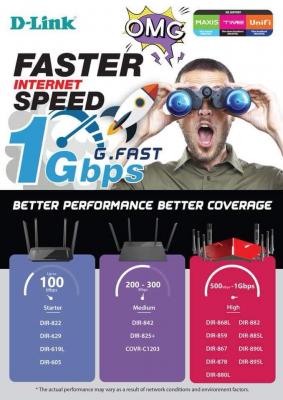
D-Link has released their recommendation too


Attached thumbnail(s)
Attached Image
SilentVampire
post Sep 20 2018, 01:29 PM

Networking Enthusiast
*******
Senior Member
5,714 posts

Joined: Mar 2007


QUOTE(matow @ Sep 20 2018, 01:14 PM)
The Archer C7 V2, after I bought it and set it up last year, I did not do any firmware upgrades after that.
Do you think I need to do any firmware upgrades or other settings?
*
V2 is considered old. It is already V5 now.

QUOTE(xperiaVuser @ Sep 20 2018, 01:20 PM)
before that, check if you enabled QOS, disable it if it's on.

For 5Ghz wifi, set to 80mhz and test again. For example, Redmi Note 5 won't go more than 300Mbps
*
No point setting to 80MHz, if your device does not support the MIMO required for the turbo speed.
mastedo
post Sep 20 2018, 01:30 PM

Getting Started
**
Junior Member
92 posts

Joined: Jan 2010


park

301 Pages « < 2 3 4 5 6 > » Top
 

Change to:
| Lo-Fi Version
0.0148sec    0.37    6 queries    GZIP Disabled
Time is now: 2nd December 2025 - 01:24 PM