Welcome Guest ( Log In | Register )

4 Pages < 1 2 3 4 >Bottom

Outline · [ Standard ] · Linear+

Home Networking WiFi Router Discussion Thread, Updated for 2023

views
     
MyProLife
post May 30 2022, 01:47 PM

I bully wumao & MPKL
*******
Senior Member
2,075 posts

Joined: Sep 2021
From: nowhere

QUOTE(imation1314 @ May 30 2022, 10:46 AM)
Thanks all for the helpful advice. Just wonder is necessary to connect 2 routers with LAN for better performance or is still fine without it ?
May need to hack the wall to hide the cable if want to connect them via LAN because don't want to see the cable hanging around the house dry.gif .
*
If you are considering 3 band system like XT8 or X68/X90, the system will make the setup easier by not having the wired backhaul necessary.

If you only have 2 band model like most of the mesh enable routers/systems, yes it is necessary
MyProLife
post Jul 6 2022, 02:01 PM

I bully wumao & MPKL
*******
Senior Member
2,075 posts

Joined: Sep 2021
From: nowhere

QUOTE(zheilwane @ Jul 6 2022, 08:34 AM)
user posted image

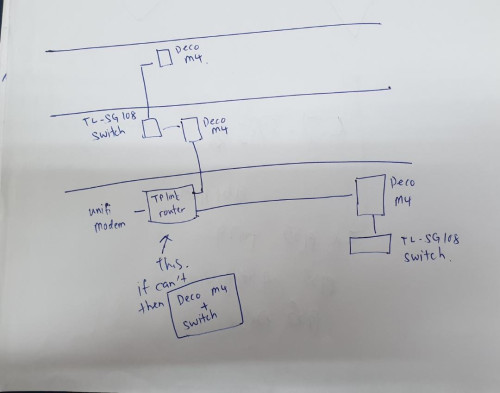
Is this workable? Wanna do this for my 3-storey shop.

I currently have 3 deco M4, wanna add two switches and link them up as per photo. Jus connect switch, no other complicated settings required right?

Since connected using LAN, internet speed should still b good at the top floor right? If workable, pls suggest which Ethernet Switch is good for LAN speed mainly connecting to a server for SQL accounting, so LAN connection must be fast. TQ minimum 6 - 8 ports for the switch
*
Yes it's possible (but Tplink explicitly disencourage the use of non-Tplink switches. They explicit say d link switches may cause issues)
MyProLife
post Jul 7 2022, 06:58 PM

I bully wumao & MPKL
*******
Senior Member
2,075 posts

Joined: Sep 2021
From: nowhere

https://www.tp-link.com/us/support/faq/1842/

Ethernet backhaul also works with AP mode (when main deco is behind another main router). You can directly wire all Deco points up AFTER finishing the setup and switching to AP mode
MyProLife
post Jul 7 2022, 07:41 PM

I bully wumao & MPKL
*******
Senior Member
2,075 posts

Joined: Sep 2021
From: nowhere

QUOTE(zheilwane @ Jul 7 2022, 07:18 PM)
my current shop i m using 3 deco but no switch, so not sure is it as easy as just connection a switch to my mesh. TQ, since u guys say is workable then i jus try, it if cant then buy new MESH router
*
As long as not isp provide router, you can use back router and put deco in ap mode, for switches you can get 2x tp link sg 108
MyProLife
post Jul 8 2022, 02:11 PM

I bully wumao & MPKL
*******
Senior Member
2,075 posts

Joined: Sep 2021
From: nowhere

QUOTE(blacktubi @ Jul 7 2022, 10:42 PM)
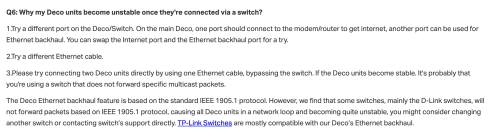
Definitely works if it's on the same switch. But, it gets tricky when you connect another switch to the second node and followed by another node to that switch.

The last time I tried, it wouldn't work properly. Probably due to the IEEE 1905.1 packet got dropped.  I didn't investigate further on that.

user posted image
*
Up there I already said D links switches may cause issues because of this. So only suggest use tp link switches like SG108
MyProLife
post Jul 17 2022, 09:37 PM

I bully wumao & MPKL
*******
Senior Member
2,075 posts

Joined: Sep 2021
From: nowhere

QUOTE(opjust @ Jul 17 2022, 09:13 PM)
Hello All,

Just to share my findings on my issues and some updates;

1) My current Ethernet connection direct from router downstairs to 2nd floor only limited to 100mbps most probably due to the cable twisting inside my wall, some CAT6 cable if it’s twisted it may cap at 100mbps. Lesson learned : if you need long Ethernet cable more than 15metres and concealed better buy high quality cable.
2) I just bought Asus XT8 and complete my setup earlier. Findings compared to my previous archer2300

- wifi speed at living room downstairs where my router is placed
Archer c2300 - 530mbps
XT8 - 470mbps

- wifi speed at 2nd floor hall (this is where my PC currently max at 100mbps using Ethernet direct from router downstairs). I placed my XT8 node here
Archer - 60mbps
XT8- 400mbps

- my bedroom
Archer - 30mbps
XT8- 300mbps

-my workstation (laptop) another wall from bedroom
Archer - 5mbps
XT8 - 270mbps

Overall, my wifi connection improve significantly and I end up not using all the Ethernet cable that I run from downstairs to hall upstairs and from the hall to my workstation.

XT8 is a really good Aimesh router, I’m super impressed with the performance and the only thing I’m surprised is c2300 can get better speed downstairs compared to XT8.
*
excellent finding about your new TRI-BAND system. maybe the bottle neck is now your device which probably still stuck at wifi 5

you can now ditch the ethernet cable as it may be redundant because XT8 dedicated backhaul is now strong enough for whole home coverage
MyProLife
post Jul 20 2022, 07:32 PM

I bully wumao & MPKL
*******
Senior Member
2,075 posts

Joined: Sep 2021
From: nowhere

QUOTE(Oltromen Ripot @ Jul 20 2022, 11:35 AM)
Not sure what you REALLY mean by "split id",
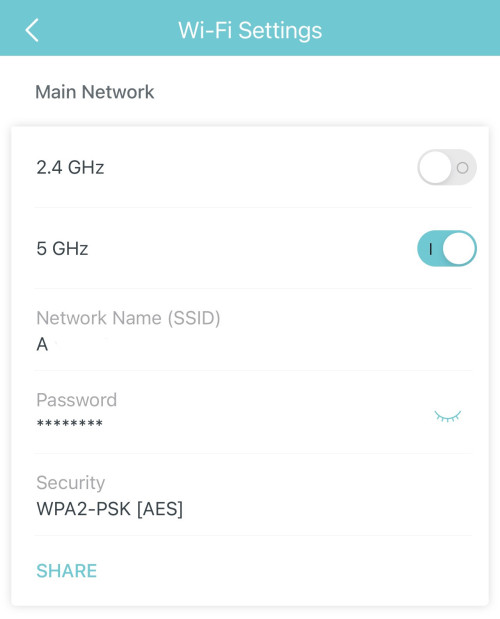
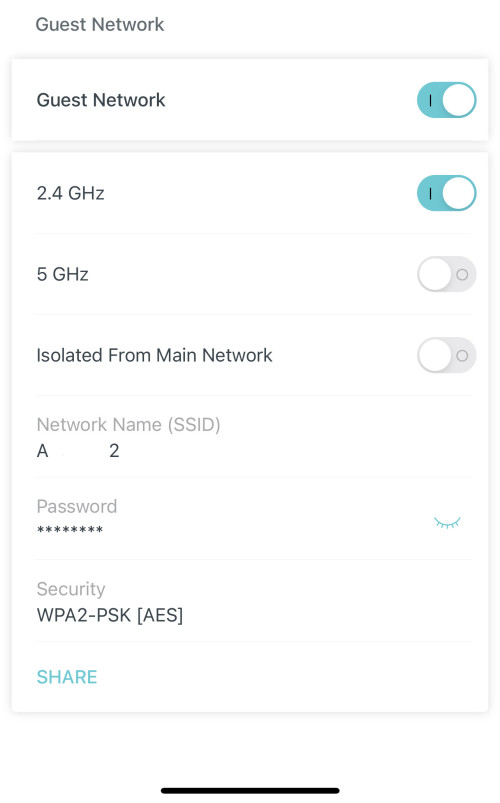
but for my deco m9 tri-band setup, I leverage the Guest network to make 2 SSIDs on different bands, AND not isolate them from each other. I'm on wired backhaul, so not concerned of speed degradation.

user posted image
user posted image
*
QUOTE(mascot123 @ Jul 20 2022, 05:14 PM)
Is there no way to isolate 2.4 and 5? Only through guest network? That mean ill have 3 wifi ssid broadcasting at any time?
*
Haha deco division sohai product manager purposely limit cannot split like usual

So better buy Asus AI mesh


By default deco only have 1 visible ssid only (of same name)

Guest network function can 1 more visible ssid (so 2 ssid visible)


But keep in mind deco mesh system also broadcasts hidden ssid for mesh purposes. So maybe 3 or 4 ssid in total depending on model

This post has been edited by MyProLife: Jul 20 2022, 07:35 PM
MyProLife
post Jul 20 2022, 09:49 PM

I bully wumao & MPKL
*******
Senior Member
2,075 posts

Joined: Sep 2021
From: nowhere

Well i means actually is most dual band router by default having 2 ssid for 2 different bands (tri band router will have 3 ssid) excluding guest functions


But if turn on the "band steering" or "smart connect" function, it make the ssid be the same for both bands, and deco by default enforce such feature by default


To turn off band steering or smart connect feature, unfortunately there is no such switch in deco. Instead you have guest function also used for the workaround. Because in one ssid can individually turn off either 2.4 or 5ghz band, so you can do so that main ssid use only 5ghz and "guest function" ssid use only 2.4

Only some models i see have the isolation off switch (deco m4 can only use when in Access point mode, not possible to switch isolation off in normal router mode)

I assume your m9 plus also in Access point mode, if yes then good you can turn off isolation to achieve the normal 2 band 2 ssid feature without problem of cannot connect 2 devices under different ssid because of isolation. Also dislike that deco forces to setting until such extent in order to use such thing normally default on most 2 band routers, this is one of BIG GIANT CON of Deco series

This post has been edited by MyProLife: Jul 20 2022, 09:49 PM
MyProLife
post Aug 12 2022, 05:11 PM

I bully wumao & MPKL
*******
Senior Member
2,075 posts

Joined: Sep 2021
From: nowhere

QUOTE(zheilwane @ Aug 11 2022, 09:03 AM)
user posted image

any1 know this can work? and which tp link router is suitable?

current setup :
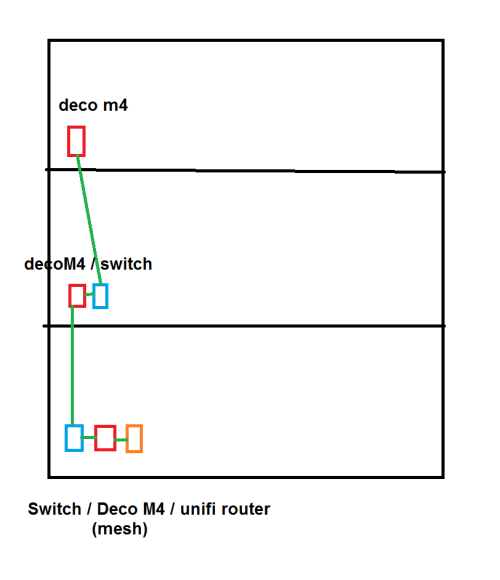
UNIFI modem ---> unifi router ---> deco m4 (mesh) ---> tl-sg108 switch

i find it very messy, if can do like this better, but nd to ensure the router is compatible with deco m4
unifi modem ---> tp link mesh router
*
Due to M4 relative limited Soc/cpu performance, i suggest to make M4s to be wireless AP only. You can put switches in between TL router and M4s as APs.

So for example

(1F) Unifi modem > TL router (5 ports) > TL sg108

After SG108

(1F) first M4 as AP

(2F) another SG108 > 2nd M4 as AP

(3F) optional SG108 > 3rd M4 as AP


I suggest use a slight stronger TL router. C6/A6/C7/A7 with same sub 800mhz single core soc as M4 is not very suitable for that. So get a TL router with at least BCM 6755 (or equivalent 2 core or above SOC/cpu) eg archer ax 20 is okay


MyProLife
post Sep 17 2022, 12:51 AM

I bully wumao & MPKL
*******
Senior Member
2,075 posts

Joined: Sep 2021
From: nowhere

QUOTE(persona93 @ Sep 16 2022, 08:04 PM)
i am currently using Unifi 30Mbps, with their Archer C1200 router

ALL the time when im on video call or whatsapp audio, every 20s or 30s, the other party will not be able to hear for 3-4s/video paused 3-4s

yesterday i had an interview, sat next to the router and modem, problem still persists

any idea? change router? up speed?

im staying in a 900sf apartment only cry.gif
*
C1200 prone overheating so cpu x leh tahan lah

Change router outside, asus one okay je
MyProLife
post Oct 15 2022, 11:11 PM

I bully wumao & MPKL
*******
Senior Member
2,075 posts

Joined: Sep 2021
From: nowhere

QUOTE(blacktubi @ Oct 15 2022, 11:42 AM)
Just want to leave this here, for those using Apple devices, consider getting a Broadcom based router.

Apple is using exclusively Broadcom Wi-Fi 6 SoC on all their products and they seem to perform better and more stable when paired with a Broadcom based router.
*
Apple as well as some Samsung S series mainline phones (s20, s21, s22) do use primarily broadcom wireless chipset.

But Samsung Z foldables use qualcomm wireless chipset

Just FYI

Most android smartphones use qualcomm wireless chipset (for snapdragon) or mediatek chipset (mtk platform), but Samsung s series is one of notable exception

Exynos platform also usually use broadcom chipset (including pixel 6/7 series tensor which is modified exynos platform)


Apple also use slightly older broadcom wifi 6 chipset bcm4375 even for 2022 models (ip 14 series), it lacks 4096qam, 6e 6ghz support and 160mhz support

Most 2021/2022 flagship android phones already support such features above, if use wifi 6e router to test (samsung s21 ultra uses slightly newer bcm4389), should be able to get higher speed during speedtest compared to iphones

This post has been edited by MyProLife: Oct 15 2022, 11:24 PM
MyProLife
post Oct 21 2022, 06:53 PM

I bully wumao & MPKL
*******
Senior Member
2,075 posts

Joined: Sep 2021
From: nowhere

QUOTE(blacktubi @ Oct 16 2022, 12:02 PM)
I think 4096QAM is a Qualcomm thing. Since it’s a non standard WiFi 6 function, I don’t expect Apple to support it.

But I do hope Apple will introduce support for 6GHz and 160MHz soon. I suspect Apple will just introduce WiFi 7 support next year which should cover these 2 features.
*
Finally ipad pro m2 2022 the first to get bcm4389

With wifi 6e 6ghz 160mhz support


Almost 2 years later than samsung s21 ultra
MyProLife
post Nov 10 2022, 09:05 PM

I bully wumao & MPKL
*******
Senior Member
2,075 posts

Joined: Sep 2021
From: nowhere

QUOTE(GameFr3ak @ Nov 10 2022, 08:01 PM)
Thanks for the recommendation. I'm doing a bit of reading as I type this. So the Deco M5 are just mesh routers right, so apart of not having to forcefully change network (like repeaters), how would it be better than me replacing the main archer 1200 router + getting a decent repeater/mesh unit in the living area ?
*
Deco mesh advantage over normal router/repeater combo

1. You can wire both mesh devices with ethernet for better speed

2. Single SSID , fast roaming function by using k/v/r protocol

3. Easier management from deco mobile app (tp link account required for setup and management)

4. More reliable overall over trash c1200 which can sometimes hang and reboot itself

Below rm400, get deco m4/hc4 , speed expect can up to 300m, because chipset is slightly weaker

M5 chipset is faster than m4/hc4


Just need avoid any models below m4
E4: dont unless you subscribe under 100mbps

This post has been edited by MyProLife: Nov 10 2022, 09:08 PM
MyProLife
post Nov 10 2022, 10:33 PM

I bully wumao & MPKL
*******
Senior Member
2,075 posts

Joined: Sep 2021
From: nowhere

QUOTE(GameFr3ak @ Nov 10 2022, 10:04 PM)
I understand all points except for 1. Wire both mesh devices meaning I'll pull LAN cable between 2 devices? Wouldn't that defeat its purpose? Thanks for the info btw
*
It's optional. You can use either wireless or wired

But for dual band model, is recommended use wired, because if use wireless speed will be half from second mesh just like repeaters
MyProLife
post Nov 10 2022, 11:53 PM

I bully wumao & MPKL
*******
Senior Member
2,075 posts

Joined: Sep 2021
From: nowhere

QUOTE(GameFr3ak @ Nov 10 2022, 07:53 PM)
but the fiber is laid right at the maid room.. there's no subsequent connectors from that room to the dining area...
*
you can ask any contractor to either

1. move the onu/fiber entry point to near dining area

2. lay ethernet cable so that ethernet point at dining area, then you can place router there

if so you might no need mesh, you can get one strong router for coverage whole condo


the problem is lie in the poor modem/router location. mesh can only do so much
MyProLife
post Feb 22 2023, 11:48 AM

I bully wumao & MPKL
*******
Senior Member
2,075 posts

Joined: Sep 2021
From: nowhere

QUOTE(BOTAK_WAI @ Feb 15 2023, 10:20 PM)
since 6ghz is still not approved by mcmc for wifi usage, i doubt u can get any official wifi 6e router.

if grey market i think tplink axe75 will be easier to get.
*
6ghz have been approved as of last mid 2022

tp link axe75 is available from official store online and offline
MyProLife
post Feb 24 2023, 02:35 PM

I bully wumao & MPKL
*******
Senior Member
2,075 posts

Joined: Sep 2021
From: nowhere

QUOTE(BOTAK_WAI @ Feb 24 2023, 02:14 PM)
any link or documentation released from MCMC?

thanks.
*
Refer to page 11 and page 21

5925 MHz to 6425 MHz

Max power 200mw

https://mcmc.gov.my/skmmgovmy/media/General...o-2-of-2022.pdf
MyProLife
post Mar 3 2023, 06:30 PM

I bully wumao & MPKL
*******
Senior Member
2,075 posts

Joined: Sep 2021
From: nowhere

QUOTE(DeepMemory @ Mar 3 2023, 12:18 PM)
Hi guys, I have a 3800 sqft 3 storey super link house. I am currently deciding if I should get the Deco XE75 2 pack or X68 3 pack as they are the same price. Looking for wide coverage and godo speed for my unifi 800mbps package.
*
get 3 pack as the AP number is priority over the individual capacity

3 storey, so get 3 pack X68 first. if you need more individual capacity , you can always swap one of them with better model (1 pack)
MyProLife
post Mar 28 2023, 01:41 AM

I bully wumao & MPKL
*******
Senior Member
2,075 posts

Joined: Sep 2021
From: nowhere

QUOTE(celciuz @ Mar 25 2023, 12:05 PM)
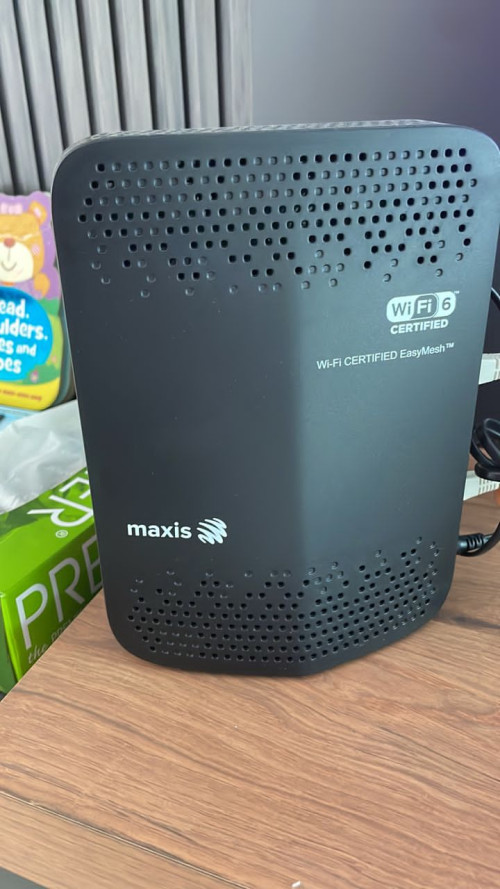
My neighbor is using this modem that came together with Maxis Fiber. It is placed in the living hall and he’s having issue with Wi-Fi coverage upstairs.

He sent me photo and I saw the “EasyMesh”, can directly just add on “EasyMesh” compatible nodes?

user posted image
*
Get a proper mesh system like tplink deco x series
MyProLife
post May 7 2023, 02:02 AM

I bully wumao & MPKL
*******
Senior Member
2,075 posts

Joined: Sep 2021
From: nowhere

QUOTE(Jjuggler @ May 6 2023, 09:55 PM)
That router with OpenWrt is good. I can vouch the claim because I used the router for testing with OpenWrt firmware of course with 800/200 plan. The stock firmware sucks. I sold the router and bought myself a Mikrotik router.

P/S: I am not affiliated with the brand neither do the person.
*
mediatek router platform: nice, can play with openwrt

qualcomm punya also harder to see it got flashed if too new

4 Pages < 1 2 3 4 >Top
 

Change to:
| Lo-Fi Version
0.0417sec    1.07    7 queries    GZIP Disabled
Time is now: 17th December 2025 - 07:40 AM