Welcome Guest ( Log In | Register )

Outline · [ Standard ] · Linear+

Home Networking WiFi Router Discussion Thread, Updated for 2023

views
     
MyProLife
post Nov 8 2023, 12:32 PM

I bully wumao & MPKL
*******
Senior Member
2,075 posts

Joined: Sep 2021
From: nowhere

QUOTE(puawk1 @ Nov 8 2023, 10:22 AM)
Hi: just try to understand a bit more on how the limitations is being applied to the CDM Asus routers, is it controlled by hardware or at software/firmware level? Thank you.
*
Region code is Hardcoded in the bootloader
MyProLife
post Nov 11 2023, 09:45 AM

I bully wumao & MPKL
*******
Senior Member
2,075 posts

Joined: Sep 2021
From: nowhere

QUOTE(Omochao @ Nov 11 2023, 08:24 AM)
Snip
*
AX50 is dead end model already and i doubt tp link will provide any further updates for firmware

Blame intel, they sold home router chip to maxlinear

Tp link expect you to buy their replacement model instead (ax53/ax55)

MyProLife
post Nov 12 2023, 02:57 PM

I bully wumao & MPKL
*******
Senior Member
2,075 posts

Joined: Sep 2021
From: nowhere

QUOTE(alip_11 @ Nov 12 2023, 02:37 PM)
House type: Landed
Size of house: 2500sqf. 2 storey
Features required: coverage to all part of house with almost same speed near main router. 
Number of devices connected to WiFi: 5-6
Internet Speed: 400-500mbps (yes flexi 5g). Using 5g router brand xyzel
Budget: rm200-300.
*
Too low budget

300 below can get ax3000 class with mediocre range for double storey, suggest up budget get mesh system instead
MyProLife
post Nov 12 2023, 03:26 PM

I bully wumao & MPKL
*******
Senior Member
2,075 posts

Joined: Sep 2021
From: nowhere

QUOTE(jibpek @ Nov 12 2023, 03:03 PM)
Why nobody talk about WIFI 7, 802.11be?

Planning to buy RT-BE96U
*
No, wait 1 or 2 years first

Routers and chip makers too rushed for that, WiFi 7 still in draft specification for now

QUOTE(alip_11 @ Nov 12 2023, 03:05 PM)
Mesh system how ya? I’m not familiar with it. Need to buy how many pcs? Just connect it my 5g router by wire? Wifi?
*
If you want keep your zyxel CPE, then need wire up either mesh or router and set AP mode during setup

Mesh system is at least 2 piece, me put 1 ground floor another one upstairs. Although solo version exists for those want add on another into their existing system
MyProLife
post Nov 13 2023, 10:29 PM

I bully wumao & MPKL
*******
Senior Member
2,075 posts

Joined: Sep 2021
From: nowhere

QUOTE(IceBikers @ Nov 13 2023, 08:54 PM)
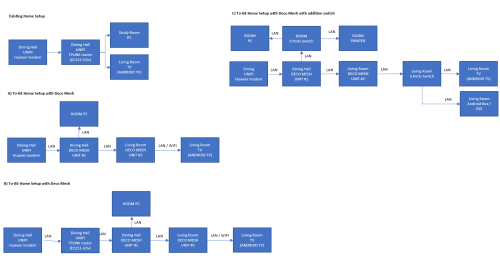
Hi, I am planning to get TPLINK Deco MESH for my home, running with ethernet backhaul.

I would like to know how would be the setup like?

is it A or B at below image?

also can each unit of mesh extend with additional switch © ?

user posted image
*
A only doable with selected deco models with 3 ports (X50, XE75, X80, X95)

B is not encouraged since isp router is weaker side compared to newer deco models

C is same as A, just with extra switch for ports

do not buy wrong model or else you need return cause not enough ports

i say again, X50, XE75, X80, X95 only can do what you planning to setup
MyProLife
post Nov 27 2023, 12:55 PM

I bully wumao & MPKL
*******
Senior Member
2,075 posts

Joined: Sep 2021
From: nowhere

QUOTE(puawk1 @ Nov 27 2023, 08:18 AM)
Hi Sifus: I would like to seek for advice.
I got an ASUS TUF-AX4200Q from China, I managed to got it connected to the internet but it seems like the wireless connection is not stable. For example, while my desktop computer connected via LAN cable can get 300 Mbps of test speed, my iPhone XR wireless connectivity seems like dropping from time to time and the spped test only gave me result of less than 10 Mbps. The other strange things is that my old IoT devices like the Xiaomi CCTVs are not able to connect to the wifi.

Appreciate you could advice. Attached are the screen shot of my router wireless setting.

[attachmentid=11485602][attachmentid=11485603]
*
Turn OFF agile multi band and try again
MyProLife
post Nov 27 2023, 02:00 PM

I bully wumao & MPKL
*******
Senior Member
2,075 posts

Joined: Sep 2021
From: nowhere

QUOTE(ellim33 @ Nov 27 2023, 01:30 PM)
Platform different and ram different

Ax86u pro, 1gb ram, broadcom quad core bcm4912

Tuf 6000, 512m ram, mediatek filogic 830 quad core


Broadcom got more support from Merlin (modded asuswrt for more features/plugins), mediatek must flash to openWRT for features beyond asuswrt
MyProLife
post Nov 27 2023, 09:23 PM

I bully wumao & MPKL
*******
Senior Member
2,075 posts

Joined: Sep 2021
From: nowhere

QUOTE(Oltromen Ripot @ Nov 27 2023, 08:26 PM)
you wrote exactly what i had in mind while reading that post earlier in the morning.
*
QUOTE(blacktubi @ Nov 27 2023, 08:35 PM)
People just never learn.

Buying a router with <200mW transmit power and wonder why it performs worst than a router with close to 1000mW transmit power.

Probably worst than whatever our ISP is giving for free. laugh.gif
*
Actually not that serious that problem. China and Europe is almost same in terms of transmit power limit, and maybe Singapore

Maybe go into expert settings can change region to Australia, can boost a little bit


I believe is not range issues, rather is because compatibility issues with certain devices with certain WiFi 6 unique features on. iPhone XR is WiFi 5 (AC ) device and unable to take advantage of WiFi 6 features anyway
MyProLife
post Nov 28 2023, 10:08 AM

I bully wumao & MPKL
*******
Senior Member
2,075 posts

Joined: Sep 2021
From: nowhere

QUOTE(blacktubi @ Nov 27 2023, 11:10 PM)
Let me explain it with some facts .

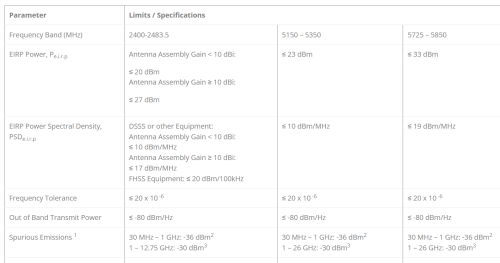
Our current UNII-1 and UNII-3 5GHz band EIRP limit is 1000mW, which is the same as FCC. That's 5x the amount of power of China (200mW).

Due to the logarithmic nature, the actual coverage with 1000mW EIRP is approximately around double of 200mW EIRP instead of 5x.

In layman terms, if all things remain consistent, you'll get around double the Wi-Fi speed and double the range. Let say you have a 500Mbps Internet plan, 1000mW might give you around 250Mbps after 2 walls. With 200mW, that's around 125Mbps.

And when all your neighbors are blasting in full 1000mW, your SNR would be horrible with just 200mW, you'll have packet loss and occassionally high ping.

Changing the Wi-Fi country code in ASUSWRT professional settings and whatever trick you saw on a famous China forum don't actually work too. I validated it. smile.gif

Anyways, most parts of EU can have up to 1000mW on RLAN 2 band. You can do up to 1000mW on UNII-3 band in SG as well.

Source:
https://www.mcmc.gov.my/skmmgovmy/media/Gen...WirelessLAN.pdf
https://www.imda.gov.sg/-/media/imda/files/...s/imdatssrd.pdf
*
okay understood

https://incompliancemag.com/article/chinas-...-ghz-equipment/

as from this site (come with latest reference on china reg at the end of this article), as of 2022
UNII-1 is limit to 23dbm or 200mw
but UNII-3 is now able to go up to 33dbm or around 2000mw
of course might be the limit for outdoors usage, indoor usage may subject to additional limits

also china just opens up UNII-2A (one of DFS freqs immediately after UNII-1) for 160mhz usage. so for 160mhz still subject to limits as stated above. (only one 160mhz usable on china sets)

user posted image

This post has been edited by MyProLife: Nov 28 2023, 10:11 AM
MyProLife
post Nov 28 2023, 02:13 PM

I bully wumao & MPKL
*******
Senior Member
2,075 posts

Joined: Sep 2021
From: nowhere

QUOTE(puawk1 @ Nov 28 2023, 01:53 PM)
Thank you for your reply, I found out that the wifi issue was due to the Guest Network. Once I disabled the Guest Network, the wifi connectivity immediately back to normal and stable.

This morning I reset the router and configure the router from scratch, everything works as expected, including all old smart devices live cctv and lights connected to the router without any issue.

I also tested the wifi coverage for both the 2.4 Ghz and 5Ghz, it is almost the same as the older RT-AC86U, though the AC86U is slightly better. For example, AC86U 2.4Ghz available at approximately 20 meter from the router but the AX-4200 only up to 17 meter. Mine is Unifi 300 Mbps, the TM speed test showed 60+ Mbps download speed while I was 17 meter away from the router.   

Regarding the Guest Network, as workaround, I only enable Guest Network-2
*
rt ac86u is from china or local set? maybe the reason is below:

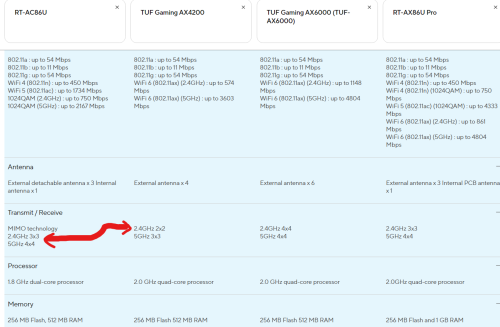
rt ac86u 2.4ghz is 3 streams (3x3)

tuf ax4200 2.4ghz is 2 streams (2x2)

the more the antenna are the greater the range

same can be say for 5ghz
rt ac86u 4 streams (4x4)
tuf ax4200 3 streams (3x3)

user posted image

ultimately for range along going from ac86u to ax4200, expect some downgrade. you will need go for ax6000 or ax5700 models for similar range
MyProLife
post Dec 6 2023, 02:23 PM

I bully wumao & MPKL
*******
Senior Member
2,075 posts

Joined: Sep 2021
From: nowhere

QUOTE(jasontanky @ Dec 1 2023, 08:15 AM)
After scrolling through some of the discussion, I just came across some of the EIRP information on the TPLink and Mercusys websites. Most of them seem to have a transmission power of 23 dBm, or 200 mW on the UNII-1 and UNIII-2/2-Extended bands. May I know if that means that those WiFi routers are not capable of leveraging the 30dBm transmission power limit in Malaysia ?
*
For EU version yes.

Most TP link branded sold in Malaysia officially (via my auth distro) are US version. For mercusys is otherwise mostly EU version
MyProLife
post Dec 7 2023, 11:29 AM

I bully wumao & MPKL
*******
Senior Member
2,075 posts

Joined: Sep 2021
From: nowhere

QUOTE(jasontanky @ Dec 7 2023, 07:15 AM)
Therefore I could assume that the TPLINK AX53 will have better wireless performance than Mercusys MR80X due to the factor as mentioned by you?
*
Should be
MyProLife
post Dec 16 2023, 01:16 AM

I bully wumao & MPKL
*******
Senior Member
2,075 posts

Joined: Sep 2021
From: nowhere

QUOTE(Omochao @ Dec 15 2023, 04:29 PM)
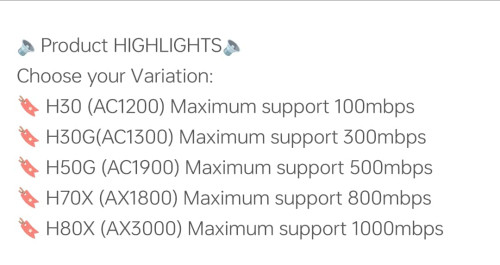
Thought I got a good deal during 12.12 sales, but ended up with a misleading device by Mercusys (TP-link), now I fully understand why there aren't many reviews in the market about Mercusys mesh system!

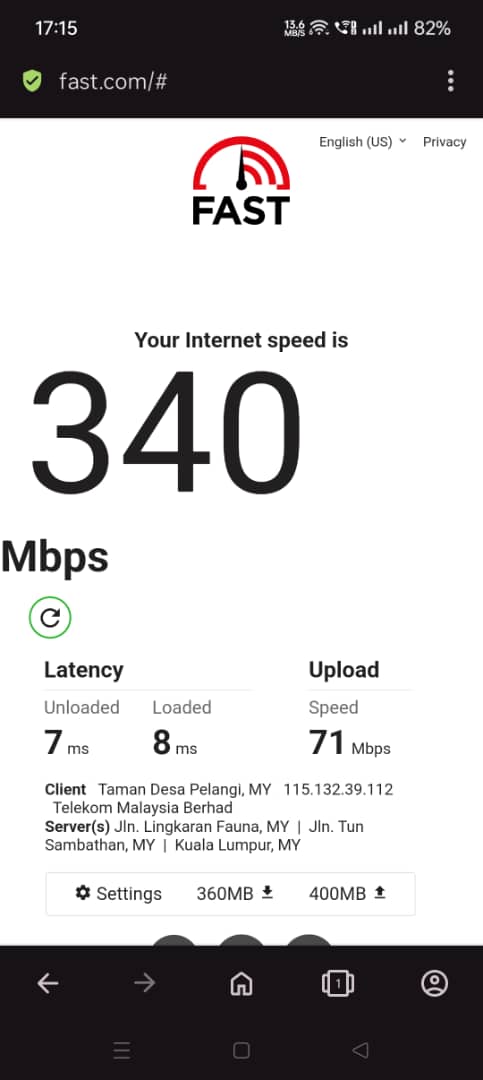
Bought a 2-pack Halo H70x mesh to try out, when set up with just only main node first, and immediately do speed test, can't even reach 400mbps on my current 500Mbps package.

This is tested on solely 5GHZ wifi 6 and also even on LAN CAT 5 E ethernet cables.

Turned on QOS and set bandwidth limit to 1000 Mbps also no use, or even 500 for that matter. Running on latest firmware!

Turned off UPNP, SLIG and use even cloudflare dns, nothing helps at all, will never be able to reach more than 400 Mbps.

anyone got any idea on configuring this devices?

There is no mode for me to change except turning on/off 2.4Ghz/5Ghz and not even setting MHZ options!
» Click to show Spoiler - click again to hide... «


Funnily, one shopee seller advertise this device can go up to 800Mbps no issues.

user posted image
*
Perhaps more to clients limitations especially on WiFi 5 clients or phones
MyProLife
post Dec 16 2023, 10:58 AM

I bully wumao & MPKL
*******
Senior Member
2,075 posts

Joined: Sep 2021
From: nowhere

QUOTE(Omochao @ Dec 16 2023, 08:24 AM)
If you dont mind, I can sell you mine, Mercusys H70x, bought it for 399 during 12.12 sales, retail price around 450.

But if your subscription speed is more than 300mbps, I wouldn't suggest you to use it as I'm facing problem for speeds over 300mbps
I was on Fiberhome ax3000 router, no such speed issues compared to this Ax1800 mesh.
*
AX1800 is not enough for speed more than 500 actually. Of course the soc and chipsets used also may be the limit
H70x might be using same older dual core mtk chip as some AC/WiFi 5 router chip, or maybe just firmware issues
MyProLife
post Dec 16 2023, 11:12 AM

I bully wumao & MPKL
*******
Senior Member
2,075 posts

Joined: Sep 2021
From: nowhere

QUOTE(MyProLife @ Dec 16 2023, 10:58 AM)
AX1800 is not enough for speed more than 500 actually. Of course the soc and chipsets used also may be the limit
H70x might be using same older dual core mtk chip as some AC/WiFi 5 router chip, or maybe just firmware issues
*


200m subscription only reach around 70mbps, something is wrong lo
MyProLife
post Jun 22 2024, 03:12 PM

I bully wumao & MPKL
*******
Senior Member
2,075 posts

Joined: Sep 2021
From: nowhere

QUOTE(x3Kai @ Jun 21 2024, 03:49 PM)
thanks for the recommendation, but i'm not really looking to invest so much into a router as of now, hence why i'm looking for cheap alternatives. other than phones and my desktop, all other devices are pretty old and can't really take full advantage of such a modern router. heck i'll probably even downgrade my plan after the loyalty monthly discount runs out  sweat.gif
just looked through this and what you posted in other parts of this threads about china routers, thanks for the treasure trove of information. seems like this even affects brands like Asus that has same product skews both globally and in china where they use cheaper parts for the china version, makes sense i guess. I was pretty lucky when I bought my ASUS RT-AC66U from china back then. It was a significant upgrade over the TP Link AC1200 that TIME provided last time, more stable connection, etc., but i'm not sure if that's just placebo effect or what.

but not sure if this still holds true, someone previously told me “it's better to have multiple AP instead a singular strong AP". with that in mind, if the price makes sense (i.e. I can get a few decent routers as AP, saw some dirt cheap AX3000 telco units) and set it up as purely AP, connected over LAN (referring to my illustration previously provided), will the impact of restricted transmit power still be that significant now that I'm not relying on radio signal penetrating any walls since each space have their dedicated AP.

if that no longer holds true, any recommendations for decent AP that can cover 700 sqft space?
thanks for the info.
*
Depends on which brand actually if you want buy from china as cheap APs (don't just expect buy one can cover everywhere)

Xiaomi there got some models available in both china and global variants. Unless you banana then china variants should be okay enough. Some models especially MTK powered can be flashed with openwrt. I recommend to try AX3000T as it is relatively recent and decent enough as ap (flashable with openwrt)

Tp-link china lineup is very different from global lineup. Because China r&d team is separated from global r&d team. China lineup tends to use cheaper components like lower amount of ram/rom/lower rf components. ( so i don't recommend buy tp-link china models from chinese platforms)

Asus also got some that available in both china and global. But actually which defind software/firmware feature is determined by CPE (in laymen term is bios for asus routers) china firmware may have some unnecessary features like game boosters service. If you want slightly better coverage can always set to Australia
mode in advanced settings


It all up to you accordingly to budget. Got more budget can try 2 or 3 asus routers as ap, if less budget then get xiaomi ax3000t should be okay (regardless of china or global variants)

MyProLife
post Jun 23 2024, 05:20 PM

I bully wumao & MPKL
*******
Senior Member
2,075 posts

Joined: Sep 2021
From: nowhere

QUOTE(podrunner @ Jun 23 2024, 03:52 PM)
Hi, finally got the free speed upgrade from 800 mbps to 1gb yesterday.  The installer came with one unit of white Dlink DPN-FX3060V.  Currently my set up is the old grey modem + Dlink DIR-X3060Z.  Installer said there’s no need to change to the combo box, that the current set up is capable.  Is this correct? 
Download WiFi speed around 850mpbs near the router on iPhone 14. Will spped improve using the white combo box?  Many thanks.

(Will be betting a new TP link mesh as current M5 is no longer as capable)
*
May not be improved with iPhone even replacing with DPN due to model wireless limitations. Best tested with laptop with AX200 or above wireless adapter .


MyProLife
post Sep 5 2024, 02:17 PM

I bully wumao & MPKL
*******
Senior Member
2,075 posts

Joined: Sep 2021
From: nowhere

QUOTE(ideaplus @ Sep 5 2024, 10:24 AM)
sad.gif
What is the suggested model in the market? Is it still the Asus TUF-4200, as suggested previously? 9/9 sale is coming soon.
*
TUF 4200 or TUF 6000. both are based on MTK filogic which IMO much better in terms of efficiency/heat buildup althought being on MTK platform means NO MERLIN SUPPORT.

i heard that many asus routers eventually fail because of high power broadcom soc platform being too power hungry and too much heat buildup
MyProLife
post Oct 19 2025, 01:22 AM

I bully wumao & MPKL
*******
Senior Member
2,075 posts

Joined: Sep 2021
From: nowhere

QUOTE(eternity4av @ Oct 15 2025, 02:30 PM)
hi, need some advise here, my house now is 1600sq ft double story, working mostly upstairs wifi signal now is 2 bars out of 3 bars, current setup is 1gbps Unifi, tied to existing Unifi router and attached lan cable to my previous ax73 as a repeater both located downstairs, what will be the most cost effective ways to have strong wifi, do not need full 1gbps wifi speed, something stable from 500mbps, will be greatly appreciated. had no expertise doing backhaul as well, preferably buying something from shop and just plug and play. know previously to buy xe75, but couldn't locate it anymore on the shops after seeking for months. please help! thanks in advance.
*
Don't buy tp link anymore unless limited budget, they EOL (discontinued ) most of wifi 6/6e products too fast

Maybe can consider something with 2.5g lan/wan. Asus ax86 pro, or xt8 v2


4 Pages « < 2 3 4Top
 

Change to:
| Lo-Fi Version
0.0365sec    0.71    7 queries    GZIP Disabled
Time is now: 17th December 2025 - 06:58 PM