QUOTE(wheelhot @ Sep 6 2019, 04:05 PM)
Hello all, so I have Unifi 500mbps, and after researching around I think the options are:
C2300
C3150
Deco M9
*Bonus* C2300 + 1x M9 in AP mode?
My house is 2 storeys but the current router placement is at the corner top floor. Can't change its location as there's where my Unifi cable access point is. Sigh.
So which is better? My current router is the one that comes with Unifi for 50mbps connection (TP Link model as well).
I read that C2300 is better than C3150 as it's newer but how about signal strength? I see more antennas on the C3150. My current Unifi router loses signal/unstable at the ground floor kitchen (furthest point from the router) and even the room above it (upper floor) loses signal as well.
So since the Unifi one is quite an old router, I wonder will the newer models like C2300 signal is strong enough to cover the whole area?
I thought of the M9, but from the reviews I read, it seems its signal drop-off quite fast especially if they're concrete walls around it. So I don't think I'll get the 500mbps wifi speed, and in mesh it seems it goes even slower.
As I mainly do my work at the main hall area which is located beneath the router, I do accept if the speed at the kitchen area won't be at 500mbps.
One last thing, I read that you can use the M9 as a Access Point mode, would this be better than getting a power line/range extender? Especially for areas with weaker signals like the kitchen area? And I guess since it's an AP, I have to manually change wifi connection on my device to point to the AP unit? As it's not a mesh network right?
https://www.tp-link.com/us/support/faq/1842/My suggestion is to get the C2300, but if you want to be sure that you get consistent signal and speed, get the 3 pack Deco M9 Plus and dump the current TP-Link router that you are using.
QUOTE(Kkkkkkkk @ Sep 7 2019, 10:24 AM)
Hi, can anyone please advise on setting up a Netgear router?
I just bought a Netgear R7000P to replace the router I got from Maxis but I can't get the internet connection to work.
Setup:
TM Modem port 2 to Netgear router's internet port
Netgear router port 4 to PC (Windows 10)
I've gotten and confirmed my PPPoE from Maxis:
Login: xxxxxx@home.maxis.com.my
Password: xxxxxx1
I've tried both MAC addresses of the Netgear and Maxis router but still couldn't connect to the internet.
Am I missing something? Please help.
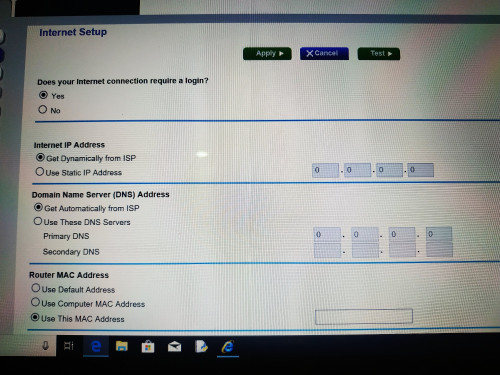
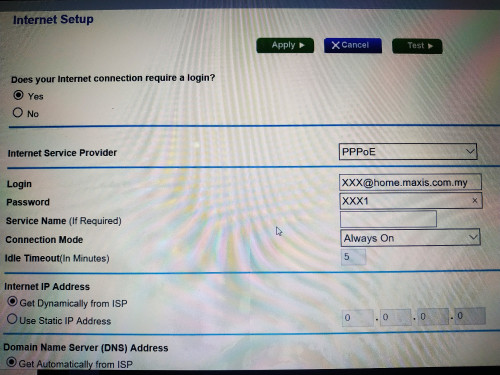
Yes, you are. Did you enable VLAN tagging at all? You need to have VLAN tagging for Maxis to work. I don’t think Netgear have native VLAN support if I am not mistaken, unlike Asus, TP-Link, or even D-Link.
You may need to set this up manually:
https://kb.netgear.com/25724/VLAN-tagging-s...ighthawk-routerMaxis VLAN is 621, just for your reference.


 Jun 20 2019, 08:02 AM


 Quote
Quote


 that's great news


 0.1629sec
 1.24
1.24
 7 queries
 GZIP Disabled