Welcome Guest ( Log In | Register )

9 Pages « < 6 7 8 9 >Bottom

Outline · [ Standard ] · Linear+

Home Networking WiFi Router Discussion Thread, Updated for 2023

views
     
SilentVampire
post Sep 23 2019, 03:07 PM

Networking Enthusiast
*******
Senior Member
5,714 posts

Joined: Mar 2007


QUOTE(presario9 @ Sep 23 2019, 01:03 PM)
Thanks man. After doing some reading, i think i should go with mesh system right. I am thinking of NETGEAR Orbi RBK50 because it got good reviews for walls and ceiling penetration performance. Or do you have any better recommendation plz? tq
*
Deco M9 Plus would be better.
SilentVampire
post Sep 26 2019, 04:39 PM

Networking Enthusiast
*******
Senior Member
5,714 posts

Joined: Mar 2007


QUOTE(wheelhot @ Sep 26 2019, 02:58 PM)
Yeah, I checked to ensure it's connected at 5ghz and I am expecting at least 400Mbps. I read that you need to place the router away from TV and cordless phone, but since the TV is not smart and that cordless phone is running at 2.4ghz, does it still affect the 5ghz frequency?
*
Latest firmware? 5GHz set to 40MHz or even 80MHz? No, the phone or tv does not affect 5GHz frequency.

QUOTE(orangtua @ Sep 26 2019, 03:50 PM)
Thanks for the suggestion. Currently my router is placed near to one side of wall on ground floor, on a shelf around half the ceiling height. The limiting factor for router placement is wife approval sad.gif I can't put a black box with antennas at the center of the house. And add in power/network cables, she will kill me. Anyway I will try to see if I can find a better spot than current one.
*
Just get the Asus RT-AC86U, and it will improve your wifi coverage.
SilentVampire
post Sep 26 2019, 07:51 PM

Networking Enthusiast
*******
Senior Member
5,714 posts

Joined: Mar 2007


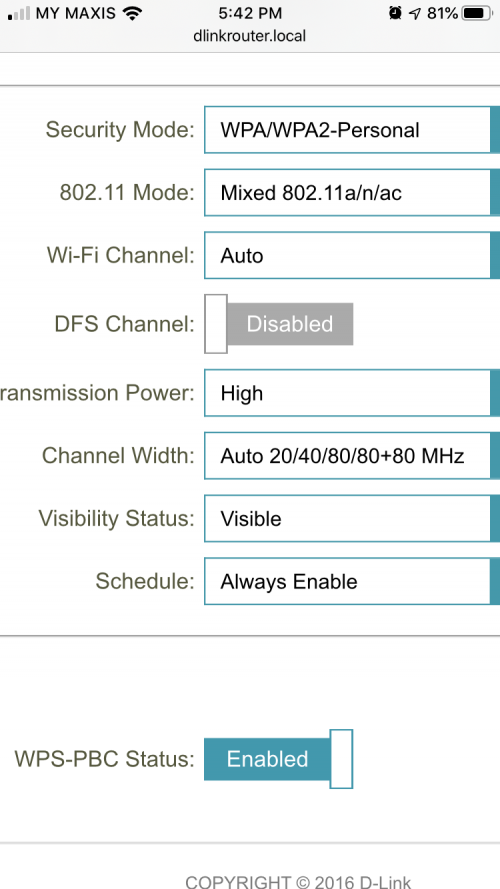
QUOTE(wheelhot @ Sep 26 2019, 05:45 PM)
user posted image

These are the wireless settings for 5Ghz, it should be fine I think.

But still not getting even 400 🤔

Any other settings I should check?
*
Can you manually set the channel width to 40 or 80MHz? I agree with Blacktubi. D-Link firmware sucks. TP-Link is better than D-Link and I would have recommended the TP-Link C2300, or the best one of all, the Asus RT-AC86U. You should have asked us lol.
SilentVampire
post Sep 29 2019, 02:15 PM

Networking Enthusiast
*******
Senior Member
5,714 posts

Joined: Mar 2007


QUOTE(sp3d2 @ Sep 29 2019, 11:01 AM)
Hi.

My house Is one floor 1250 ft2. Combine outside it is 2870 ft2.

4 average user in the house. Max usage is 4 people opening YouTube at the same time.

Should I upgrade current router dir-842 to better router? Does tenda ac18 really good for me and make any difference?

Using unifi 100 mbps.
*
Yes. The Tenda should be more than enough, but I would recommend you top up a little, and get the TP-Link C2300.
SilentVampire
post Oct 3 2019, 10:13 AM

Networking Enthusiast
*******
Senior Member
5,714 posts

Joined: Mar 2007


QUOTE(DaddyRhino @ Oct 3 2019, 06:00 AM)
Hi, I'm on Unifi 500Mbps and currently using Asus RT-AC1300UHP. The internet speed is not going beyond 300Mbps both wired (CAT 6A) and wireless (5Ghz) no matter what setting I change. I even updated with beta firmware and factory reset but no improvement. Any suggestion please to solve my issue? Thanks
*
You should be getting full speed with wired, but you won't get full speed of 500Mbps on 5GHz with that router.
SilentVampire
post Oct 3 2019, 11:46 AM

Networking Enthusiast
*******
Senior Member
5,714 posts

Joined: Mar 2007


QUOTE(DaddyRhino @ Oct 3 2019, 10:34 AM)
Nope, unfortunately even the wired (CAT 6A) is not getting more than 300Mbps. I'm getting TM technician to check their configuration again today. Both wired and wireless getting almost similar speed.
*
Did you try with another cable? It could be a cable issue.
SilentVampire
post Oct 7 2019, 05:15 PM

Networking Enthusiast
*******
Senior Member
5,714 posts

Joined: Mar 2007


QUOTE(DaddyRhino @ Oct 7 2019, 03:00 PM)
Finally managed to get 500Mbps via wifi connection after some tweaks in router's setting:

1) Changed the cable connecting modem and router's WAN (Cat5e - shorter than the previous one)
2) Changed 2.4Ghz band's frequency to 40Mhz only
3) Changed 5Ghz band's frequency to 80Mhz only
4) Disabled MU-MIMO option

Tested the wifi over 5Ghz band with iPhone8 and voila..the speed can clock more than 500Mbps...

Thanks to guidance from the sifus here...
*
Good job. Happy to see I was proven wrong innocent.gif
SilentVampire
post Oct 17 2019, 10:42 AM

Networking Enthusiast
*******
Senior Member
5,714 posts

Joined: Mar 2007


QUOTE(uhlaw @ Oct 16 2019, 11:38 PM)
Is buying M9 plus overkill for maxis fibre 300mbps?  My house 2 storey, 23x50 feet. I wana ditch all routers and connect mesh directly to TM modem
*
Yes, it is considered overkill. You should get one good router such as the Asus RT-AC86U. If you want excellent coverage all over the house though, I would recommend Deco M5. You can get M9 Plus if you have the money.

QUOTE(myrancid @ Oct 17 2019, 10:06 AM)
Hi I’m subscribed to Unifi 100Mbps. Which router should I get to filter some nasty things on the Net (porn etc) without slowing my connection?
*
Get the Asus RT-AC86U or TP-Link AC2300 or AC3150. Both brands have basic filter that you can activate. Keep in mind that if someone uses VPN, the filters won't be of any use unless you filter VPN connections as well.

QUOTE(DaddyRhino @ Oct 17 2019, 10:09 AM)
haha..sharing is caring...
*
Cheers!
SilentVampire
post Oct 17 2019, 01:46 PM

Networking Enthusiast
*******
Senior Member
5,714 posts

Joined: Mar 2007


QUOTE(uhlaw @ Oct 17 2019, 10:54 AM)
I wan coverage over my house, i feel right now i have too many devices in use: Archer c5v, huawei b618, re450. And I not happy with archer a9 too, even it is opened box.

Once i got proper setup, i will sell off all above devices. (I feel my current setup too rojak)
*
Too many devices. I suggest getting Deco M5 or M9 then. M9 Plus for the best coverage.
SilentVampire
post Oct 17 2019, 06:49 PM

Networking Enthusiast
*******
Senior Member
5,714 posts

Joined: Mar 2007


QUOTE(uhlaw @ Oct 17 2019, 01:54 PM)
before that i need to be sure, is maxis fibre profile saved/pre-set in these deco? I know unifi is fine, not sure about maxis fibre. I not going to use maxis voip and iptv
*
Yes, it is preset. If it is not, you can manually do it. It is not an issue.

QUOTE(myrancid @ Oct 17 2019, 02:56 PM)
My kids are still in kindergarten, I think that is good enough for now. Thank you!
*
Alright, get the Asus then for the best choice.
SilentVampire
post Oct 20 2019, 10:30 AM

Networking Enthusiast
*******
Senior Member
5,714 posts

Joined: Mar 2007


QUOTE(gwt_89 @ Oct 19 2019, 11:50 AM)
Hi, i just bought a mercury router D268G, but I cant set it up as a main router, have you try before on your D26G?

Can it be set up as main router in Malaysia?
*
You can’t. It does not support VLAN tagging. Not sure why people keep buying routers that does not support Unifi, when the first page has a great list of recommended routers.


QUOTE(smithveg @ Oct 19 2019, 04:02 PM)
My office area do not have fiber optic cables. Thus i cannot apply for unifi and maxis fiber. I would like to subscribe a mobile plan, and use it as a hotspot. But can anyone share with me if i manage the wifi in this way,  a hotspot can support up to how many devices?
*
Depends. Use a good router such as the Huawei B618, and you can probably support more.
SilentVampire
post Oct 21 2019, 06:32 PM

Networking Enthusiast
*******
Senior Member
5,714 posts

Joined: Mar 2007


QUOTE(Ninjagogogo @ Oct 21 2019, 02:42 PM)
House type: Landed
Size of house: 2 n half storey
Features required: Nothing much just need it to support my android TV
Number of devices connected to WiFi: 10
Internet Speed: 100mbps
Budget: between 2xx - 3xx

Current router : DIR850-L
Currently facing the slow and unstable wifi connection but when I perform speedtest throuh LAN it reached the 9xmbps for download speed.
*
Your budget is way too low for something decent, especially for a 2 and a half storey house. Look at first page and decide which suit your budget. Just keep in mind that you must pay for quality.
SilentVampire
post Oct 28 2019, 09:23 AM

Networking Enthusiast
*******
Senior Member
5,714 posts

Joined: Mar 2007


QUOTE(myrancid @ Oct 28 2019, 03:57 AM)
How do we know our devices/tv/laptop support ax or not? How to check?
*
No current devices/tv/laptop support AX unless you bought them in the last few months or so.
SilentVampire
post Nov 5 2019, 12:24 PM

Networking Enthusiast
*******
Senior Member
5,714 posts

Joined: Mar 2007


QUOTE(pixelrider @ Nov 5 2019, 12:09 PM)
Any router recommendation for 100Mbps Unifi with HyppTV at a double storey 2.6k sq. ft house? Been using the DIR-850L for ages but I think it's time for an upgrade because the signals are rather weak at 2nd floor. The router is located at 1st floor due to the existing wiring setup.

After some research these are the few models I'm thinking of, however I'm also open to other suggestions
1. TP-Link Deco M4 (2 unit)
2. D-Link Covr (2 unit)
3. TP-Link Archer A9
4. Tenda AC18 AC1900
5. Asus RT-AC1300UHP

Would love to hear suggestion from you guys, thanks!
*
I suggest getting the TP-Link C2300 or the Asus RT-AC86U. If you want strong consistent coverage, get the TP-Link Deco M5 or M9 Plus.
SilentVampire
post Nov 7 2019, 08:51 AM

Networking Enthusiast
*******
Senior Member
5,714 posts

Joined: Mar 2007


QUOTE(Silver_Shadow @ Nov 7 2019, 01:56 AM)
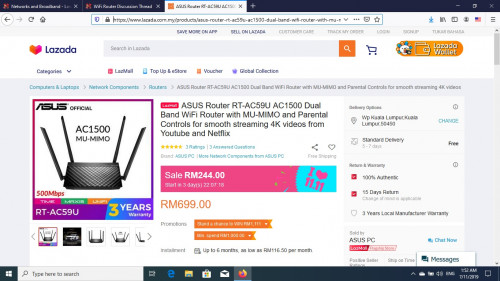
Now using Unifi 300Mbps & the TP-Link router spoiled.
Need to buy a new router with budget.
Is this router OK for 300Mbps?
Got promotion on 11/11.
Thanks

https://www.lazada.com.my/products/asus-rou...6QakUn&search=1

user posted image
*
I suggest the TP-Link AC2300 instead.
SilentVampire
post Nov 7 2019, 12:37 PM

Networking Enthusiast
*******
Senior Member
5,714 posts

Joined: Mar 2007


QUOTE(MGM @ Nov 7 2019, 09:51 AM)
Asus@Rm244 vs TPlink@rm428, double the price but how is the performance?
*
The TP-Link should be better.

This post has been edited by SilentVampire: Nov 7 2019, 12:38 PM
SilentVampire
post Nov 11 2019, 11:16 AM

Networking Enthusiast
*******
Senior Member
5,714 posts

Joined: Mar 2007


QUOTE(LostAndFound @ Nov 9 2019, 10:26 PM)
Thanks. Layout of my house (airwell in between) means I can probably use two units of mesh router and just about every important location is only one wall/floor away from a router. Deco m9 plus is better than M5 in what sense?
*
I suggest you read his review on his official website on the Deco M9 Plus. He elaborated in how M9 is better than M5: https://www.blacktubi.com/review/tp-link-de...m9-plus-review/

QUOTE(gugukrez @ Nov 9 2019, 11:03 PM)
any recommended product and affordable ?
*
Try the TP-Link RE450.

QUOTE(zahranzuheer @ Nov 11 2019, 09:50 AM)
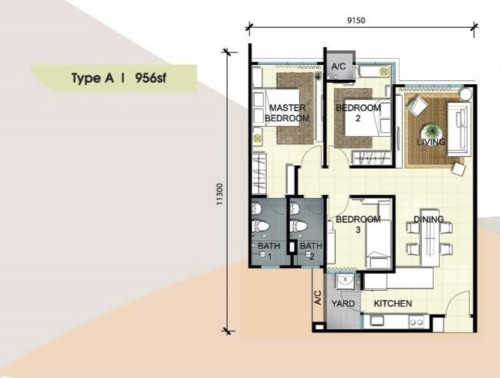
Hi, I'm currently using TIME 100 Mbps with the provided D-Link DIR -850L router. The router is currently placed in the living room on the TV cabinet, next to the TV. I'm getting dropped signals in the master bedroom. Any suggestions on how I can improve reception in the bedroom or do I need a new router?

user posted image
*
Get the C2300. I support bro FusionXY’s suggestion.
SilentVampire
post Nov 11 2019, 01:58 PM

Networking Enthusiast
*******
Senior Member
5,714 posts

Joined: Mar 2007


QUOTE(zahranzuheer @ Nov 11 2019, 11:56 AM)
Thanks, will have a look.

Currently looking at TP-Link's lineup. Between the C2300 and the AC4000, would I see any difference in performance?
*
Not much difference. The C4000 is similar to the C2300, except that it has a tri-band. Get the C2300.

QUOTE(Xflkekw @ Nov 11 2019, 12:52 PM)
Any thoughts on the D-Link AC1300 DIR-1360 wifi router? I am thinking of getting a new router for my TIME 500Mbps. Was considering that or the ASUS RT-AC58U. Which is better? I live in a small studio with another housemate and I mainly use wired connection for my laptop because the router and modem is in my room. The current router I am using is the default C1200 router provided by TIME which have been restarting a lot randomly due to its CPU not being able to handle my heavy usage.
*
I suggest getting the Asus RT-AC68U. It supports 500Mbps.
SilentVampire
post Nov 11 2019, 03:48 PM

Networking Enthusiast
*******
Senior Member
5,714 posts

Joined: Mar 2007


QUOTE(Xflkekw @ Nov 11 2019, 03:00 PM)
Asus RT-AC68U is way out of my budget... cheapest I have seen even today on lazada/shopee is like RM 679. I am looking for one under rm400.
*
Fair enough, get the Asus RT-AC58U.
SilentVampire
post Nov 11 2019, 09:40 PM

Networking Enthusiast
*******
Senior Member
5,714 posts

Joined: Mar 2007


QUOTE(LostAndFound @ Nov 11 2019, 04:43 PM)
Thanks, I haven't done Mikrotik before, and am not afraid of configuration or command line, but nowadays so busy I just want something which works without much setup.
Thanks, I already read that while googling. Ended up purchasing 4 Deco M9 Plus units this morning (3+1 is cheaper than 2+2), 2 for my house and 2 for my parents house who have been having router-related issues as well.
*
Good on you. You definitely would not regret the purchase.

9 Pages « < 6 7 8 9 >Top
 

Change to:
| Lo-Fi Version
0.1784sec    0.87    7 queries    GZIP Disabled
Time is now: 22nd December 2025 - 07:46 AM