Outline ·
[ Standard ] ·
Linear+
Unifi Official TM UniFi High Speed Broadband Thread V34, READ 1ST PAGE FOR TURBO SPEED INFO!
|
wilson1stop
|
 Aug 23 2018, 05:49 PM Aug 23 2018, 05:49 PM
|

|
QUOTE(cyberian @ Aug 23 2018, 06:45 PM) huh.. downgrade package no less in price ah... using 100MB now, thinking of downgrade to 300MB later previously got ppls mentioned downgrade was not allowed 30mbps, and that rm139 is for new subscriber only (for 24mths) i think you only got rm129 10mbps choices only, plus rm200 downgrade fee (maybe you can ask TM to waive, subject to approval) Refer: https://forum.lowyat.net/topic/4426624/allThis post has been edited by wilson1stop: Aug 23 2018, 05:52 PM |
|
|
|
|
|
ksking
|
Aug 23 2018, 06:11 PM
|
|
|
QUOTE(cwk0713 @ Aug 23 2018, 06:06 PM) Am I still overpaying for this?? Since I'm upgraded from 30mbps to 50mbps during the Thank You Campaign, but now 30mbps plan RM139/month, can I get a reduction? Or the rm139 is only eligible for new subscriber only?? I have not received email or sms about the turbo yet in Puchong Utama area... if ur contract ended... then yes |
|
|
|
|
|
nevland
|
Aug 23 2018, 06:24 PM
|
|
|
Mine after upgrade 800mb, the test using WiFi 5g, router is tp link Ac1200 Attached thumbnail(s)
|
|
|
|
|
|
poh880
|
Aug 23 2018, 06:27 PM
|
|
|
QUOTE(nuel92 @ Aug 23 2018, 02:33 PM) Check with maxis and maxis said no port at my area 😩 have to tahan with unipie lah Which unifi plan are you currently on? If less than 100 Mbps, can apply Maxis 30 Mbps. Just tell Maxis you have unifi at home will do. |
|
|
|
|
|
TSSilentVampire
|
Aug 23 2018, 06:29 PM
|
|
|
QUOTE(nevland @ Aug 23 2018, 06:24 PM) Mine after upgrade 800mb, the test using WiFi 5g, router is tp link Ac1200 WiFi 5GHz and that speed is considered decent. You need a router that can support 3x3, as well as a device that can support it as well. The TP-Link C1200 is only 2x2, so try to get the TP-Link C7 v5 or v4. |
|
|
|
|
|
AsuKi
|
Aug 23 2018, 06:32 PM
|
|
|
QUOTE(lelynx @ Aug 23 2018, 12:14 PM) okie, I've retested 800Mbps package again 1) 200++ Mbps DL and 100 Mbps UL on 5.0Ghz wifi (I hope TM will fully release the speed soon after the pilot testing) 2) 100 Mbps DL and 100 Mbps UL on 2.4Ghz wifi 3) 500++ Mbps DL and 100 Mbps UL on LAN ur 5Ghz can't handle giga speed lol |
|
|
|
|
|
poh880
|
Aug 23 2018, 06:33 PM
|
|
|
QUOTE(lyrilmaki @ Aug 23 2018, 05:35 PM) If I terminate my contract now and switch to Maxis, do I have to pay the RM500 in one time or I can pay monthly accumulated until RM500? Tell Maxis you have unifi and still in contract, they will reimburse you. |
|
|
|
|
|
lyrilmaki
|
Aug 23 2018, 06:36 PM
|
|
|
QUOTE(poh880 @ Aug 23 2018, 06:33 PM) Tell Maxis you have unifi and still in contract, they will reimburse you. Maxis called, and they said at this discounted price for RM89/month, they are unable to provide the reimbursement |
|
|
|
|
|
wilson1stop
|
Aug 23 2018, 06:40 PM
|
|
|
QUOTE(lyrilmaki @ Aug 23 2018, 07:36 PM) Maxis called, and they said at this discounted price for RM89/month, they are unable to provide the reimbursement Same call to me 2 days ago, hence these plans is for those contract-free to jumpship... This post has been edited by wilson1stop: Aug 23 2018, 06:41 PM |
|
|
|
|
|
miloaisdino
|
Aug 23 2018, 07:04 PM
|
|
|
https://rhombuscake.me/ works, except for bip check which doesnt work
|
|
|
|
|
|
Luxmi
|
Aug 23 2018, 07:07 PM
|
New Member

|
my area still very slow. Not yet upgraded. Download 1 movie take even longer hour now
|
|
|
|
|
|
youngy
|
Aug 23 2018, 07:10 PM
|
|
|
QUOTE(Andy72 @ Aug 22 2018, 04:14 PM) For those who have the budget, try ASUS RT-AC5300 and RT-AC88U. Using RT-AC5300 as the primary router in the living room and RT-AC88U as the media bridge in the office to link up devices using 1Gbps LAN. Wireless speed exceeds 900Mbps. Perfect for Unifi Turbo 800Mbps. Using wireless USB receiver? |
|
|
|
|
|
cwk0713
|
Aug 23 2018, 07:33 PM
|
Getting Started
|
QUOTE(ksking @ Aug 23 2018, 06:11 PM) if ur contract ended... then yes I installed mine at 2-1-2016, Thank you Campaign upgrade on 23 March 2017. I guess my contract ended, what can I do to get a reduction?? |
|
|
|
|
|
ksking
|
Aug 23 2018, 07:39 PM
|
|
|
QUOTE(cwk0713 @ Aug 23 2018, 07:33 PM) I installed mine at 2-1-2016, Thank you Campaign upgrade on 23 March 2017. I guess my contract ended, what can I do to get a reduction?? Walk in tmpoint to downgrade |
|
|
|
|
|
Zack5095
|
Aug 23 2018, 07:51 PM
|
New Member
|
QUOTE(miloaisdino @ Aug 23 2018, 07:04 PM) https://rhombuscake.me/ works, except for bip check which doesnt work How can it the result tell that my package is entitle turbo speed upgrade? This post has been edited by Zack5095: Aug 23 2018, 07:52 PM |
|
|
|
|
|
ad2000
|
Aug 23 2018, 07:59 PM
|
|
|
|
|
|
|
|
|
wilson1stop
|
Aug 23 2018, 08:01 PM
|
|
|
QUOTE(ad2000 @ Aug 23 2018, 08:59 PM) thats was fast marketing strategy... Should pin it in front page, time for ubah router!! This post has been edited by wilson1stop: Aug 23 2018, 08:05 PM |
|
|
|
|
|
JohnLai
|
Aug 23 2018, 08:10 PM
|
|
|
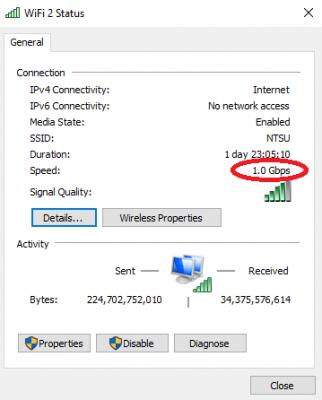
QUOTE(Icehart @ Aug 23 2018, 08:05 PM) Is this a good indicator to assume my router will support the 800Mbps new speed?  Nope......wifi protocol efficiency issue. With that 1Gbps PHY link speed, your MAC layer speed probably around 500 - 600Mbps. |
|
|
|
|



 Quote
Quote




 0.0387sec
 0.56
0.56
 6 queries
 GZIP Disabled