Welcome Guest ( Log In | Register )

Bump Topic Topic Closed RSS Feed
423 Pages « < 70 71 72 73 74 > » Bottom

Outline · [ Standard ] · Linear+

Unifi Official TM UniFi High Speed Broadband Thread V34, READ 1ST PAGE FOR TURBO SPEED INFO!

views
     
sHawTY
post Aug 23 2018, 12:47 AM

Frequent Reporter
********
All Stars
14,909 posts

Joined: Jul 2005

QUOTE(anip94 @ Aug 22 2018, 11:28 PM)
anyone here on a high rise using vdsl2 has received the turbo yet?
You can't, you won't, you never will
Unless the building management of your apartment / condo is willing to fork out the money to upgrade the equipment in the MDF room
imin
post Aug 23 2018, 01:46 AM

Enthusiast
*****
Senior Member
818 posts

Joined: Jan 2003
Hi, is there any way I can extend my unifi wiring line? I mean currently my unifi line/wiring together with all the modem is located inside my master bedroom. But now I want to put the modem outside in the living room. The unifi fibre cable (which originates from outside my house) isn't long enough if I want to put all the modem and router in the living room.... So how can I extend the unifi fibre cable all the way to the living room? Thanks!
wilson1stop
post Aug 23 2018, 01:55 AM

Look at all my stars!!
*******
Senior Member
2,779 posts

Joined: Feb 2008


QUOTE(imin @ Aug 23 2018, 02:46 AM)
Hi, is there any way I can extend my unifi wiring line? I mean currently my unifi line/wiring together with all the modem is located inside my master bedroom. But now I want to put the modem outside in the living room. The unifi fibre cable (which originates from outside my house) isn't long enough if I want to put all the modem and router in the living room.... So how can I extend the unifi fibre cable all the way to the living room? Thanks!
*
Wifi? eg get a wifi attenna for boost coverage
Powerline? eg Aztech Homeplug

Fiber cable extensions? Watchout cut your hand and it's very easily broken.
https://www.lazada.com.my/products/20-meter...s511379709.html

Better options is Modem remain in bedroom, but extend LAN cable into living room (router can put in living room or a switch also can) since it's thicker and cheaper.

P/s: Try find yourself for cheaper or longer cable if needed.

This post has been edited by wilson1stop: Aug 23 2018, 02:01 AM
Doraku
post Aug 23 2018, 01:58 AM

Old threads digger
******
Senior Member
1,155 posts

Joined: Apr 2016


QUOTE(Ben Ling @ Aug 22 2018, 12:36 PM)
may I know which hardware revision is it ? Still V1 ?
*
QUOTE(hurricane21 @ Aug 22 2018, 12:51 PM)
I was about to ask the same too, saw the new TP-Link logo
*
QUOTE(Jjuggler @ Aug 22 2018, 01:07 PM)
it is v2 or v3?
nope. it is either v2 or v3. v1 has old tplink logo.
kindly refer to the above assumptions.
*
Nope sadly it still a old V1 hardware
Attached Image

QUOTE(JohnLai @ Aug 22 2018, 02:37 PM)
Sometimes C1200 UPNP doesn't work if it is triggered by 'certain' software. (Have you turn it off and on yet?)

However, for EU firmware......there is beta firmware available specifically for UPNP issue.......here

Malaysia firmware update = "pergi mimpilah"  console.gif
*
lol i was try to use Utorrent so i enable UPnP and it only worked one time out of - 20+++ because of Utorrent built in port checker is not working properly i dont know port open or not lol,then i decide to check port and found out port is still closed,to make sure utorrent is not the problem i try to Open port using MiniUPnP but it give me error lol. Shh now i have to manually open and close port everytime i want using torrent lol cry.gif

This post has been edited by Doraku: Aug 23 2018, 02:00 AM
imin
post Aug 23 2018, 02:07 AM

Enthusiast
*****
Senior Member
818 posts

Joined: Jan 2003
QUOTE(wilson1stop @ Aug 23 2018, 01:55 AM)
Wifi? eg get a wifi attenna for boost coverage
Powerline? eg Aztech Homeplug

Fiber cable extensions? Watchout cut your hand and it's very easily broken.
https://www.lazada.com.my/products/20-meter...s511379709.html

wow thanks. but what's the difference between the cable in the link you gave above with this one https://www.lazada.com.my/products/sc-sc-si...s541022387.html ?

Better options is Modem remain in bedroom, but extend LAN cable into living room (router can put in living room or a switch also can) since it's thicker and cheaper.

P/s: Try find yourself for cheaper or longer cable if needed.
*
wilson1stop
post Aug 23 2018, 02:18 AM

Look at all my stars!!
*******
Senior Member
2,779 posts

Joined: Feb 2008


QUOTE(imin @ Aug 23 2018, 03:07 AM)

*
Are you sure extend fiber cable RG45 into living room is a good idea?
If you regret someday, don't blame me ya.

hardcase vs normal cable (over bend will broken easily)
AVFAN
post Aug 23 2018, 02:20 AM

20k VIP Club
*********
All Stars
24,454 posts

Joined: Nov 2010
QUOTE(imin @ Aug 23 2018, 01:46 AM)
Hi, is there any way I can extend my unifi wiring line? I mean currently my unifi line/wiring together with all the modem is located inside my master bedroom. But now I want to put the modem outside in the living room. The unifi fibre cable (which originates from outside my house) isn't long enough if I want to put all the modem and router in the living room.... So how can I extend the unifi fibre cable all the way to the living room? Thanks!
*
u can replace the white cable from the junction box with a longer one... to where u want it to end (modem) unless it is very far.

for that, u can call unifi, they can arrange a contractor for you.

price.. can't remember but I think rm300-400... from a fren's case 2 years ago.
imin
post Aug 23 2018, 02:23 AM

Enthusiast
*****
Senior Member
818 posts

Joined: Jan 2003
QUOTE(wilson1stop @ Aug 23 2018, 02:18 AM)
Are you sure extend fiber cable RG45 into living room is a good idea?
If you regret someday, don't blame me ya.

hardcase vs normal cable (over bend will broken easily)
*
Ouch.. it's that easy to break is it?? shocking.gif shocking.gif


QUOTE(AVFAN @ Aug 23 2018, 02:20 AM)
u can replace the white cable from the junction box with a longer one... to where u want it to end (modem) unless it is very far.

for that, u can call unifi, they can arrange a contractor for you.

price.. can't remember but I think rm300-400... from a fren's case 2 years ago.
*
I think this is the better method then... I'll contact TM later. Thanks!
lelynx
post Aug 23 2018, 03:00 AM

Enthusiast
*****
Senior Member
838 posts

Joined: Aug 2005
From: Selangor


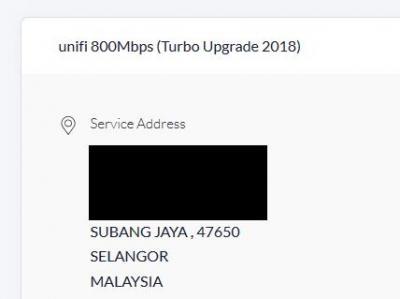
I've checked my unifi package just now and saw it was upgraded to 800mpbs
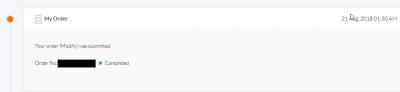
There was an Work Order on 21-Aug for this. Some info here
- I do not receive any email or sms on this turbo upgrade
- I'm with unifi for many years now and paying rm217 for 100mpbs package; with hypptv
- I'm on huawei BTU and the tp-link ac1200 (v1 firmware)
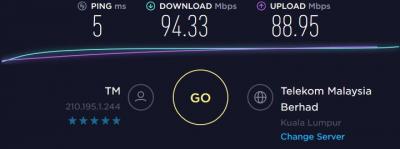
- After the reboot, I can only get 200mpbs DL and 100mpbs UL on 5.0ghz
- But only get 100mpbs DL and 100mpbs UL on LAN and 2.4ghz. Wonder why the low speed on LAN. QOS was disabled
- I'm from Subang Jaya, Selangor
- photos as follows

This post has been edited by lelynx: Aug 23 2018, 03:44 AM


Attached thumbnail(s)
Attached Image Attached Image Attached Image Attached Image
Ebony & Ivory
post Aug 23 2018, 04:29 AM

Enthusiast
*****
Senior Member
961 posts

Joined: Jan 2016
QUOTE(lelynx @ Aug 23 2018, 03:00 AM)
I've checked my unifi package just now and saw it was upgraded to 800mpbs
- After the reboot, I can only get 200mpbs DL and 100mpbs UL on 5.0ghz
- But only get 100mpbs DL and 100mpbs UL on LAN and 2.4ghz. Wonder why the low speed on LAN. QOS was disabled
*
normal for wifi, device limitation.

ur cable is CAT5E?

use another Ethernet cable to test it.

This post has been edited by Ebony & Ivory: Aug 23 2018, 04:30 AM
alextan99
post Aug 23 2018, 05:08 AM

Wassup
*******
Senior Member
2,660 posts

Joined: Jan 2003
From: Somewhere in the world
QUOTE(lelynx @ Aug 23 2018, 03:00 AM)
I've checked my unifi package just now and saw it was upgraded to 800mpbs
There was an Work Order on 21-Aug for this. Some info here
- I do not receive any email or sms on this turbo upgrade
- I'm with unifi for many years now and paying rm217 for 100mpbs package; with hypptv
- I'm on huawei BTU and the tp-link ac1200 (v1 firmware)
- After the reboot, I can only get 200mpbs DL and 100mpbs UL on 5.0ghz
- But only get 100mpbs DL and 100mpbs UL on LAN and 2.4ghz. Wonder why the low speed on LAN. QOS was disabled
- I'm from Subang Jaya, Selangor
- photos as follows
*
Probably the LAN port on the modem or wireless AP only max 100MB
Azusa_San
post Aug 23 2018, 05:14 AM

Casual
***
Junior Member
309 posts

Joined: Mar 2015
QUOTE(alextan99 @ Aug 23 2018, 05:08 AM)
Probably the LAN port on the modem or wireless AP only max 100MB
*
Not port, because he can still obtain 200mbps+ on 5GHz WIFI.

Most probably is cable issue or he is using a Fast Ethernet NIC. Need at least CAT5E + Gigabit NIC.

This post has been edited by Azusa_San: Aug 23 2018, 05:19 AM
lelynx
post Aug 23 2018, 05:40 AM

Enthusiast
*****
Senior Member
838 posts

Joined: Aug 2005
From: Selangor


Found the culprit, it's the NIC as it's FE only
No issue on cable as it's on CAT5E
Just have to wait for unifi on the full release of 800mpbs speed on 5.0ghz then
zulkarnain98
post Aug 23 2018, 07:10 AM

Getting Started
**
Junior Member
116 posts

Joined: Nov 2016


QUOTE(chocobo7779 @ Aug 23 2018, 12:37 AM)
I highly doubt you'll get a turbo upgrade due to limitations of VDSL2 icon_idea.gif

Although you may get a speed upgrade (somewhere of 30->50Mbps)  icon_idea.gif
*
Change to maxis fibre new plan. 30mbps rm89 and 100mbps RM129.
Neo|ofGeo
post Aug 23 2018, 07:35 AM

Stop Complaining and Read
Group Icon
Elite
3,142 posts

Joined: Nov 2010


QUOTE(zulkarnain98 @ Aug 23 2018, 07:10 AM)
Change to maxis fibre new plan. 30mbps rm89 and 100mbps RM129.
*
sad.gif you hit your head when birth is it
didn't understand question or situation is it
zulkarnain98
post Aug 23 2018, 07:42 AM

Getting Started
**
Junior Member
116 posts

Joined: Nov 2016


QUOTE(Neo|ofGeo @ Aug 23 2018, 07:35 AM)
sad.gif  you hit your head when birth is it
didn't understand question or situation is it
*
VDSL2 HSBB can't get turbo upgrade.
birain
post Aug 23 2018, 08:17 AM

良い一日を
******
Senior Member
1,448 posts

Joined: Apr 2007
QUOTE(zulkarnain98 @ Aug 23 2018, 07:42 AM)
VDSL2 HSBB can't get turbo upgrade.
*
since maxis is riding on tm's fibre, how are they going to service you? maxis don't have vdsl2. icon_idea.gif
TSSilentVampire
post Aug 23 2018, 08:33 AM

Networking Enthusiast
*******
Senior Member
5,714 posts

Joined: Mar 2007


QUOTE(Haruji Sora @ Aug 23 2018, 12:01 AM)
Landed Property , Kuala Lumpur (Wangsa Maju)

Unifi Portal Account updated to 800mbps 2 days ago.

Speed test still showing only 300+ mbps on LAN. WiFi 5Ghz flip flop in between 1xx mbps to 240+ mbps

Not sure is it my equipment problem of Unifi still very unstable in the speed upgrade.

Live Chat earlier with Unifi, they just say currently it is Pilot Phase and Monitoring so the speed can't achieve full yet.

I'm using the Huawei BTU (changed earlier this year Feb)

Router own personal Archer C7 V2 (bought it over a year or 2 ago)
*
You could try with another router or change your cable, and your receiving device just be able to support the turbo speed as well.

QUOTE(imin @ Aug 23 2018, 01:46 AM)
Hi, is there any way I can extend my unifi wiring line? I mean currently my unifi line/wiring together with all the modem is located inside my master bedroom. But now I want to put the modem outside in the living room. The unifi fibre cable (which originates from outside my house) isn't long enough if I want to put all the modem and router in the living room.... So how can I extend the unifi fibre cable all the way to the living room? Thanks!
*
Contact TM to do it, or as other posters said have said, so it yourself but be extremely careful as the fiber cable is very fragile. If you want better wireless coverage, you could get a better router that as stronger wireless capabilities.

QUOTE(lelynx @ Aug 23 2018, 03:00 AM)
I've checked my unifi package just now and saw it was upgraded to 800mpbs
There was an Work Order on 21-Aug for this. Some info here
- I do not receive any email or sms on this turbo upgrade
- I'm with unifi for many years now and paying rm217 for 100mpbs package; with hypptv
- I'm on huawei BTU and the tp-link ac1200 (v1 firmware)
- After the reboot, I can only get 200mpbs DL and 100mpbs UL on 5.0ghz
- But only get 100mpbs DL and 100mpbs UL on LAN and 2.4ghz. Wonder why the low speed on LAN. QOS was disabled
- I'm from Subang Jaya, Selangor
- photos as follows
*
It is normal for the wireless, and on LAN, your limitation is your NIC on your device. Either get a USB adapter that support 5GHz AC, and get one that is fairly good and support at least 3x3. You have to change your router as well, to one that supports at least 3x3, so you will have to spend a fair bit. I recommend the TP-Link Archer C7 v4 or v5.

toytoy
post Aug 23 2018, 08:52 AM

Enthusiast
*****
Senior Member
875 posts

Joined: Jan 2003


Saw in another FB Setia Alam group the upgrade started. No SMS no email no notification. Suddenly upgraded.
Keatsan
post Aug 23 2018, 09:07 AM

If it ain't broke, don't 6ix it
******
Senior Member
1,218 posts

Joined: Jan 2010
From: Today 06.09 am
My area USJ - Subang Jaya has received the Turbo upgrade between 1am-5am today.

50mbps -> 500mpbs

No SMS / Email. Found out my profile through Unifi App.

423 Pages « < 70 71 72 73 74 > » Top
Topic ClosedOptions
 

Change to:
| Lo-Fi Version
0.0202sec    0.12    6 queries    GZIP Disabled
Time is now: 7th December 2025 - 07:05 AM