Welcome Guest ( Log In | Register )

Bump Topic Topic Closed RSS Feed
11 Pages « < 6 7 8 9 10 > » Bottom

Outline · [ Standard ] · Linear+

Unifi Official TM UniFi High Speed Broadband Thread V34, READ 1ST PAGE FOR TURBO SPEED INFO!

views
     
StuartLee2015
post Sep 13 2018, 11:07 PM

Regular
******
Senior Member
1,221 posts

Joined: Sep 2014
From: Malaysia


QUOTE(JohnLai @ Sep 13 2018, 11:00 PM)
Test faster.

If the link speed between RGX4400 WAN port with your PC using CAT5e is 1Gbps, it means BTU is the culprit and you have no choice but to contact TM..
*
RGX4400 ---- Cat5e ---- PC lan port.

does this BTU affect the wireless speed of the RGX4400?


Attached thumbnail(s)
Attached Image
StuartLee2015
post Sep 13 2018, 11:10 PM

Regular
******
Senior Member
1,221 posts

Joined: Sep 2014
From: Malaysia


QUOTE(jusbella @ Sep 13 2018, 11:09 PM)
No, wireless speed is depend on 2.4 or 5ghz only.

please refer this for full spec of the router: https://forum.lowyat.net/topic/3994248/all

in 5Ghz u will get max 300mbps only.

Use cable is the most accurate.
*
the thing is, even with 5ghz running, i can't get connected ( my phone can't detect it if i step few steps away from the router )
StuartLee2015
post Sep 13 2018, 11:14 PM

Regular
******
Senior Member
1,221 posts

Joined: Sep 2014
From: Malaysia


QUOTE(jusbella @ Sep 13 2018, 11:11 PM)
That's because ur phone is not Dual AC capable. Ur old phone is 2.4GHz capable only.
*
Specs say it's AC Capable, and have dual-band. if i place my phone on the router's top, i get 100% Strength, if i lift it up, it will drop to 20% and further down the further i away . My Samsung TAB S3 is the same too.
StuartLee2015
post Sep 13 2018, 11:31 PM

Regular
******
Senior Member
1,221 posts

Joined: Sep 2014
From: Malaysia


QUOTE(JohnLai @ Sep 13 2018, 11:22 PM)
As cpt7 mentioned, your I240G is "T" or "P" variant?
  hmm.gif
EDIT: Take a look on the sticker under the BTU/ONU.
NAT Boost / NAT Acceleration / Cut Through Forwarding / Fast Track will be disabled if QOS is enabled.
*
it's T variant...
StuartLee2015
post Sep 13 2018, 11:43 PM

Regular
******
Senior Member
1,221 posts

Joined: Sep 2014
From: Malaysia


QUOTE(JohnLai @ Sep 13 2018, 11:39 PM)
Well, guess the variant doesn't matter.... hmm.gif

My condolences.... console.gif
*
no no it's okay, i don't know the variant or what it differences is...

So i tried many speed test over the phone, pc and tab

I can't get about the same speed as LAN, eg: 70+ Mbps

I tap on the SSID on my phone, it shows 72 Mbps, when i speed test it, it max about 27 Mbps...

you know what's wrong?

- Router is already RGX4400
StuartLee2015
post Sep 13 2018, 11:50 PM

Regular
******
Senior Member
1,221 posts

Joined: Sep 2014
From: Malaysia


QUOTE(JohnLai @ Sep 13 2018, 11:46 PM)
72Mbps? This is 802.11N speed at 20Mhz channel width, SGI 400ns and 64-QAM 5/6. I thought you are connecting using 802.11AC?  confused.gif

27Mbps is about right with that link speed given your neighbourhood busy 2.4Ghz hotspots.
*
I can't connect to 5Ghz if i went back into my room. So all left is 2.4GHz.

will the speed improve when i get DIR878 over 2.4Ghz...?
StuartLee2015
post Sep 14 2018, 12:39 AM

Regular
******
Senior Member
1,221 posts

Joined: Sep 2014
From: Malaysia


So now i am chatting with LiveChat TM to ask to configure the BTU to 1.0Gbps from 100.0MBps, she says reset port, does that work?
StuartLee2015
post Sep 14 2018, 12:46 AM

Regular
******
Senior Member
1,221 posts

Joined: Sep 2014
From: Malaysia


QUOTE(jusbella @ Sep 14 2018, 12:43 AM)
No, the btu must reconfigure to 1gbps.

Anyway u may test, once they reset your port, your modem will restart, then u try plug in cat5e cable direct to your Lan port see whether you getting 1gbps connection speed or not.
*
You mean they can actually Reset the Port remotely, and my modem will shows 1.0Gpbs when i test it by Modem - Cat5e - my pc gigabit port?
StuartLee2015
post Sep 14 2018, 01:01 AM

Regular
******
Senior Member
1,221 posts

Joined: Sep 2014
From: Malaysia


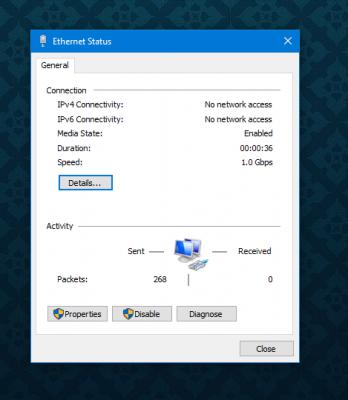
Update:

Alcatel Lucent 1240G got 1.0Gbps now.


Attached thumbnail(s)
Attached Image
StuartLee2015
post Sep 14 2018, 01:11 AM

Regular
******
Senior Member
1,221 posts

Joined: Sep 2014
From: Malaysia


QUOTE(JohnLai @ Sep 14 2018, 01:04 AM)
Now then...time to test via PC LAN first.....

Then 5ghz 802.11AC 80mhz channel width on your phone.
Oh ya, use the speedtest apps on your android phone, change the server, type in "Kuala Lumpur" and press "Telekom Malaysia"
If you use web browser on your phone....the webkit or webview component is bottlenecked by your phone weak CPU.
*
I just speedtest on 2.4Ghz , cannot get past 30Mbps, sometimes 3Mbps. I used the Speedtest android app.
StuartLee2015
post Sep 14 2018, 01:15 AM

Regular
******
Senior Member
1,221 posts

Joined: Sep 2014
From: Malaysia


QUOTE(Boy96 @ Sep 14 2018, 01:05 AM)
What did u tell to the livechat CS? mine just now just gave up on me and never replied anymore
*
I mentioned that connecting Alcatel Lucent 1240G to my Pc with intel 1219-V gigabit Lan port using Cat5e, and i got 100.0Mbps.
I then mentioned that connecting RGX4400 to my PC with intel 1219-V Gigabit Lan port using Cat5e, and i got 1.0Gbps.
I then mentioned that people in Low Yat Forums suggest me to contact TM to configure the Alcatel Lucent 1240G to 1.0Gbps.
I also mentioned that previously i am on Advance 50 Plus and got turbo-ed to 500Mbps and i can't get past 90+ Mbps.
then she say can't promise but can try reset port.
StuartLee2015
post Sep 14 2018, 01:24 AM

Regular
******
Senior Member
1,221 posts

Joined: Sep 2014
From: Malaysia


QUOTE(jusbella @ Sep 14 2018, 01:19 AM)
Dude, don't tell them lowyat forum etc. Just tell them my friend work as network engineer guiding u.
*
Oh? haha... i see..
StuartLee2015
post Sep 14 2018, 01:41 AM

Regular
******
Senior Member
1,221 posts

Joined: Sep 2014
From: Malaysia


So i use my Laptop which have 1000Mbps LAN port , connect to RGX4400 using Cat5e, and it won't go above 100Mbps on download and upload.

What's wrong again?
StuartLee2015
post Sep 14 2018, 02:09 AM

Regular
******
Senior Member
1,221 posts

Joined: Sep 2014
From: Malaysia


QUOTE(jusbella @ Sep 14 2018, 01:42 AM)
Your account not turbo yet
*
Even though the Unifi account shows 500Mbps?
StuartLee2015
post Sep 14 2018, 02:27 AM

Regular
******
Senior Member
1,221 posts

Joined: Sep 2014
From: Malaysia


QUOTE(stasio @ Sep 14 2018, 02:15 AM)
From where you get laptop now?
*
My sis's.
StuartLee2015
post Sep 14 2018, 02:27 AM

Regular
******
Senior Member
1,221 posts

Joined: Sep 2014
From: Malaysia


QUOTE(dragna @ Sep 14 2018, 02:25 AM)
Seriously? You’re asking this question again when we already pointed out to you the source of problem where it’s youre BTU. It supply’s the connection to your router then to your devices. Irregardless of speeds your laptop or router is capable of the main root comes from the BTU!
*
Live Chat with TM, Reset Port, the BTU is now 1.0Gbps instead of 100.0Mbps .... I posted about it's success on getting the BTU to 1.0Gbps.

This post has been edited by StuartLee2015: Sep 14 2018, 02:35 AM
StuartLee2015
post Sep 14 2018, 02:36 AM

Regular
******
Senior Member
1,221 posts

Joined: Sep 2014
From: Malaysia


QUOTE(hannchua @ Sep 14 2018, 02:28 AM)
Just live chat and request for a technician to come and stress that it's their fault so you don't have to pay. Ask them to bring new equipment just in case.
*
Okay.. the speed is not stable at all... I guess TM Technician is the only last thing i can do now.
StuartLee2015
post Sep 14 2018, 09:56 AM

Regular
******
Senior Member
1,221 posts

Joined: Sep 2014
From: Malaysia


QUOTE(Doraku @ Sep 14 2018, 05:45 AM)
AHHHHHHHHHHHHHH Why you so mati-mati dont want to tell me your device distance from router bangwall.gif  bangwall.gif  bangwall.gif
*
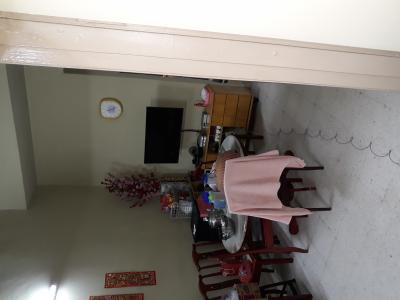
I don't know how to measure distance so photo for you


Attached thumbnail(s)
Attached Image
StuartLee2015
post Sep 14 2018, 10:02 AM

Regular
******
Senior Member
1,221 posts

Joined: Sep 2014
From: Malaysia


QUOTE(Doraku @ Sep 14 2018, 10:00 AM)
i mean your laptop distance from your router, and dont please stack your router with BTU it will cause overheating
*
I got a fan blowing... i put my laptop on the dining table also max about 30+ Mbps...

Just now speedtest in my room pc on wifi got 9.27 Mbps... i don't know what's wrong anymore haha... sometimes 0.XX Mbps.. too
StuartLee2015
post Sep 14 2018, 10:28 AM

Regular
******
Senior Member
1,221 posts

Joined: Sep 2014
From: Malaysia


QUOTE(Doraku @ Sep 14 2018, 10:03 AM)
Please tell me distance from your pc to your router plus is there any obstacle like wall?
*
Distance i don't know how to measure, i just told you lol... here's photo..
my pc is in my room, i was standing at my room entrance on this photo.


Attached thumbnail(s)
Attached Image

11 Pages « < 6 7 8 9 10 > » Top
Topic ClosedOptions
 

Change to:
| Lo-Fi Version
0.2253sec    0.49    7 queries    GZIP Disabled
Time is now: 6th December 2025 - 10:31 AM