

QUOTE(wilson1stop @ Sep 12 2018, 11:46 PM)

OMG, now you just know CAT5 is 100Mbps and CAT5e is 1000Mbps?

Unifi Official TM UniFi High Speed Broadband Thread V34, READ 1ST PAGE FOR TURBO SPEED INFO!
|
|
 Sep 12 2018, 11:50 PM Sep 12 2018, 11:50 PM
Return to original view | Post
#101
|
 
Senior Member
1,221 posts Joined: Sep 2014 From: Malaysia  
|
QUOTE(wilson1stop @ Sep 12 2018, 11:46 PM) OMG, now you just know CAT5 is 100Mbps and CAT5e is 1000Mbps? |
|
|
|
|
|
Sep 12 2018, 11:53 PM
Return to original view | IPv6 | Post
#102
|
|
Senior Member
1,221 posts Joined: Sep 2014 From: Malaysia
|
QUOTE(JohnLai @ Sep 12 2018, 11:48 PM) Since you mentioned your cable is cat5 and not cat5e, we can skip that LAN link speed check. Make sure you are using CAT5e cable from I240G to RGX4400 too. Same with LAN cable from RGX4400 to PC's Intel 1219-V Yes, i am sure, 1240G > Cat5e > RGX4400.Not much we can do now. Can you at least ensure CAT5e cable is being used to connect I240G and RGX4400 now? Let start with fixing your 5Ghz signal first. First, set both 2.4ghz and 5.0ghz wifi channel width to 40Mhz and 80Mhz respectively. Orient your RGX4400 vertically with the TM logo side facing the direction you wanna focus. Speedtest your 5ghz smartphone again using TM speedtest server. there's ' Cat5e ' printed on the blue wire. It comes from the STB box. Okay. I will set 2.4Ghz on 40Mhz and 5Ghz on 80Mhz. Update : I have set 2.4Ghz on 40Mhz and 5Ghz on 80Mhz... next will orient my RGX4400 facing my room.... This post has been edited by StuartLee2015: Sep 12 2018, 11:55 PM |
|
|
 Sep 13 2018, 12:02 AM Sep 13 2018, 12:02 AM
Return to original view | IPv6 | Post
#103
|
|
Senior Member
1,221 posts Joined: Sep 2014 From: Malaysia
|
QUOTE(JohnLai @ Sep 12 2018, 11:56 PM) Max transmit power too..... Samsung J7 Pro @ 5Ghz @ 80mhzI am sitting in front like 10 cm close to router to get connected and max Wi-Fi strength . If I walk away like few steps , it will drop to the last dot of the Wi-Fi icon. This post has been edited by StuartLee2015: Sep 13 2018, 12:04 AM Attached thumbnail(s) 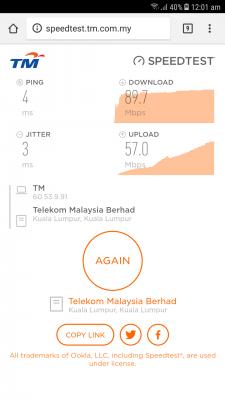
|
|
|
Sep 13 2018, 12:08 AM
Return to original view | Post
#104
|
|
Senior Member
1,221 posts Joined: Sep 2014 From: Malaysia
|
QUOTE(JohnLai @ Sep 13 2018, 12:05 AM) ........-.-.......Just a quick check, how many 5Ghz hotspot detected on your area using the phone through wifi analyzer? I think only me?Max 100% power too... channel is 44... This post has been edited by StuartLee2015: Sep 13 2018, 12:10 AM Attached thumbnail(s) 
|
|
|
Sep 13 2018, 12:11 AM
Return to original view | Post
#105
|
|
Senior Member
1,221 posts Joined: Sep 2014 From: Malaysia
|
QUOTE(wilson1stop @ Sep 13 2018, 12:10 AM) Not only you, but your phone unable to detect other 5Ghz hotspot. Hahaha... |
|
|
Sep 13 2018, 12:13 AM
Return to original view | IPv6 | Post
#106
|
|
Senior Member
1,221 posts Joined: Sep 2014 From: Malaysia
|
5Ghz setting is like in the picture...
Attached thumbnail(s) 
|
|
|
|
|
|
Sep 13 2018, 12:17 AM
Return to original view | IPv6 | Post
#107
|
|
Senior Member
1,221 posts Joined: Sep 2014 From: Malaysia
|
QUOTE(JohnLai @ Sep 13 2018, 12:14 AM) Hmm.....can you change 5ghz channel to 56, 104, 124,136 and 149? Speedtest again with these different channels. These test is where i directly sit in front the router achieved speeds... lol... Check if changing to different 5ghz channel make any difference or not.  Previous horizontal orientation result: Speed test on Samsung J7 Pro: 60.0 Mbps, upload: 93.5 Mbps ( 5.0 Ghz ) After vertical orientation result: Download 89.97Mbps , Upload 57Mbps (5.0ghz) Strange indeed....I wonder why the result kinda 'reversed'  Oh yes, 5Ghz signal strength is not that weak ( few steps away from router get disconnected and switched to 2.4Ghz ) right? doens't have any obstacle also. orientation is facing me holding the phone.  |
|
|
Sep 13 2018, 12:24 AM
Return to original view | IPv6 | Post
#108
|
|
Senior Member
1,221 posts Joined: Sep 2014 From: Malaysia
|
QUOTE(JohnLai @ Sep 13 2018, 12:20 AM) Aiyoyo.....try lah...change to different 5ghz channels......directly try channel 149........ Just now used 56, not in range, now using 149, my phone still cannot detect If i just step back few steps from router... Different SSID names too.... |
|
|
Sep 13 2018, 12:36 AM
Return to original view | IPv6 | Post
#109
|
|
Senior Member
1,221 posts Joined: Sep 2014 From: Malaysia
|
QUOTE(JohnLai @ Sep 13 2018, 12:28 AM) .....I am starting to think maybe your phone has bad signal reception issue. Faulty phone antenna or hardware? Do you have any other phone with 802.11AC wifi chip? I guess so... my sibling have TAB S3, i borrow her's and try. Impossible so close to the router and can't detect the 5ghz signal....... Update, her's the same, can't detect at all. Wonder what's wrong now.. lol If this AC is like this, i bet the USB AC adapter will be the same, maybe not... i have to get very very close, to the router to get 90% signal strength. if i lift the phone away from on top the router, it drop to 40% and if i step a little further, it goes down to 5% and then 0% and it switch to 2.4GHz ( 100% signal strength ) no matter how far i am from router. lol This post has been edited by StuartLee2015: Sep 13 2018, 12:44 AM |
|
|
Sep 13 2018, 12:45 AM
Return to original view | IPv6 | Post
#110
|
|
Senior Member
1,221 posts Joined: Sep 2014 From: Malaysia
|
QUOTE(JohnLai @ Sep 13 2018, 12:39 AM) That the strange part. no metal cover, a rubber cover only.He posted a picture of the distance between his phone and router before 5ghz signal totally vanish here https://forum.lowyat.net/uploads/attach-74/...-1536766044.jpg The distance is around 2 - 3 meters. Kinda impossible for signal loss to happen at that distance even for 5ghz. Do you use any sort of phone cover? A metal in the phone cover will heavily attenuate or reflect the signal as well. Try to remove the phone cover...... |
|
|
Sep 13 2018, 01:04 AM
Return to original view | IPv6 | Post
#111
|
|
Senior Member
1,221 posts Joined: Sep 2014 From: Malaysia
|
QUOTE(Hungry_Wolf @ Sep 13 2018, 12:45 AM) I notice there is a small fan close to the router. Possible the magnet from the fan causes interference to 5ghz signal? Cannot be that serious lo...  |
|
|
Sep 13 2018, 01:05 AM
Return to original view | IPv6 | Post
#112
|
|
Senior Member
1,221 posts Joined: Sep 2014 From: Malaysia
|
QUOTE(wilson1stop @ Sep 13 2018, 12:52 AM) true, so he must test with another wifi and phones... my phone is rubber cover, nothing else, no flip etc. .I think i will be getting DIR878 later on, and cat5e or USB AC55 .. |
|
|
Sep 13 2018, 01:10 AM
Return to original view | IPv6 | Post
#113
|
|
Senior Member
1,221 posts Joined: Sep 2014 From: Malaysia
|
QUOTE(JohnLai @ Sep 13 2018, 01:08 AM) Indeed, we had exhausted every possible scenarios and solutions. hahaha... Pening kepala lol... wonder where's wrong ...It is time to throw in the towel.....  |
|
|
|
|
|
Sep 13 2018, 01:34 AM
Return to original view | Post
#114
|
|
Senior Member
1,221 posts Joined: Sep 2014 From: Malaysia
|
QUOTE(JohnLai @ Sep 13 2018, 01:13 AM) Anyway, you will not be able to get 500Mbps with Asus USB3.0 AC55. oh... ? okay, not sure how to check if it's 3x3:3.... on other brands.You will need 3x3:3 wifi adapter to match your planned DIR-878 purchase. |
|
|
Sep 13 2018, 01:46 AM
Return to original view | IPv6 | Post
#115
|
|
Senior Member
1,221 posts Joined: Sep 2014 From: Malaysia
|
QUOTE(kwss @ Sep 13 2018, 01:45 AM) Set your 5GHz to 20MHz and channel 44. tested what you mentioned on 5ghz... nothing, only can connect if i sit in front of router and need really really close.Test and see if there is improvement. Also, do you happen to have 2 SIM card for different country in your phone? Remove the foreign country SIM card if there is one My phone is dual-sim, I use local Umobile sim, and i don't think it can affect that since i use wifi.... ? |
|
|
Sep 13 2018, 10:08 AM
Return to original view | Post
#116
|
|
Senior Member
1,221 posts Joined: Sep 2014 From: Malaysia
|
is it normal for me to get 30 to 40 Mbps on Chanell 1 @ 2.4Ghz of RGX4400 on USB DWA131 (300Mbps)?
unless i plug in LAN Cat5, i get 80 to 90 Mbps... |
|
|
Sep 13 2018, 11:33 AM
Return to original view | Post
#117
|
|
Senior Member
1,221 posts Joined: Sep 2014 From: Malaysia
|
QUOTE(wilson1stop @ Sep 13 2018, 10:17 AM) Dude, wifi is half-duplex which mean you only get around 150Mbps if you BTU connected CAT5e to Router. Then i should be getting at least 90 to 150 Mbps since I am already on RGX 4400?Don't FANCY what's they write about... I have seen other people with similar setup on 2.4Ghz get higher than what I get on 2.4 Ghz... |
|
|
Sep 13 2018, 01:02 PM
Return to original view | Post
#118
|
|
Senior Member
1,221 posts Joined: Sep 2014 From: Malaysia
|
QUOTE(wilson1stop @ Sep 13 2018, 11:38 AM) then easy la... RGX 4400 cannot get at least 100Mbps on 2.4 Ghz? Change everything including your router, cable, phone, laptop to get your dreamed turbo-speeds...  But others RGX 4400 can output 100+ Mbps over 2.4 Ghz? |
|
|
Sep 13 2018, 01:28 PM
Return to original view | Post
#119
|
|
Senior Member
1,221 posts Joined: Sep 2014 From: Malaysia
|
QUOTE(SilentVampire @ Sep 13 2018, 01:16 PM) Back to your old habits again. Read 1st page, 1st post, green text. Your 2.4GHz is congested or full of intereference. Others might be okay. Why do you keep asking? Get your own router already, and go on the 5GHz AC band. Get something good and stop asking. I have been switching channels but can't get above 100mbpsI would recommend the TP-Link C9. Get it from OOKAS, and you will get the latest version, which is V5. What if I get new router , new cables, new usb Wi-Fi adapter, and can't event hit pass 100 Mbps? |
|
|
Sep 13 2018, 01:57 PM
Return to original view | Post
#120
|
|
Senior Member
1,221 posts Joined: Sep 2014 From: Malaysia
|
QUOTE(JohnLai @ Sep 13 2018, 01:32 PM) Sigh, start with your DIR-878 purchase. Haha, right away ..Then speedtest 5Ghz 802.11AC with your J7 Pro. If speed is satisfactory and reach 200Mbps with your phone, then you can begin cable and adapter purchase. |
|
Topic ClosedOptions
|
| Change to: |  0.2014sec 0.2014sec
 0.22 0.22
 7 queries 7 queries
 GZIP Disabled GZIP Disabled
Time is now: 6th December 2025 - 07:18 AM |
 Quote
Quote