Welcome Guest ( Log In | Register )

Bump Topic Topic Closed RSS Feed
11 Pages « < 7 8 9 10 11 >Bottom

Outline · [ Standard ] · Linear+

Unifi Official TM UniFi High Speed Broadband Thread V34, READ 1ST PAGE FOR TURBO SPEED INFO!

views
     
StuartLee2015
post Sep 14 2018, 10:41 AM

Regular
******
Senior Member
1,221 posts

Joined: Sep 2014
From: Malaysia


QUOTE(Doraku @ Sep 14 2018, 10:00 AM)
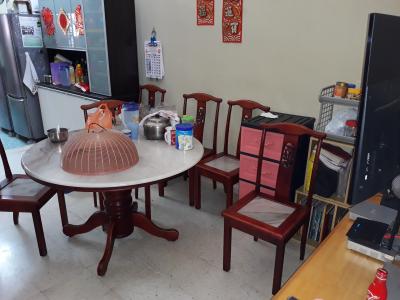
i mean your laptop distance from your router plus is any obstacle and wall?, and dont please stack your router with BTU it will cause overheating,and you can try measure distance using your foot
*
Like this only bro


Attached thumbnail(s)
Attached Image
StuartLee2015
post Sep 14 2018, 11:18 AM

Regular
******
Senior Member
1,221 posts

Joined: Sep 2014
From: Malaysia


QUOTE(wilson1stop @ Sep 14 2018, 10:50 AM)
LOL, pity you...
TM now came out idea kept play play with user so that they can give up and stay remain to maintain their ARPU? just idea...
You can if staff willing/able to help you, but still paying same price unless you got Ultimate then you can JIMAT RM30...
Thanks.
Now your WIFI myths is SOLVED.
You put your BTU and router in KICTHEN?

Do you know wifi is radio-wave? and so many kitchen peripherals affected your wifi?

CALL TM to relocate your equipment is the ONLY CHOICES.  sweat.gif  sweat.gif
*
No lol , that's not kitchen.
StuartLee2015
post Sep 14 2018, 11:26 AM

Regular
******
Senior Member
1,221 posts

Joined: Sep 2014
From: Malaysia


QUOTE(cyberic @ Sep 14 2018, 10:53 AM)
Since they already reset the BTU port. Just go ahead and buy new router. No point testing with WiFi if you can get full speed on LAN. Or borrow any other router from friend. No point testing using the same device over and over again. Your 5Ghz WiFi is screwed for some reason.
*
I see.... it means both my routers 2.4Ghz is screwed?
RT-N12BHP B1 and RGX4400.

Could it be pilot phase? Cat5e cable from both routers to laptop gigabits port also cannot hit pass 90+ Mbps. The btu have been configured to 1.0 Gbps. Cable Cat5e is perfectly fine.
StuartLee2015
post Sep 14 2018, 11:28 AM

Regular
******
Senior Member
1,221 posts

Joined: Sep 2014
From: Malaysia


QUOTE(Doraku @ Sep 14 2018, 11:25 AM)
there is other choice BTW he can just buy a long cat5e cable and relocate his Router at higher place and there is no other electronic stuff nearby.
But only problem is he hate cable sweat.gif
*
Lol... I tested with short cable to see if I got 400+ but no. I placed my router at the edge of the table also cannot improve.

And isn't a kitchen, kitchen is at the rear. This is my dining hall?
StuartLee2015
post Sep 14 2018, 02:06 PM

Regular
******
Senior Member
1,221 posts

Joined: Sep 2014
From: Malaysia


QUOTE(SilentVampire @ Sep 14 2018, 11:43 AM)
Don’t bother. Have told him many times, and he keeps asking the same questions and talk about the same issues.
*
I know... but both router can't output more than 10 Mbps most of the time very suey liao.
StuartLee2015
post Sep 14 2018, 02:44 PM

Regular
******
Senior Member
1,221 posts

Joined: Sep 2014
From: Malaysia


I am sorry everyone, I guess I buy all new router and if still fail, I give up and ask for TM.
StuartLee2015
post Sep 14 2018, 03:30 PM

Regular
******
Senior Member
1,221 posts

Joined: Sep 2014
From: Malaysia


QUOTE(Max2006 @ Sep 14 2018, 03:16 PM)
First, don't put your BTU and router besides the TV monitor. In some cases, the TV monitor will affect the router's wifi performance if put both of them side by side.

Second, don't put your router on the top of your BTU as the heat will damage your equipment in long term.

And third, like some other forumers said, if possible, don't put your router near to the kitchen.
*
That is not kitchen... it's dining hall. Kitchen is at the rear . My room is just 6 feet away from where I put unifi equipment, do I say right? Even I stand next to the Router, placing router far away from BTU. I don't have any microwave appliances too.

This post has been edited by StuartLee2015: Sep 14 2018, 03:34 PM
StuartLee2015
post Sep 16 2018, 01:46 PM

Regular
******
Senior Member
1,221 posts

Joined: Sep 2014
From: Malaysia


TM came and replaced my router with DIR842 with MU-MIMO.

Package is 500Mbps.

They tested with their thick Cat6 cable on their and mine devices and achieved 520+ Mbps.

They tested 2.4 Ghz and got about 170+ to 200+ Mbps.

And 5ghz above 200+ .


Now , I got 3 questions.

1. Does this router sufficient for the time being before I buy something better to ultilize 300Mbps and above on Wi-Fi?

2. How so no login to the Router? They set it up and now I forget to ask for the password. I found there's user password on the bottom, do they use that during set up?

3. They recommend me getting new Wi-Fi adapter with A.C and I have one in mind, DWA182, should be good for getting close to 500Mbps or DWA192?

They tested my Cat5e and strangely it maxed at about 90mbps

StuartLee2015
post Sep 16 2018, 02:02 PM

Regular
******
Senior Member
1,221 posts

Joined: Sep 2014
From: Malaysia


QUOTE(wilson1stop @ Sep 16 2018, 01:54 PM)
LOL, eventually you still called TM like I've said very very early!!
It's your router and faulty cable caused it.

Unless you demanded 300Mbps+ for your smartphone, otherwise current setup is enough for you.

Default password inside the router box, should be default used.
BEWARE that, you might screw the settings if you are not familiar, BETTER STAY AWAY from it.!!
*
I see, well, I need to get access for changing ssid, password and thing like chanells, DNS....
StuartLee2015
post Sep 16 2018, 02:10 PM

Regular
******
Senior Member
1,221 posts

Joined: Sep 2014
From: Malaysia


QUOTE(SilentVampire @ Sep 16 2018, 01:53 PM)
Good enough. Yes, use that password. But, you will need admin user and password details, for more advanced configuration. Get the DWA192. Your Cat5e cable must not be really Cat5e and instead Cat5, or quality is bad. Get one of the recommended brands on the 1st page.

*
Hmm... I see.. about the ' admin user ' , is it can be found on the bottom label too?
StuartLee2015
post Sep 16 2018, 02:34 PM

Regular
******
Senior Member
1,221 posts

Joined: Sep 2014
From: Malaysia


QUOTE(JohnLai @ Sep 16 2018, 02:17 PM)
I believe the real situation is like this:

Before the turbo, he wanted a good router, but StuartLee2015 is a stingy person. He knew Asus brand is good, but he was too stingy to spend money. Thus he asked for the cheapest asus router available which is RT-N12HP B1.

Back to few days ago when his account was turbo-ed.
He claimed he will purchase expensive router to max out his 500Mbps turbo such as DIR 878 and ASUS USB-AC53 adapter. (Everyone know StuartLee2015 is bullshitting by now)
When he learnt that his cable might be the issue, he went and bought the cheapest possible long cable without checking it for CAT5e certification. Not only that, he said he wanna buy DWA182 instead of USB-AC53.
He probably has only TWO real cat5e cables which was bundled with RGX4400 and ONU.

When the TM technician came after his begging, TM probably brought along DIR842 and normal cat5e (bundled with DIR842 instead of that cat6 bullshit) and demonstrated it is router problem as expected.
TM probably said to StuartLee2015 he could refresh his unifi contract duration and that DIR842 will be his.
Being the world most stingy person, StuartLee2015 immediately accepted the condition.
*
No lol... I not stingy.. I have limited funds atm.

I purchased RT-N12BHP back when still 50mbps last year. Never though this year it won't enough. And since it's only 50mbps, the shop recommend me that router.

And the cable is I bought way before the asus router, rarely used . I don't even know back Then when I first bought It, cat ratings...

I am indeed will be getting DWA878 the next month and getting the DWA192 for now to at least have A.C adapter.

The cat5e supplied along with hypptv back when vip5. It has 3 to 4.

I made a request for TM technician to come and check what's the problem before I went ahead and buy the DWA878 and 182/192 and the problem still exist of unstable LAN and Wi-Fi speed due to Pilot Phase.

I can always switch to AC53 if that's better than DWA182/192.

This post has been edited by StuartLee2015: Sep 16 2018, 02:35 PM

StuartLee2015
post Sep 16 2018, 02:37 PM

Regular
******
Senior Member
1,221 posts

Joined: Sep 2014
From: Malaysia


QUOTE(JohnLai @ Sep 16 2018, 02:31 PM)
Indeed, next thing we know, he wanna ask how to remove that pesky @unifi suffix from his wifi SSID.  :lol2:
*
Nope... The @Unifi is totally fine with me and I don't think it's pesky.
StuartLee2015
post Sep 16 2018, 02:45 PM

Regular
******
Senior Member
1,221 posts

Joined: Sep 2014
From: Malaysia


QUOTE(JohnLai @ Sep 16 2018, 02:40 PM)
rolleyes.gif

I find it unlikely since you already refreshed your contract and accepted that DIR842.

Anyway, DIR842 only has 2x2:2 configuration, so over 5Ghz with 2x2:2 wifi adapter, best case wifi speedtest will be 400Mbps without interference from neighbouring 5ghz hotspot.
Don't complain about not reaching 500Mbps again with wifi.
*
I know it won't reach 500Mbps, around 300 to 400 is already good .


StuartLee2015
post Sep 16 2018, 02:49 PM

Regular
******
Senior Member
1,221 posts

Joined: Sep 2014
From: Malaysia


QUOTE(wilson1stop @ Sep 16 2018, 02:44 PM)
brows.gif I'm so curious he will choose RM3xx bill shock or renew contract?
*
You all misunderstood me.

I accept the renew contract to get the router to at least have a decent router for now than using RT-N12BHP before upgrading to better router when I got next month pay.
StuartLee2015
post Sep 16 2018, 03:10 PM

Regular
******
Senior Member
1,221 posts

Joined: Sep 2014
From: Malaysia


QUOTE(wilson1stop @ Sep 16 2018, 02:54 PM)
play around with wifi channel and channel width, after analysed nearby wifi hostpot. DIR850L max 2.4Ghz around 16xMbps so far...
I see, so you went for renew contract, but Technicians didn't charge you since it's on-site visiting?
*
Nope, since i wanted a decent router for temporarily uses before changing to 878 or asus when I got extra money . I think they says it will be credited into the bill.
StuartLee2015
post Sep 16 2018, 03:15 PM

Regular
******
Senior Member
1,221 posts

Joined: Sep 2014
From: Malaysia


QUOTE(JohnLai @ Sep 16 2018, 02:59 PM)
Ah, the webkit/webview rendering engine something has cpu limitation when speedtest via web browser. Best to use speedtest apps on android.
~.~ Finally, he admitted it.....
Note: you will be charged for on site visit.  nod.gif
edit: Still nobody gonna trust you will purchase new router. mega_shok.gif
Let see how will he respond to TM after his bill has additional RM53....... biggrin.gif
*
I am okay with it Lol, really. They mentioned to me before accepting.

I will buy new router for sure, really.
StuartLee2015
post Sep 16 2018, 06:59 PM

Regular
******
Senior Member
1,221 posts

Joined: Sep 2014
From: Malaysia


Dir842 5Ghz on J7pro in my room.

Any good Or nice?


Attached thumbnail(s)
Attached Image
StuartLee2015
post Sep 16 2018, 06:59 PM

Regular
******
Senior Member
1,221 posts

Joined: Sep 2014
From: Malaysia


QUOTE(soonwai @ Sep 16 2018, 03:44 PM)
Good for you. Finally solve the speed problem. I think it's sufficient. No point in spending unnecessary money.

The password should be on a sticker somewhere.

As for AC, if you're some distance away and behind a door or a wall, you can pretty much forget about high speeds. If you really want the speed, it's better to pull a cable and install a 5Ghz AP in your room.

The cable is probably just bad. I have a bad Cat5e which refuses to link at 1Gbps all the time and I have a Cat5 cable which links at 1Gbps but transfers at a max of 350Mbps.
*
I see.... One question though...

tommorow i am going to Thundermatch to check out AC USB adapter or Cat5e ( Do i need Cat6 ? )

found the password , logged in, just checking out it's interface and didn't change anything. Just want to familiar with it.

I see, they tried the Blue Cat5e and they get only above 90+ and won't hit pass 100Mbps. The red is Fine as the other day i tested it with Alcatel 1240G by directly connecting to my PC Lan Port ( 1219-V ) Gigabit. Now it's connectin the Router and BTU.

There's Harvey Norman beside thundermatch , and i will check and compare pricing before buying. ( Cable or USB ) Need to measure how long i really need should i want to route from the router to my room.
StuartLee2015
post Sep 16 2018, 07:17 PM

Regular
******
Senior Member
1,221 posts

Joined: Sep 2014
From: Malaysia


QUOTE(dragna @ Sep 16 2018, 07:07 PM)
You happy or not? Your room to router is like Pudu to Puchong.
*
What do you mean? It's better than not connected at all and speed below 5 Mbps.... I guess it's okay for now until i get DIR878 or higher ones .
StuartLee2015
post Sep 16 2018, 07:41 PM

Regular
******
Senior Member
1,221 posts

Joined: Sep 2014
From: Malaysia


Like this

This post has been edited by StuartLee2015: Sep 16 2018, 07:41 PM


Attached thumbnail(s)
Attached Image

11 Pages « < 7 8 9 10 11 >Top
Topic ClosedOptions
 

Change to:
| Lo-Fi Version
0.4008sec    0.28    7 queries    GZIP Disabled
Time is now: 7th December 2025 - 05:02 AM