

QUOTE(wilson1stop @ Sep 13 2018, 01:53 PM)
 Good News to me...

Unifi Official TM UniFi High Speed Broadband Thread V34, READ 1ST PAGE FOR TURBO SPEED INFO!
|
|
 Sep 13 2018, 01:59 PM Sep 13 2018, 01:59 PM
Return to original view | Post
#121
|
 
Senior Member
1,221 posts Joined: Sep 2014 From: Malaysia  
|
QUOTE(wilson1stop @ Sep 13 2018, 01:53 PM) Good News to me... |
|
|
|
|
|
Sep 13 2018, 03:03 PM
Return to original view | Post
#122
|
|
Senior Member
1,221 posts Joined: Sep 2014 From: Malaysia
|
QUOTE(zher4883 @ Sep 13 2018, 02:27 PM) When there's a will, there's a way. They could only make it harder for heavy downloaders using torrent but they can't stop them How long are they going to block us from torrent? |
|
|
Sep 13 2018, 03:06 PM
Return to original view | Post
#123
|
|
Senior Member
1,221 posts Joined: Sep 2014 From: Malaysia
|
QUOTE(zher4883 @ Sep 13 2018, 02:27 PM) When there's a will, there's a way. They could only make it harder for heavy downloaders using torrent but they can't stop them How long they are blocking? |
|
|
Sep 13 2018, 09:13 PM
Return to original view | IPv6 | Post
#124
|
|
Senior Member
1,221 posts Joined: Sep 2014 From: Malaysia
|
Okay, went to ALL IT near my area, don't have DIR878, and the USB adapter DWA182 is expensive than online, so i will buy next monday...
For now, i using Cat5 from PC Intel 1219-V to Router , get constant 80+ Mbps. Before being Turbo-ed, I am on Advance 50 Plus. Was using RGX4400 with settings unchanged, I can get 40 to 51 Mbps with my DWA131. The next day, Monday 10 September, I checked my account that i got Turbo-ed. Excited, i went back home to speed test right away, to my surprise, i can't get even 50 Mbps or close to 100 Mbps on the Wifi. All my devices ( Samsung Tab S3 and J7 Pro ) which used to get 40 - 50 Mbps, now only 20 to 30+ Mbps... I know you all suggesting me to change router... but i want to know what's wrong with the wifi first. T_T |
|
|
Sep 13 2018, 09:18 PM
Return to original view | IPv6 | Post
#125
|
|
Senior Member
1,221 posts Joined: Sep 2014 From: Malaysia
|
QUOTE(JohnLai @ Sep 13 2018, 09:15 PM) Your RGX4400 might be faulty too........? Let's say after i bought the DIR878 and DWA182 , and if still the same, can't even hit 300 to 400+ over wifi..., what's next?Buy new router please....... If say congested, i think it's not likely, cause before i can get constant 40 to 50 Mbps with the same channels, and settings... |
|
|
Sep 13 2018, 09:43 PM
Return to original view | IPv6 | Post
#126
|
|
Senior Member
1,221 posts Joined: Sep 2014 From: Malaysia
|
QUOTE(hannchua @ Sep 13 2018, 09:23 PM) I suggest you: Okay... i will call the technician, if still fail, i don't know already. hahahaGet ze technician from ze TM to check ze problem... Spend zat technician fee if you are scared of potentially wasting more moneyz...  |
|
|
|
|
|
Sep 13 2018, 09:45 PM
Return to original view | IPv6 | Post
#127
|
|
Senior Member
1,221 posts Joined: Sep 2014 From: Malaysia
|
QUOTE(jedi_dc @ Sep 13 2018, 09:43 PM) Hello sifus, Me the same.... been asking for days, and switching between RGX4400 and RT-N12HP B1, only problem is the wifi.Got my package turbo-ed to 500mbps, from 50. However, i can't seem to get anything above 100mbps up /down. Using AC66u + Alcatel Lucent I-240-G BTU, Connected via LAN cat5e cable (btu -- router, router --pc ) Possible configuration error on my part? or just the BTU LAN port that needs TM to fix? Have not checked by plugging in PC to BTU just yet to see if gigabit speeds. Since you using AC66U, and many says my routers maybe faulty, yours being faulty is very impossible... I even Hard Reset both routers. only problem is wifi. Don't have these problems before Turbo-ed. |
|
|
Sep 13 2018, 09:49 PM
Return to original view | IPv6 | Post
#128
|
|
Senior Member
1,221 posts Joined: Sep 2014 From: Malaysia
|
QUOTE(SilentVampire @ Sep 13 2018, 09:41 PM) I would suggest Asus RT-AC86U. I did read... Well, i decided on DIR878 .. enough for 500Mbps like in the 1st post?Many reasons why. Did you even read 1st page? Could be your neighbour got a new router, more powerful router, and that is interfering on your wireless signals. |
|
|
Sep 13 2018, 09:51 PM
Return to original view | IPv6 | Post
#129
|
|
Senior Member
1,221 posts Joined: Sep 2014 From: Malaysia
|
QUOTE(zher4883 @ Sep 13 2018, 09:24 PM) You will never hit more than 320Mbps with DWA-182. I just bought one and tested it out Oh.... no... if i recall, it's AC type adapter right? and thing like USB3.0 is better for the speed? |
|
|
Sep 13 2018, 09:58 PM
Return to original view | IPv6 | Post
#130
|
|
Senior Member
1,221 posts Joined: Sep 2014 From: Malaysia
|
If DWA 182 can't be used for 500Mbps , maybe this ' orb ' one-of-a-kind USB adapter.
Attached thumbnail(s) 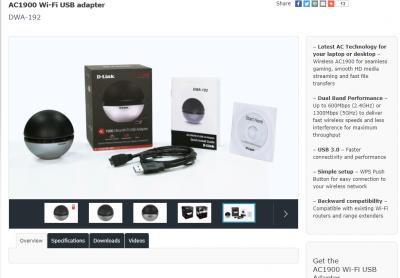
|
|
|
Sep 13 2018, 10:12 PM
Return to original view | IPv6 | Post
#131
|
|
Senior Member
1,221 posts Joined: Sep 2014 From: Malaysia
|
QUOTE(alexlaw90 @ Sep 13 2018, 10:00 PM) Hi, Your speed test and get 100 Mbps is on Wifi or LAN wire to PC?Today I was told i get turbo-ed to 500mbps since 10 sept while checking with TM center staff about the 100mbps package. I get neither email nor sms notification about it until today. So i did the speedtest and only get 100mbps. My router is Asus RT-N12HP and using cat6 cable. The router website show i can get up to 300mbps. Am i missing something with the setting? My area is Pandan Indah, Kuala Lumpur. Thanks. |
|
|
Sep 13 2018, 10:14 PM
Return to original view | IPv6 | Post
#132
|
|
Senior Member
1,221 posts Joined: Sep 2014 From: Malaysia
|
So, I connect BTU to my PC using Cat5e directly, and this is what i got...
About leds on the back of the BTU 1240G, i can't find any thing that blink.... Attached thumbnail(s) 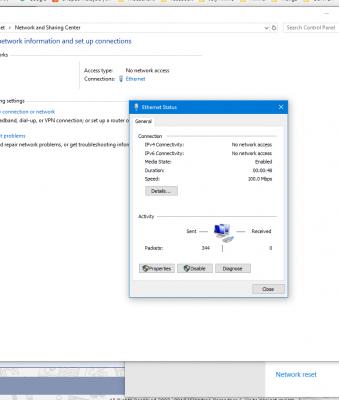
|
|
|
Sep 13 2018, 10:25 PM
Return to original view | IPv6 | Post
#133
|
|
Senior Member
1,221 posts Joined: Sep 2014 From: Malaysia
|
QUOTE(JohnLai @ Sep 13 2018, 10:18 PM) Finally...BTU to PC using CAT5E link speed result. You mean ' if still the same ' is it, i plug BTU to PC second time or speedtest over Wifi ?Remember to restart BTU and make sure connection is tight. If still the same 100Mbps link speed......time to call tm..... I have Cat5 , the longest one that i can pull from my PC In my room to the router. with the cable dangling over the floor. If route by nailing the wall all the way to the router, i don't know how long i need so that i don't spend too much on length i don't need. let's say the BTU is 1gbps , my wifi will be like 100+ Mbps? since most people says N300 of 300Mbps cannot reach half of it. |
|
|
|
|
|
Sep 13 2018, 10:36 PM
Return to original view | IPv6 | Post
#134
|
|
Senior Member
1,221 posts Joined: Sep 2014 From: Malaysia
|
QUOTE(SilentVampire @ Sep 13 2018, 10:33 PM) Yes. Just get it first This means my BTU 1240G is limited to 100Mbps and need technician to come over to change to 1Gbps?Attached thumbnail(s) 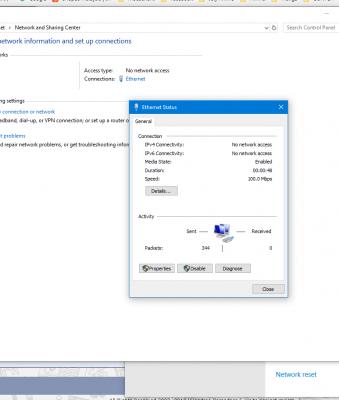
|
|
|
Sep 13 2018, 10:40 PM
Return to original view | IPv6 | Post
#135
|
|
Senior Member
1,221 posts Joined: Sep 2014 From: Malaysia
|
QUOTE(SilentVampire @ Sep 13 2018, 10:38 PM) Yes, if you are getting this speed while directly connected to the BTU. I see, Time to live Chat with TM to make an appointment. |
|
|
Sep 13 2018, 10:49 PM
Return to original view | IPv6 | Post
#136
|
|
Senior Member
1,221 posts Joined: Sep 2014 From: Malaysia
|
QUOTE(amirul hafizz @ Sep 13 2018, 10:48 PM) i used netis, i get 1.0Gbps /netis? |
|
|
Sep 13 2018, 10:51 PM
Return to original view | IPv6 | Post
#137
|
|
Senior Member
1,221 posts Joined: Sep 2014 From: Malaysia
|
QUOTE(JohnLai @ Sep 13 2018, 10:42 PM) Good luck with your endeavour.......... just to confirm one thing,,About the BTU, by directly connect BTU > Cat5e > PC Lan port, it shows no Internet Access on Ipv4 and Ipv6 , is it supposed to be like that ? I connect on LAN1 port of 1240G. ... |
|
|
Sep 13 2018, 10:53 PM
Return to original view | IPv6 | Post
#138
|
|
Senior Member
1,221 posts Joined: Sep 2014 From: Malaysia
|
QUOTE(amirul hafizz @ Sep 13 2018, 10:52 PM) yeap... oh... i see... |
|
|
Sep 13 2018, 10:57 PM
Return to original view | IPv6 | Post
#139
|
|
Senior Member
1,221 posts Joined: Sep 2014 From: Malaysia
|
QUOTE(dragna @ Sep 13 2018, 10:54 PM) From all your questions past couple days because you say you’re not tech savvy and when others are advicing you yet you query over and over again. I know a thing or two... but not very deep... NIC is?I honestly don’t know if you’ve plugged your NIC correctly as instructed into, the router or BTU. |
|
|
Sep 13 2018, 10:58 PM
Return to original view | IPv6 | Post
#140
|
|
Senior Member
1,221 posts Joined: Sep 2014 From: Malaysia
|
QUOTE(JohnLai @ Sep 13 2018, 10:54 PM) Yes. The BTU is operating in 'Bridge' mode. Mine's desktop PC, self build. the Cable is new and never used, and it comes with the HyppTV box back when i first register Unifi.Really 100Mbps LAN link speed?  You don't have laptop with gigabit LAN port? If the cable (Your new CAT5e cable) is connected from RGX4400 WAN* port to PC Lan port, does it link at 1Gbps? (Just to check if the cable has problem......subpar cable tends......you know) |
|
Topic ClosedOptions
|
| Change to: |  0.2006sec 0.2006sec
 0.15 0.15
 7 queries 7 queries
 GZIP Disabled GZIP Disabled
Time is now: 6th December 2025 - 09:23 AM |
 Quote
Quote