Welcome Guest ( Log In | Register )

Bump Topic Topic Closed RSS Feed
13 Pages « < 6 7 8 9 10 > » Bottom

Outline · [ Standard ] · Linear+

Unifi Official TM UniFi High Speed Broadband Thread V34, READ 1ST PAGE FOR TURBO SPEED INFO!

views
     
JohnLai
post Sep 12 2018, 03:57 PM

Skeptical Cat
*******
Senior Member
3,669 posts

Joined: Apr 2006
QUOTE(miloaisdino @ Sep 12 2018, 02:16 PM)
I use streamyx and time lol.
*
sweat.gif .......no comment from me....


QUOTE(StuartLee2015 @ Sep 12 2018, 02:16 PM)
Hahaha... thinking about DIR878 for 500Mbps , good choice?
*
Hmm.....does this model has support for additional 5Ghz DFS channels? hmm.gif
Revision A1 seem to support DFS, I can't be certain about this, plus I have no idea what hardware revision of DIR878 being sold in Malaysia.
JohnLai
post Sep 12 2018, 04:46 PM

Skeptical Cat
*******
Senior Member
3,669 posts

Joined: Apr 2006
QUOTE(miloaisdino @ Sep 12 2018, 04:24 PM)
Ok. I checked the manual and it seems that you can pull the config files from the voip vlan400 to find the onu password using ftp. Then u have to try configure the onu yrself. If not the more straight forward solution is to get the tech to execute these on the olt:

As u can see, the speed configured here is 20Mbps. Can change to any speed desired. (Still subject to pppoe speed restriction, but can borrow someones turbo id smile.gif )
*
At first, I was like shocking.gif , after reading, I am like rclxub.gif

This stuff is way above my basic networking knowledge.
To begin with, I don't know how to pull config files off vlan400 (config-vlan?)
Plus, isn't there hidden or disabled WebGUI somewhere in the 240g-T?

Conclusion, I give up on using ONU LAN ports........I shall buy a cheap gigabit network switch instead...... notworthy.gif

Not enough LAN ports for upcoming turbo.
Current TPLink C1200 LAN ports are fully utilized.....3 LAN ports for my desktop PCs + 1 LAN ports for hypptv.
Currently sharing unifi bill with neighbours and they are using wifi to connect.
Two neighbours are requesting me to pull CAT5e cables to their house (They gonna buy two 50 metres CAT5e cables and new routers as AP) once my account got turbo-ed.


JohnLai
post Sep 12 2018, 07:25 PM

Skeptical Cat
*******
Senior Member
3,669 posts

Joined: Apr 2006
QUOTE(StuartLee2015 @ Sep 12 2018, 07:20 PM)
epic Speedtest today... 1.63 Mbps of 500 Mbps...
*
Change your speedtest server.
Webe server is one of the worst server for speed testing.
nod.gif
If possible, test with Telekom Malaysia server, just search for Kuala Lumpur and TM server will pop out.
JohnLai
post Sep 12 2018, 08:22 PM

Skeptical Cat
*******
Senior Member
3,669 posts

Joined: Apr 2006
QUOTE(StuartLee2015 @ Sep 12 2018, 08:13 PM)
Tested with Telekom Malaysia Berhad , get 2.67 Mbps and 17.50 Mbps.... is this due to Pilot Phase?
*
.........strange indeed....... confused.gif LAN also the same?

Otherwise, your area fiber contention ratio might be very high...... hmm.gif , but your ping value is fine, thus* there is no way it is contention issue.

This post has been edited by JohnLai: Sep 12 2018, 08:23 PM
JohnLai
post Sep 12 2018, 09:27 PM

Skeptical Cat
*******
Senior Member
3,669 posts

Joined: Apr 2006
QUOTE(StuartLee2015 @ Sep 12 2018, 09:24 PM)
Modem : Alcatel 1240G
Router: asus RT-N12BHP B1 , RGX 4400
Cables: very long cat5  , and short cat5e

Pc: USB DWA131 N300 Wi-Fi adapter
Spec list in my signature.
*
Please use RGX 4400 and stop using asus RT-N12BHP B1........
JohnLai
post Sep 12 2018, 09:41 PM

Skeptical Cat
*******
Senior Member
3,669 posts

Joined: Apr 2006
QUOTE(StuartLee2015 @ Sep 12 2018, 09:33 PM)
Okay, later back home I will switch to RGX4400 and test both Lan and Wi-Fi and speed test on my Samsung J7 pro's 2.4 and 5Ghz .

Phone specs says it has Wi-Fi 802.11 a/b/g/n/ac, dual-band.
*
You wanna know why I suggest you to switch back to RGX4400?

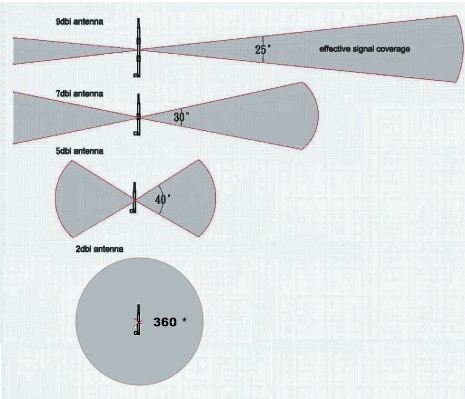
Aside from RGX4400 3dbi antenna (your asus RT-N12HP B1 has 9dbi antenna which might be useless if your house is 'small', small is a subjective matter, dont feel insulted over it.) ........, RGX4400 hardware is way better and more powerful compared to your asus RT-N12BHP B1.

RGX4400 has better CPU, more RAM, gigabit ports etc than asus RT-N12HP B1.

edit:

https://wikidevi.com/wiki/ASUS_RT-N12HP_B1 = RT-N12HP B1 hardware
VS
https://forum.lowyat.net/topic/3994248/ = RGX4400


Why high dbi antenna is pointless :
user posted image

Notice the coverage problem?


EDIT2: Not much info for you samsung j7 pro wifi chip. Let assume the worst case where it has single spatial stream. Assume it will connect at 433Mbps at 5ghz band 80Mhz channel width. (if only single spatial stream....this mean your phone 2.4ghz band 40Mhz channel width only connect at 150Mbps)
Factor in Wifi protocol overhead 60%.......The most you can get for 802.11AC 5.0ghz band 80Mhz = around 260Mbps?

EDIT3:Some website claims j7 pro has 2x2:2, so maybe it has 2 spatial streams? confused.gif Just tell us your phone 5Ghz link speed to RGX4400....It is faster this way.

EDIT4: Do remember to restart the ONU once a while.....

This post has been edited by JohnLai: Sep 12 2018, 10:15 PM

JohnLai
post Sep 12 2018, 11:09 PM

Skeptical Cat
*******
Senior Member
3,669 posts

Joined: Apr 2006
QUOTE(hauwong @ Sep 12 2018, 11:06 PM)
same situation ...similar speed like you ,maybe my RT-N12HP_B1 asus router issue
*
RT-N12HP_B1 is the issue. WAN port only 100Mbps. What do you expect? bangwall.gif

SilentVampire, I propose RT-N12HP_B1 to be put at first page (top most) this 'expensive' router doesn't support 300 - 800Mbps turbo speed.
JohnLai
post Sep 12 2018, 11:14 PM

Skeptical Cat
*******
Senior Member
3,669 posts

Joined: Apr 2006
QUOTE(StuartLee2015 @ Sep 12 2018, 11:11 PM)
Using this now...

Speed test on Samsung J7 Pro: 30.0  Mbps, upload : 48.7 Mbps ( 2.4 Ghz )
Speed test on Samsung J7 Pro: 60.0 Mbps, upload: 93.5 Mbps ( 5.0 Ghz )

Speed test on DWA131 @ USB 2.0 ; 47.12 Mbps , upload : 58.58 Mbps ( 2.4 Ghz  )
Speed test on Intel 1219-v gigabit LAN : 91.61 Mbps, upload: 115.88 Mbps
RGX 4400 have default stock settings, nothing tweaked yet.

Rebooted the modem 5 minutes ago.
*
hmm.gif Almost there.....

Are you using TM speedtest server?
JohnLai
post Sep 12 2018, 11:20 PM

Skeptical Cat
*******
Senior Member
3,669 posts

Joined: Apr 2006
QUOTE(StuartLee2015 @ Sep 12 2018, 11:19 PM)
It uses random, I now use the Web version of TM.
*
http://speedtest.tm.com.my/
Use this official TM speedtest site.

Test using your Intel 1219-v gigabit LAN.
JohnLai
post Sep 12 2018, 11:27 PM

Skeptical Cat
*******
Senior Member
3,669 posts

Joined: Apr 2006
QUOTE(StuartLee2015 @ Sep 12 2018, 11:19 PM)
It uses random, I now use the Web version of TM.

Update: Cat5 LAN, RGX4400 @ LAN1.
*
Saw your edited post

One step you have to do. This is for checking if your BTU port is misconfigured....

If you connect your BTU directly to your Intel 1219-v gigabit LAN, what is the LAN link speed?

Is it 1Gbps?

Sample images;
user posted image

or

user posted image

This post has been edited by JohnLai: Sep 12 2018, 11:28 PM
JohnLai
post Sep 12 2018, 11:32 PM

Skeptical Cat
*******
Senior Member
3,669 posts

Joined: Apr 2006
QUOTE(StuartLee2015 @ Sep 12 2018, 11:29 PM)
Which port do i plug the cable coming from my Intel 1219-V on the BTU?
*
Normally, there is a LAN cable connecting from I240G (port 1) to the RGX4400.

Connect that particular LAN cable from I240G (port 1) to Intel 1219-V.

Question: You sure the LAN cable is CAT5 or CAT5e?
JohnLai
post Sep 12 2018, 11:35 PM

Skeptical Cat
*******
Senior Member
3,669 posts

Joined: Apr 2006
QUOTE(StuartLee2015 @ Sep 12 2018, 11:27 PM)
Here's where my room is and under the tv is the router.

At this distance , Samsung J7 Pro can't detect 5Ghz.
*
-.-....oh...that....you need to orient the router vertically and let the TM logo facing front (facing the area where you want to focus the signal)

Cause the both 2.4Ghz and 5Ghz antenna are printed on the circuit board itself.
https://en.wikipedia.org/wiki/Inverted-F_antenna
JohnLai
post Sep 12 2018, 11:48 PM

Skeptical Cat
*******
Senior Member
3,669 posts

Joined: Apr 2006
QUOTE(StuartLee2015 @ Sep 12 2018, 11:40 PM)
You mean connect from 1240G's LAN1 to my PC's Intel 1219-V?
I afraid that's impossible for now, since the longest cable is Cat5.. will need to go buy Cat5e tommorow or next monday.
How much is it in range?

Answer :
There's label of ' Cat5 ' of my meters long... and the blue one is Cat5e.  smile.gif

Oh yea, i didn't feel insulted at all, my house is terrace house, 20x 80, which is decent . smile.gif  rclxms.gif
*
Since you mentioned your cable is cat5 and not cat5e, we can skip that LAN link speed check. Make sure you are using CAT5e cable from I240G to RGX4400 too. Same with LAN cable from RGX4400 to PC's Intel 1219-V

Not much we can do now.


Can you at least ensure CAT5e cable is being used to connect I240G and RGX4400 now?
Let start with fixing your 5Ghz signal first. First, set both 2.4ghz and 5.0ghz wifi channel width to 40Mhz and 80Mhz respectively.
Orient your RGX4400 vertically with the TM logo side facing the direction you wanna focus.
Speedtest your 5ghz smartphone again using TM speedtest server.

edit: make sure transmit power is maxed.

This post has been edited by JohnLai: Sep 12 2018, 11:52 PM
JohnLai
post Sep 12 2018, 11:56 PM

Skeptical Cat
*******
Senior Member
3,669 posts

Joined: Apr 2006
QUOTE(StuartLee2015 @ Sep 12 2018, 11:53 PM)
Yes, i am sure, 1240G > Cat5e > RGX4400.
there's ' Cat5e ' printed on the blue wire. It comes from the STB box.

Okay. I will set 2.4Ghz on 40Mhz and 5Ghz on 80Mhz.
Update : I have set 2.4Ghz on 40Mhz and 5Ghz on 80Mhz...

next will orient my RGX4400 facing my room....
*
Max transmit power too.....
JohnLai
post Sep 13 2018, 12:05 AM

Skeptical Cat
*******
Senior Member
3,669 posts

Joined: Apr 2006
QUOTE(StuartLee2015 @ Sep 13 2018, 12:02 AM)
Samsung J7 Pro @ 5Ghz @ 80mhz
*
........-.-.......Just a quick check, how many 5Ghz hotspot detected on your area using the phone through wifi analyzer?
JohnLai
post Sep 13 2018, 12:14 AM

Skeptical Cat
*******
Senior Member
3,669 posts

Joined: Apr 2006
QUOTE(StuartLee2015 @ Sep 13 2018, 12:08 AM)
I think only me?
*
Hmm.....can you change 5ghz channel to 56, 104, 124,136 and 149? Speedtest again with these different channels.
Check if changing to different 5ghz channel make any difference or not. hmm.gif


Previous horizontal orientation result:
Speed test on Samsung J7 Pro: 60.0 Mbps, upload: 93.5 Mbps ( 5.0 Ghz )

After vertical orientation result:
Download 89.97Mbps , Upload 57Mbps (5.0ghz)

Strange indeed....I wonder why the result kinda 'reversed' sweat.gif


JohnLai
post Sep 13 2018, 12:20 AM

Skeptical Cat
*******
Senior Member
3,669 posts

Joined: Apr 2006
QUOTE(StuartLee2015 @ Sep 13 2018, 12:17 AM)
These test is where i directly sit in front the router achieved speeds... lol...

Oh yes, 5Ghz signal strength is not that weak ( few steps away from router get disconnected and switched to 2.4Ghz ) right?
doens't have any obstacle also. orientation is facing me holding the phone.  rclxub.gif
*
Aiyoyo.....try lah...change to different 5ghz channels......directly try channel 149........

JohnLai
post Sep 13 2018, 12:28 AM

Skeptical Cat
*******
Senior Member
3,669 posts

Joined: Apr 2006
QUOTE(StuartLee2015 @ Sep 13 2018, 12:24 AM)
Just now used 56, not in range, now using 149, my phone still cannot detect If i just step back few steps from router...  rclxub.gif

Different SSID names too....
*
.....I am starting to think maybe your phone has bad signal reception issue. Faulty phone antenna or hardware? Do you have any other phone with 802.11AC wifi chip? sweat.gif
Impossible so close to the router and can't detect the 5ghz signal.......
JohnLai
post Sep 13 2018, 12:39 AM

Skeptical Cat
*******
Senior Member
3,669 posts

Joined: Apr 2006
QUOTE(fruitie @ Sep 13 2018, 12:34 AM)
Same here. No other device to test ma? I have a feeling more to devices' limitation.
*
That the strange part.
He posted a picture of the distance between his phone and router before 5ghz signal totally vanish here https://forum.lowyat.net/uploads/attach-74/...-1536766044.jpg

The distance is around 2 - 3 meters. Kinda impossible for signal loss to happen at that distance even for 5ghz.


QUOTE(StuartLee2015 @ Sep 13 2018, 12:36 AM)
I guess so... my sibling have TAB S3, i borrow her's and try.

i have to get very very close, to the router to get 90% signal strength. if i lift the phone away from on top the router, it drop to 40% and if i step a little further, it goes down to 5% and then 0% and it switch to 2.4GHz ( 100% signal strength ) no matter how far i am from router. lol
*
Do you use any sort of phone cover? hmm.gif
A metal in the phone cover will heavily attenuate or reflect the signal as well.

Try to remove the phone cover...... hmm.gif

JohnLai
post Sep 13 2018, 12:42 AM

Skeptical Cat
*******
Senior Member
3,669 posts

Joined: Apr 2006
QUOTE(kwss @ Sep 13 2018, 12:39 AM)
-73 dBm standing in front of the router is very very bad signal.
I get the same signal with TM issued DIR-850L 5GHz on the ground floor in front of the house and me one floor up behind the house

Consider hardware failure. Bring your phone to McD to try their wifi
*
I agree with your assesment on the bad signal.

He should get at least -48dBm or better -45 dBm at that distance for 5Ghz. (The closer to 0 dBm, the better signal reception)

I propose him to remove any phone cover first.......

13 Pages « < 6 7 8 9 10 > » Top
Topic ClosedOptions
 

Change to:
| Lo-Fi Version
0.2192sec    0.72    7 queries    GZIP Disabled
Time is now: 1st December 2025 - 09:21 AM