Welcome Guest ( Log In | Register )

Bump Topic Topic Closed RSS Feed
11 Pages « < 3 4 5 6 7 > » Bottom

Outline · [ Standard ] · Linear+

Unifi Official TM UniFi High Speed Broadband Thread V34, READ 1ST PAGE FOR TURBO SPEED INFO!

views
     
StuartLee2015
post Sep 11 2018, 07:25 PM

Regular
******
Senior Member
1,221 posts

Joined: Sep 2014
From: Malaysia


QUOTE(ScivanShimitar @ Sep 11 2018, 07:21 PM)
Got upgraded today around 5pm since the last time I checked before the upgrade was around 4pm. Area Lestari Perdana SK.

Router Asus AC66U

Wired to desktop
user posted image\

5G wireless to Samseng S8
» Click to show Spoiler - click again to hide... «

*
Yours is 500Mbps ?
StuartLee2015
post Sep 11 2018, 07:45 PM

Regular
******
Senior Member
1,221 posts

Joined: Sep 2014
From: Malaysia


QUOTE(JohnLai @ Sep 11 2018, 07:36 PM)
DWA131?
An USB 2.0 device. USB 2.0 has raw bandwidth of 480Mbps. USB 2.0 has 20% protocol overhead. Effective bandwidth available is 384Mbps. No bottleneck as your DWA131 raw wifi bandwidth is 300Mbps.

Unfortunately....from your wifi analyser screenshot.....you will have hard time getting that effective 60% of 300Mbps bandwidth.... sweat.gif
You are sharing your 2.4ghz air time (broadcast time) with 5 different hotspots. Think of it as interference which resulted in non-usable data.

See the edited picture below. The area under the curve is your 180Mbps ( 60% of 300Mbps, remember, wifi protocol overhead ).

I have colored your usable area (bandwidth) in pink color.
user posted image
If you still remember how to calculate area from secondary school.......then you will know what is your actual effective speed after deducting those overlapping areas.
edit: From rough looking at your wifi analyser result......roughly 50% of your bandwidth is gone from overlapping hotspots from your neighbours.

So....160Mbps divided by another 50% = 80Mbps......... sweat.gif
This is the best case scenario from your screenshot.

Some routers save power by lowering transmit power when not in use. If your neighbour starts to use their 2.4 ghz wifi as well....I imagine the interference will be worse.......
*
shocking.gif Any remedy for temporally, before i saved up enough money for both D-Link AC1900 (DIR-878 ) Wifi router and USB AC55 ?

StuartLee2015
post Sep 12 2018, 02:16 PM

Regular
******
Senior Member
1,221 posts

Joined: Sep 2014
From: Malaysia


QUOTE(JohnLai @ Sep 12 2018, 02:03 PM)
StuartLee2015 just asked the same question for 3 days straight. doh.gif
No way. ASUS RT-N12HP WAN port is limited to Fast Ethernet 100Mbps. This is your router hardware limitation.
*
Hahaha... thinking about DIR878 for 500Mbps , good choice?
StuartLee2015
post Sep 12 2018, 07:20 PM

Regular
******
Senior Member
1,221 posts

Joined: Sep 2014
From: Malaysia


epic Speedtest today... 1.63 Mbps of 500 Mbps...


Attached thumbnail(s)
Attached Image
StuartLee2015
post Sep 12 2018, 08:13 PM

Regular
******
Senior Member
1,221 posts

Joined: Sep 2014
From: Malaysia


QUOTE(JohnLai @ Sep 12 2018, 07:25 PM)
Change your speedtest server.
Webe server is one of the worst server for speed testing.
nod.gif
If possible, test with Telekom Malaysia server, just search for Kuala Lumpur and TM server will pop out.
*
Tested with Telekom Malaysia Berhad , get 2.67 Mbps and 17.50 Mbps.... is this due to Pilot Phase?


StuartLee2015
post Sep 12 2018, 08:23 PM

Regular
******
Senior Member
1,221 posts

Joined: Sep 2014
From: Malaysia


QUOTE(stasio @ Sep 12 2018, 08:15 PM)
Read a few pages back...then you will understand why.... blink.gif  blink.gif
Still no enought what everybody try to advice you yesterday.  cry.gif
*
Yes, i tried everything available to me now , but still can't improve...

All left is to get TM Technician, Get new router, get new Cat5e or 6 cables, and get new USB adapter.


StuartLee2015
post Sep 12 2018, 08:26 PM

Regular
******
Senior Member
1,221 posts

Joined: Sep 2014
From: Malaysia


QUOTE(dragna @ Sep 12 2018, 08:15 PM)
Is that tested via LAN or WiFi?
If LAN could you try with another laptop/pc?
*
Both LAN (cat5 , the longest cable that i can pull from my room to the router. ) and wifi, more or less the same, can't reach 10 Mbps now... Ping is no bigger than 6 - 10 ... not sure why anymore...

Current BTU and Router should at least capable of 150 Mbps ...
StuartLee2015
post Sep 12 2018, 08:28 PM

Regular
******
Senior Member
1,221 posts

Joined: Sep 2014
From: Malaysia


QUOTE(stasio @ Sep 12 2018, 08:27 PM)
Can you list your hardware NOW.....
*
I going out, will list the hardware later today before 10Pm.
StuartLee2015
post Sep 12 2018, 09:24 PM

Regular
******
Senior Member
1,221 posts

Joined: Sep 2014
From: Malaysia


QUOTE(dragna @ Sep 12 2018, 08:41 PM)
I think his signature lists his setup.
*
Modem : Alcatel 1240G
Router: asus RT-N12BHP B1 , RGX 4400
Cables: very long cat5 , and short cat5e

Pc: USB DWA131 N300 Wi-Fi adapter
Spec list in my signature.


StuartLee2015
post Sep 12 2018, 09:25 PM

Regular
******
Senior Member
1,221 posts

Joined: Sep 2014
From: Malaysia


QUOTE(charymsylyn @ Sep 12 2018, 08:29 PM)
When you plugged in cable from your router, disconnect from WiFi before running speedtest. If you don't know how, unplug the WiFi adapter.
*
Yes, I do remove the Wi-Fi adapter before plug the Lan cable.
StuartLee2015
post Sep 12 2018, 09:27 PM

Regular
******
Senior Member
1,221 posts

Joined: Sep 2014
From: Malaysia


QUOTE(stasio @ Sep 12 2018, 08:25 PM)
He dont have LAN connection...only Wifi 2.4......and questionable 5....
Read yesterday posts...so many people advice him..... rolleyes.gif
*
For all your helps, I really appreciate it.
StuartLee2015
post Sep 12 2018, 09:33 PM

Regular
******
Senior Member
1,221 posts

Joined: Sep 2014
From: Malaysia


QUOTE(JohnLai @ Sep 12 2018, 09:27 PM)
Please use RGX 4400 and stop using asus RT-N12BHP B1........
*
Okay, later back home I will switch to RGX4400 and test both Lan and Wi-Fi and speed test on my Samsung J7 pro's 2.4 and 5Ghz .

Phone specs says it has Wi-Fi 802.11 a/b/g/n/ac, dual-band.
StuartLee2015
post Sep 12 2018, 11:11 PM

Regular
******
Senior Member
1,221 posts

Joined: Sep 2014
From: Malaysia


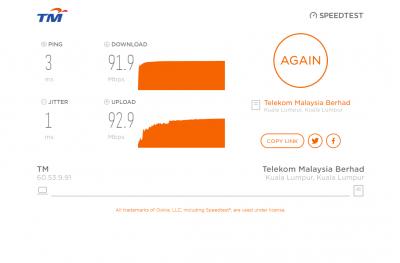
Using this now...

Speed test on Samsung J7 Pro: 30.0 Mbps, upload : 48.7 Mbps ( 2.4 Ghz )
Speed test on Samsung J7 Pro: 60.0 Mbps, upload: 93.5 Mbps ( 5.0 Ghz )

Speed test on DWA131 @ USB 2.0 ; 47.12 Mbps , upload : 58.58 Mbps ( 2.4 Ghz )
Speed test on Intel 1219-v gigabit LAN : 91.61 Mbps, upload: 115.88 Mbps


RGX 4400 have default stock settings, nothing tweaked yet.

Rebooted the modem 5 minutes ago.


Attached thumbnail(s)
Attached Image
StuartLee2015
post Sep 12 2018, 11:19 PM

Regular
******
Senior Member
1,221 posts

Joined: Sep 2014
From: Malaysia


QUOTE(JohnLai @ Sep 12 2018, 11:14 PM)
hmm.gif  Almost there.....

Are you using TM speedtest server?
*
It uses random, I now use the Web version of TM.

Update: Cat5 LAN, RGX4400 @ LAN1.


This post has been edited by StuartLee2015: Sep 12 2018, 11:21 PM


Attached thumbnail(s)
Attached Image
StuartLee2015
post Sep 12 2018, 11:27 PM

Regular
******
Senior Member
1,221 posts

Joined: Sep 2014
From: Malaysia


Here's where my room is and under the tv is the router.

At this distance , Samsung J7 Pro can't detect 5Ghz.


Attached thumbnail(s)
Attached Image
StuartLee2015
post Sep 12 2018, 11:29 PM

Regular
******
Senior Member
1,221 posts

Joined: Sep 2014
From: Malaysia


QUOTE(JohnLai @ Sep 12 2018, 11:27 PM)
Saw your edited post

One step you have to do. This is for checking if your BTU port is misconfigured....

If you connect your BTU directly to your Intel 1219-v gigabit LAN, what is the LAN link speed?

Is it 1Gbps?

Sample images;
user posted image

or

user posted image
*
Which port do i plug the cable coming from my Intel 1219-V on the BTU?
StuartLee2015
post Sep 12 2018, 11:32 PM

Regular
******
Senior Member
1,221 posts

Joined: Sep 2014
From: Malaysia


QUOTE(stasio @ Sep 12 2018, 11:29 PM)
With Cat5 cable your speed is ok,as cable support up to 100Mbps.
*
I see... I will be getting a very long Cat5e cable... To route from my room to the router . Distance from router to my PC is the picture above.
StuartLee2015
post Sep 12 2018, 11:40 PM

Regular
******
Senior Member
1,221 posts

Joined: Sep 2014
From: Malaysia


QUOTE(JohnLai @ Sep 12 2018, 11:32 PM)
Normally, there is a LAN cable connecting from I240G (port 1) to the RGX4400.

Connect that particular LAN cable from I240G (port 1)  to Intel 1219-V.

Question: You sure the LAN cable is CAT5 or CAT5e?
*
You mean connect from 1240G's LAN1 to my PC's Intel 1219-V?
I afraid that's impossible for now, since the longest cable is Cat5.. will need to go buy Cat5e tommorow or next monday.
How much is it in range?

Answer :
There's label of ' Cat5 ' of my meters long... and the blue one is Cat5e. smile.gif

Oh yea, i didn't feel insulted at all, my house is terrace house, 20x 80, which is decent . smile.gif rclxms.gif

StuartLee2015
post Sep 12 2018, 11:45 PM

Regular
******
Senior Member
1,221 posts

Joined: Sep 2014
From: Malaysia


QUOTE(SilentVampire @ Sep 12 2018, 11:32 PM)
No point. It is just this guy who constantly asking the same questions and insisting that this router supports 300Mbps on 2.4GHz. I am tired of saying the same things repeatedly, so just going to leave it. You can understand how I feel lol.
*
hahaha, sorry... I don't know how those things works... the specs says so ( 300 Mbps ) , so i just assume it does . I know very little about networking but not into that deep like you guys smile.gif

sorry ...
StuartLee2015
post Sep 12 2018, 11:47 PM

Regular
******
Senior Member
1,221 posts

Joined: Sep 2014
From: Malaysia


QUOTE(spadecrew @ Sep 12 2018, 11:35 PM)
hahaha...he doesnt understand that theoretical speed are different than real world speed...just let him be...
*
haha, yes...

11 Pages « < 3 4 5 6 7 > » Top
Topic ClosedOptions
 

Change to:
| Lo-Fi Version
0.2498sec    0.33    7 queries    GZIP Disabled
Time is now: 6th December 2025 - 02:07 PM