Outline ·
[ Standard ] ·
Linear+
Unifi Official TM UniFi High Speed Broadband Thread V34, READ 1ST PAGE FOR TURBO SPEED INFO!
|
StuartLee2015
|
 Sep 11 2018, 03:04 AM Sep 11 2018, 03:04 AM
|

|
QUOTE(soonwai @ Sep 11 2018, 02:56 AM) Try setting Band to "5Ghz (AC Only)" and Channel to "Auto" Tap on the Wifi name on your J7, I think it should show you the Link Speed. What is it? Network speed : 65Mbps , 5ghz frequency |
|
|
|
|
|
StuartLee2015
|
Sep 11 2018, 03:10 AM
|
|
|
https://www.speedtest.net/my-result/d/4262b...9a-af4c5e017759Translates to? my is 500Mbps Unifi - RGX4400 ... i can't even reach 300MBps.... This post has been edited by StuartLee2015: Sep 11 2018, 03:12 AM
|
|
|
|
|
|
StuartLee2015
|
Sep 11 2018, 03:11 AM
|
|
|
QUOTE(soonwai @ Sep 11 2018, 03:11 AM) Sorry, not sure why it connects at only 65Mbps. You should be connecting at 300-400 at least. Any other wifi devices/laptop you can try? none atm.... I've got my phone ( samsung J7 pro ) My PC on DWA 131 USB wifi adapter no laptop... This post has been edited by StuartLee2015: Sep 11 2018, 03:15 AM |
|
|
|
|
|
StuartLee2015
|
Sep 11 2018, 03:23 AM
|
|
|
QUOTE(soonwai @ Sep 11 2018, 03:17 AM) Are you very close to the router when testing? If you are, one last thing to try, turn down the RGX4400 radio power to 35%. Power cycle the RGX4400 and try again. does it works for the 2.4Ghz and should be getting 200 to 300 Mbps of 500Mbps? |
|
|
|
|
|
StuartLee2015
|
Sep 11 2018, 03:29 AM
|
|
|
QUOTE(stasio @ Sep 11 2018, 03:25 AM) Attached thumbnail(s)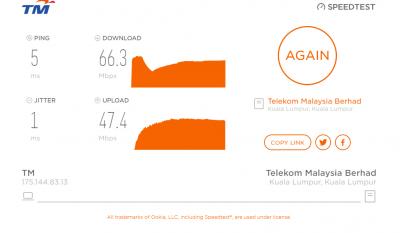
|
|
|
|
|
|
StuartLee2015
|
Sep 11 2018, 03:38 AM
|
|
|
QUOTE(soonwai @ Sep 11 2018, 03:29 AM) On 2.4, you probably get max 80-100Mbps. Most/All phones will only use 20Mhz even if you set the router to 40Mhz. This is assuming 2 streams. I think the J7 Pro should be 2 streams. Connect to 2.4 and look at your link speed. As as guesstimate, the max speedtest you can get is usually 1/2 to 2/3 of the link speed. Your PC is quite far from the RGX4400? The Speedtest you did just now for the PC is quite OK. Don't expect too much from 2.4 and the tiny DWA-131. hahaha, i know, i am saving up to get USB AC55 ... should be good right? As for the Router, maybe AC66U for Unifi 500Mbps? |
|
|
|
|
|
StuartLee2015
|
Sep 11 2018, 03:44 AM
|
|
|
QUOTE(soonwai @ Sep 11 2018, 03:41 AM) Be aware that 5Ghz not so good for even slightly moderate distance. It's hard to say without knowing what's between your PC and the router. Any brand will do. I don't use Asus so can't recommend anything from them. Personally I use Mikrotik. AC66U is expensive, maybe switch to DIR-867, around 500 can get, 200RM cheaper.... |
|
|
|
|
|
StuartLee2015
|
Sep 11 2018, 03:48 AM
|
|
|
QUOTE(stasio @ Sep 11 2018, 03:46 AM) Better buy Cat6 cable to connect router directly with you PC.  Hate the wires, but i'll see when time comes... USB or CAt6 |
|
|
|
|
|
StuartLee2015
|
Sep 11 2018, 04:04 AM
|
|
|
QUOTE(stasio @ Sep 11 2018, 03:56 AM) Wired network is king 100% ...this all USB (wifi)...hmmmm.  ..you will never get proper speed. Btw, DIR-867 is arround RM600 (+) Maybe Tenda AC18 (~RM280) or TP-Link C7 V.5 (~RM350). This price at lelong, this seller quite trustworthy... Attached thumbnail(s)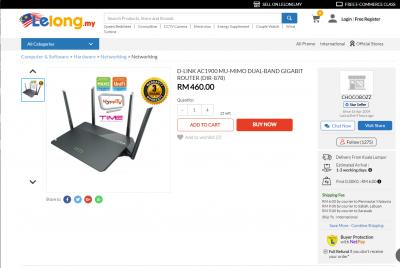
|
|
|
|
|
|
StuartLee2015
|
Sep 11 2018, 01:46 PM
|
|
|
Live chat with TM says that I can't get the max speed of my rgx4400 and DWA131 is because of pilot phase... is that true?
|
|
|
|
|
|
StuartLee2015
|
Sep 11 2018, 01:57 PM
|
|
|
QUOTE(Martha_Fokker @ Sep 11 2018, 01:50 PM) Not true. They gave the same B S. when my turbo-ed 800mbps could only get 200mbps. It turns out that I had to switch to a cat 6 cable between router and b.t.u. and re-enable a setting on my router. I am getting 830+ Mbps after the fix. I see, mine is 500Mbps, from BTU to RGX 4400 is the Cat5e cable.. but cannot achieve even 100Mbps on my pc on 2.4Ghz, and Samsung J7pro on both 2.4 and 5Ghz... I don't know what's wrong and what to tweak anymore, hahaha |
|
|
|
|
|
StuartLee2015
|
Sep 11 2018, 02:06 PM
|
|
|
QUOTE(wilson1stop @ Sep 11 2018, 02:02 PM) CAT-5e is from router box? Tried with CAT6 cable? (also try reboot after 10 mins shutdown) If still below 100Mbps, either your BTU was wrong configuration 10/100Mbps instead of 1000Mbps, or you are really still in pilot's victim... I don't have cat6, need to go buy 1 and test... my BTu is the silver ones, it need to configure? Like TM technician? |
|
|
|
|
|
StuartLee2015
|
Sep 11 2018, 03:57 PM
|
|
|
QUOTE(wilson1stop @ Sep 11 2018, 03:40 PM) we did, but he don't want cable things ... Are you guys mentioning me? |
|
|
|
|
|
StuartLee2015
|
Sep 11 2018, 06:41 PM
|
|
|
QUOTE(JohnLai @ Sep 11 2018, 04:01 PM) Yes, what is your BTU model exactly? 'Silver box' ain't informative you know.... BTU : ONU-ALCATEL-LUCENT-1240G Router : RG-MARITIME-RGX4400 you mean this?  |
|
|
|
|
|
StuartLee2015
|
Sep 11 2018, 06:47 PM
|
|
|
Can't even reach 40.00Mbps now.... back when 50Mbps Advance Plus, i can reach sometime even 51.00+/- Mbps... now..  Tested few more times, now 9.10Mbps and 38.86Mbps ....  This post has been edited by StuartLee2015: Sep 11 2018, 06:48 PM Attached thumbnail(s) This post has been edited by StuartLee2015: Sep 11 2018, 06:48 PM Attached thumbnail(s)
|
|
|
|
|
|
StuartLee2015
|
Sep 11 2018, 06:58 PM
|
|
|
QUOTE(SilentVampire @ Sep 11 2018, 06:55 PM) Not sure why you are complaining, when all the seniors have taught you, me included, to change router, or test via wired. You seem to just keep doing the same thing over and over and over again, and expecting the same results  No, I am not complaining, i am just baffled by the speeds and router. Tested via wired shows more or less the same. I have the Cat5 which should at least hit 100MBps, or close, but it's the same as wifi. |
|
|
|
|
|
StuartLee2015
|
Sep 11 2018, 07:13 PM
|
|
|
QUOTE(fruitie @ Sep 11 2018, 07:00 PM) Aiyo, your device has limitation and please use the correct term of Bytes and bits. You are confusing us..  Just change router, you use Cat-6 cable now also doesn't help much. Lol, I just follow whatever is written on the speed test ' Mbps' |
|
|
|
|
|
StuartLee2015
|
Sep 11 2018, 07:16 PM
|
|
|
Confirm will change the router and usb Wi-Fi adapter to Ac55 ... but the current router Asus Rtn12hpb1, what's the actual Wi-Fi speed , wired speed?
|
|
|
|
|
|
StuartLee2015
|
Sep 11 2018, 07:18 PM
|
|
|
QUOTE(JohnLai @ Sep 11 2018, 07:00 PM) Probably extra @unifi at wireless? Yes. Yup. BTU = no problem Router = no problem Let focus on your desktop computer wifi chip. You mentioned your desktop wifi chip can only support 2.4Ghz band. May I know your desktop wifi chip model? edit: Next, can you install https://play.google.com/store/apps/details?....analyzer&hl=en on your Samsung J7 Pro phone? Please post the screenshot of how many 2.4Ghz hotspot around your area. How do I check the Wi-Fi chip in DWA131? 8 I will now install the Wi-Fi Analyzer. The screenshot... my Wi-Fi is MSUC0096 This post has been edited by StuartLee2015: Sep 11 2018, 07:24 PM Attached thumbnail(s)
|
|
|
|
|
|
StuartLee2015
|
Sep 11 2018, 07:22 PM
|
|
|
QUOTE(JohnLai @ Sep 11 2018, 07:19 PM) Asus Rtn12hpb1 = doesn't matter wifi or lan, the top speed you will get is 95 - 97 Mbps. WAN port is Fast Ethernet 100Mbps (This is the main limitation) I see... I still wonder why they write 300Mbps and says 802.11n support 300Mbps , they should just write clearly ... Tested using the RGX4400 also can't even reach past 70Mbps today. |
|
|
|
|



 Quote
Quote
 0.0313sec
 0.23
0.23
 7 queries
 GZIP Disabled