Welcome Guest ( Log In | Register )

68 Pages « < 46 47 48 49 50 > » Bottom

Outline · [ Standard ] · Linear+

 [2018/2019] MacBook Pro User Thread

views
     
tutuyao
post Nov 9 2019, 11:38 AM

noob
*****
Senior Member
876 posts

Joined: Sep 2010


QUOTE(holoman @ Nov 4 2019, 10:13 AM)
Hi guys ,
Rm5,499 MBP 13'
1.4GHz / 8GB / 128GB / Touch Bar & Touch ID
This model suitable for editting or not ? AI/PS
*
If you’re not working on crazy high res & high dpi and mostly uni projects, no problem.

However with 128 gb you better grab yourself a portable drive.
apowerfulskill
post Nov 9 2019, 11:18 PM

Getting Started
**
Junior Member
253 posts

Joined: Feb 2012
Just got a 2019 MacBook Pro. Aside from Satechi and HyperDrive, any good recommendations on USB-C hubs? Maybe the Kingston Nucleum?

Thanks in advance!

This post has been edited by apowerfulskill: Nov 9 2019, 11:22 PM
eddmecha
post Nov 10 2019, 10:32 PM

And its LEGEND...wait for it.........DARY!!
*******
Senior Member
3,688 posts

Joined: Jun 2008
From: P6Punk


QUOTE(apowerfulskill @ Nov 9 2019, 11:18 PM)
Just got a 2019 MacBook Pro. Aside from Satechi and HyperDrive, any good recommendations on USB-C hubs? Maybe the Kingston Nucleum?

Thanks in advance!
*
Am using beasus 7 in 1 (eth,hdmi,2 usb A ,1 Usb c pd ,1tf card reader and 1 sd card reader).been using for 1 year..so far so good
ah.men9
post Nov 11 2019, 06:50 PM

New Member
*
Junior Member
38 posts

Joined: Oct 2008


QUOTE(ah.men9 @ Nov 8 2019, 02:38 PM)
Anyone buy from Adorama which is recommended by appleinsider before?
they seem to have good deal quite often.

I think I can't post the link here right?
*
no one bought from them before?

Zaryl
post Nov 12 2019, 05:41 PM

Hardcore Casual Gamer
******
Senior Member
1,711 posts

Joined: Jan 2003
From: Kedah Khap Khoun Khap (4K)


QUOTE(eddmecha @ Nov 10 2019, 10:32 PM)
Am using beasus 7 in 1 (eth,hdmi,2 usb A ,1 Usb c pd ,1tf card reader and 1 sd card reader).been using for 1 year..so far so good
*
Do you encounter wifi interference when using these 3rd party usb c adapters?

Or need to wrap tin foil around the adapter to overcome it? sweat.gif
eddmecha
post Nov 12 2019, 06:38 PM

And its LEGEND...wait for it.........DARY!!
*******
Senior Member
3,688 posts

Joined: Jun 2008
From: P6Punk


QUOTE(Zaryl @ Nov 12 2019, 05:41 PM)
Do you encounter wifi interference when using these 3rd party usb c adapters?

Or need to wrap tin foil around the adapter to overcome it?  sweat.gif
*
No leh.. didn't encounter such problem..and i always plugged in coz i use network and hdmi during work
ngkwdaniel
post Nov 12 2019, 08:26 PM

Getting Started
**
Junior Member
51 posts

Joined: Aug 2010


Any reseller for USB C external HDD?
lifenoregret
post Nov 13 2019, 10:31 AM

Getting Started
**
Junior Member
210 posts

Joined: Oct 2018


QUOTE(Zaryl @ Nov 12 2019, 05:41 PM)
Do you encounter wifi interference when using these 3rd party usb c adapters?

Or need to wrap tin foil around the adapter to overcome it?  sweat.gif
*
I only encountered laggy with my Bluetooth mouse during heavy WiFi usage
fox_shinoda
post Nov 13 2019, 01:03 PM

Regular
******
Senior Member
1,001 posts

Joined: Apr 2010


I'm currently using MacBook Pro with Touch Bar (13-inch, 2016, Four Thunderbolt 3 Ports) as my daily work driver. Some coding and linux server remote management.

Bought it Dec 2017 at a discount from an IT retailer here in KL. I hardly use it unplugged, once I reached the office, it will be connected constantly on the power adapter. Unless I need it for meeting or meeting client out of office, then only it will be on battery.

Battery cycle count is only 115.

My current predicament is that when it is running on battery, the battery can only last for like 1.5 to 2 hours at most when it is on 100%. Checked the battery condition is Normal.
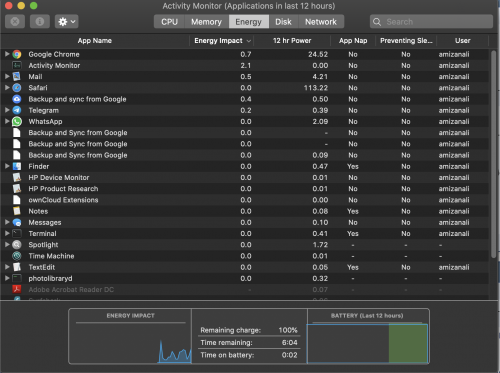
user posted image

From the screenshot above it shows now the battery is at 100%, however every 3-4 minutes on battery it will minus time remaining 10 minutes sweat.gif

user posted image

This is after 12 minutes of usage on battery.


I've did SMC reset, but still the issue persist. Contact Apple Support and they are saying based on the numbers from System Information, and the battery condition, all is normal. Take note, I've lowered the screen brightness to 60%, and keyboard backlight to none.

Any other ideas I can try to improve the battery life usage?
ericlaiys
post Nov 13 2019, 01:37 PM

Look at all my stars!!
*******
Senior Member
7,589 posts

Joined: May 2012


QUOTE(fox_shinoda @ Nov 13 2019, 01:03 PM)
I'm currently using MacBook Pro with Touch Bar (13-inch, 2016, Four Thunderbolt 3 Ports) as my daily work driver. Some coding and linux server remote management.

Bought it Dec 2017 at a discount from an IT retailer here in KL. I hardly use it unplugged, once I reached the office, it will be connected constantly on the power adapter. Unless I need it for meeting or meeting client out of office, then only it will be on battery.

Battery cycle count is only 115.

My current predicament is that when it is running on battery, the battery can only last for like 1.5 to 2 hours at most when it is on 100%. Checked the battery condition is Normal.

user posted image

From the screenshot above it shows now the battery is at 100%, however every 3-4 minutes on battery it will minus time remaining 10 minutes  sweat.gif
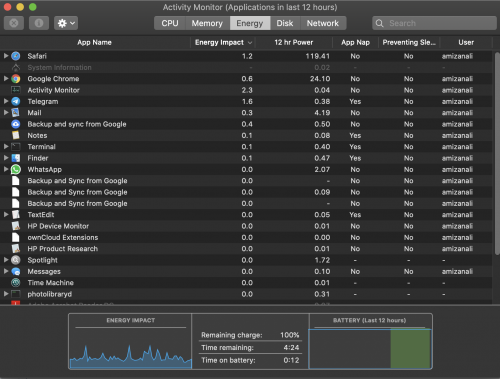
user posted image

This is after 12 minutes of usage on battery.
I've did SMC reset, but still the issue persist. Contact Apple Support and they are saying based on the numbers from System Information, and the battery condition, all is normal. Take note, I've lowered the screen brightness to 60%, and keyboard backlight to none.

Any other ideas I can try to improve the battery life usage?

*
App drain battery.
Nauts
post Nov 13 2019, 01:59 PM

Casual
***
Junior Member
340 posts

Joined: Jun 2011
QUOTE(fox_shinoda @ Nov 13 2019, 01:03 PM)
I'm currently using MacBook Pro with Touch Bar (13-inch, 2016, Four Thunderbolt 3 Ports) as my daily work driver. Some coding and linux server remote management.

Bought it Dec 2017 at a discount from an IT retailer here in KL. I hardly use it unplugged, once I reached the office, it will be connected constantly on the power adapter. Unless I need it for meeting or meeting client out of office, then only it will be on battery.

Battery cycle count is only 115.

My current predicament is that when it is running on battery, the battery can only last for like 1.5 to 2 hours at most when it is on 100%. Checked the battery condition is Normal.

user posted image

From the screenshot above it shows now the battery is at 100%, however every 3-4 minutes on battery it will minus time remaining 10 minutes  sweat.gif

user posted image

This is after 12 minutes of usage on battery.
I've did SMC reset, but still the issue persist. Contact Apple Support and they are saying based on the numbers from System Information, and the battery condition, all is normal. Take note, I've lowered the screen brightness to 60%, and keyboard backlight to none.

Any other ideas I can try to improve the battery life usage?
*
The culprit is google chrome. I have since uninstalled chrome.

You stop using chrome and you will notice the batt wont drain so fast.

Give it a try.


Zaryl
post Nov 13 2019, 05:00 PM

Hardcore Casual Gamer
******
Senior Member
1,711 posts

Joined: Jan 2003
From: Kedah Khap Khoun Khap (4K)


QUOTE(Nauts @ Nov 13 2019, 01:59 PM)
The culprit is google chrome. I have since uninstalled chrome.

You stop using chrome and you will notice the batt wont drain so fast.

Give it a try.
*
best to use SAFARI to surf websites as it is optimized for macOS.

using other browsers such as Google Chrome will have big impact on battery life as it is not optimized.
Raymond_ACCA
post Nov 13 2019, 09:32 PM

Enthusiast
*****
Junior Member
826 posts

Joined: Mar 2008
Check out Tim Cook’s Twitter. Looks like MacBook 16” is out very soon
PoisonSoul
post Nov 13 2019, 10:16 PM

Regular
******
Senior Member
1,841 posts

Joined: Feb 2018


Macbook Pro 16" is now live
tech_frix
post Nov 14 2019, 04:40 PM

Boo Yah!
*******
Senior Member
5,656 posts

Joined: Sep 2007
From: wheres d oil price is higher than condoms..

QUOTE(apowerfulskill @ Nov 9 2019, 11:18 PM)
Just got a 2019 MacBook Pro. Aside from Satechi and HyperDrive, any good recommendations on USB-C hubs? Maybe the Kingston Nucleum?

Thanks in advance!
*
I've been using dodo cool for a year now and seems ok..
piscesguy
post Nov 15 2019, 03:35 PM

私の名前はりゅうです
*******
Senior Member
3,965 posts

Joined: Nov 2006
QUOTE(Zaryl @ Nov 13 2019, 05:00 PM)
best to use SAFARI to surf websites as it is optimized for macOS.

using other browsers such as Google Chrome will have big impact on battery life as it is not optimized.
*
i use Chrome, my 6 years old MBP battery manufactured on 20-May-2013 can lasts 5 hours.
SUSbronkos
post Nov 15 2019, 03:42 PM

Regular
******
Senior Member
1,159 posts

Joined: Mar 2019
do u guys have your MBP connected to the power adapter all the time when using or only charge when battery level is low?
jianwei87
post Nov 15 2019, 03:51 PM

Casual
***
Junior Member
481 posts

Joined: Jan 2007
how to charge macbook pro to minimize battery cycle
limkj
post Nov 16 2019, 09:57 AM

Getting Started
**
Junior Member
241 posts

Joined: Jun 2007


QUOTE(bronkos @ Nov 15 2019, 03:42 PM)
do u guys have your MBP connected to the power adapter all the time when using or only charge when battery level is low?
*
If I have access to a power point, I charge my MacBook Pro. That will minimize cycle count.
TSwestlife
post Nov 16 2019, 09:59 AM

10k Club
********
All Stars
14,312 posts

Joined: Jan 2011
QUOTE(bronkos @ Nov 15 2019, 03:42 PM)
do u guys have your MBP connected to the power adapter all the time when using or only charge when battery level is low?
*
All the time. I used it at home. Power cycle for battery: 6.

68 Pages « < 46 47 48 49 50 > » Top
 

Change to:
| Lo-Fi Version
0.0349sec    0.92    6 queries    GZIP Disabled
Time is now: 20th December 2025 - 01:14 AM