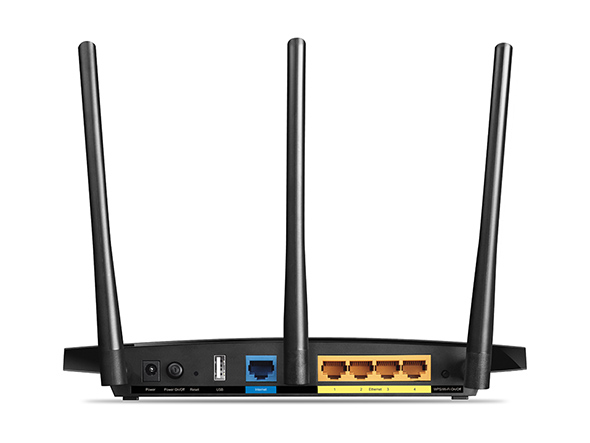
QUOTE(Alex9182 @ Mar 17 2018, 08:08 PM)
Give up on C1200 d. 

Haha. Lets hope for a miracle. For such an awesome hardware, this router should be a rival to its big bro, Archer c7.Official TP-Link C1200 V1(EU) Firmware is out, Hidden WDS functionality works!, Page 29
|
|
 Mar 17 2018, 11:15 PM Mar 17 2018, 11:15 PM
|
 
Senior Member
1,342 posts Joined: Dec 2016 
|
QUOTE(Alex9182 @ Mar 17 2018, 08:08 PM) Give up on C1200 d. Haha. Lets hope for a miracle. For such an awesome hardware, this router should be a rival to its big bro, Archer c7. |
|
|
|
|
|
Mar 18 2018, 12:26 AM
|

Senior Member
1,031 posts Joined: Sep 2006 From: ▁▂▃▅▇ ٩͡[๏̯͡๏]۶?  
|
QUOTE(Jjuggler @ Mar 17 2018, 11:07 PM) channel 36 and auto inclusive. last firmware update was on 2017 and no more update after that? . Having 9 including auto channels in total. So far i am a happy user of this router. Never faced a single issues. Special thanks SilentVampire bro for suggesting me to test this router. Those who wish to buy this router, do upgrade your firmware to the latest version. Because you will face some minor difficulties of getting an error to setup the router successfully. . Having 9 including auto channels in total. So far i am a happy user of this router. Never faced a single issues. Special thanks SilentVampire bro for suggesting me to test this router. Those who wish to buy this router, do upgrade your firmware to the latest version. Because you will face some minor difficulties of getting an error to setup the router successfully. Can refer my personal review on this router here [attachmentid=9667832] I hope they really find out a possible solution for the auto-reboot part. I felt pity to those who have to depend on stock isp router and those who tight budget. I felt surprise that, the router that received many negative reviews, DIR850L performs better than c1200. Awesome hardware, poorly coded firmware. asus ac88u double the price of c3150 c3150 with 32 mb flash memory for firmware/256 ram ac88u with 128 mb flash memory for firmware/512 ram |
|
|
Mar 18 2018, 12:37 AM
|
|
Senior Member
1,342 posts Joined: Dec 2016
|
QUOTE(RoxyGal @ Mar 18 2018, 12:26 AM) last firmware update was on 2017 and no more update after that? Yeap. I am surprised too. However, one good feature that this router has is, built-in antivirus that blocks suspicious activity when we are surfing through the internet. As we know, its TP-LINK brand. So yeah. Hopefully they will soon release the new improved firmware. I am not sure whether they already solved the KRACK WPA2 issue since most of the manufacturer release an urgent update for their router despite it is affected or vice versa.asus ac88u double the price of c3150 c3150 with 32 mb flash memory for firmware/256 ram ac88u with 128 mb flash memory for firmware/512 ram |
|
|
Mar 18 2018, 01:16 AM
|

Junior Member
322 posts Joined: Jan 2008
|
QUOTE(RoxyGal @ Mar 18 2018, 12:26 AM) last firmware update was on 2017 and no more update after that? @jjuglerasus ac88u double the price of c3150 c3150 with 32 mb flash memory for firmware/256 ram ac88u with 128 mb flash memory for firmware/512 ram Your C3150 review is well written. Good read. @RoxyGal If you were to compare, it should be the Asus AC86U, the current model as the AC88U is outdated. Also the AC86U has the newer BCM4366E chip whch fixes some of the issues with the BCM4366 used in both the AC88U and C3150. |
|
|
Mar 18 2018, 01:23 AM
|

Senior Member
3,669 posts Joined: Apr 2006
|
QUOTE(Jjuggler @ Mar 17 2018, 11:07 PM) channel 36 and auto inclusive. . Having 9 including auto channels in total. So far i am a happy user of this router. Never faced a single issues. Special thanks SilentVampire bro for suggesting me to test this router. Those who wish to buy this router, do upgrade your firmware to the latest version. Because you will face some minor difficulties of getting an error to setup the router successfully. Can refer my personal review on this router here [attachmentid=9667832]  If you set 20Mhz, did channel 165 appear for C3150V2  ? ?Could you some extra testing with your new toy? Download wifi analyzer https://play.google.com/store/apps/details?....analyzer&hl=en , Check if the dbm changes (take note of the dbm value) for channel 36, 149, 157 and 165 (if 165 appears after setting 20mhz or auto width). I wonder if TP-Link is using same transmit power for all channels in its whole product range. Because C1200 (eu firmware) seems to use same transmit power for all 5ghz channel........the proof is the dbm signal quality decreasing as the frequency get higher linearly. |
|
|
Mar 18 2018, 02:47 AM
|
|
Senior Member
1,031 posts Joined: Sep 2006 From: ▁▂▃▅▇ ٩͡[๏̯͡๏]۶?
|
QUOTE(JohnLai @ Mar 18 2018, 01:23 AM) If you set 20Mhz, did channel 165 appear for C3150V2 ?Could you some extra testing with your new toy? Download wifi analyzer https://play.google.com/store/apps/details?....analyzer&hl=en , Check if the dbm changes (take note of the dbm value) for channel 36, 149, 157 and 165 (if 165 appears after setting 20mhz or auto width). I wonder if TP-Link is using same transmit power for all channels in its whole product range. Because C1200 (eu firmware) seems to use same transmit power for all 5ghz channel........the proof is the dbm signal quality decreasing as the frequency get higher linearly. |
|
|
|
|
|
Mar 18 2018, 03:27 AM
|
|
Senior Member
1,031 posts Joined: Sep 2006 From: ▁▂▃▅▇ ٩͡[๏̯͡๏]۶?
|
QUOTE(XPS @ Mar 18 2018, 01:16 AM) @jjugler I think i know why .Your C3150 review is well written. Good read. @RoxyGal If you were to compare, it should be the Asus AC86U, the current model as the AC88U is outdated. Also the AC86U has the newer BCM4366E chip whch fixes some of the issues with the BCM4366 used in both the AC88U and C3150. C1200 has 16 mb of flash memory and the latest firmware update file size is 14.86 MB. Tplink international forumer stated that tplink has yet to fix KRACK issue. I guess, the flash memory is just not enough space to update everything. Better remove feature and go for stability and wifi power See this link. https://www.asus.com/my/Networking/RTN14UHP...pDesk_Download/ even asus n14uhp has KRACK update on february 2018 and due to not enough space in flash memory, some feature is deleted for the latest firmware. |
|
|
Mar 18 2018, 10:53 AM
|

Senior Member
669 posts Joined: Sep 2015
|
QUOTE(Jjuggler @ Mar 17 2018, 11:07 PM) Bro, i saw the router come with power adapter, if let it on 24/7, the power consumption must be quite high. |
|
|
Mar 18 2018, 01:31 PM
|
|
Senior Member
1,342 posts Joined: Dec 2016
|
QUOTE(XPS @ Mar 18 2018, 01:16 AM) @jjugler Thank you. Your C3150 review is well written. Good read.  QUOTE(JohnLai @ Mar 18 2018, 01:23 AM) If you set 20Mhz, did channel 165 appear for C3150V2 ?Could you some extra testing with your new toy? Download wifi analyzer https://play.google.com/store/apps/details?....analyzer&hl=en , Check if the dbm changes (take note of the dbm value) for channel 36, 149, 157 and 165 (if 165 appears after setting 20mhz or auto width). I wonder if TP-Link is using same transmit power for all channels in its whole product range. Because C1200 (eu firmware) seems to use same transmit power for all 5ghz channel........the proof is the dbm signal quality decreasing as the frequency get higher linearly. QUOTE(Alex9182 @ Mar 18 2018, 10:53 AM) Bro, i saw the router come with power adapter, if let it on 24/7, the power consumption must be quite high. This is a high performance router. I haven't check my electric bill. Just only 2 weeks + bro. I will let you know if it consumes electricity compared with other routers. Even my previous asus ac87r comes with adapter. all high end router does comes with adapter to be precise.  This post has been edited by Jjuggler: Mar 18 2018, 01:32 PM |
|
|
Mar 18 2018, 05:19 PM
|
|
Senior Member
669 posts Joined: Sep 2015
|
QUOTE(Jjuggler @ Mar 18 2018, 01:31 PM) Thank you. Archer C7 consume 4.5W of power, Archer C1200 consume around 7W the last time i check. I will test it and provide the outcome of the test. This is a high performance router. I haven't check my electric bill. Just only 2 weeks + bro. I will let you know if it consumes electricity compared with other routers. Even my previous asus ac87r comes with adapter. all high end router does comes with adapter to be precise. This post has been edited by Alex9182: Mar 18 2018, 07:59 PM Attached image(s) 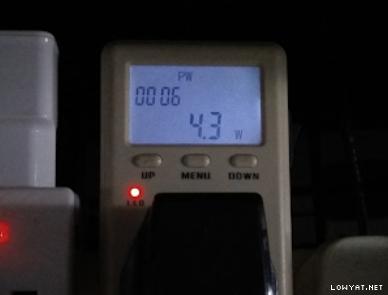 |
|
|
Mar 18 2018, 07:47 PM
|

Senior Member
561 posts Joined: Jul 2015
|
QUOTE(shamsay @ Mar 17 2018, 01:38 PM) After 22days..my router rebooted...how i know it was reboot..since i set vpn..so the public ip still same until it is reboot n wan ip is change..and i cant vpn anymore.22 days uptime consider ok la.. 8 days 20 hours and rebooted. Damn it.Previous max uptime was 8+ days as well. Can't seem to go beyond 9 days... |
|
|
Mar 18 2018, 08:05 PM
|
|
Senior Member
1,342 posts Joined: Dec 2016
|
QUOTE(Alex9182 @ Mar 18 2018, 05:19 PM) Archer C7 consume 4.5W of power, Archer C1200 consume around 7W the last time i check. Wow. Nice. Haha |
|
|
Mar 18 2018, 10:59 PM
|

Senior Member
606 posts Joined: Jan 2003 From: Deep Beach 
|
QUOTE(biloxee @ Mar 18 2018, 07:47 PM) 8 days 20 hours and rebooted. Damn it. Please try to factory reset and configure again.that how i can get 22days uptime.maybe you can try alsoPrevious max uptime was 8+ days as well. Can't seem to go beyond 9 days... |
|
|
|
|
|
Mar 18 2018, 11:04 PM
|
|
Senior Member
669 posts Joined: Sep 2015
|
QUOTE(shamsay @ Mar 18 2018, 10:59 PM) Please try to factory reset and configure again.that how i can get 22days uptime.maybe you can try also Continue to monitor see next reboot can sustain another 22days, maybe next time different d. |
|
|
Mar 19 2018, 11:37 AM
|
|
Senior Member
1,152 posts Joined: Jul 2011
|
QUOTE(Alex9182 @ Mar 18 2018, 05:19 PM) Archer C7 consume 4.5W of power, Archer C1200 consume around 7W the last time i check. Hi,Can I know what brand/model of that power measurement device you using there? |
|
|
Mar 19 2018, 12:38 PM
|
|
Senior Member
669 posts Joined: Sep 2015
|
QUOTE(lyt25_1234 @ Mar 19 2018, 11:37 AM) Hi, mine is generic no brand one, you can find new models at Lazada, search for "ac electricity meter" cost around RM50.Can I know what brand/model of that power measurement device you using there? if you want branded, Uni-T brand is not bad. This post has been edited by Alex9182: Mar 19 2018, 12:44 PM Attached thumbnail(s) 
|
|
|
Mar 19 2018, 01:36 PM
|
|
Senior Member
1,152 posts Joined: Jul 2011
|
QUOTE(Alex9182 @ Mar 19 2018, 12:38 PM) mine is generic no brand one, you can find new models at Lazada, search for "ac electricity meter" cost around RM50. Thanks!if you want branded, Uni-T brand is not bad. |
|
|
Mar 19 2018, 02:09 PM
|

Senior Member
7,120 posts Joined: Oct 2011 From: Wakanda
|
QUOTE(Alex9182 @ Mar 19 2018, 12:38 PM) mine is generic no brand one, you can find new models at Lazada, search for "ac electricity meter" cost around RM50. Nice... I be quoting for my future reference.. if you want branded, Uni-T brand is not bad.  |
|
|
Mar 20 2018, 02:43 AM
|
|
Junior Member
552 posts Joined: Aug 2010
|
QUOTE(voncrane @ Mar 19 2018, 02:09 PM) Nice... I be quoting for my future reference.. hello guys, i am also user of TP-Link C1200 Router (it is given by TM).Behind the Router only got 1 USB Port, but i wanna setup both Print Server & Disk Storage. Can I connect additional USB Hub to extend the usage of default USB Port?  Reference picture » Click to show Spoiler - click again to hide... « This post has been edited by westernkl: Mar 20 2018, 02:44 AM |
|
|
Mar 20 2018, 08:42 AM
|
|
Senior Member
7,120 posts Joined: Oct 2011 From: Wakanda
|
QUOTE(westernkl @ Mar 20 2018, 02:43 AM) hello guys, i am also user of TP-Link C1200 Router (it is given by TM). No idea.. Not even using my usb port. Got a HP printer with inbuilt wifi.. Can scan or print from all connected devices including mobile phones or tablets, etc..Behind the Router only got 1 USB Port, but i wanna setup both Print Server & Disk Storage. Can I connect additional USB Hub to extend the usage of default USB Port? Reference picture » Click to show Spoiler - click again to hide... « This post has been edited by voncrane: Mar 20 2018, 08:42 AM |
| Change to: |  0.0194sec 0.0194sec
 0.56 0.56
 6 queries 6 queries
 GZIP Disabled GZIP Disabled
Time is now: 16th December 2025 - 10:09 AM |
 Quote
Quote