Outline ·
[ Standard ] ·
Linear+
Official TP-Link C1200 V1(EU) Firmware is out, Hidden WDS functionality works!, Page 29
|
SilentVampire
|
 Jan 10 2018, 06:47 PM Jan 10 2018, 06:47 PM
|

|
QUOTE(Baconateer @ Jan 10 2018, 06:44 PM) Sounds terrible..  hopefully mine will be okay.. Hopefully not bro. If it does, you have to change router or flash this beta firmware, or change router and wait for the stable release of the new firmware. Either way, changing router is the only way if it happen now. |
|
|
|
|
|
lyt25_1234
|
Jan 10 2018, 11:00 PM
|
|
|
QUOTE(lyt25_1234 @ Jan 10 2018, 04:56 PM) Any idea when will the BETA firmware be out as Official FW? Just got to know it will be out very soon.... |
|
|
|
|
|
TSJohnLai
|
Jan 10 2018, 11:42 PM
|
|
|
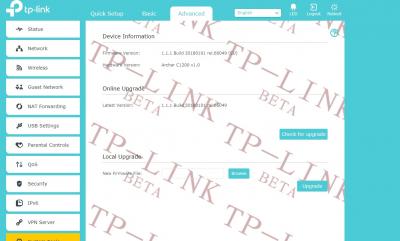
QUOTE(Baconateer @ Jan 10 2018, 06:14 PM) will give it a try later... Update: Just discovered TIME has different method to login after one accidentally update the nightmare firmware which hide the firmware upgrade page. http://192.168.0.1/userRpm/firmwareUpgrade.htm |
|
|
|
|
|
jimmy.soo
|
Jan 11 2018, 10:06 PM
|
|
|
updated the beta firmware, the configuration and settings retained, did not get reset.
|
|
|
|
|
|
coolguy_0925
|
Jan 12 2018, 10:53 AM
|
|
|
Anyone tried this from TP-Link AU? http://static.tp-link.com/2018/201801/2018...)_V1_180103.zipI guess it is the same as the beta? |
|
|
|
|
|
TSJohnLai
|
Jan 12 2018, 11:53 AM
|
|
|
QUOTE(coolguy_0925 @ Jan 12 2018, 10:53 AM) Anyone tried this from TP-Link AU? http://static.tp-link.com/2018/201801/2018...)_V1_180103.zipI guess it is the same as the beta? Except that one is for US hardware and not EU hardware. Firmware is same as US beta firmware. |
|
|
|
|
|
sohlican
|
Jan 13 2018, 08:23 PM
|
|
|
Is the beta firmware final yet?
|
|
|
|
|
|
biloxee
|
Jan 14 2018, 01:24 PM
|
|
|
Archer C1200 (EU) V1: http://static.tp-link.com/2018/201801/2018...180101_Beta.zip1 week uptime with this beta firmware with IPv6 disabled. No random reboots. No problems with WIFI. No decrease in speed. Some tests were done while the internet connection was being used. 
|
|
|
|
|
|
quackpack
|
Jan 14 2018, 10:41 PM
|
|
|
QUOTE(JohnLai @ Jan 10 2018, 11:42 PM) Update: Just discovered TIME has different method to login after one accidentally update the nightmare firmware which hide the firmware upgrade page. http://192.168.0.1/userRpm/firmwareUpgrade.htmI can't seem to go to that page, it just loops back in the main menu. Is the link correct? Thanks |
|
|
|
|
|
TSJohnLai
|
Jan 14 2018, 10:51 PM
|
|
|
QUOTE(quackpack @ Jan 14 2018, 10:41 PM) I can't seem to go to that page, it just loops back in the main menu. Is the link correct? Thanks According to sohlican, he can access the hidden firmware page via the link after updating to TIME firmware. |
|
|
|
|
|
biloxee
|
Jan 14 2018, 11:46 PM
|
|
|
QUOTE(quackpack @ Jan 14 2018, 10:41 PM) I can't seem to go to that page, it just loops back in the main menu. Is the link correct? Thanks I did it this way with Chrome... - Log in and right-click say for eg. Guest Network and select Inspect 
- A new window will open. Look for the "./pages/userrpm/basic_guest.##############.html" and double-click to edit. Replace basic_guest with firmwareUpgrade 
- Go back to the first window, and click on Guest Network. It will launch the firmware upgrade page... |
|
|
|
|
|
TSJohnLai
|
Jan 15 2018, 12:06 AM
|
|
|
QUOTE(biloxee @ Jan 14 2018, 11:46 PM) I did it this way with Chrome... - Log in and right-click say for eg. Guest Network and select Inspect
- A new window will open. Look for the "./pages/userrpm/basic_guest.##############.html" and double-click to edit. Replace basic_guest with firmwareUpgrade
- Go back to the first window, and click on Guest Network. It will launch the firmware upgrade page... Only applicable for v60000 firmware. Older 30000 and 40000 firmwares which TIME firmware seem to be based don't make use of the extra 13 digits. |
|
|
|
|
|
biloxee
|
Jan 15 2018, 12:12 AM
|
|
|
QUOTE(JohnLai @ Jan 15 2018, 12:06 AM) Only applicable for v60000 firmware. Older 30000 and 40000 firmwares which TIME firmware seem to be based don't make use of the extra 13 digits. That's the method I used after I mistakenly installed the TIME firmware. The method works without the numbers... |
|
|
|
|
|
TSJohnLai
|
Jan 15 2018, 12:16 AM
|
|
|
QUOTE(biloxee @ Jan 15 2018, 12:12 AM) That's the method I used after I mistakenly installed the TIME firmware. The method works without the numbers... Eh? You mean TIME already use v60000 as base firmware?  Well, I did posted how to find the 13digits on post #15....... |
|
|
|
|
|
biloxee
|
Jan 15 2018, 12:23 AM
|
|
|
QUOTE(JohnLai @ Jan 15 2018, 12:16 AM) Eh? You mean TIME already use v60000 as base firmware? Well, I did posted how to find the 13digits on post #15....... No, it might not have had the 13 numbers. I installed many firmwares the first few days I got the C1200 so I can't remember exactly. But that's the way I got myself out of that hole... I would reinstall the TIME firmware again for the exact screenshots and links but I want to see how long this beta firmware will go before it reboots on its own or needs a reboot. This post has been edited by biloxee: Jan 15 2018, 12:27 AM |
|
|
|
|
|
MrSpeedy
|
Jan 23 2018, 07:14 PM
|
|
|
TP-Link FAQ website suddenly removed the C1200 EU V1 Beta firmware.
So full firmware will release soon?
|
|
|
|
|
|
biloxee
|
Jan 23 2018, 08:18 PM
|
|
|
QUOTE(MrSpeedy @ Jan 23 2018, 07:14 PM) TP-Link FAQ website suddenly removed the C1200 EU V1 Beta firmware. So full firmware will release soon? It's still available here... http://static.tp-link.com/2018/201801/2018...180101_Beta.zip |
|
|
|
|
|
happyboy1234
|
Jan 23 2018, 10:08 PM
|
New Member

|
anyone face this issue before
QOS enabled and add few device to limit the speed, but the device not in the list also affected. Need to disable QOS then only back to normal
|
|
|
|
|
|
TSJohnLai
|
Jan 23 2018, 10:19 PM
|
|
|
QUOTE(happyboy1234 @ Jan 23 2018, 10:08 PM) anyone face this issue before QOS enabled and add few device to limit the speed, but the device not in the list also affected. Need to disable QOS then only back to normal -.- Devices not added to QOS list will get lowest priority. Didn't you read the manual? |
|
|
|
|



 Quote
Quote




 0.0400sec
 0.11
0.11
 6 queries
 GZIP Disabled