


Don't mind i copy the nice usedbar from "Eiraku", "unknowndevices" and also from others....

Nice to meet you all and this is a nice thread

Dell XPS M1210 Support Thread #1, COD4? No problem...
|
|
 May 9 2007, 11:49 PM May 9 2007, 11:49 PM
|
 
Junior Member
30 posts Joined: Jul 2006 From: Puchong, PJ  
|
XPS owner reporting here...
Don't mind i copy the nice usedbar from "Eiraku", "unknowndevices" and also from others.... Nice to meet you all and this is a nice thread |
|
|
|
|
|
May 9 2007, 11:53 PM
|

Senior Member
7,037 posts Joined: Apr 2006
|
QUOTE(NewbieBetta @ May 9 2007, 04:38 PM) OMG i run 3dmark06 & i got 204 marks only...omg..wth..my fps is like 0~1 204 points? Now that's a problem... I haven't had the time to d'load 3DMark06 yet, but Notebookcheck.com's posting 800++ 3DMark06 points for a C2D 2GHz M1210... Even taking into account that they're probably running XP, Vista should be around 600 points, minimum... any of you guys test your 7400 before..& my temp shot up to 101C..siao..i will call DELL..so "dell" la..  and need to change which setting to make it looks cooler..?   And with the temp up to 101C? Thats definitely a problem... The hottest it goes when playing games for me is about 70-80, I think (I dunno how to check the GC temp while playing games, just put my hand next to the vent when playing)... The air coming out is hot, but never enough to burn my hand (101 degrees is definitely enuff to burn my hand somewhat)...  Call Dell... They might have screwed the GC heatsink or something... How the heck do you check the GC Temp while playing anyway, I've been wondering that for a while now... On another note, I'm probably gonna go to Lowyat tomorrow to check up prices on a few things, namely Razer's Krait and Logitech's V400 mice (my mouse's still working fine, but both these mice look really tempting); Zalman's ZM-NC1000 and CM's CoolPal P1 notebook cooler; and a few other stuff...  And I also found out that you can get NOD32 antivirus at a student rate of RM74... That's a heck of a deal for one of the best AVs out there (Kapersky level detection, even lower system load)... So many things to buy, so little money in my pocket...  Added on May 9, 2007, 11:53 pm QUOTE(ahchew @ May 9 2007, 11:49 PM) XPS owner reporting here... Welcome mate! Don't mind i copy the nice usedbar from "Eiraku", "unknowndevices" and also from others.... Nice to meet you all and this is a nice thread This post has been edited by Eiraku: May 9 2007, 11:53 PM |
|
|
May 10 2007, 12:21 AM
|
|
Junior Member
30 posts Joined: Jul 2006 From: Puchong, PJ
|
Thx.
 By the way...can you also help me check the price for this cordless mouse too  ...if convenient...think to get one ...if convenient...think to get one  Logitech(R) Cordless Mini Optical Mouse  Logitech(R) V200 Cordless notebook mouse  Logitech(R) LX5 wireless optical mouse  Microsoft Wireless Notebook Laser Mouse 6000  This post has been edited by ahchew: May 10 2007, 12:24 AM |
|
|
May 10 2007, 12:32 AM
|

Senior Member
2,040 posts Joined: Oct 2004 From: UK
|
QUOTE(unknowndevices @ May 9 2007, 10:38 PM) just noticed that you change to Vista Ultimate...how's the changes goes with Vista? one of our fren here says his LCD yellowish color so i try to enlighten him what do you mean can "change the color settings" in nVidia control panel? is the yellowish thingy or other color thingy? but im not sure my LCD is truly yellowish onot...only when i compare with other ppl's LCD then i see the difference...lol...not to say yellowish, jus tat the colors are warmer, the black colors in my LCD somehow is darker...more saturated but heck so far my LCD is in tip top condition...good colors, no leakage generally vista is good...u need to work out with the tweaking of the 3D settings for ur nvidia awhile to master it...sometimes when settings are not in good mode, the animation of Aero lags abit more...overall still ok...hehe i will try to help out if anyone having problem optimising the aero effects of vista This post has been edited by kwws: May 10 2007, 12:32 AM |
|
|
May 10 2007, 01:25 AM
|
|
Senior Member
7,037 posts Joined: Apr 2006
|
QUOTE(ahchew @ May 10 2007, 12:21 AM) Thx. I'll try... By the way...can you also help me check the price for this cordless mouse too ...if convenient...think to get one Logitech(R) Cordless Mini Optical Mouse Logitech(R) V200 Cordless notebook mouse Logitech(R) LX5 wireless optical mouse Microsoft Wireless Notebook Laser Mouse 6000 |
|
|
May 10 2007, 01:31 AM
|

Senior Member
2,915 posts Joined: Jan 2005
|
QUOTE(ahchew @ May 9 2007, 11:49 PM) XPS owner reporting here... this compliment should goes for Eiraku...he's the one doing it... Don't mind i copy the nice usedbar from "Eiraku", "unknowndevices" and also from others.... Nice to meet you all and this is a nice thread  yeah!...welcome to the club...  guess...you did have a nice specs of XPS...and currently you're the only one with HDD@160gb(correct if im wronged )... QUOTE(Eiraku @ May 9 2007, 11:53 PM) On another note, I'm probably gonna go to Lowyat tomorrow to check up prices on a few things, namely Razer's Krait and Logitech's V400 mice (my mouse's still working fine, but both these mice look really tempting); Zalman's ZM-NC1000 and CM's CoolPal P1 notebook cooler; and a few other stuff... wah!...Eiraku would be going for shopping at Lowyat tomorrow... And I also found out that you can get NOD32 antivirus at a student rate of RM74... That's a heck of a deal for one of the best AVs out there (Kapersky level detection, even lower system load)... So many things to buy, so little money in my pocket... Added on May 9, 2007, 11:53 pm Welcome mate!  who wanna accompany him...make sure you prepared your pockets with money... do update us if there's any promotions or good deals on PC stuff...  QUOTE(ahchew @ May 10 2007, 12:21 AM) Thx. yeah!...Eiraku don't forget to check for our friend here...if you're not in hurry... By the way...can you also help me check the price for this cordless mouse too... if convenient...think to get one Logitech(R) Cordless Mini Optical Mouse Logitech(R) V200 Cordless notebook mouse Logitech(R) LX5 wireless optical mouse Microsoft Wireless Notebook Laser Mouse 6000  QUOTE(kwws @ May 10 2007, 12:32 AM) one of our fren here says his LCD yellowish color so i try to enlighten him wah!...looking forward for your good jobs and any reviews/feedbacks about Vista to share?... but im not sure my LCD is truly yellowish onot...only when i compare with other ppl's LCD then i see the difference...lol...not to say yellowish, jus tat the colors are warmer, the black colors in my LCD somehow is darker...more saturated but heck so far my LCD is in tip top condition...good colors, no leakage generally vista is good...u need to work out with the tweaking of the 3D settings for ur nvidia awhile to master it...sometimes when settings are not in good mode, the animation of Aero lags abit more...overall still ok...hehe i will try to help out if anyone having problem optimising the aero effects of vista  |
|
|
|
|
|
May 10 2007, 01:41 AM
|

Senior Member
1,238 posts Joined: May 2007
|
QUOTE(Eiraku @ May 9 2007, 10:53 AM) How the heck do you check the GC Temp while playing anyway, I've been wondering that for a while now... Cant u use Alt + Tab ? (assuming u have Nvtemplogger or Rivatuner; temp display on desktop for Nvtemplogger or temp display in either barchart or textvalue for Rivatuner on the system tray) u can see the temp shows on the system tray.. if u use Rivatuner i think u can record ur temp so after u finish or exit ur game u can see back the history how hot ur GC went during ur gaming.. usually right after gaming the temp will display the best range of temp while ur gaming.. in other word just after 2-3 hours of gaming when u exit see the temp on the system tray and thats basically ur GC temp while gaming.. Added on May 9, 2007, 11:53 pm Welcome mate! i hope this help.. I'll add more if there's a need for how-to use Rivatuner.. If not im assuming we all somehow know.. This post has been edited by derred: May 10 2007, 01:47 AM |
|
|
May 10 2007, 01:54 AM
|
|
Senior Member
7,037 posts Joined: Apr 2006
|
QUOTE(derred @ May 10 2007, 01:41 AM) Cant u use Alt + Tab ? (assuming u have Nvtemplogger or Rivatuner; temp display on desktop for Nvtemplogger or temp display in either barchart or textvalue for Rivatuner on the system tray) u can see the temp shows on the system tray.. if u use Rivatuner i think u can record ur temp so after u finish or exit ur game u can see back the history how hot ur GC went during ur gaming.. usually right after gaming the temp will display the best range of temp while ur gaming.. in other word just after 2-3 hours of gaming when u exit see the temp on the system tray and thats basically ur GC temp while gaming.. Im more an ATITool guy, but thanks... I'll try using both.. i hope this help.. I'll add more if there's a need for how-to use Rivatuner.. If not im assuming we all somehow know.. |
|
|
May 10 2007, 02:18 AM
|

Senior Member
3,706 posts Joined: Aug 2005 
|
will call them after I had finish downloading my drama,i don want my hdd incase get screwed up..then my 17.88GB drama will gone..haha
|
|
|
May 10 2007, 02:22 AM
|
|
Senior Member
1,238 posts Joined: May 2007
|
QUOTE(Eiraku @ May 9 2007, 12:54 PM) Im more an ATITool guy, but thanks... I'll try using both.. Oh i see, sorry i was assuming XPS m1210 using nVidia card.. but the new Rivatuner v2.01 works with ATI.. but thats something i still couldnt figure out.. since my card is not ATi.. I'll check on for ATi later on.. if anyone needs help about Rivatuner, i'll do step-by-step tutorial by request.. and the fastest i can post for it will be tomorrow afternoon.. i mean today's afternoon by today's date.. It's not that hard but if u never used it before u might not be able to make it appears on the system tray.. so.. and of course its all freeware.. im here to share .. not to sell.. Added on May 10, 2007, 2:24 am QUOTE(NewbieBetta @ May 9 2007, 01:18 PM) will call them after I had finish downloading my drama,i don want my hdd incase get screwed up..then my 17.88GB drama will gone..haha are u sending it to depot? if u do it is always a good idea to format ur system before let anybody touches ur pc.. for security and privacy purposes.. unless all u have is nothing important. good luck to u..This post has been edited by derred: May 10 2007, 02:26 AM |
|
|
May 10 2007, 09:57 AM
|
|
Senior Member
7,037 posts Joined: Apr 2006
|
QUOTE(derred @ May 10 2007, 02:22 AM) Oh i see, sorry i was assuming XPS m1210 using nVidia card.. but the new Rivatuner v2.01 works with ATI.. but thats something i still couldnt figure out.. since my card is not ATi.. Well actually, ATiTool can check (and OC) Nvidia cards too (even in Vista, that's the + point)... But just post the Rivatuner tut when you're not busy, and we'll have the first how to for this thread! I'll check on for ATi later on.. if anyone needs help about Rivatuner, i'll do step-by-step tutorial by request.. and the fastest i can post for it will be tomorrow afternoon.. i mean today's afternoon by today's date.. It's not that hard but if u never used it before u might not be able to make it appears on the system tray.. so.. and of course its all freeware.. im here to share .. not to sell.. Added on May 10, 2007, 2:24 am are u sending it to depot? if u do it is always a good idea to format ur system before let anybody touches ur pc.. for security and privacy purposes.. unless all u have is nothing important. good luck to u.. |
|
|
May 10 2007, 10:12 AM
|
|
Junior Member
77 posts Joined: Sep 2006
|
I'm using NVIDIA nTune to monitor the status of my GeForce Go 7400 graphic card on my XPS. It can also monitor the RPM of the fan, its quite usefull. It integrated with the nVidia Control Panel software. Visit this website to download: http://www.nvidia.com/object/ntune_5.05.25.00.html I have no 3DMark software yet, I will see if I can download it and benchmark my XPS. I kind of wonder what is the score  . . |
|
|
May 10 2007, 10:17 AM
|

Senior Member
1,325 posts Joined: Oct 2006 From: Puchong
|
QUOTE(llleon @ May 10 2007, 10:12 AM) I'm using NVIDIA nTune to monitor the status of my GeForce Go 7400 graphic card on my XPS. It can also monitor the RPM of the fan, its quite usefull. It integrated with the nVidia Control Panel software. if completed the 3dmark06 then post here can? i also curious about XPS with 7400..Visit this website to download: http://www.nvidia.com/object/ntune_5.05.25.00.html I have no 3DMark software yet, I will see if I can download it and benchmark my XPS. I kind of wonder what is the score . |
|
|
|
|
|
May 10 2007, 10:28 AM
|
|
Senior Member
1,238 posts Joined: May 2007
|
Ok first of all, lets get the software first, just click here to get one :
RIVATUNER ok after we install everything.. just follow these steps below : 1) 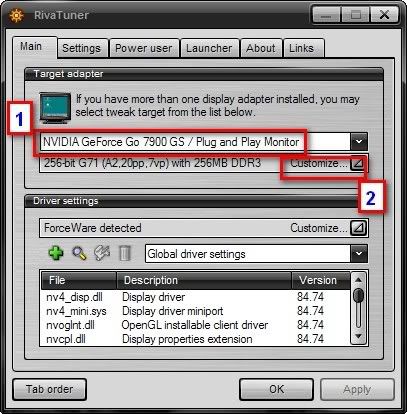 2) 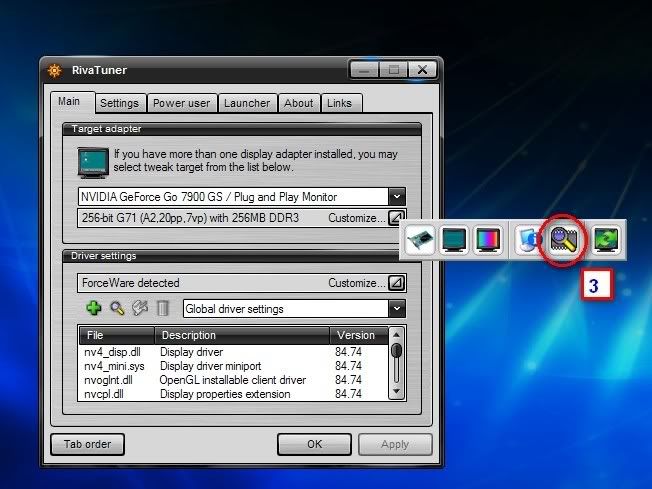 3) 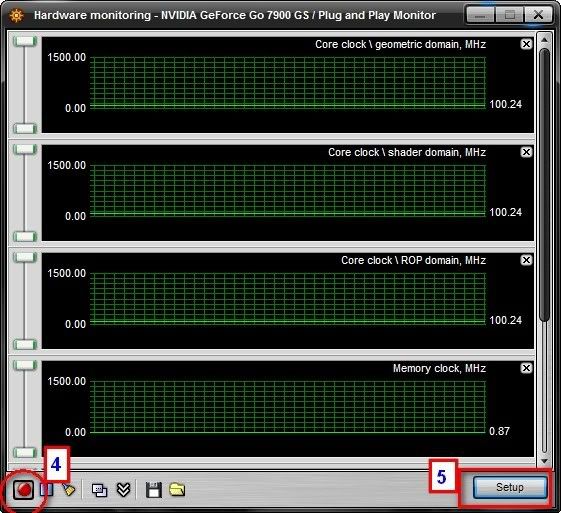 4) 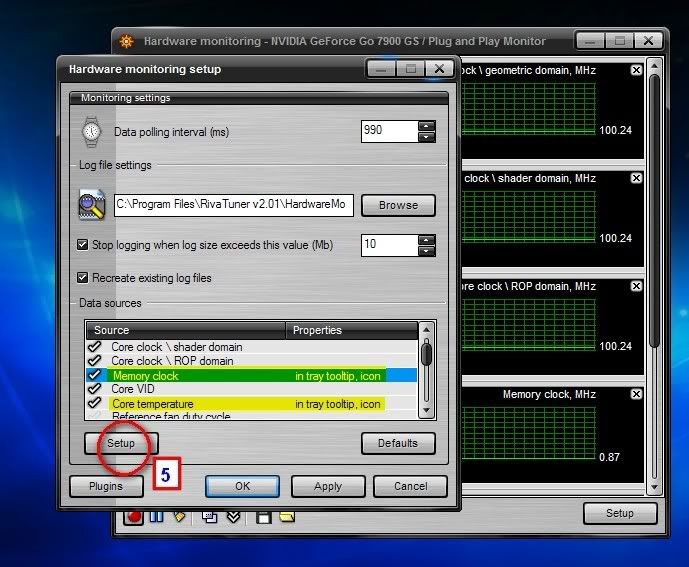 Now what u really need to highlight is core temperature.. if u would like to display memory like mine.. then do it one by one.. highlight one of them then click 'Setup' 5) 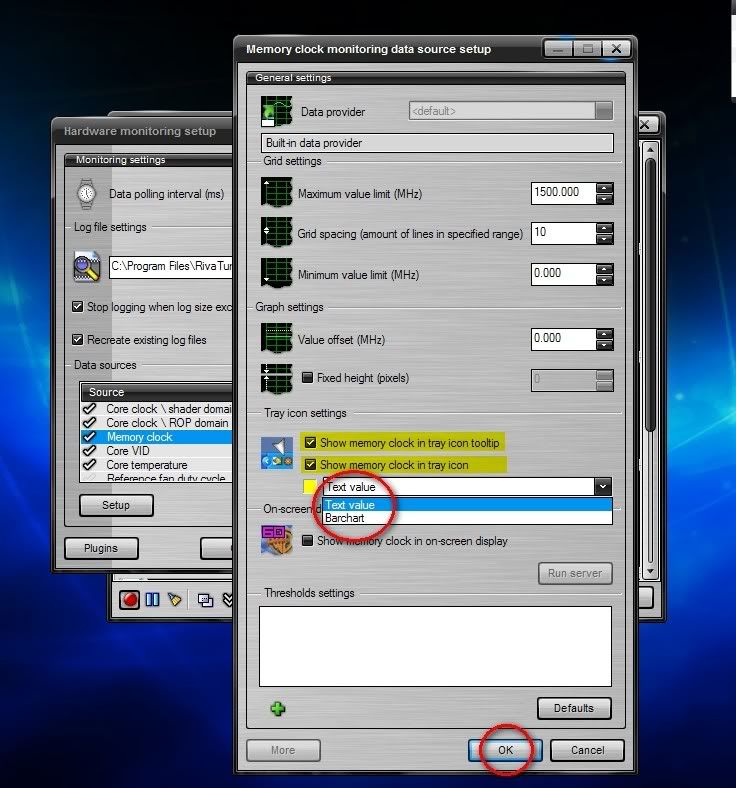 6) 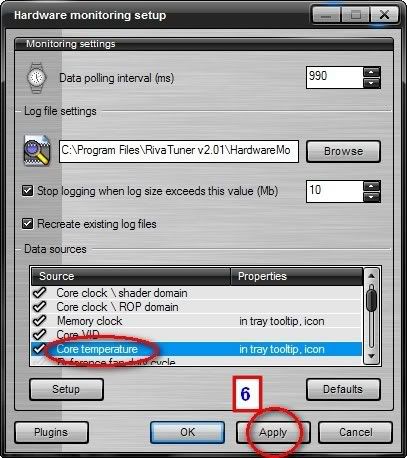 Repeat Step 4 and 5 for Core Temperature also 7) 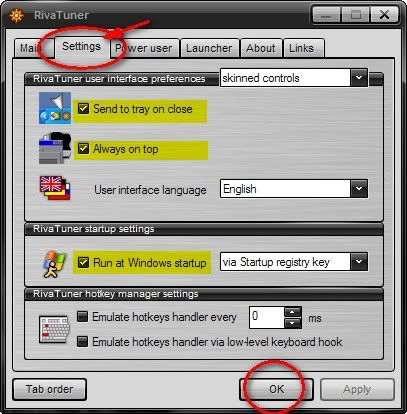 8)  if u prefer the numbers then use text value (the one with red arrow) ; instead if u prefer bar chart (green arrow) good luck and enjoy ! Hope this is helpful to u guys !! This post has been edited by derred: May 10 2007, 10:36 AM |
|
|
May 10 2007, 10:36 AM
|
|
Senior Member
7,037 posts Joined: Apr 2006
|
QUOTE(derred @ May 10 2007, 10:28 AM) Ok first of all, lets get the software first, just click here to get one : Hmm, I wonder if this is applicable to Vista... Nonetheless this sure is going frontpage! RIVATUNER ok after we install everything.. just follow these steps below : » Click to show Spoiler - click again to hide... « good luck and enjoy ! Hope this is helpful to u guys !! This post has been edited by Eiraku: May 10 2007, 10:37 AM |
|
|
May 10 2007, 10:40 AM
|
|
Senior Member
1,238 posts Joined: May 2007
|
QUOTE(Eiraku @ May 9 2007, 09:36 PM) Hmm, I wonder if this is applicable to Vista... Good point.. i dont know about that.. are you guys using Vista right now ? I pretty sure for gaming performance it isnt that stable yet.. I mean there are benchmarks and framerate for games like F.E.A.R etc for these facts.. i think its last month MaximumPC.. or prob the April 2007 that have face-to-face performance showdown.. SLi vs non-SLi, C2D vs AMDs , Vista vs XP.. u can check it out.. try 3Dmark and compare.. I bet u will lost some couple hundreds point for just using Vista..just in case anyone need to know, u can see from the tutorial above me myself dont use Vista yet, but it depends on how u see things and preference.. IMO, why bother using Vista when we already know our laptops are not dx10-capable.. unless theres are performance gains in terms of FPS etc.. but im pretty sure Microsoft is working on it now.. hopefully there will be an increase from XP.. One more thing, sorry if u guys know this already, for Vista gaming profile or whatever it called (the one that shows ESRB thingy and stuff.. ) not all games are fully-supported by Vista.. the only great game i remember works like charm is Company of Heroes. Too bad for great other games like Steam-based is a joke on Vista.. or its not anymore now ? This post has been edited by derred: May 10 2007, 10:51 AM |
|
|
May 10 2007, 10:48 AM
|
|
Senior Member
7,037 posts Joined: Apr 2006
|
QUOTE(derred @ May 10 2007, 10:40 AM) Good point.. i dont know about that.. are you guys using Vista right now ? I pretty sure for gaming performance it isnt that stable yet.. I mean there are benchmarks and framerate for games like F.E.A.R etc for these facts.. i think its last month MaximumPC.. or prob the April 2007 that have face-to-face performance showdown.. SLi vs non-SLi, C2D vs AMDs , Vista vs XP.. u can check it out.. try 3Dmark and compare.. I bet u will lost some couple hundreds point for just using Vista.. Sure lose a couple hundred of points already, lets say 600-700 for Vista, 800 for XP... Its the immature drivers I tell you... FEAR actually FEELS slower under Vista, but there's not much actual difference in practical gaming application for most other games... Although I haven't tried a straight comparison yet... Nor have I dloaded 3DMark06 yet... Anybody here with XP and is a gamer (or at least have FEAR installed in their XPS)? Care to help me test? Granted FEAR is more of a CPU oriented game then a GPU one... I guess I really have to download 3DMark06... Hmm... Added on May 10, 2007, 10:53 amDloading PCMark05 and 3DMark06 now... Need them for the XPS Review anyway... This post has been edited by Eiraku: May 10 2007, 10:53 AM |
|
|
May 10 2007, 10:59 AM
|
|
Senior Member
1,238 posts Joined: May 2007
|
QUOTE(Eiraku @ May 9 2007, 09:48 PM) Sure lose a couple hundred of points already, lets say 600-700 for Vista, 800 for XP... Its the immature drivers I tell you... FEAR actually FEELS slower under Vista, but there's not much actual difference in practical gaming application for most other games... Although I haven't tried a straight comparison yet... Nor have I dloaded 3DMark06 yet... There are actually alot lot of gamers out there still holding their breath for Vista.. those who are very picky about framerate stats,benchies, etc.. u know what i mean.. since ur using Vista, i think i have a question for u.. howz 3rd-party programs doing so far on Vista.. is it still full of licensing prob and such.. thats what i read and heard.. i think i dont switch to Vista yet not mainly about gaming, but also some cool inresistible softwares Anybody here with XP and is a gamer (or at least have FEAR installed in their XPS)? Care to help me test? doing comparison is a very good idea.. let me know how it goes.. ah suddenly everyone is using 3dmark06.. i think i shud download one now and see whats up with it.. i hate it when i know i wont get as much.. theres nothing wrong with my gpus but just it doesnt work perfectly as it shud.. FOR GC temperature & core memory MONITORING on system tray or dekstop, please scroll to my previous reply. Its somewhere up there..(right now its for Nvidia cards only tho,sorry i dont have ATi card so.. anyone with ATi card please post if already know-how) This post has been edited by derred: Jun 14 2007, 02:00 AM |
|
|
May 10 2007, 11:22 AM
|
|
Senior Member
2,915 posts Joined: Jan 2005
|
QUOTE(Eiraku @ May 10 2007, 10:48 AM) Sure lose a couple hundred of points already, lets say 600-700 for Vista, 800 for XP... Its the immature drivers I tell you... FEAR actually FEELS slower under Vista, but there's not much actual difference in practical gaming application for most other games... Although I haven't tried a straight comparison yet... Nor have I dloaded 3DMark06 yet... wah!...what you guys been discussing about?... Anybody here with XP and is a gamer (or at least have FEAR installed in their XPS)? Care to help me test? Granted FEAR is more of a CPU oriented game then a GPU one... I guess I really have to download 3DMark06... Hmm... Added on May 10, 2007, 10:53 amDloading PCMark05 and 3DMark06 now... Need them for the XPS Review anyway... is it about the 3D and graphics thingy?mind to elaborate more...  those this kind of thing related to graphics and multimedia? |
|
|
May 10 2007, 11:47 AM
|
|
Senior Member
3,706 posts Joined: Aug 2005
|
Added on May 10, 2007, 2:24 am are u sending it to depot? if u do it is always a good idea to format ur system before let anybody touches ur pc.. for security and privacy purposes.. unless all u have is nothing important. good luck to u.. [/quote] doesnt get what you mean,why do i need to format my system after downloading a huge size of drama?i'll actually transfer it into my desktop & burn it to DVD. will post my 3Dmark06 result ASAP,you guys can download it from the 3dmark website..i got the ahem thingy..then post your result too..curious to know what you guys score |
| Change to: |  0.0267sec 0.0267sec
 0.64 0.64
 6 queries 6 queries
 GZIP Disabled GZIP Disabled
Time is now: 14th December 2025 - 07:32 PM |
 Quote
Quote