On Facebook, they suggest to contact service center....1800 888 678 to lodge a service report, so as to assign a technician to my home to rectify the problem.
Edit: Service report lunch, probably next week technician will attend at my home address.
This post has been edited by stasio: May 17 2019, 02:15 PM
Oh wow! Changing the screen is very big fault. I would have thought only need to change the motherboard
Yea, technician didnt show much interest to check deeply. I google that this kind of failure is mostly "TAB error" or losing connection on ribbon cable to screen (a simple re-seating of the cables usually helps). As is under warranty.let them to change panel.
I cannot use Netflix on my LC-50UA6800X because it demands the Android Software to be updated. But whenever I try to update the TV via OTA, it says "cannot access the network". Also tried to google if I can download the software manually and put it in a flashdrive, but I cannot also find anything.
Does somebody here experienced the "cannot access the network" thingy?
If you are on LAN connection, change to WiFi. Is happen to me also.
Yea, technician didnt show much interest to check deeply. I google that this kind of failure is mostly "TAB error" or losing connection on ribbon cable to screen (a simple re-seating of the cables usually helps). As is under warranty.let them to change panel.
Update...... Instead of new panel, this thursday they will replace with complete new unit of LC45UA6800X.
Edit: Replaced with new unit and new remote (sealed box).
This post has been edited by stasio: Jun 27 2019, 06:56 PM
Getting on 26th Astro Ultra box and hope no problem with support HDCP 2.2....for astro channel 780 on my 6800X.... Anybody already watching Astro UHD channel...?
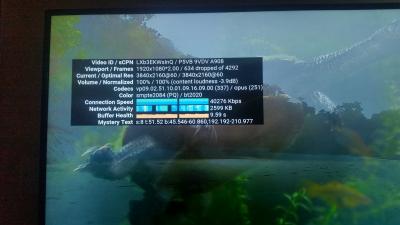
All Sharp UA6800X owners, not sure whether you faced the same issue like mine. I just bought a new 60UA6800X from Harvey last week @ RM2880 (5 Years Warranty). Not sure whether it is a good deal but it's below my budget of <RM3K. They do have 60UA6500X @ RM2500 but some of the missing features make switched last minute (no ATV, less HDMI port, no ARC, panel color gamut lower). Initially wanna go for Samsung Q60R 65" at RM5500 (5 Years) but have to let go due to much higher price. When I test HDR color capability of the TV using 4K HDR videos from Youtube, the color stat always show bt709 (below). By right if the video support HDR, it should be bt2020. Anyone face the same issue like mine on their UA6800X ATV? I have updated my ATV to latest and UNiFi speed at 50Mbps. Technically I think this model support HDR. I dont think it support HDR10 though, after all it is a 1.5 year old model. Nevertheless, the quality is way better than the LG 55" UB850T TV it replaced. The LG smartly went kaput right after the 5 year warranty ended and the quoted repair cost by authorised LG service center was so expensive.. will never never buy a LG TV again. Sumore, it was so expensive last time @RM5K.
Any ideas? Do you all face the same issue when running HDR content from Youtube? Thanks
How you test HDR color capability...? I also want to know why in Picture setting/Advanced.....HDR Gamma Adjustment is greyed...?
Edit:
I have also bt709 from Youtube.
This post has been edited by stasio: May 30 2020, 09:09 PM
Anybody watching 4K HDR videos from Youtube TV, what is your color status bt709 or bt2020 ?
Refer to post#2318 & 2319...
Edit:
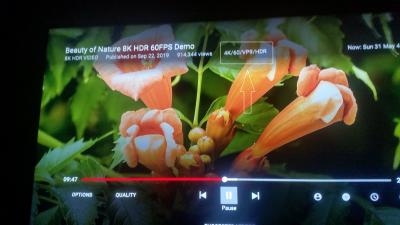
Smart YouTube and Plex manage to turn on the HDR. HDR Gamma Adjustment setting is available (no more greyed). Display button also working on Remote control showing is HDR contest.
This post has been edited by stasio: May 31 2020, 01:12 PM
Finally playing full HDR in YouTube TV (YouTube for Android TV 2.10.15 )..... Linked TV with phone and PC (Chromecast) and set highest display quolity in that devices.
Interesting that Device Info HW+ .apk ,displaying HDR as HDR10
Edit: Last only 2 days , Google Play Store updated YT to version 2.10.17 and back to square one...bt.709 only. YouTube in HDR quality requires hardware (firmware) support for the ‘VP9 Profile2’ .
This post has been edited by stasio: Jul 4 2020, 02:25 AM
Woke up this morning saw this kind of vertical line across the screen. This month will be 2 years for my sharp. Is it possible to claim warranty? Bought extra warranty from senheng.
Yea, same as me a year ago (my line has been on right side). If warranty ok, they will change screen (panel) or if no stock,complete TV (as me).
Strange that they claim panel from Japan has so many complain......
Btw, anybody on Netflix can watch in HDR ?
My YouTube TV app, HDR contest go back to SDR (BT.709).
This post has been edited by stasio: Jul 1 2020, 12:03 PM
This TV boder me so much about YouTube HDR content.
HDR content are displaying as SDR (bt.709) on UA6800X series TV's and Sharp need released a firmware update (?) to enable YouTube HDR. YouTube in HDR quality requires hardware (firmware) support for the ‘VP9 Profile2’ (vp09.02).
Now I have 2 apps installed which replace YouTube TV. They force VP9 (HDR) codec.
deducated mostly for phones, but a bit with mouse help, works very nice for Android TV (acting as YouTube Premium). Need to install apps + MicroG Vanced + Manager (optional). More info can get on XDA or XDA forum.
Note: When you watch real HDR content in Picture setting/ Advanced/ HDR Gamma Adjustment is no more greyed.... :
This post has been edited by stasio: Jul 4 2020, 05:51 AM


 May 17 2019, 10:01 AM


 Quote
Quote




 0.0962sec
 0.95
0.95
 7 queries
 GZIP Disabled