

QUOTE(fishmango @ May 3 2019, 04:07 PM)
Dafang IR can be turn off? Anyone know?

top right corner theres a cresent moon - theres off, auto, and always onGuide Review & Setup - Xiaomi DaFang IP Cam
|
|
 May 3 2019, 04:27 PM May 3 2019, 04:27 PM
|
 
All Stars
11,308 posts Joined: Feb 2008 
|
QUOTE(fishmango @ May 3 2019, 04:07 PM) Dafang IR can be turn off? Anyone know? top right corner theres a cresent moon - theres off, auto, and always on |
|
|
|
|
|
May 3 2019, 05:21 PM
Show posts by this member only | IPv6 | Post
#402
|
|
Senior Member
796 posts Joined: May 2005 
|
QUOTE(idoblu @ May 3 2019, 04:27 PM) top right corner theres a cresent moon - theres off, auto, and always on TqVM. It is same for xiaofang? |
|
|
May 3 2019, 05:23 PM
Show posts by this member only | IPv6 | Post
#403
|
|
All Stars
11,308 posts Joined: Feb 2008
|
QUOTE(fishmango @ May 3 2019, 05:21 PM) TqVM. It is same for xiaofang? Yes |
|
|
May 5 2019, 11:04 AM
Show posts by this member only | IPv6 | Post
#404
|
|
All Stars
11,308 posts Joined: Feb 2008
|
If you got Google Home, Chromecast, you can try casting your Xiaofang, Dafang, mijia cams to your tv or google hub
This post has been edited by idoblu: May 5 2019, 05:36 PM |
|
|
May 5 2019, 02:52 PM
Show posts by this member only | IPv6 | Post
#405
|

Junior Member
541 posts Joined: Mar 2009 From: Technically not from Lebanon 
|
QUOTE(idoblu @ May 5 2019, 11:04 AM) If you got Google Home, Chromecast, you can try casting your Xiaofang, Dafang, mijia cams to your tv Do you mind sharing the steps? |
|
|
May 5 2019, 05:31 PM
|
|
All Stars
11,308 posts Joined: Feb 2008
|
QUOTE(fiqqq @ May 5 2019, 02:52 PM) Do you mind sharing the steps? I didn’t do anything so I dunno if there is any step. I’m not even sure if it’s possible with dafang but I read that xiaofang is working and to me they are the same. Both my xiaofang and dafang haven’t shown up yet in google home but my Mijia security Cam has, just today. I still have three missing camsLook in your google home app device list or if you have google home hub, look for the video icon This post has been edited by idoblu: May 5 2019, 05:31 PM Attached thumbnail(s) 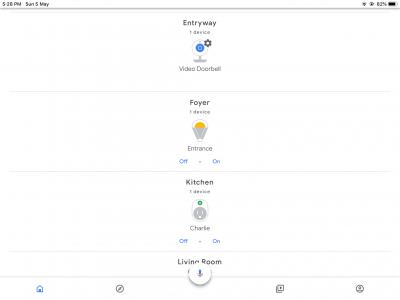
|
|
|
|
|
|
May 6 2019, 08:47 AM
|
|
Junior Member
385 posts Joined: Sep 2009
|
QUOTE(idoblu @ May 5 2019, 11:04 AM) If you got Google Home, Chromecast, you can try casting your Xiaofang, Dafang, mijia cams to your tv or google hub Xiaofang and Dafang to google hub. Not working for me. |
|
|
May 6 2019, 08:56 AM
|
|
All Stars
11,308 posts Joined: Feb 2008
|
QUOTE(lleihuan @ May 6 2019, 08:47 AM) Xiaofang and Dafang to google hub. Not working for me. is the cam icon showing up at your hub?Attached thumbnail(s) 
|
|
|
May 6 2019, 09:13 AM
|
|
Junior Member
385 posts Joined: Sep 2009
|
QUOTE(idoblu @ May 6 2019, 08:56 AM) is the cam icon showing up at your hub? No. Mine bought from Aliexpress. Read the one soldin the US only works. Do not want to invest or spend too much time in Xiaofang or Dafang anymore. Now invested in Wyze. Wyze at the moment work on Echo Show. Google Hub and Wyze firmware on beta. Maybe by the middle of the year, we will see Wyze on Goggle Hub. |
|
|
Jul 1 2019, 08:24 PM
Show posts by this member only | IPv6 | Post
#410
|
|
Junior Member
541 posts Joined: Mar 2009 From: Technically not from Lebanon
|
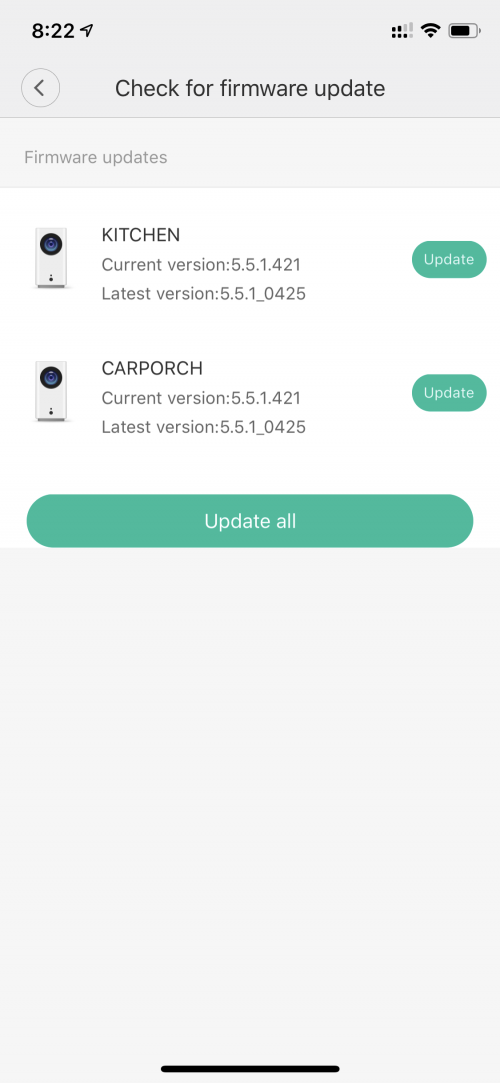 Anybody updated to the latest firmware? |
|
|
Jul 1 2019, 08:26 PM
|
|
All Stars
11,308 posts Joined: Feb 2008
|
421 also I didn’t update haha
|
|
|
Jul 10 2019, 12:30 PM
Show posts by this member only | IPv6 | Post
#412
|

Junior Member
63 posts Joined: May 2015
|
Does anyone facing Timezone issue? I had select Malaysia Timezone GMT +8 but the time stamp on the screen shown -8.5 hours than current time.
I know there is a trick by enabling the "Distortion Correction", and the time zone will be shown the accurate one. But if you record or take a picture from the apps, the video or picture will show back the inaccurate time zone again. Is there anyone facong the same issue? Or is there any solution so far? Kindly advise. Thank you. |
|
|
Jul 18 2019, 09:38 PM
|

Senior Member
702 posts Joined: Oct 2004 
|
Recently just gotten myself a Xiaomi cctv for my home.
I'm not able to access my camera when I'm in overseas, the camera keeps loading at the screen "initializing.." May I ask is anybody experiencing the same issue as me? Please HEEELP!!  |
|
|
|
|
|
Jul 18 2019, 09:47 PM
|
|
All Stars
11,308 posts Joined: Feb 2008
|
QUOTE(Winter@7 @ Jul 10 2019, 12:30 PM) Does anyone facing Timezone issue? I had select Malaysia Timezone GMT +8 but the time stamp on the screen shown -8.5 hours than current time. I bought another dafang a few days ago with this problem. The strange thing is my two older dafang is ok. All 3 have the same firmware versionI know there is a trick by enabling the "Distortion Correction", and the time zone will be shown the accurate one. But if you record or take a picture from the apps, the video or picture will show back the inaccurate time zone again. Is there anyone facong the same issue? Or is there any solution so far? Kindly advise. Thank you. |
|
|
Jul 19 2019, 09:32 AM
|

Senior Member
1,065 posts Joined: Sep 2005
|
QUOTE(Winter@7 @ Jul 10 2019, 12:30 PM) Does anyone facing Timezone issue? I had select Malaysia Timezone GMT +8 but the time stamp on the screen shown -8.5 hours than current time. manually set your phone timezone to china gmt+8. dont set it auto.I know there is a trick by enabling the "Distortion Correction", and the time zone will be shown the accurate one. But if you record or take a picture from the apps, the video or picture will show back the inaccurate time zone again. Is there anyone facong the same issue? Or is there any solution so far? Kindly advise. Thank you. then reset ur camera. |
|
|
Jul 24 2019, 12:12 PM
Show posts by this member only | IPv6 | Post
#416
|
|
Junior Member
63 posts Joined: May 2015
|
QUOTE(th3_glove20 @ Jul 18 2019, 09:38 PM) Recently just gotten myself a Xiaomi cctv for my home. Do you tested OK while you are at home? Make sure the camera is within wifi coverage. If you also unable to view it from home, then you have to reset it.I'm not able to access my camera when I'm in overseas, the camera keeps loading at the screen "initializing.." May I ask is anybody experiencing the same issue as me? Please HEEELP!! |
|
|
Jul 24 2019, 12:13 PM
Show posts by this member only | IPv6 | Post
#417
|
|
Junior Member
63 posts Joined: May 2015
|
QUOTE(idoblu @ Jul 18 2019, 09:47 PM) I bought another dafang a few days ago with this problem. The strange thing is my two older dafang is ok. All 3 have the same firmware version Let me know if anyone can solve this issue. Like what you say your oldder dafang with no timezone issue even with the same firmware version. This is weird. |
|
|
Jul 31 2019, 11:37 AM
|

Junior Member
87 posts Joined: Oct 2007
|
Got some problem with my Dafang after using it for nearly 2 years. After resetting it cannot connect to wifi. It keeps prompting "Bring device closer to router" even it's just next to the router. I think it's kong.
|
|
|
Jul 31 2019, 02:24 PM
|
|
Senior Member
1,065 posts Joined: Sep 2005
|
QUOTE(Winter@7 @ Jul 24 2019, 12:13 PM) Let me know if anyone can solve this issue. Like what you say your oldder dafang with no timezone issue even with the same firmware version. This is weird. manually set your phone timezone to china gmt+8. dont set it auto.then reset ur camera and setup with your phone. i fixed mine this way. |
|
|
Aug 2 2019, 08:32 AM
|

Senior Member
1,200 posts Joined: Feb 2006 From: Wangsa Maju
|
QUOTE(fiqqq @ Jul 1 2019, 08:24 PM) Anybody updated to the latest firmware? |
| Change to: |  0.0258sec 0.0258sec
 0.77 0.77
 6 queries 6 queries
 GZIP Disabled GZIP Disabled
Time is now: 9th December 2025 - 08:14 PM |
 Quote
Quote