Outline ·
[ Standard ] ·
Linear+
Guide Review & Setup - Xiaomi DaFang IP Cam
|
lleihuan
|
 Jan 10 2018, 03:53 PM Jan 10 2018, 03:53 PM
|

|
QUOTE(wc_how @ Jan 10 2018, 08:40 AM) I tried many version. Only .194 work best for me. I don't know either i got a lemon unit or digi problem. Some period of time, the connection work normal. Just for sharing.I use YES pre-paid on one of the Mi A1 slots. Works all the time. |
|
|
|
|
|
TSidoblu
|
Jan 12 2018, 09:48 PM
|
|
|
QUOTE(aeiou228 @ Jan 10 2018, 08:30 AM) Sorry, mine is Xiao Fang, after updated camera firmware to the latest one, I can access the sd card but the 15sec motion detected videos still unable to download. As for the recording to the sd card, the latest firmware now have new auto motion detect recording mode to replace the time zone selection mode. I like this new feature, it lessen the stress to the sd card. motion detected videos are not store on the SD card but in the Cloud If you meant "download" as in save those videos to your phone or pc - i dun think you can do that i can view mine just fine. try using a different network - eg if you were using wifi, try using 4G and vice versa (to eliminate if you have a connection problem) This post has been edited by idoblu: Jan 12 2018, 09:53 PM |
|
|
|
|
|
aeiou228
|
Jan 13 2018, 01:11 AM
|
|
|
QUOTE(idoblu @ Jan 12 2018, 09:48 PM) motion detected videos are not store on the SD card but in the Cloud If you meant "download" as in save those videos to your phone or pc - i dun think you can do that i can view mine just fine. try using a different network - eg if you were using wifi, try using 4G and vice versa (to eliminate if you have a connection problem) I tried 4G, still can't download the short 15sec motion detected video from the cloud. I have no problem to view motion detected video recorded on SD card via WiFi and 4G. Now SD card has two options of recording, 24hrs or motion video. Motion recording minimum 1 min and will continue recording if continuous motion detected. Schedule recording no longer available. |
|
|
|
|
|
TSidoblu
|
Jan 13 2018, 07:50 AM
|
|
|
QUOTE(aeiou228 @ Jan 13 2018, 01:11 AM) I tried 4G, still can't download the short 15sec motion detected video from the cloud. I have no problem to view motion detected video recorded on SD card via WiFi and 4G. Now SD card has two options of recording, 24hrs or motion video. Motion recording minimum 1 min and will continue recording if continuous motion detected. Schedule recording no longer available. you mean this (in red) ? Attached thumbnail(s)
|
|
|
|
|
|
aeiou228
|
Jan 13 2018, 08:34 AM
|
|
|
QUOTE(idoblu @ Jan 13 2018, 07:50 AM) Yes sir. It's min 1min and continuous motion detection recording can supplement the footage not capture by the short 15 sec motion video and the few min waiting time (I think is around 4 to 5 min ) for next motion detection in the cloud storage. Also, less stress to the SD card. |
|
|
|
|
|
TSidoblu
|
Jan 13 2018, 09:00 AM
|
|
|
QUOTE(aeiou228 @ Jan 13 2018, 08:34 AM) Yes sir. It's min 1min and continuous motion detection recording can supplement the footage not capture by the short 15 sec motion video and the few min waiting time (I think is around 4 to 5 min ) for next motion detection in the cloud storage. Also, less stress to the SD card. I was able to view videos from their cloud but I dunno how to access the videos from the card. How? Previously we weren’t able to record to card Every firmware updates seems to have big changes. This guide is useless now haha This post has been edited by idoblu: Jan 13 2018, 09:01 AM |
|
|
|
|
|
aeiou228
|
Jan 13 2018, 06:59 PM
|
|
|
QUOTE(idoblu @ Jan 13 2018, 09:00 AM) I was able to view videos from their cloud but I dunno how to access the videos from the card. How? Previously we weren’t able to record to card Every firmware updates seems to have big changes. This guide is useless now haha Tap "Device online" then under the live stream video, look at the bottom right corner for an icon named "Look Back". I was able to record to the SD card all these while even on old Xiao Fang firmware. Previously it has 2 recording modes which are All Day or Schedule, but the latest camera firmware discarded schedule recording and replaced it with motion detection recording. The access to the motion video in the SD card is far more easier than the motion alarm in the cloud. Faster playback, can select preferred time zone to view, can scroll back and forth and footage not limited to 15 sec. |
|
|
|
|
|
TSidoblu
|
Jan 13 2018, 07:26 PM
|
|
|
QUOTE(aeiou228 @ Jan 13 2018, 06:59 PM) Tap "Device online" then under the live stream video, look at the bottom right corner for an icon named "Look Back". I was able to record to the SD card all these while even on old Xiao Fang firmware. Previously it has 2 recording modes which are All Day or Schedule, but the latest camera firmware discarded schedule recording and replaced it with motion detection recording. The access to the motion video in the SD card is far more easier than the motion alarm in the cloud. Faster playback, can select preferred time zone to view, can scroll back and forth and footage not limited to 15 sec.  thanks |
|
|
|
|
|
popice2u
|
Jan 14 2018, 03:12 PM
|
|
|
QUOTE(idoblu @ Jan 7 2018, 05:53 PM) The app can work using 3G/4G and other wifi network, so I dont see why in your situation it wont work. It wont know which wifi you paired it to after it is setup Please report back  manage to install 2nd Dafang at my mom's house.  |
|
|
|
|
|
CherishYY
|
Jan 17 2018, 12:43 PM
|
New Member

|
Hi, anyone know if the DaFang have motion alarm which alerts our phone as soon as it detects movement when supposingly no one would be at home?
I read through the post and it seems that we have to download the motion alarm from the server. Is there ways to know as soon as the camera picked up motion or is there any other model that has this function?
|
|
|
|
|
|
TSidoblu
|
Jan 17 2018, 12:47 PM
|
|
|
QUOTE(CherishYY @ Jan 17 2018, 12:43 PM) Hi, anyone know if the DaFang have motion alarm which alerts our phone as soon as it detects movement when supposingly no one would be at home? I read through the post and it seems that we have to download the motion alarm from the server. Is there ways to know as soon as the camera picked up motion or is there any other model that has this function? Just turn motion detect on only Read the first post la |
|
|
|
|
|
vaitapu
|
Jan 17 2018, 07:02 PM
|
New Member
|
Hi,
I also have Dafang camera and I am pretty satisfied but I have one issue.
Everything works fine via home LAN....when I am out of home I can access via phone mobile internet(4G) to see the live capture.
The issue is that when I am out of home, I have trouble to access recording to SD card. When I am at the same LAN everything works smooth. But only over 4G is that issue present. Over 4G I can watch live capture, sometime I can even download motions on the cloud(last days cloud works crap)...
I can't access to my recording on SD via 4G..maybe is the issue related to my home xDSL line 10Mbit/1Mbit...maybe is 1 Mbit for upload to little?
Thanks and regards
|
|
|
|
|
|
TSidoblu
|
Jan 17 2018, 08:30 PM
|
|
|
» Click to show Spoiler - click again to hide... « QUOTE(vaitapu @ Jan 17 2018, 07:02 PM) Hi, I also have Dafang camera and I am pretty satisfied but I have one issue. Everything works fine via home LAN....when I am out of home I can access via phone mobile internet(4G) to see the live capture. The issue is that when I am out of home, I have trouble to access recording to SD card. When I am at the same LAN everything works smooth. But only over 4G is that issue present. Over 4G I can watch live capture, sometime I can even download motions on the cloud(last days cloud works crap)... I can't access to my recording on SD via 4G..maybe is the issue related to my home xDSL line 10Mbit/1Mbit...maybe is 1 Mbit for upload to little? Thanks and regards Mine works fine over 4G so yeah maybe your upload speed too little or maybe your 4G network |
|
|
|
|
|
xperiaVuser
|
Jan 18 2018, 08:39 AM
|
|
|
Guys, will there be a problem if dafang is mounted upside down on a ceiling?
|
|
|
|
|
|
TSidoblu
|
Jan 18 2018, 08:41 AM
|
|
|
QUOTE(xperiaVuser @ Jan 18 2018, 08:39 AM) Guys, will there be a problem if dafang is mounted upside down on a ceiling? no problem, just reverse the video |
|
|
|
|
|
xperiaVuser
|
Jan 18 2018, 08:56 AM
|
|
|
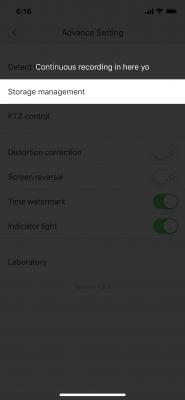
QUOTE(idoblu @ Jan 18 2018, 08:41 AM) no problem, just reverse the video There is a setting in dafang to reverse the video? |
|
|
|
|
|
TSidoblu
|
Jan 18 2018, 08:58 AM
|
|
|
QUOTE(xperiaVuser @ Jan 18 2018, 08:56 AM) There is a setting in dafang to reverse the video? 
|
|
|
|
|
|
xperiaVuser
|
Jan 18 2018, 09:00 AM
|
|
|
QUOTE(idoblu @ Jan 18 2018, 08:58 AM) awesome thanks! Btw, do you know how long is the provided USB cable? This post has been edited by xperiaVuser: Jan 18 2018, 09:03 AM |
|
|
|
|
|
TSidoblu
|
Jan 18 2018, 09:07 AM
|
|
|
QUOTE(xperiaVuser @ Jan 18 2018, 09:00 AM) awesome thanks! Btw, do you know how long is the provided USB cable? 180cm |
|
|
|
|



 Quote
Quote



 0.0257sec
 0.33
0.33
 6 queries
 GZIP Disabled