Outline ·
[ Standard ] ·
Linear+
D-Link Malaysia Official Thread
|
SilentVampire
|
 Jul 20 2019, 04:39 PM Jul 20 2019, 04:39 PM
|

|
QUOTE(SmallPotato2011 @ Jul 20 2019, 03:13 PM) Disable the IPv6 already. Still cannot... 😕 Hmmm, you sure you on public IP? Log into your router and see what your WAN IP is? Please download Pingplotter and attach a picture of the trace to Google.com here on an Imgur link. This post has been edited by SilentVampire: Jul 20 2019, 04:39 PM |
|
|
|
|
|
SilentVampire
|
Jul 22 2019, 09:21 AM
|
|
|
QUOTE(SmallPotato2011 @ Jul 21 2019, 10:49 PM) Bro, yes. I am confirm. Enclose the relevant information in attachment. Hopefully can get some clue from you.. Looks like everything is configured correctly. I have no idea why you can't access the CCTV. I suggest trying with another router, as it could be a router issue. |
|
|
|
|
|
SilentVampire
|
Aug 25 2019, 03:26 PM
|
|
|
QUOTE(edisoner90 @ Aug 25 2019, 02:33 PM) is unifi stock router D-Link AC1200 DIR 842 better than TP-Link ARCHER AC1200?? Yes, but both are extremely basic. I recommend that you get your own third party router. |
|
|
|
|
|
SilentVampire
|
Sep 11 2019, 10:57 PM
|
|
|
QUOTE(ejslayer @ Sep 11 2019, 08:04 PM) hello, im having issue with my Unifi Dlink Router, DIR-842 C2, everytime i plug in cctv connection to the router, in few hours, sometimes few days, connection is lost, (power button blinking) n i will need to restart the router.. it will be ok n then will lost connection again later on.. repeatitively.. pls help.. this only happen if i plug in the cctv nvr, else no lost of connection happen at all. *no issue with cctv nvr, checked. technician said maybe i need to check or open some port for the cctv, not sure this is done by ISP or a simple configuration on the router.. Change to your own router. |
|
|
|
|
|
SilentVampire
|
Sep 14 2019, 01:47 PM
|
|
|
QUOTE(ejslayer @ Sep 14 2019, 09:54 AM) unifi router not meant for cctv? Unifi router is very basic. I only recommend you get another one as it sounds like it is a router issue. |
|
|
|
|
|
SilentVampire
|
Oct 11 2019, 06:10 PM
|
|
|
QUOTE(jiun89 @ Oct 11 2019, 05:39 PM) hi everyone, Please help..... i m new to networking.. Bought dir 895L but have no idea to connect to maxis. any sifu can help c whats the problem? 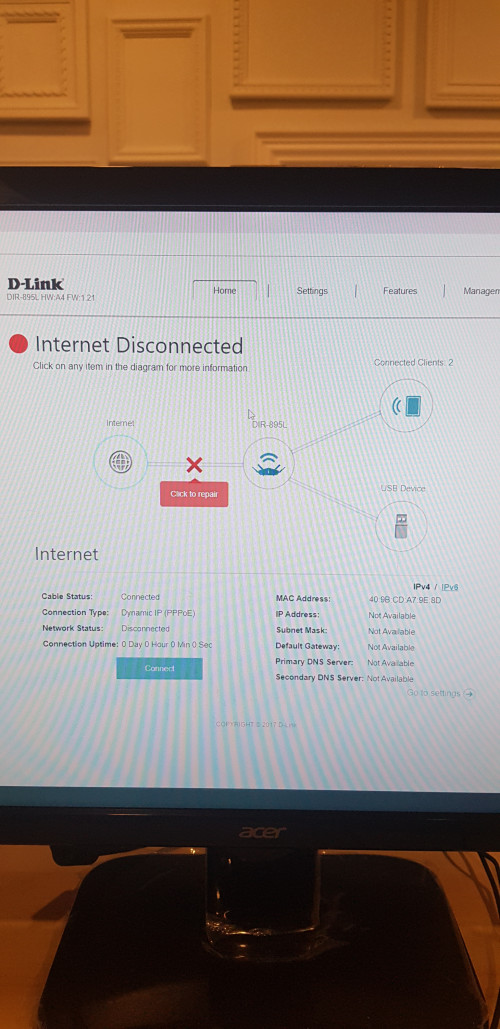 You need to configure VLAN tagging or IPTV mode for Maxis. Did you do that already? See here: http://global.dlink.com.sg/faq/faq_pdfs/DI...AN(Singtel).pdfIt is either VLAN 621 or 11 for Internet access. |
|
|
|
|
|
SilentVampire
|
Oct 12 2019, 08:25 AM
|
|
|
QUOTE(jiun89 @ Oct 11 2019, 06:20 PM) thanks.. but we dont use iptv, is that a must to do vlan ? the port also ngam ngam enough use for lan connecting cctv, printer, nas, pc.. Yes, Maxis and TM use VLAN tagging for Internet. If there are not enough LAN ports, I suggest getting a switch for additional LAN ports. |
|
|
|
|
|
SilentVampire
|
Dec 3 2019, 10:45 PM
|
|
|
QUOTE(Zhe Xia @ Nov 29 2019, 09:51 PM) I bought the new model Dir-2660. On the box it said, "McAfee Protected Free Subscription 5 year protection" I use web browser to log into the router page but there is no menu selection for the "Protection from McAfee" On the back of box, it said "all controlled and managed via mobile app". But I prefer to use my laptop to access the router's setting page, is there a way for me to control the "Protection" from laptop's web browser? (to turn on the "Protection" and check the status)? Try logging into the router GUI. Go to a PC and run ipconfig/all to get the default gateway, and log into it to manage it. QUOTE(hyalbert @ Dec 3 2019, 06:51 PM) I am currently using TM Unifi D-Link AC1200 DIR 842 stock router and all devices are connecting on wireless mode only. I would like to connect a android box using the LAN port. Is there any configuration to be done for using LAN or I just connect the cable to the LAN port? No. Just connect the cable to the LAN port and it will work. |
|
|
|
|
|
SilentVampire
|
Apr 8 2020, 11:16 AM
|
|
|
QUOTE(Aqils @ Apr 8 2020, 12:03 AM) Hi, I have the DIR-842. 5Ghz sometimes disconnect all devices for like 20 seconds every 1 or 2 hours. 2.4Ghz is okay. Also when using Plex on my Samsung TV, my connection sometimes drops. Anyone know why? Yes, the router is crap unfortunately. Time to change. |
|
|
|
|



 Quote
Quote
 0.0172sec
 0.42
0.42
 7 queries
 GZIP Disabled