Outline ·
[ Standard ] ·
Linear+
Review ASUS RT-AC86U, Feature-packed advanced wireless router
|
graphidz
|
 Feb 2 2019, 08:15 PM Feb 2 2019, 08:15 PM
|

|
QUOTE(poi2005 @ Feb 2 2019, 06:42 PM) Have you got this sorted out? I got mine ac86u for two days was working fine. Today out of sudden wifi not connecting, power reboot, in boot looping mode already. Tried asus firmware restored also wont work. Sent it back to my seller and he agreed to exchange to another RMA unit. Works good for me |
|
|
|
|
|
poi2005
|
Feb 2 2019, 10:26 PM
|
|
|
QUOTE(rc2x @ Feb 2 2019, 07:09 PM) I'm curious, did you attach any fan to cool it down? Nope, i didn't. Is Fan necessary? All my previous router includes 68u run without fan and still surviving after few years. The place I put my router is quite cooling though. |
|
|
|
|
|
poi2005
|
Feb 2 2019, 10:26 PM
|
|
|
QUOTE(graphidz @ Feb 2 2019, 08:15 PM) Sent it back to my seller and he agreed to exchange to another RMA unit. Works good for me Ahh ok. I am going to RMA also. Btw, did u attached fan to it before and now? Just wondering is it necessary. |
|
|
|
|
|
jimbet1337
|
Feb 2 2019, 10:43 PM
|
|
|
QUOTE(poi2005 @ Feb 2 2019, 10:26 PM) Ahh ok. I am going to RMA also. Btw, did u attached fan to it before and now? Just wondering is it necessary. which set are yours bro? taobao? |
|
|
|
|
|
graphidz
|
Feb 2 2019, 10:59 PM
|
|
|
QUOTE(poi2005 @ Feb 2 2019, 10:26 PM) Ahh ok. I am going to RMA also. Btw, did u attached fan to it before and now? Just wondering is it necessary. Don't really think attaching a fan helps THAT much. Although I don't use the fans recommended in this thread so my experience is very different lol. I just use a small fan you can get from any pc shop. Helps to maintain temperature less tuan 60C Anyway, there was that one time when the router's 5ghz radio temp shot up. Search in this thread I posted a picture. And that was on the new router I replaced. Happened one time with this current fan I'm using. |
|
|
|
|
|
thamch
|
Feb 3 2019, 09:40 AM
|
Getting Started

|
1st time encounter 5Ghz wifi missing even with fan attached to the router. Temperature is 51C. Rebooted the router and everything working fine again.
|
|
|
|
|
|
MC Mong
|
Feb 3 2019, 11:28 PM
|
Getting Started
|
Dear all,
I plugged Usb pendrive into my usb 3.0, and wish to use it for file sharing. I can see the router folder in my pc. However, i can't paste file into the usb, anyone know whats the problem?
Thank you
|
|
|
|
|
|
poi2005
|
Feb 3 2019, 11:50 PM
|
|
|
QUOTE(jimbet1337 @ Feb 2 2019, 10:43 PM) which set are yours bro? taobao? Malaysia set. |
|
|
|
|
|
poi2005
|
Feb 3 2019, 11:51 PM
|
|
|
QUOTE(graphidz @ Feb 2 2019, 10:59 PM) Don't really think attaching a fan helps THAT much. Although I don't use the fans recommended in this thread so my experience is very different lol. I just use a small fan you can get from any pc shop. Helps to maintain temperature less tuan 60C Anyway, there was that one time when the router's 5ghz radio temp shot up. Search in this thread I posted a picture. And that was on the new router I replaced. Happened one time with this current fan I'm using. Hmm, understand. Thanks for sharing the info. Its a good router but shame with some issues happening here and there after reading through this thread. |
|
|
|
|
|
graphidz
|
Feb 4 2019, 12:41 PM
|
|
|
QUOTE(poi2005 @ Feb 3 2019, 11:51 PM) Hmm, understand. Thanks for sharing the info. Its a good router but shame with some issues happening here and there after reading through this thread. Yep that's really unfortunate. If you don't use any of the advanced functions (I bought this because it is quite good as a VPN router), you can get the Netgear r7800 for around the same Malaysian unit pricing. |
|
|
|
|
|
neuromancerx
|
Feb 10 2019, 01:49 AM
|
|
|
QUOTE(MC Mong @ Feb 3 2019, 11:28 PM) Dear all, I plugged Usb pendrive into my usb 3.0, and wish to use it for file sharing. I can see the router folder in my pc. However, i can't paste file into the usb, anyone know whats the problem? Thank you Make sure R/W access is enabled on the shared folder This post has been edited by neuromancerx: Feb 10 2019, 01:52 AM Attached thumbnail(s)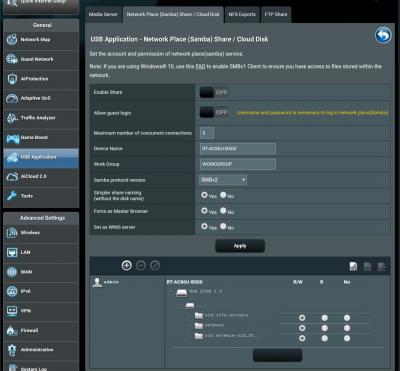
|
|
|
|
|
|
bloodsucker
|
Feb 12 2019, 05:43 PM
|
Getting Started
|
I'm not able to turn on/off Wifi using the button (using official latest firmware), are you guys encounter same issue too?
|
|
|
|
|
|
maxxxxx0123
|
Feb 14 2019, 02:20 PM
|
Getting Started
|
hm... mine is unifi 800Mbps, but only get 500Mbps at speedtest.tm.com.my
before that using tplink archer 1200 get 350Mbps
|
|
|
|
|
|
sHawTY
|
Feb 14 2019, 05:08 PM
|
|
|
QUOTE(maxxxxx0123 @ Feb 14 2019, 02:20 PM) hm... mine is unifi 800Mbps, but only get 500Mbps at speedtest.tm.com.my You test using Wi-Fi or LAN cable? |
|
|
|
|
|
maxxxxx0123
|
Feb 14 2019, 06:58 PM
|
Getting Started
|
QUOTE(sHawTY @ Feb 14 2019, 05:08 PM) You test using Wi-Fi or LAN cable? WiFi. You guys can only get 800 from LAN? |
|
|
|
|
|
sHawTY
|
Feb 15 2019, 11:06 AM
|
|
|
QUOTE(maxxxxx0123 @ Feb 14 2019, 06:58 PM) WiFi. You guys can only get 800 from LAN? To get 800Mb/s on Wi-Fi, your device must be able to run at 1.3Gb/s and above on Wi-Fi The router supports AC 2.1Gb/s, but your device does not |
|
|
|
|
|
maxxxxx0123
|
Feb 15 2019, 12:15 PM
|
Getting Started
|
QUOTE(sHawTY @ Feb 15 2019, 11:06 AM) To get 800Mb/s on Wi-Fi, your device must be able to run at 1.3Gb/s and above on Wi-Fi The router supports AC 2.1Gb/s, but your device does not my desktop wireles card is PCE-AC68, according to the spec it says 1.30Gbps  |
|
|
|
|
|
sHawTY
|
Feb 15 2019, 03:05 PM
|
|
|
QUOTE(maxxxxx0123 @ Feb 15 2019, 12:15 PM) my desktop wireles card is PCE-AC68, according to the spec it says 1.30Gbps 1. Did you set the 5GHz channel bandwidth to run at 80MHz? 2. How far are you from the router? 3. What processor are you using in your desktop PC? 4. What network speed are you getting right now? Network speed, not internet speed |
|
|
|
|
|
maxxxxx0123
|
Feb 15 2019, 05:53 PM
|
Getting Started
|
QUOTE(sHawTY @ Feb 15 2019, 03:05 PM) 1. Did you set the 5GHz channel bandwidth to run at 80MHz? 2. How far are you from the router? 3. What processor are you using in your desktop PC? 4. What network speed are you getting right now? Network speed, not internet speed 1. Yes. Just change to 80Mhz and test again 2. Less than 10m away 3. i7-7700 4. Hm...how to check this? From my routher, Tx Rate is 975 to 1170 Mbps, Rx Rate is constant at 1300. Not sure is this what you want |
|
|
|
|
|
deathninjax
|
Feb 17 2019, 11:37 PM
|
Getting Started
|
i opened the router and asus is using thermal pads on the chips. there is no thermal paste used. i thought can use liquid metal to reduce the temps.
i guess the only upgrade that can be done is changing the thermal pads to thermal grizzly minus 8 thermal pads.
|
|
|
|
|



 Quote
Quote


 0.0286sec
 0.43
0.43
 6 queries
 GZIP Disabled