

QUOTE(zeronehza @ Sep 2 2017, 04:51 PM)
tried also.. maybe my modem spoilt one. 

I am out of idea...... 
Unifi Unifi Lite 10Mbps Brotherhood -- v3.0 --, Incoming RM99 package!? (Put On Hold)
|
|
 Sep 2 2017, 05:57 PM Sep 2 2017, 05:57 PM
Show posts by this member only | IPv6 | Post
#741
|
 
Senior Member
3,669 posts Joined: Apr 2006 
|
QUOTE(zeronehza @ Sep 2 2017, 04:51 PM) tried also.. maybe my modem spoilt one. I am out of idea...... |
|
|
|
|
|
Sep 2 2017, 09:55 PM
|

Junior Member
205 posts Joined: Jan 2010 
|
unifi lite with TP-Link AC1200 router, wifi through android phone get 0mbps unload compare to 5mbps using lan PC. Anyone manage to solved it?
|
|
|
Sep 2 2017, 10:18 PM
Show posts by this member only | IPv6 | Post
#743
|
|
Senior Member
3,669 posts Joined: Apr 2006
|
QUOTE(kel32 @ Sep 2 2017, 09:55 PM) unifi lite with TP-Link AC1200 router, wifi through android phone get 0mbps unload compare to 5mbps using lan PC. Anyone manage to solved it? ........0Mbps upload? Impossible....it is either your android* web browser or speed measuring apps has issue.This post has been edited by JohnLai: Sep 2 2017, 10:18 PM |
|
|
Sep 2 2017, 10:30 PM
|
|
Junior Member
205 posts Joined: Jan 2010
|
QUOTE(JohnLai @ Sep 2 2017, 10:18 PM) ........0Mbps upload? Impossible....it is either your android* web browser or speed measuring apps has issue. here's the screenshotAttached thumbnail(s) 
|
|
|
Sep 2 2017, 10:48 PM
Show posts by this member only | IPv6 | Post
#745
|
|
Senior Member
3,669 posts Joined: Apr 2006
|
QUOTE(kel32 @ Sep 2 2017, 10:30 PM) here's the screenshot Hmm....that is using speedtest app?How about http://openspeedtest.com using android web browser? Tell us about your phone model too. |
|
|
Sep 2 2017, 11:32 PM
|
|
Junior Member
205 posts Joined: Jan 2010
|
QUOTE(JohnLai @ Sep 2 2017, 10:48 PM) Hmm....that is using speedtest app? lenovo vibe android 6How about http://openspeedtest.com using android web browser? Tell us about your phone model too. test using chrome browser Attached thumbnail(s) 
|
|
|
|
|
|
Sep 2 2017, 11:44 PM
Show posts by this member only | IPv6 | Post
#747
|
|
Senior Member
3,669 posts Joined: Apr 2006
|
QUOTE(kel32 @ Sep 2 2017, 11:32 PM) lenovo vibe android 6 Oh crap, you might be screwed. test using chrome browser  Back in June, there was discussion about it being TP-Link C1200 router fault. https://forum.lowyat.net/topic/4293588/+1240 No solution so far other than changing router.....maybe give C1200 a firmware update? *Update reset router settings* |
|
|
Sep 3 2017, 12:10 AM
|

All Stars
11,456 posts Joined: Oct 2007 From: KL
|
QUOTE(kel32 @ Sep 2 2017, 09:55 PM) unifi lite with TP-Link AC1200 router, wifi through android phone get 0mbps unload compare to 5mbps using lan PC. Anyone manage to solved it? If you have IPv6 enabled, can you disable it and try the speedtest from the Android phone again.This post has been edited by soonwai: Sep 3 2017, 01:14 AM |
|
|
Sep 3 2017, 12:34 AM
Show posts by this member only | IPv6 | Post
#749
|

Senior Member
4,717 posts Joined: Jan 2003
|
welcome to the club, i think i'm the 2nd person (according to the tm technician who talked to me) who successfully convinced the tm technician this is the valid issue and eventually the tm technician agreed to swap the router for me...there is no solution if you continue to use the AC1200 router, just need to change to other router....
at first they send the installer to check out my issue, for two times, but i persisted and continue to escalate the issue until they send tm technician to my house and check the issue.... if you continue would like to troubleshoot... don't waste your time do the following: - enable or disable ipv6 - use whatever DNS you can use, unifi dns, google dns, open dns..all won't work - change the wifi band - use the 5Ghz band - use static ip i think i troubleshoot a lot already la...no solution....dunno why that router won't compatible with Android phones...tried note 2, note 5, Mi Note, Huawei and also Asus phone, all not working...  QUOTE(kel32 @ Sep 2 2017, 09:55 PM) unifi lite with TP-Link AC1200 router, wifi through android phone get 0mbps unload compare to 5mbps using lan PC. Anyone manage to solved it? bro...this is a valid issue and only happens for AC1200 router and also for Android phone only... really damn annoying, certain website won't work, example you cannot post item at Mudah (no upload) and also if you try to post reply at lowyat forum, i think won't work also...either post or upload attachment, forgot already...but it does impact your web browsing experience.... QUOTE(JohnLai @ Sep 2 2017, 10:18 PM) ........0Mbps upload? Impossible....it is either your android* web browser or speed measuring apps has issue. This post has been edited by kevyeoh: Sep 3 2017, 12:36 AM |
|
|
Sep 3 2017, 01:01 AM
Show posts by this member only | IPv6 | Post
#750
|
|
Junior Member
205 posts Joined: Jan 2010
|
0mbps upload really headache, previously on 1mbps streamyx which is balance in download and upload.
|
|
|
Sep 3 2017, 01:02 AM
Show posts by this member only | IPv6 | Post
#751
|
|
Senior Member
3,669 posts Joined: Apr 2006
|
QUOTE(kevyeoh @ Sep 3 2017, 12:34 AM) welcome to the club, i think i'm the 2nd person (according to the tm technician who talked to me) who successfully convinced the tm technician this is the valid issue and eventually the tm technician agreed to swap the router for me...there is no solution if you continue to use the AC1200 router, just need to change to other router.... Oh ya...what are C1200 version you and kel32 have?at first they send the installer to check out my issue, for two times, but i persisted and continue to escalate the issue until they send tm technician to my house and check the issue.... if you continue would like to troubleshoot... don't waste your time do the following: - enable or disable ipv6 - use whatever DNS you can use, unifi dns, google dns, open dns..all won't work - change the wifi band - use the 5Ghz band - use static ip i think i troubleshoot a lot already la...no solution....dunno why that router won't compatible with Android phones...tried note 2, note 5, Mi Note, Huawei and also Asus phone, all not working... bro...this is a valid issue and only happens for AC1200 router and also for Android phone only... really damn annoying, certain website won't work, example you cannot post item at Mudah (no upload) and also if you try to post reply at lowyat forum, i think won't work also...either post or upload attachment, forgot already...but it does impact your web browsing experience.... V1 (EU), V2 (US) or V3 (US)? Cause I am using V1(EU) and I never encounter 0Mbps upload issue with Galaxy S2, 2 Zenfone Selfie phones, Zenfone Max, Galaxy Note N5100, Galaxy S3 Mini, and Galaxy W. I wonder if that issue is specific to V2 and V3.  edit: Have you try disabling WMM for the wireless? This post has been edited by JohnLai: Sep 3 2017, 01:10 AM |
|
|
Sep 3 2017, 01:19 AM
|
|
All Stars
11,456 posts Joined: Oct 2007 From: KL
|
QUOTE(kevyeoh @ Sep 3 2017, 12:34 AM) welcome to the club, i think i'm the 2nd person (according to the tm technician who talked to me) who successfully convinced the tm technician this is the valid issue and eventually the tm technician agreed to swap the router for me...there is no solution if you continue to use the AC1200 router, just need to change to other router.... Interesting, there're 2 coffee shops here using C1200s. Next time I'm there, I'll check with my wife's Lenovo to see if I get that problem.... |
|
|
Sep 3 2017, 01:24 AM
Show posts by this member only | IPv6 | Post
#753
|
|
Senior Member
3,669 posts Joined: Apr 2006
|
QUOTE(soonwai @ Sep 3 2017, 01:19 AM) Interesting, there're 2 coffee shops here using C1200s. Next time I'm there, I'll check with my wife's Lenovo to see if I get that problem. Don't forget to flip the coffee shops routers and check model version  This post has been edited by JohnLai: Sep 3 2017, 01:24 AM |
|
|
|
|
|
Sep 3 2017, 01:40 AM
|
|
All Stars
11,456 posts Joined: Oct 2007 From: KL
|
QUOTE(JohnLai @ Sep 3 2017, 01:24 AM) Don't forget to flip the coffee shops routers and check model version What? you mean manual labour. I don't do that. Here's one of them. C1200v1. This is the one where I tested the 5-min Covfefe-Break feature.  The other one is also v1 and not the latest firmware but forgot what it was. This post has been edited by soonwai: Sep 3 2017, 01:42 AM |
|
|
Sep 3 2017, 01:42 AM
Show posts by this member only | IPv6 | Post
#755
|
|
Senior Member
3,669 posts Joined: Apr 2006
|
QUOTE(soonwai @ Sep 3 2017, 01:40 AM) What? you mean manual labour. I don't do that. This one yours? Here's one of them C1200v1.  Why don't you update the firmware? I thought you know where to find it? Got 5Ghz beamforming support added.  Edit: You saw my screenshot on the other thread? https://forum.lowyat.net/index.php?showtopi...post&p=86198301 This post has been edited by JohnLai: Sep 3 2017, 01:46 AM |
|
|
Sep 3 2017, 01:50 AM
|
|
All Stars
11,456 posts Joined: Oct 2007 From: KL
|
QUOTE(JohnLai @ Sep 3 2017, 01:42 AM) This one yours? Not mine, the coffee shop one. Can't upgrade remotely because of the reset to defaults. Planning to upgrade the one at the other coffee shop and see if got improvement. Been going to that place more often. Why don't you update the firmware? I thought you know where to find it? Got 5Ghz beamforming support added. Edit: You saw my screenshot on the other thread? https://forum.lowyat.net/index.php?showtopi...post&p=86198301 |
|
|
Sep 3 2017, 02:03 AM
Show posts by this member only | IPv6 | Post
#757
|
|
Senior Member
3,669 posts Joined: Apr 2006
|
QUOTE(soonwai @ Sep 3 2017, 01:50 AM) Not mine, the coffee shop one. Can't upgrade remotely because of the reset to defaults. Planning to upgrade the one at the other coffee shop and see if got improvement. Been going to that place more often. Yup....everything reset to factory default.Retyping unifi login, wireless encryption , disabling wps, disabling upnp, portforwarding, ddns setup, google dns, modifying damned IPTV back to port 4, disabling TP-LINK file share, disable print server, disable all ALG  You better know the other coffee shop unifi login ID + Pass.... With 5Ghz beamforming, seem like my phone can communicate with the router from further away. (Visiting nearby neighbour house to help him update the firmware too  ) )By using phone to access the router configuration page to disable and enable beamforming, the result is: From -60dbm to -50dbm, an 'okay' improvement I guess...... (My phone reported -38dbm when I am in my* house though) This post has been edited by JohnLai: Sep 3 2017, 02:04 AM |
|
|
Sep 3 2017, 02:16 AM
|
|
All Stars
11,456 posts Joined: Oct 2007 From: KL
|
QUOTE(JohnLai @ Sep 3 2017, 02:03 AM) Yup....everything reset to factory default. Oh yeah, of course. It's in the router. Will definitely note both down before I upgrade.... You better know the other coffee shop unifi login ID + Pass.... QUOTE With 5Ghz beamforming, seem like my phone can communicate with the router from further away. (Visiting nearby neighbour house to help him update the firmware too Wow, that's more than OK. That's a magnitude higher. Signal strengths are logarithmic. )By using phone to access the router configuration page to disable and enable beamforming, the result is: From -60dbm to -50dbm, an 'okay' improvement I guess...... |
|
|
Sep 3 2017, 02:20 AM
|

Senior Member
2,400 posts Joined: Jun 2007
|
C1200 v1, android phones on honeycomb and kitkat, not the best of speeds but tolerable.
Screenshot of my antique kitkat Redmi Note 3G's test: 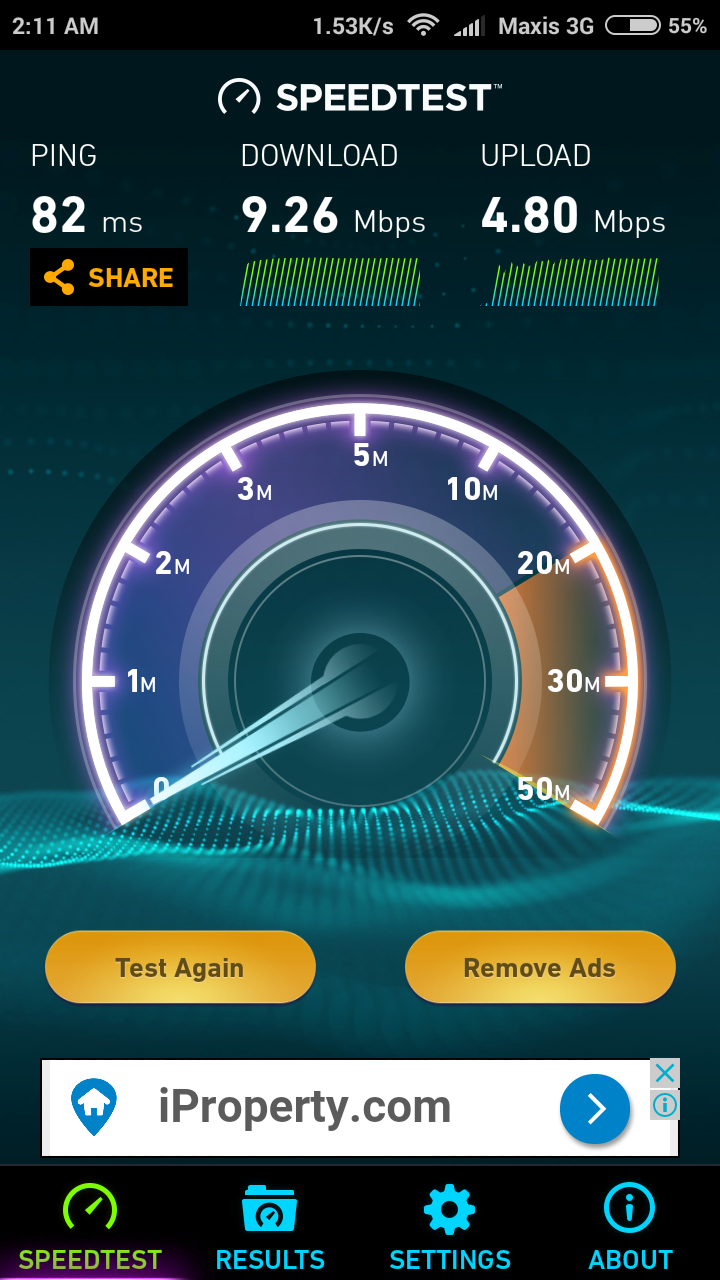 |
|
|
Sep 3 2017, 09:32 AM
Show posts by this member only | IPv6 | Post
#760
|
|
Senior Member
4,717 posts Joined: Jan 2003
|
I changed router long time ago already.... but I think should be v1... not able to check which version already.... anyway... to those facing this issue... simple solution is swap router... unless you already know how to troubleshoot it....
QUOTE(JohnLai @ Sep 3 2017, 01:02 AM) Oh ya...what are C1200 version you and kel32 have? V1 (EU), V2 (US) or V3 (US)? Cause I am using V1(EU) and I never encounter 0Mbps upload issue with Galaxy S2, 2 Zenfone Selfie phones, Zenfone Max, Galaxy Note N5100, Galaxy S3 Mini, and Galaxy W. I wonder if that issue is specific to V2 and V3. edit: Have you try disabling WMM for the wireless? |
| Change to: |  0.0317sec 0.0317sec
 0.33 0.33
 6 queries 6 queries
 GZIP Disabled GZIP Disabled
Time is now: 5th December 2025 - 11:04 AM |
 Quote
Quote