

QUOTE(AhBoy~~ @ Sep 15 2019, 06:10 PM)
Contact TM CS, cannot remove play tv
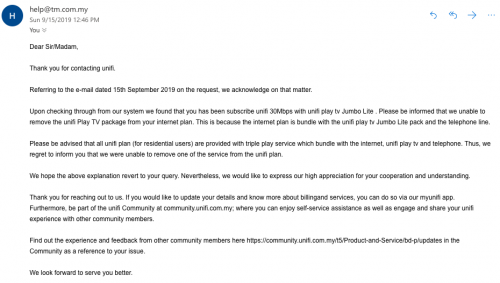

tm sucks !the unifi playtv shouldn't be there.
They should let customer choose whether want the unifi tv pack...
If interested then only add-on to the package.
Unifi Unifi Lite 10Mbps Brotherhood -- v3.0 --, Incoming RM99 package!? (Put On Hold)
|
|
 Sep 28 2019, 11:49 AM Sep 28 2019, 11:49 AM
Return to original view | Post
#1
|
 
Junior Member
422 posts Joined: Mar 2010 
|
QUOTE(AhBoy~~ @ Sep 15 2019, 06:10 PM) Contact TM CS, cannot remove play tv tm sucks !the unifi playtv shouldn't be there. They should let customer choose whether want the unifi tv pack... If interested then only add-on to the package. |
|
|
|
|
|
Sep 28 2019, 12:06 PM
Return to original view | Post
#2
|
|
Junior Member
422 posts Joined: Mar 2010
|
QUOTE(AhBoy~~ @ Sep 15 2019, 06:10 PM) Contact TM CS, cannot remove play tv btw , did u suscribe to advance 30M or the current 30M unlimited package ? |
|
|
Nov 19 2019, 04:05 PM
Return to original view | Post
#3
|
|
Junior Member
422 posts Joined: Mar 2010
|
QUOTE(blacksunday @ Nov 19 2019, 04:01 PM) so i just call up tm and after checking, its because of the hypptv budle package that is adding to the price. the hypptv is rm30 + int rm99 + voice rm20...rm149 exclu sst....i told them i dont need the hypptv but they said it comes together with the package...so there is nothing we can do bout it. unless i downgrade my package to 30mb w/o stb...great...made me all excited bout the 99 but hidden charges w/o informing customer..... In fact , when tm called u to upgrade the broadband package...the first thing is to ask about the pricethen ask got any hidden charges or not . |
|
|
Dec 16 2019, 02:32 PM
Return to original view | IPv6 | Post
#4
|
|
Junior Member
422 posts Joined: Mar 2010
|
Your ip address is something like this 10.65.x.x ?
|
|
|
Dec 22 2019, 04:58 PM
Return to original view | IPv6 | Post
#5
|
|
Junior Member
422 posts Joined: Mar 2010
|
QUOTE(hizad @ Dec 22 2019, 10:45 AM) My wish for 2020 is for SUBB Unifi Lite be upgraded to at least 20Mbps Upgraded unifi lite to 20M still copper line ... doesn't help much.Finger-cross that ur area upgraded to fiber line. |
|
|
Dec 23 2019, 01:20 PM
Return to original view | IPv6 | Post
#6
|
|
Junior Member
422 posts Joined: Mar 2010
|
QUOTE(NightFelix @ Dec 23 2019, 11:39 AM) I dont even have Unifi 10Mbps for my home area. stucked at Stimix 8mbps I think unifi 10M is not fiber line.So ur stimix 8M lebih kurang same as unifi 10M. |
|
|
|
|
|
Dec 26 2019, 05:26 PM
Return to original view | IPv6 | Post
#7
|
|
Junior Member
422 posts Joined: Mar 2010
|
QUOTE(sl3ge @ Dec 25 2019, 04:58 PM) Hi sifu here, Are u using desktop pc or laptop ?May i ask a question I am using Ugreen Cat6 Ethernet cable. but in my network connection the Ethernet show connected to 2.4Ghz @unifi. But my unifi here sometime not stable. So sometime when ethernet is slow, i need to disable ethernet and use my wifi connect to 5Ghz @unifi(and the speed instantly become fast) I wonder why when at ethernet 2.4Ghz it is slow, but i switch to 5Ghz it is fast? But the main question i want ask here is how to configure my ethernet connect to 5Ghz ? i cant find the setting.. (i prefer use ethernet than wifi, because the radiation things) Thanks 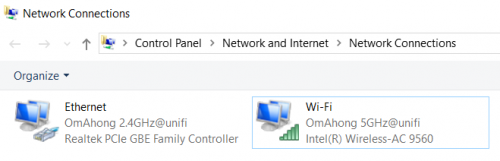 In fact , ur ethernet lan network already connected to cable LAN connection. OmAhong 2.4Ghz@unifi (realteak pcie gbe controller) icon is cable connection. OmAhong 5Ghz@unifi icon is for wifi. How long is ur ugreen cat6 cable ? What unifi package u subscribe and router model use ? |
|
|
Dec 27 2019, 08:58 AM
Return to original view | IPv6 | Post
#8
|
|
Junior Member
422 posts Joined: Mar 2010
|
QUOTE(sl3ge @ Dec 26 2019, 09:56 PM) i am using acer nitro 5 laptop, my laptop is at 1st floor, router is at ground floor. acer nitro 5 ... nice laptop.ugreen 1.5 meter. unifi 300mbps, D-Link AC1200. What i mean is, usually i will put my laptop at airplane mode(which wifi off) only using ethernet. usually normal day ethernet speed is fine, play youtube 1080p(youtube is a example, other website also smooth) is smooth like butter. but sometime my area unifi will slow down(like weekend, one week happen like one or two days), ethernet speed become very slow, even play youtube 780p also lag. During this time i disable my ethernet, and connect my wifi 5Ghz youtube 1080p & other website start smooth again. My question is, since my 5Ghz all the while is fast, Is it able to let my ethernet connect to 5Ghz, not the 2.4Ghz ethernet(since 2.4Ghz will intermittently slow down) Is the ethernet 5Ghz exist? or ethernet only has 2.4Ghz? I like ur Intel ac 9560 wifi card . unifi line speed drop is normal ...if connected to usa web site. My ethernet lan network icon same like u. myusername_2.4Ghz@unifi Cable connection is direct broadband speed , in ur case is 300M . U can not choose either 2.4Ghz or 5Ghz. Only wifi can choose to enable 2.4Ghz or 5Ghz and enable both at the same time. My router i only "tick" and enable 2.4Ghz for wifi ...since i don't have 5Ghz device or smartphone. Ur unifi line is o.k since u mentioned wifi 5Ghz having fast connection. To do the test , disable wifi mode (disable both 2.4Ghz and 5Ghz) on ur router. See whether u can get fast ethernet lan cable connection or not . |
|
|
Jul 9 2020, 10:08 PM
Return to original view | IPv6 | Post
#9
|
|
Junior Member
422 posts Joined: Mar 2010
|
QUOTE(ray148 @ Jul 9 2020, 10:00 PM) Hope someone can help. I bought a new modem Asus DSL N16 for my parent and for some reason it refuse to connect --- the ADSL never stop blinking. The old tm modem Riger DB102 and D-Link ADSL-2750U can connect just fine. If ur password contain special charater like @#$% then some modemIt's Unifi Lite but on ADSL2+ I think, so 10mbps download but only 0.5 to 1mbps upload. cannot recognise it and refuse to connect to unifi server ... |
|
|
Jul 9 2020, 10:26 PM
Return to original view | IPv6 | Post
#10
|
|
Junior Member
422 posts Joined: Mar 2010
|
QUOTE(ray148 @ Jul 9 2020, 10:13 PM) I thought it was password too, but it's not. Already confirmed with tm operator that it was correct. The way u test doesn't mean anything ...Also retype the password into the old modem and they both works. The old modem accept the password with abc123$ but some modem didn't recognise it. Make sure that password without special charater....I bought one cheap dlink adsl modem last time ...can't accept abc123$ and refuse to connect internet but old modem no problem. Since u already checked it then it must be other problem. |
|
|
Jul 20 2020, 07:37 AM
Return to original view | IPv6 | Post
#11
|
|
Junior Member
422 posts Joined: Mar 2010
|
QUOTE(nite_eif @ Jul 20 2020, 12:46 AM) Sabor bang.. Yep, finished installation.. Now on unifi.. U still pay telephone line rent rm29 ?My copper cabling I just left it be.. Maybe in the future tm bagi flat rate screamyx rm20-30 ke.. It is necessity nowadays lol.. |
|
|
Jul 20 2020, 11:27 AM
Return to original view | Post
#12
|
|
Junior Member
422 posts Joined: Mar 2010
|
QUOTE(nite_eif @ Jul 20 2020, 09:42 AM) nope..who use fixed phone line nowadays? My house still used fixed telephone but signal is from unifii mean the existing copper cable n trunking, i let it be..xbuang..who knows nanti nk pakai..when the time TM bagi free use ke..haha lel fiber line.So no more rent the stupid high price dial telephone line . |
|
|
Jul 20 2020, 07:02 PM
Return to original view | IPv6 | Post
#13
|
|
Junior Member
422 posts Joined: Mar 2010
|
QUOTE(nite_eif @ Jul 20 2020, 03:32 PM) yep..will it be a time when wired connection will be pupus.. Wired or lan (fiber) connection is cater for high usage bandwidth like p2p . haha 5G all the way..  So it wouldn't pupus. 5G is super fast but not design for p2p. |
|
|
|
|
|
Oct 8 2020, 01:29 PM
Return to original view | Post
#14
|
|
Junior Member
422 posts Joined: Mar 2010
|
QUOTE(jimmy_none @ Oct 7 2020, 09:07 PM) Sorry another question what is the difference between 30mbps unifi vs unifi lite (besides copper and fiber)? Download speed is the same and same price too. thanks unifi 30M download speed 3.5M per second ...forget about lousy unifi lite.oh yea.. what is the procedure to upgrade to unifi lite? can't find the upgrade plan in my tmnet dashboard, all is unifi.  .. go to the nearest tm point fill in the form .. grab the new modem and install myself. then is ready to use? .. go to the nearest tm point fill in the form .. grab the new modem and install myself. then is ready to use?unifi 30M plan upload speed 1100k per second only. If u have extra money , go for unifi 100M with upload speed 5500k per second. If budget tight , then choose unifi 30M plan. |
|
|
Oct 9 2020, 12:56 PM
Return to original view | Post
#15
|
|
Junior Member
422 posts Joined: Mar 2010
|
QUOTE(jimmy_none @ Oct 8 2020, 06:19 PM) unifi no port.. misread the unifi lite info from the tmnet website.. the 10mbps only limited to certain area.. U stay landed house or condo ?Condo seems easier to apply fiber line because time , celcom ,maxis and digi etc keep looking customer to install fiber broadband. Beware of maxis fiber line ... they block the port by default...mean cannot download torrent.u have to request them to open port for ur fiber line. |
|
|
Nov 25 2020, 02:12 PM
Return to original view | Post
#16
|
|
Junior Member
422 posts Joined: Mar 2010
|
QUOTE(NightFelix @ Nov 25 2020, 02:08 PM) how much? 10mbps sounds like a joke for broadband lol. That is max copper line can support.He also waiting for fiber line pull to his area. |
|
|
Nov 26 2020, 02:26 PM
Return to original view | Post
#17
|
|
Junior Member
422 posts Joined: Mar 2010
|
QUOTE(s3polZ @ Nov 26 2020, 08:08 AM) RM89/mth Too bad to hear that rm89 per month.joke or not, this is the only option i have at the moment i subscribed for 500mbps package for my parent's house currently, but sadly in my area here still dont have fiber coverage Same money , same tmnet company , I subscribe to unifi 30M per month. Hopefully ur area cover by fiber line faster. Beware of Maxis and digi isp ...they give u private ip address by default. Who know one day they reply to customer ... "we are short of public ip address and unable to provide to u ....." End of the day to ur p2p. |
|
|
Dec 20 2020, 06:26 AM
Return to original view | IPv6 | Post
#18
|
|
Junior Member
422 posts Joined: Mar 2010
|
QUOTE(Yapbe @ Dec 20 2020, 12:32 AM) HI, I new in Unifi, when I request for Public IP for Unifi, the Live agent(Unifi website) said it's charge RM200 for 1 fixed IP, and he told me to go to TM point to apply. What is ur ip address ?Subscribe to unifi already ?Anyone come across this issued? BTW, does Unifi provided Public IP address by default? Click this link . https://www.ip2location.com/ U need to know what ip address u get first ... Yapbe liked this post
|
|
|
Dec 20 2020, 06:35 AM
Return to original view | IPv6 | Post
#19
|
|
Junior Member
422 posts Joined: Mar 2010
|
QUOTE(powerwoot @ Dec 19 2020, 08:06 PM) Saying goodbye to the good unifi lite 10mbps. Managed to upgrade to 100mbps HSBB after years of waiting. TM was reluctant to entertained because my address is in kampung, with dozens of rejection due to no coverage at my area. In fact the nearest DP is less than 100m from my house. Old modem can use to extend the wifi coverage as well.My first complaint to SKMM in Nov last month, fruitful. About 2 week after the complaint submitted, TM agreed to pull a cable to my house. My VDSL modem can rest in peace inside the kotak now. Say...u got bedroom at first floor , pull one network cat5e/cat6 cable to first floor then connect to old modem. Simple configuration on it to extend wifi signal to first floor. May not get high wifi speed , but 30~50M speed enough for u to access internet. powerwoot liked this post
|
|
|
Dec 21 2020, 01:25 PM
Return to original view | IPv6 | Post
#20
|
|
Junior Member
422 posts Joined: Mar 2010
|
QUOTE(Yapbe @ Dec 21 2020, 12:47 AM) Hi, thanks for help. Just do the port forward setup.by the link you provided, my IP address : 175.144.xx.xxx so, is a Public IP or not? IF so, will this IP address changing time by time or just this will be a the time. BTW, i already subscribed to Unifi....for few days ago.  Then run bitcomet 1.73 , if green light at lower right hand side , then it is successful and it is public ip address. Private ip address , it will be forever orange light . Yapbe liked this post
|
| Change to: |  0.1485sec 0.1485sec
 0.51 0.51
 7 queries 7 queries
 GZIP Disabled GZIP Disabled
Time is now: 3rd December 2025 - 07:57 AM |
 Quote
Quote