

QUOTE(noobandroid @ Dec 27 2017, 06:33 PM)
on current powerline, speed is only reaching 50mbps out of 100mbps i subscribed

What router you use now?The new powerline should be able to reach 100Mbps if you are lucky.
TP-LINK Malaysia Official Thread, Technical Enquiries and Support
|
|
 Dec 27 2017, 06:39 PM Dec 27 2017, 06:39 PM
Return to original view | Post
#81
|
 
Elite
8,416 posts Joined: Jul 2008  
|
QUOTE(noobandroid @ Dec 27 2017, 06:33 PM) on current powerline, speed is only reaching 50mbps out of 100mbps i subscribed What router you use now?The new powerline should be able to reach 100Mbps if you are lucky. |
|
|
|
|
|
Dec 27 2017, 10:04 PM
Return to original view | Post
#82
|
|
Elite
8,416 posts Joined: Jul 2008
|
QUOTE(neekun @ Dec 27 2017, 07:56 PM) Did you ever tested TP C5400 on a double storey house with router at ground floor and testing connection at upstair? Got to be honest to you that there's no definite answer for this.I am looking for a good wifi router which at least can give me 100mbps wireless connection at upstairs. Every house is constructed differently but I would say the C5400 is one of the strongest wireless router around. You have to use 5Ghz and make sure your router is placed in the middle of your house. That's why it is my current main router also. Partly also because it is cheap.  |
|
|
Dec 28 2017, 10:41 AM
Return to original view | Post
#83
|
|
Elite
8,416 posts Joined: Jul 2008
|
QUOTE(SilentForever @ Dec 27 2017, 10:19 PM) Hey BlackTubi, awesome reviews on your site. I want to ask whether the TP Link C2600 is reaching end of life? And the general standard now for price/performance is AC1900. However TP Link AC1900s looks like crap tbh. Actually I like the design of the C3200 and C5400 more than others by alot but these are super overkill. xD Should I go for the C2300 or the C3150 V2? And what do you recommend for extending wifi coverage for >5000 sq ft. Heard that mesh is not good for concrete? Extender? Thanks. I prefer a router + powerline extender combo. It is the most cost effective and able to deliver better performance that a mesh network config. It works really well for Malaysian houses with reinforced concrete wall.AC1900 is the best 2 years ago but now we are already on AC3150 with Wireless AC Wave 2 MU-MIMO. Go for the C3150 V2, a lot of people use that model and it's really good. Must cheaper than other brands as well. This post has been edited by blacktubi: Dec 28 2017, 10:43 AM |
|
|
Jan 1 2018, 07:06 PM
Return to original view | Post
#84
|
|
Elite
8,416 posts Joined: Jul 2008
|
QUOTE(neekun @ Jan 1 2018, 04:02 PM) Money well spent One of the best TP-Link products I ever own too.  [attachmentid=9473939] [attachmentid=9473940] Tips: Use the tpPLC app on your phone to view the connectivity speed so you don't need the desktop app. |
|
|
Jan 2 2018, 10:00 PM
Return to original view | IPv6 | Post
#85
|
|
Elite
8,416 posts Joined: Jul 2008
|
QUOTE(brianklc @ Jan 2 2018, 03:27 PM) any product that can support wifi vlan tagging? Eg. to have another wifi SSID for VLan 600 (Hypptv) I believe only D-Link routers do that currently.QUOTE(JohnLai @ Jan 2 2018, 08:03 PM) Nobody wanna contact official TP-Link support via their email on C1200 auto restart issue? They are already investigating that issue. I not sure when a fix will be released but apparently not all users are affected somehow.Have anyone tried cooling the router down? I do not have the Unifi version of the C1200. |
|
|
Jan 9 2018, 05:09 PM
Return to original view | Post
#86
|
|
Elite
8,416 posts Joined: Jul 2008
|
QUOTE(CKyoon @ Jan 9 2018, 05:02 PM) Our company size doesn't need to high end, will not approve. Got any suggestion less than RM500? If you can wait, wait for the new TP-Link ADSL routers.It will have VDSL support for future and even come with VOIP feature. It will be released soon. TM will move all ADSL users to VDSL very soon. |
|
|
|
|
|
Jan 10 2018, 10:13 AM
Return to original view | Post
#87
|
|
Elite
8,416 posts Joined: Jul 2008
|
QUOTE(Doraku @ Jan 10 2018, 08:12 AM) Cool,Is this a part of new SUBB upgrade project to improve streamyx speed? (https://www.tm.com.my/AboutTM/NewsRelease/Pages/TM-EMBARKS-ON-BROADBAND-IMPROVEMENT-PLAN-TO-PROVIDE-MALAYSIANS-WITH-GREATER-VALUE-OFFERINGS.aspx) Yes.So can you use this router for VDSL Unifi? BTW TP-Link just released they new VDSL Router,Archer VR1200V 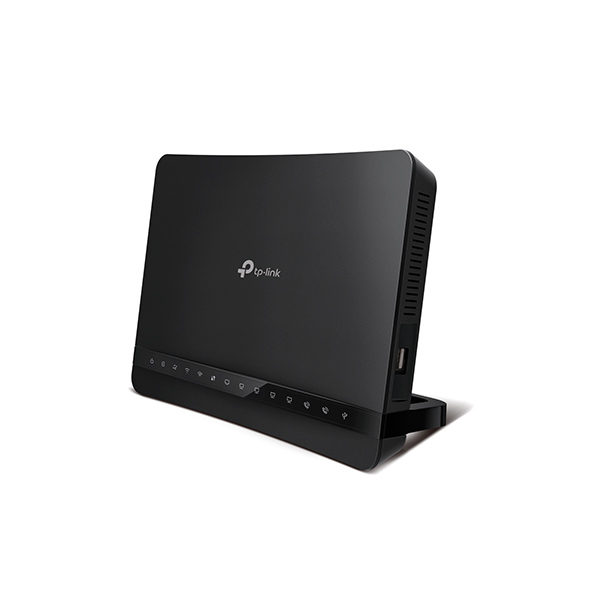  However, the VR1200V is not released in Malaysia yet. I believe TP-Link is tuning the firmware to ensure Unifi compatibility once it is available. |
|
|
Jan 10 2018, 10:46 AM
Return to original view | Post
#88
|
|
Elite
8,416 posts Joined: Jul 2008
|
QUOTE(Doraku @ Jan 10 2018, 10:36 AM) Oh okay,BTW can you review a TP Link Deco M5?,It is okay? Currently testing it as my daily router. Anything specific you would like to know? |
|
|
Jan 10 2018, 10:56 AM
Return to original view | Post
#89
|
|
Elite
8,416 posts Joined: Jul 2008
|
QUOTE(Doraku @ Jan 10 2018, 10:54 AM) How about the deco m5 wifi range,and it performance is you connect alot of devices?,it is can be use as Range extender, AP and router? It is mesh networking so it is some sort of combination of all 3 you mentioned. it is worth it? As for router, it cannot do VLAN tagging so in order to use that with Unifi, you need to add another router as VLAN bridge |
|
|
Jan 10 2018, 11:04 AM
Return to original view | Post
#90
|
|
Elite
8,416 posts Joined: Jul 2008
|
QUOTE(Ckmwpy0370 @ Jan 10 2018, 10:58 AM) by the way any experts here use the features Parental control? Is the clock at your router working properly?i have tested by restricted time access from 11pm to 5am for certain devices but when on the said devices at 7am, browser display black page any ideal? If it is not, enable time sync and select the correct time zone. |
|
|
Jan 12 2018, 11:56 AM
Return to original view | Post
#91
|
|
Elite
8,416 posts Joined: Jul 2008
|
QUOTE(eddyann @ Jan 12 2018, 11:45 AM) I'm goin nuts troubleshooting the TPlink NC230 IP camera. the camera became offline right after 8am ++. Therefore I need to switch off and ON again to make it work and it last until 745-815 am roughly. Soon after, before 9 am the camera went offline again. Try updating the firmware, resetting it and make sure your wireless signal is good and not through any wireless repeater. Try diagnosing it with wires connection.The thing is I have another unit of NC230 connected with the same router AC3150. the rest are ok. Worst to worst, RMA it. TP-Link is always generous for RMA and you can just ship it to their Lowyat service center. |
|
|
Jan 12 2018, 03:44 PM
Return to original view | Post
#92
|
|
Elite
8,416 posts Joined: Jul 2008
|
QUOTE(eddyann @ Jan 12 2018, 03:01 PM) firmware is the latest, reapply the firmware failed because it detect the same firmware version. reset also the same thing. I swap the other NC230 to that location, weird thing is, the swap unit also showed the same symptom. Right now it happen daily exactly between 745-845 am. It is possible that there's some interference at that place. Could be someone using the Microwave oven at the time or simply anything operating at 2.4Ghz.Connected to my archer AC3150 which kinda descent unit. wifi signal received from the cam is minimum 85%. Tried also wifi channel via inssider, not dense and polluted, the channel I'm using is 11 and I'm the only one. Once connected it is perfectly fine. I will try again to relocate the camera, it may or may not caused by unknown inteference  My recent interference experience is caused by some cheap China baby monitor. I suggest you to try channel 1 and see if it is better even if other devices are on channel 1. The best case solution is to go powerline but that would require additional investment which may not be ideal. |
|
|
Jan 12 2018, 03:49 PM
Return to original view | Post
#93
|
|
Elite
8,416 posts Joined: Jul 2008
|
QUOTE(popice2u @ Jan 12 2018, 03:41 PM) Note is for printing wirelessly only. So TL-WR841N ok aaah? The cheaper models do not support print server. Get Archer C1200. Please google your printer model first as certain models are problematic . |
|
|
|
|
|
Jan 12 2018, 06:11 PM
Return to original view | Post
#94
|
|
Elite
8,416 posts Joined: Jul 2008
|
QUOTE(popice2u @ Jan 12 2018, 05:50 PM) I am NOT using for internet purpose. I do not have Unifi. Get thisI just want to be able to print wirelessly. http://www.tp-link.com.my/products/details...TL-WPS510U.html |
|
|
Jan 15 2018, 12:30 PM
Return to original view | Post
#95
|
|
Elite
8,416 posts Joined: Jul 2008
|
QUOTE(night_wolf_in @ Jan 15 2018, 12:23 PM) guys, anyone using TP-Link TL-WPA8630P ? I need a solution to my shitty wifi connection. The current Modem's wifi can't reach to my bedroom. though it is not even 5 meters away. How far is your room to the router. If it is too far, even the best wireless router can't penetrate that many walls.I'm looking at the cheapest possible way of doing. either using the powerlink (which i never used, and not sure if it will work within my home), or just changing the modem. I am using this KIT for quite some time and it performs pleasantly. I have no complaint apart from the price. It is not really cheap but at least it works.  |
|
|
Jan 15 2018, 01:41 PM
Return to original view | Post
#96
|
|
Elite
8,416 posts Joined: Jul 2008
|
QUOTE(night_wolf_in @ Jan 15 2018, 12:36 PM) Same floor, 10 meters, almost 2 walls. Yes, it should work since most condos are single phase powered.btw,the KIT, will it work as long as the electrical outlet is within the same condo unit? I like the solution, i'm just worried if it wont work inside my house once i get it for that price. I am actually using it in my three phase condo and it works too. But it should work with 90% of the people unless you have some broken power equipment which produce a ton of noise. |
|
|
Jan 15 2018, 01:41 PM
Return to original view | Post
#97
|
|
Elite
8,416 posts Joined: Jul 2008
|
QUOTE(psyduck89 @ Jan 15 2018, 01:32 PM) was attempt to bridge TL-WR1043ND to Archer C1200.. Try elaborate further. Which is the main router?after steps done, no internet connection.. but i was able to login local host tru the new ssid... any help? |
|
|
Jan 16 2018, 10:02 AM
Return to original view | Post
#98
|
|
Elite
8,416 posts Joined: Jul 2008
|
TP-Link just released a firmware update for Archer C1200 and it should fix the ongoing issues.
http://www.tp-link.com/us/faq-2050.html |
|
|
Jan 18 2018, 12:23 PM
Return to original view | Post
#99
|
|
Elite
8,416 posts Joined: Jul 2008
|
QUOTE(azihas @ Jan 18 2018, 10:40 AM) How is the connectivity issue when using google cast/home thing?. does the beta firmware resolve the issue?. Take the beta firmware from the link I share.It should fix the issue. |
|
|
Jan 21 2018, 04:02 PM
Return to original view | Post
#100
|
|
Elite
8,416 posts Joined: Jul 2008
|
QUOTE(Jjuggler @ Jan 21 2018, 03:40 PM) I like the design of this modem / router. Normally i don't prefer a router has external antennas. I much prefer those which has internal antennas except the stock tm router like rgx440 and innatech. lmao. I wonder how much it would cost since it is an ac1200 router/modem. hopefully below rm400. Probably below RM400. QUOTE(gildan2020 @ Jan 21 2018, 03:45 PM) Hi You have to use a third party firmware for that. It is a really old router and the performance would suffer.Do you guys know how to setup TL-WR1043ND to connect to VPN services like ExpressVPN, IPVanish and etc? I have been looking for the PPTP or L2TP option but it seems to be missing. |
| Change to: |  0.1237sec 0.1237sec
 0.46 0.46
 7 queries 7 queries
 GZIP Disabled GZIP Disabled
Time is now: 14th December 2025 - 05:59 PM |
 Quote
Quote