Welcome Guest ( Log In | Register )

24 Pages < 1 2 3 4 5 > » Bottom

Outline · [ Standard ] · Linear+

 TP-LINK Malaysia Official Thread, Technical Enquiries and Support

views
     
blacktubi
post Oct 19 2017, 01:11 PM

-
Group Icon
Elite
8,416 posts

Joined: Jul 2008

QUOTE(skywardsword @ Oct 19 2017, 12:13 PM)
thinking about boycotting tp-link ... the malaysia archer c7 dont have any firmware update for dog years already.

And the us version, lock out the user to use other firmware like ddwrt.

Going to buy an asus next.
*
The issue is with FCC ruling which prevent third party firmware as some users run a third power firmware to boost the wireless transmit power above the legal limit.

Apparently this issue is resolved now and you should see third party firmware to be back soon.

https://arstechnica.com/information-technol...are-on-routers/
blacktubi
post Oct 19 2017, 11:11 PM

-
Group Icon
Elite
8,416 posts

Joined: Jul 2008

QUOTE(ppfoong @ Oct 19 2017, 10:13 PM)
I am using C2600. So how? Still supported?
*
Modern AC models doesn't seem to be affected.

I believe this is due to a better implementation of WPA2 by TP-Link now.
blacktubi
post Nov 13 2017, 04:45 PM

-
Group Icon
Elite
8,416 posts

Joined: Jul 2008

Just got my hands on TP-Link Deco M5. Gonna test it out real soon. biggrin.gif

Feel free to ask me anything regarding this device.


Attached thumbnail(s)
Attached Image
blacktubi
post Nov 14 2017, 04:29 PM

-
Group Icon
Elite
8,416 posts

Joined: Jul 2008

QUOTE(arrsoo @ Nov 14 2017, 04:07 PM)
Thanks to bro SilentVampire, followed your guides and below is what I get...

for 2.4G, no channel congestion, signal strength is 4 bar but no matter what channel I set, speed still sucks, give up liao
[attachmentid=9335081][attachmentid=9335088][attachmentid=9335100]

for 5G, also no channel congestion, signal strength is only 1 bar but routers default the channel to 153 which caused the speed to drop drastically but after I set to use channel 44, I managed to get full speed
[attachmentid=9335108][attachmentid=9335111][attachmentid=9335113]
based on most forumer's recommendations here, try to disable both IPV6 and Qos(Bandwith Control) first. Best is you use a cat5e cable to test.  by right if LAN also not giving you full speed, you will need to call TM, they are obligated to get it fixed for you, good luck
*
The app can only scan those wifi complaint network but they are a lot more other devices hogging the 2.4Ghz band.

Dect phones, microwave ovens and even some baby monitor all use 2.4Ghz
blacktubi
post Nov 20 2017, 12:20 AM

-
Group Icon
Elite
8,416 posts

Joined: Jul 2008

QUOTE(g104 @ Nov 20 2017, 12:06 AM)
Where did you obtain 1.1.1 Build 20170706 rel.65715 (EU) ??

http://www.tp-link.com.my/download/Archer-...1.html#Firmware
*
http://uk.tp-link.com/download/Archer-C1200_V1.html#Firmware

Available on TP-Link EU sites.
blacktubi
post Nov 24 2017, 02:35 AM

-
Group Icon
Elite
8,416 posts

Joined: Jul 2008

QUOTE(huatty @ Nov 24 2017, 02:03 AM)
Finally, send my C1200 to refund.
Looking to buy C7v2 as replacement.

Any big brother using C7v2 here? mind to share the experience?
My main concern will be stability, Maybe will try to setup file sharing as well.

*i got very bad experience with C1200, auto reboot, hang, wifi lost connection.....hope C7 will be better.
*
Consider the higher end series. I tested C3150, C5400 and AD7200 and they are really good routers.


blacktubi
post Nov 28 2017, 12:08 PM

-
Group Icon
Elite
8,416 posts

Joined: Jul 2008

QUOTE(chocobo7779 @ Nov 26 2017, 08:35 PM)
blacktubi Tried to set up Wake On Lan on my C1200 (the one provided by TM).  It worked perfectly when it is on the LAN, but when I tried it outside my LAN (i.e. waking up my PC through my phone via mobile data), it worked briefly and it won't work anymore after some time.  Tried setting ARP binding and it still didn't work  sweat.gif

I was trying to set up an OpenVPN server on the router to allow my phone to be 'part' of my LAN so that I can send a magic packet to the PC, but it appears that the VPN is assigning a different IP address (10.x.x.x) rather than (192.168.x.x).  hmm.gif

Do I need to set some kind of static routing so that I can forward the packet from the 10.x.x.x subnet to the other subnet?  Please advise as I'm not too familiar on VPNs and subnets hmm.gif
*
You couldn't access the LAN network on the 192.168 range when connected to the VPN?
blacktubi
post Nov 28 2017, 04:15 PM

-
Group Icon
Elite
8,416 posts

Joined: Jul 2008

QUOTE(helob @ Nov 28 2017, 02:15 PM)
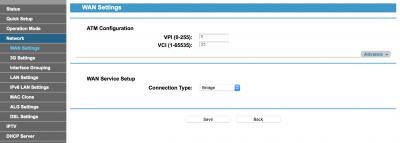
I have a TP-Link W8968 which I intend to use in bridge mode for my 8Mbps streamyx broadband.
Only way to get it in bridge mode is to a reset to factory setting.
However VPI/VCI default to 8/35.
I can't find a way to change it to 0/35.
Please Help
Thank You
*
Delete the 8/35 interface and add a new interface with 0/35


Attached thumbnail(s)
Attached Image
blacktubi
post Nov 28 2017, 04:16 PM

-
Group Icon
Elite
8,416 posts

Joined: Jul 2008

QUOTE(pengembara @ Nov 28 2017, 03:27 PM)
Hi
Appreciate your help and advise on this.

I am a Maxis Home Fibre subscriber. As I am not very happy with their Technicolor wifi due to the number of access that my family has, I bought a TPL AC900 (Archer C20) .

With Maxis help I am able to configure the C20 and gain access to the Internet through connecting a RJ45 to the Technicolor which is acting as a bridge.

When I tried to plug the C20 directly to the TM fibre modem I am unable to get any connection to the Internet.

Is there some extra set-ups I need to do or at the telco side?

I noticed the only difference is the access point name.

Many thanks in advance.

rgds
*
You need to retain the Technicolor modem if you use Astro IPTV or the telephone. If you don't care about those then you can proceed with a direct connection.

You will need the PPPOE ID and Password from Maxis, I guess you can retrieve it from the Technicolor router.

Remember to put your Archer C20 on Maxis mode.
blacktubi
post Nov 28 2017, 05:21 PM

-
Group Icon
Elite
8,416 posts

Joined: Jul 2008

QUOTE(razkal @ Nov 28 2017, 04:52 PM)
Any thought on TPLINK AC3150. How does it compares with ASUS AC68U? I find asus in on the expensive side. Tq.
*
I have both routers, mind you TP-Link C3150 have the same chipset as the Asus RT-AC88U.

Performance is better than the RT-AC68U for sure but it comes with less features.

It depends what is your priority.
blacktubi
post Nov 28 2017, 06:00 PM

-
Group Icon
Elite
8,416 posts

Joined: Jul 2008

QUOTE(arrsoo @ Nov 28 2017, 05:52 PM)
mind sharing what features/advantages rt ac88 has over c3150 till it can fetch such a huge premium in price?
*
These features below. If you don't plan on using your router as anything more than just a router, the C3150 is a great choice.


Attached thumbnail(s)
Attached Image
blacktubi
post Nov 28 2017, 10:27 PM

-
Group Icon
Elite
8,416 posts

Joined: Jul 2008

QUOTE(arrsoo @ Nov 28 2017, 06:38 PM)
thanks for the input bro but what about LAN and wifi stability and reliablilty between the 2? I have also read some where about the MU-MIMO of the C3150 ranked the lowest in terms of effectiveness
*
Nowadays pretty much every router can handle LAN. The wireless range and performance of the C3150 is better to me.

MU-MIMO only work with MU-MIMO devices. I didn't test it. The V2 version of the C3150 have improved MU-MIMO.
blacktubi
post Nov 29 2017, 11:04 AM

-
Group Icon
Elite
8,416 posts

Joined: Jul 2008

QUOTE(razkal @ Nov 29 2017, 08:39 AM)
Thanks for the input bro. Glad to know this. Also need some recommendation for my internet setup. My router is the cylindrical DLINK supplied by TM located upstairs. No problem getting 100Mbps upstairs but downstairs I opt for TP link powerline extenders AV500. Using this extender downstairs, with wifi able to get only half the speed around 50Mbps, with LAN able to get around 75Mbps.

Is it better for me to change my router located upstairs to TPLINK C3150 or change to a better powerline extender for example TP-Link TL-WPA8630P as what you've reviewed at your site? Tq.
*
My current setup involve the Archer C5400 (Basically C3150 with an additional 5Ghz) and TL-WPA8630P AV1200 Powerline.

Both wouldn't guarantee you to have 100Mbps on the extended network but I would replace the D-Link DIR-850L in a heartbeat. That thing is slow and unstable.

I am fairly sure the C3150V2 can cover your entire house with 2.4Ghz but 2.4Ghz is so heavily congested nowadays where sustaining a high throughput is harder especially in high density areas.

Powerline rely heavily on power noise, even with the AV1200, my speed will degrade to somewhere 80Mbps when I have certain appliances on. Mind you my house is on 3 phase power.

This post has been edited by blacktubi: Nov 29 2017, 11:07 AM
blacktubi
post Nov 29 2017, 11:05 AM

-
Group Icon
Elite
8,416 posts

Joined: Jul 2008

QUOTE(pengembara @ Nov 29 2017, 02:04 AM)
Sir

All 3 things done.  It just did not work.  It's unable to access the Internet.

rgds
*
Make sure your PPPOE ID and Password is correct and make sure you selected the Maxis profile.
blacktubi
post Nov 29 2017, 01:57 PM

-
Group Icon
Elite
8,416 posts

Joined: Jul 2008

QUOTE(pengembara @ Nov 29 2017, 01:25 PM)
All done sir .. still unable to access.

The PPOE ID and pwd is the same as with the old box.

Maxis profile done under Advanced > Network > IPTV option.  I saw the profile loaded.

Thank you
*
How is your connection configured? Is it direct from the TM Modem to the TP-LINK Router.

It should be on either LAN2 or LAN3 of the TM modem to the WAN port of the TP-LINK.
blacktubi
post Nov 29 2017, 02:55 PM

-
Group Icon
Elite
8,416 posts

Joined: Jul 2008

QUOTE(pengembara @ Nov 29 2017, 02:32 PM)
The old Maxis router was connected to LAN2 .. I just swapped the cable.
*
Try contacting TP-Link, seem like an issue with the product.
blacktubi
post Nov 30 2017, 03:50 PM

-
Group Icon
Elite
8,416 posts

Joined: Jul 2008

QUOTE(playoff90 @ Nov 30 2017, 03:12 PM)
May i ask for suggestion staying at a 5000 sq feet place… currently using TPLINK AC1750… half of the place couldnt get any wifi.

Would like to ask does wifi extender affect the speed? Would prefer to have full speed as i would like to stream HD videos. Thank you. Also there will be at least 8 users as well.

or should just get a power router. Btw, each room upstairs got ethernet port as well.

Need suggestion for it. Usually just use wifi and now need to google all this as just shifted place.
*
A single router cannot cover 8000sqf with decent coverage. That is just too big.

Consider getting a powerline wireless extender. I have the AV500 and AV1200 kit and both are really good.

https://www.blacktubi.com/review/tp-link-tl...30p-kit-review/
blacktubi
post Nov 30 2017, 04:12 PM

-
Group Icon
Elite
8,416 posts

Joined: Jul 2008

QUOTE(playoff90 @ Nov 30 2017, 04:04 PM)
Is it 8000 or 5000? does an extender slow down the speed?
*
Typo but 5000 sqf land area is pretty big.

I have a 100Mbps internet connection, I have no problem getting the full speed on the AV1200 Powerline.

The condition is you cant use it with 3 phase power normally.
blacktubi
post Dec 2 2017, 02:28 PM

-
Group Icon
Elite
8,416 posts

Joined: Jul 2008

QUOTE(razkal @ Dec 2 2017, 01:34 PM)
Hello guys, just got my AC3150 router today. Have been trying to setup the router but it failed to connect to internet. Of course using password given by TM unifi. Any thought on this. On my first trial i did not switch of modem just setup normally on the router. Second trial i reset the router back to factory setting-->restart modem-->setup router. Still didnt work for me. I check the WAN light is switch on the router so should be any problem. Also checked connection no problem. After that i reattached my old router and the internet connection work as it should.
*
Have you selected the Unifi profile? It is required in order for Unifi to work.

https://www.blacktubi.com/tp-link-_unifi_9/
blacktubi
post Dec 2 2017, 03:10 PM

-
Group Icon
Elite
8,416 posts

Joined: Jul 2008

QUOTE(razkal @ Dec 2 2017, 02:40 PM)
how to change dns server? should i disable IPV6 connection?
*
I prefer leaving IPV6 disabled as it may cause issues with some sites currently.

24 Pages < 1 2 3 4 5 > » Top
 

Change to:
| Lo-Fi Version
0.1159sec    0.60    7 queries    GZIP Disabled
Time is now: 14th December 2025 - 12:44 PM