Outline ·
[ Standard ] ·
Linear+
TP-LINK Malaysia Official Thread, Technical Enquiries and Support
|
spreeeee
|
 Jun 9 2021, 05:15 PM Jun 9 2021, 05:15 PM
|

|
just setup successfully the tplink m4, and then only found out cannot separate the ssid for 2.4 and 5ghz.. read a few forum saying just wait for the next firmware..
while waiting, any alternative solution?
current setup is already replaced tm provided wifi router (fiberhome).
|
|
|
|
|
|
jacktiew
|
Jun 9 2021, 08:03 PM
|
Getting Started

|
QUOTE(spreeeee @ Jun 9 2021, 05:15 PM) just setup successfully the tplink m4, and then only found out cannot separate the ssid for 2.4 and 5ghz.. read a few forum saying just wait for the next firmware.. while waiting, any alternative solution? current setup is already replaced tm provided wifi router (fiberhome). Turn on the guest network and disable the 'Isolated from main network'. Then disabl3 2.4Ghz on main network'. |
|
|
|
|
|
spreeeee
|
Jun 9 2021, 11:10 PM
|
|
|
QUOTE(jacktiew @ Jun 9 2021, 08:03 PM) Turn on the guest network and disable the 'Isolated from main network'. Then disabl3 2.4Ghz on main network'. Thanks, but could not find the Isolate option/function in M4. |
|
|
|
|
|
jacktiew
|
Jun 9 2021, 11:35 PM
|
Getting Started
|
QUOTE(spreeeee @ Jun 9 2021, 11:10 PM) Thanks, but could not find the Isolate option/function in M4. Try update your firmware to the latest version. If you still don't get it after firmware update, then you might have to wait future release. FYI, I'm using M4 is v1. Yours might be newer. 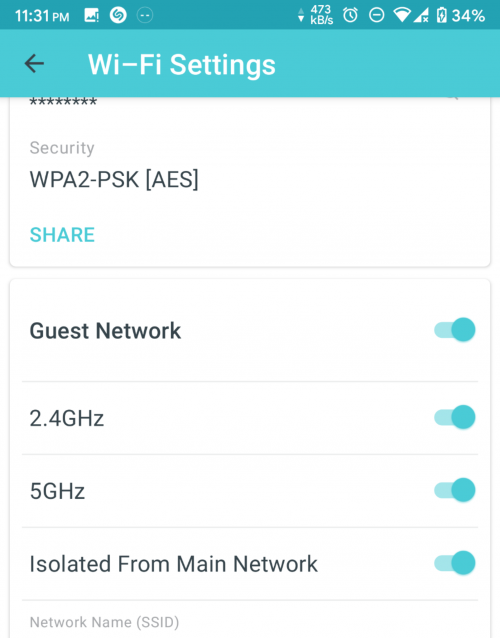 |
|
|
|
|
|
spreeeee
|
Jun 10 2021, 09:34 AM
|
|
|
QUOTE(jacktiew @ Jun 9 2021, 11:35 PM) Try update your firmware to the latest version. If you still don't get it after firmware update, then you might have to wait future release. FYI, I'm using M4 is v1. Yours might be newer. Mine v1.4.3, how about yours? Check for firmware upgrade no update at the moment. Attached thumbnail(s)
|
|
|
|
|
|
jacktiew
|
Jun 10 2021, 01:39 PM
|
Getting Started
|
QUOTE(spreeeee @ Jun 10 2021, 09:34 AM) Mine v1.4.3, how about yours? Check for firmware upgrade no update at the moment. Same as yours. |
|
|
|
|
|
spreeeee
|
Jun 10 2021, 01:46 PM
|
|
|
QUOTE(jacktiew @ Jun 10 2021, 01:39 PM) Weird, mine do not have the isolate option. Attached thumbnail(s)
|
|
|
|
|
|
MixBlood
|
Jun 10 2021, 02:13 PM
|
Getting Started
|
I'm trying to set Parent Control in AC1200 Wireless Dual Band Gigabit VoIP Router, Model No: Archer C5v which was provided by Maxis but it's not working although I already enabled it and save some MACs. Does anyone know why?
|
|
|
|
|
|
ray8426
|
Jun 10 2021, 02:21 PM
|
|
|
QUOTE(spreeeee @ Jun 10 2021, 01:46 PM) Weird, mine do not have the isolate option. Possible need restart and clear cache from your apps?  |
|
|
|
|
|
aniq8676
|
Jun 10 2021, 03:26 PM
|
|
|
QUOTE(spreeeee @ Jun 10 2021, 09:34 AM) Mine v1.4.3, how about yours? Check for firmware upgrade no update at the moment. If you use Deco M4 V2. The function is not available in the firmware yet. Only Deco M4 V1 is available. You can see your Deco version on the box at the bottom or on the bottom of the Deco |
|
|
|
|
|
spreeeee
|
Jun 10 2021, 04:11 PM
|
|
|
QUOTE(ray8426 @ Jun 10 2021, 02:21 PM) Possible need restart and clear cache from your apps? is newly installed app though.. QUOTE(aniq8676 @ Jun 10 2021, 03:26 PM) If you use Deco M4 V2. The function is not available in the firmware yet. Only Deco M4 V1 is available. You can see your Deco version on the box at the bottom or on the bottom of the Deco how come newer version doesn't have.. lol.. |
|
|
|
|
|
Klemann C
|
Jun 11 2021, 10:12 AM
|
|
|
Hi guys, Can anyone enlighten me how can I solve the speed issue after i hookup AX20 router with RE605X WiFi extender range to utilise Mesh WiFi system? 
Previously I was on Powerline setup very consistent good download speed and low latency. Also this setup very reliable but the downside I need to operate 2 different routers 1 upstairs and 1 downstairs. Thanks... |
|
|
|
|
TSTP-LINK MY
|
Jun 11 2021, 10:41 AM
|
Getting Started
|
QUOTE(Klemann C @ Jun 11 2021, 11:12 AM) Hi guys, Can anyone enlighten me how can I solve the speed issue after i hookup AX20 router with RE605X WiFi extender range to utilise Mesh WiFi system?
Previously I was on Powerline setup very consistent good download speed and low latency. Also this setup very reliable but the downside I need to operate 2 different routers 1 upstairs and 1 downstairs. Thanks... Dear Klemann C, Please change your Archer AX20 to the below settings on the 5Ghz network. 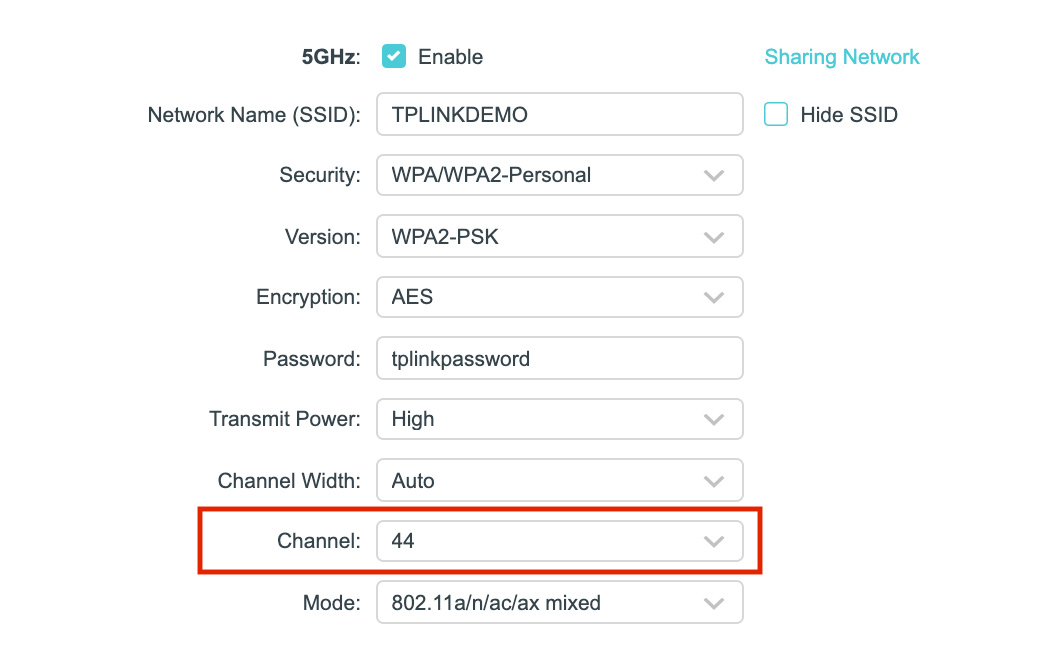 After this, please make sure the RE605X is linked to the 5Ghz network of your Archer AX20. QUOTE(MixBlood @ Jun 10 2021, 03:13 PM) I'm trying to set Parent Control in AC1200 Wireless Dual Band Gigabit VoIP Router, Model No: Archer C5v which was provided by Maxis but it's not working although I already enabled it and save some MACs. Does anyone know why? Dear MixBlood, Please be informed that the parental control feature in this model has been disabled by the service provider. This post has been edited by TP-LINK MY: Jun 11 2021, 10:42 AM |
|
|
|
|
|
Klemann C
|
Jun 11 2021, 11:36 AM
|
|
|
QUOTE(TP-LINK MY @ Jun 11 2021, 10:41 AM) Dear Klemann C, Please change your Archer AX20 to the below settings on the 5Ghz network. After this, please make sure the RE605X is linked to the 5Ghz network of your Archer AX20. Hi TP-Link, I've setup via Application, how can I be sure if I linked to the 5GHz? |
|
|
|
|
|
MixBlood
|
Jun 12 2021, 02:33 PM
|
Getting Started
|
QUOTE(TP-LINK MY @ Jun 11 2021, 10:41 AM) Dear MixBlood, Please be informed that the parental control feature in this model has been disabled by the service provider. Noted, thanks |
|
|
|
|
|
JohnLai
|
Jun 13 2021, 11:15 AM
|
|
|
O.o A firmware update for the dreaded Archer A6 V2? https://www.tp-link.com/my/support/download...a6/v2/#FirmwareQUOTE Modifications and Bug Fixes
1. Add the OneMesh button;
2. Enhance device security;
3. Fixed the bug that Daylight Saving Time causing Parental Control to take effect incorrectly;
4. Fixed the bug that change the router's name on tether will not take effect;
5. Fixed the bug that unstable WAN connection under certain circumstances.
Noted: For Archer A6(US) 2.0 At first, I was like  "Now that is rare and unexpected" Then I am  , why in the world TP-Link upload a log instead of firmware at its website?  |
|
|
|
|
|
lygsl
|
Jun 13 2021, 04:49 PM
|
New Member
|
QUOTE(daigoking @ Feb 15 2021, 11:39 AM) Anyone knows how to flash Celcom Home Fiber's TP link AX10 firmware to common TP link firmware? As I want to sell this AX10 so don't want it keep as Celcom's firmware. Any solution now? |
|
|
|
|
|
aniq8676
|
Jun 13 2021, 06:55 PM
|
|
|
QUOTE(lygsl @ Jun 13 2021, 04:49 PM) Perhaps router provided by Celcom is not AX10, otherwise it EX220-G2u model (which is almost the same as the model AX10) EX220-G2u |
|
|
|
|
|
markypcs
|
Jun 14 2021, 01:18 PM
|
|
|
Hi guys, asking for advise here.
On a Time 500mbps plan currently and running it with the provided stock router. In a space of about 2,300 sqft, currently, certain rooms aren't getting proper wifi coverage.
Would it be better to upgrade the router or keep the stock router and get mesh wifi?
Budget of around RM500.
|
|
|
|
|
|
chongkiatz
|
Jun 14 2021, 02:09 PM
|
|
|
guys i'm using the ax20 , my router is at upstair computer table , when i'm doing speed test i able to get max 100mbps , when i go to downstair , the speed drop to 20-30mbps only , is that normal?
|
|
|
|
|



 Quote
Quote




 0.0261sec
 0.36
0.36
 6 queries
 GZIP Disabled