

Thanks blacktubi and shahie. I've follow FusionXY instruction to custom the ISP profile and its working now.
TP-LINK Malaysia Official Thread, Technical Enquiries and Support
TP-LINK Malaysia Official Thread, Technical Enquiries and Support
|
|
 Dec 3 2020, 05:15 PM Dec 3 2020, 05:15 PM
Show posts by this member only | IPv6 | Post
#2881
|
 
Junior Member
113 posts Joined: Apr 2011 
|
Thanks blacktubi and shahie. I've follow FusionXY instruction to custom the ISP profile and its working now.
|
|
|
|
|
|
Dec 3 2020, 05:22 PM
Show posts by this member only | IPv6 | Post
#2882
|

Senior Member
3,836 posts Joined: Aug 2016
|
QUOTE(WHITE APPLE @ Dec 3 2020, 05:15 PM) Thanks blacktubi and shahie. I've follow FusionXY instruction to custom the ISP profile and its working now.   |
|
|
Dec 4 2020, 08:36 AM
|

Senior Member
5,989 posts Joined: Nov 2005
|
QUOTE(blacktubi @ Dec 2 2020, 09:58 AM) OneMesh don’t support Ethernet backhaul I was just wondering about that. Thanks for clarifying that OneMesh can't do ethernet backhaul TP-Link reserve that for the Deco series  Looks like I will have to get a proper mesh system then... |
|
|
Dec 4 2020, 10:18 AM
|

Junior Member
506 posts Joined: Feb 2005
|
QUOTE(jchong @ Dec 4 2020, 08:36 AM) I was just wondering about that. Thanks for clarifying that OneMesh can't do ethernet backhaul see to be no backhaul on one mesh. read this: Looks like I will have to get a proper mesh system then... https://community.tp-link.com/us/home/stories/detail/536 This post has been edited by shahie: Dec 4 2020, 10:19 AM |
|
|
Dec 4 2020, 09:30 PM
|

Junior Member
146 posts Joined: Feb 2012
|
Hey guys, I am about to subscribe to time later this month or next month at a place I am moving to. Is the TP-Link EC230-G1 from Time any good? Am probably gonna Connect to 10-ish devices.
Asking because I had bad experience from the free router from TIME before (can't remember which one tho) |
|
|
Dec 6 2020, 12:19 AM
|
|
Junior Member
168 posts Joined: Jul 2010  
|
Hi all..
Current setup BTU - Deco M5 - Hypp TV Im just wondering my TV have been experiencing sudden disconnecting to deco via wireless..therefore i would like to change to wired connection..is there any ways i can add another connection on current setup? If i use switchs can i have an access to hypp tv? |
|
|
|
|
|
Dec 6 2020, 12:25 AM
|
|
Junior Member
363 posts Joined: Aug 2008
|
Hi, I just got a 2 units of Deco M5, I have one issue that, one unit of the M5 works perfectly with either 2.4G or 5G WIFI.
However, another unit only able to broadcast the 2.4G WIFI. I tried to disable the 2.4G of this unit, then the 5G WIFI cannot be connected at all, and there is one unknown "DECO_F0037" WIFI SSID appears and cannot be connected at all. The 2.4G signal strength of this unit very weak also. I test the internet speed of this unit, it can reach the max speed of the package I subscribe. Only the WIFI broadcast issue. Signal weak and 5G cannot be connected. The working unit can cover quite wide coverage, the problematic one, a few steps away then the signal drops tremendously. I have reset many times of this unit. I am not sure anyone has this issue before? Is this a defected unit? This post has been edited by kitter: Dec 6 2020, 12:28 AM |
|
|
Dec 6 2020, 12:37 AM
Show posts by this member only | IPv6 | Post
#2888
|
|
Senior Member
3,836 posts Joined: Aug 2016
|
QUOTE(syler89 @ Dec 6 2020, 12:19 AM) » Click to show Spoiler - click again to hide... « If you want to set wired, you may use 2nd LAN Port as HyppTV. If you are using 2nd LAN Port. I suggest you to get smart switch like this. Link here. Thanks. QUOTE(kitter @ Dec 6 2020, 12:25 AM) » Click to show Spoiler - click again to hide... « Did you check the 5GHz is enable in the settings? You tried to restart or reset? Reset is factory and setup everything again. Thanks. |
|
|
Dec 6 2020, 12:46 AM
|
|
Junior Member
168 posts Joined: Jul 2010
|
QUOTE(FusionXY @ Dec 6 2020, 12:37 AM) Hello, you are connecting the HyppTV via wireless? its wired..so i guess since the Vlan is difference i cant use the same port for multiple purpose.. will consider the switch.. thank you..If you want to set wired, you may use 2nd LAN Port as HyppTV. If you are using 2nd LAN Port. I suggest you to get smart switch like this. Link here. Thanks. Is it still a new? You may send in to exchange a new unit. Did you check the 5GHz is enable in the settings? You tried to restart or reset? Reset is factory and setup everything again. Thanks. |
|
|
Dec 6 2020, 12:50 AM
Show posts by this member only | IPv6 | Post
#2890
|
|
Senior Member
3,836 posts Joined: Aug 2016
|
QUOTE(syler89 @ Dec 6 2020, 12:46 AM) its wired..so i guess since the Vlan is difference i cant use the same port for multiple purpose.. will consider the switch.. thank you.. You may order that smart switch and follow the steps on blacktubi's website.Do wait for 12.12 for offer price if not urgent. Thanks. |
|
|
Dec 6 2020, 08:43 AM
|
|
Junior Member
363 posts Joined: Aug 2008
|
QUOTE(FusionXY @ Dec 6 2020, 12:37 AM) Hello, you are connecting the HyppTV via wireless? Like I said,If you want to set wired, you may use 2nd LAN Port as HyppTV. If you are using 2nd LAN Port. I suggest you to get smart switch like this. Link here. Thanks. Is it still a new? You may send in to exchange a new unit. Did you check the 5GHz is enable in the settings? You tried to restart or reset? Reset is factory and setup everything again. Thanks. I enabled both 2.4G and 5G so I test the speed using the phone just next to the device and I only managed to get 2.4G speed. So I disabled the 2.4G setting and leave 5G on. Then my phone totally cannot connect the 5G WIFI even I can see the SSID still there. Then there is a weird SSID WIFI appears the name something like "DECO_0F383" , can't really remember the name. Another unit is working fine. I can connect either 2.4G or 5G when I disable the either one network. It is a brand new unit just got 2 days ago. This post has been edited by kitter: Dec 6 2020, 08:44 AM |
|
|
Dec 6 2020, 12:50 PM
|
 
Elite
8,427 posts Joined: Jul 2008 
|
QUOTE(kitter @ Dec 6 2020, 08:43 AM) Like I said, If you see that weird SSID, it means you haven't link it to the mesh WiFi system.I enabled both 2.4G and 5G so I test the speed using the phone just next to the device and I only managed to get 2.4G speed. So I disabled the 2.4G setting and leave 5G on. Then my phone totally cannot connect the 5G WIFI even I can see the SSID still there. Then there is a weird SSID WIFI appears the name something like "DECO_0F383" , can't really remember the name. Another unit is working fine. I can connect either 2.4G or 5G when I disable the either one network. It is a brand new unit just got 2 days ago. |
|
|
Dec 6 2020, 01:00 PM
|

Junior Member
130 posts Joined: Jun 2014
|
Anybody where i can buy deco m9 plus adapter. My adapter tenggelam air la.. Banjir.. Full water inside.. Urgent
|
|
|
|
|
|
Dec 6 2020, 01:08 PM
|
|
Junior Member
363 posts Joined: Aug 2008
|
QUOTE(blacktubi @ Dec 6 2020, 12:50 PM) If you see that weird SSID, it means you haven't link it to the mesh WiFi system. I use it as a router.When only enabling 2.4G WIFI, I can connect. When only enabling 5G WIFT, it cannot be connected. Same way of doing for 2 units, one functions perfectly, the other one no. That's why I have some questions here. |
|
|
Dec 6 2020, 01:58 PM
|
|
Junior Member
506 posts Joined: Feb 2005
|
QUOTE(Fat Albert @ Dec 6 2020, 01:00 PM) Anybody where i can buy deco m9 plus adapter. My adapter tenggelam air la.. Banjir.. Full water inside.. Urgent https://shopee.com.my/TL-DECO-M9-POWER-ADAP...0706.7217754886 Fat Albert liked this post
|
|
|
Dec 6 2020, 02:58 PM
|
|
Elite
8,427 posts Joined: Jul 2008
|
QUOTE(kitter @ Dec 6 2020, 01:08 PM) I use it as a router. Click on the Internet logo on your Deco app, do you see 2 units there?When only enabling 2.4G WIFI, I can connect. When only enabling 5G WIFT, it cannot be connected. Same way of doing for 2 units, one functions perfectly, the other one no. That's why I have some questions here. |
|
|
Dec 7 2020, 12:15 AM
|

Senior Member
1,654 posts Joined: Nov 2011
|
hey guys i need help. Just acquired AX50 today, but the speed i got from wireless is so much worst than Maxis original router(C5v).
I can get rougly 400mbps when i am 0m from C5v, but i only can get 200mbps on my Ax50. and on Lan can only get 300mbps while 500mbps on C5v. May i know is it any problem with my router? Or i have a wrong setting on my router? |
|
|
Dec 7 2020, 07:34 AM
|
|
Junior Member
506 posts Joined: Feb 2005
|
QUOTE(lazybump_nonsense @ Dec 7 2020, 12:15 AM) hey guys i need help. Just acquired AX50 today, but the speed i got from wireless is so much worst than Maxis original router(C5v). AX50 actually only with a dual core cpu as compare to AX20 quad core. where in theory can do more. BTW, please confirm that no Qos was set.I can get rougly 400mbps when i am 0m from C5v, but i only can get 200mbps on my Ax50. and on Lan can only get 300mbps while 500mbps on C5v. May i know is it any problem with my router? Or i have a wrong setting on my router? |
|
|
Dec 7 2020, 08:50 AM
|
|
Senior Member
1,654 posts Joined: Nov 2011
|
QUOTE(shahie @ Dec 7 2020, 07:34 AM) AX50 actually only with a dual core cpu as compare to AX20 quad core. where in theory can do more. BTW, please confirm that no Qos was set. Hello sir. This is my QOS. 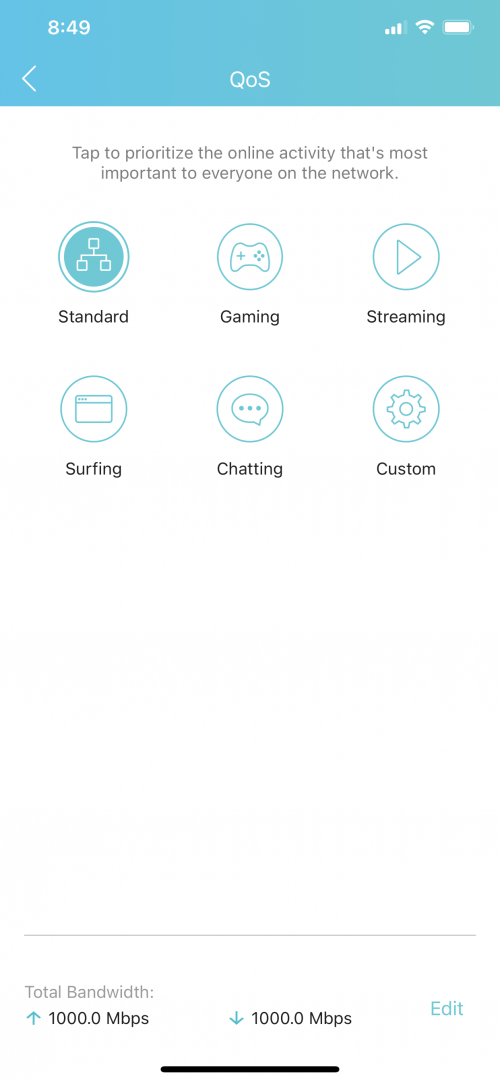 |
|
|
Dec 7 2020, 09:52 AM
|
|
Junior Member
506 posts Joined: Feb 2005
|
QUOTE(lazybump_nonsense @ Dec 7 2020, 08:50 AM) Hello sir. This is my QOS. Ok, i do believe you are using same LAN cable on the ONU to the default router and to PC = 500mbps while after swapping to AX50 = suddenly only get 300mbps. base on the Qos snapshot, seem to be the default router with his telco firmware works better. i think both router with the same powerplant, only AX50 is a wifi 6. wait some expert to guide you further.This post has been edited by shahie: Dec 7 2020, 09:54 AM |
| Change to: |  0.0260sec 0.0260sec
 1.14 1.14
 6 queries 6 queries
 GZIP Disabled GZIP Disabled
Time is now: 23rd December 2025 - 10:42 PM |
 Quote
Quote