

QUOTE(Khalid21 @ Nov 30 2018, 02:26 PM)
error
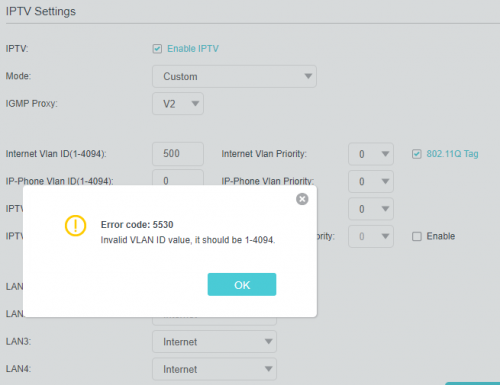

Should work well. Try IGMP Proxy V3.TP-LINK Malaysia Official Thread, Technical Enquiries and Support
|
|
 Nov 30 2018, 05:22 PM Nov 30 2018, 05:22 PM
Return to original view | Post
#261
|
 
Senior Member
5,714 posts Joined: Mar 2007   
|
QUOTE(Khalid21 @ Nov 30 2018, 02:26 PM) error Should work well. Try IGMP Proxy V3. |
|
|
|
|
|
Nov 30 2018, 07:31 PM
Return to original view | Post
#262
|
|
Senior Member
5,714 posts Joined: Mar 2007
|
QUOTE(Khalid21 @ Nov 30 2018, 06:29 PM) now working..... i just put any no. Good to know.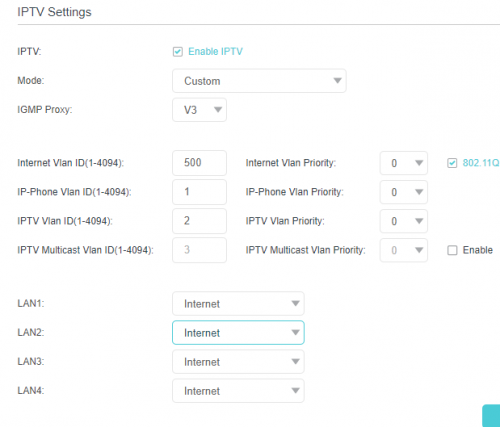 |
|
|
Dec 31 2018, 11:38 PM
Return to original view | Post
#263
|
|
Senior Member
5,714 posts Joined: Mar 2007
|
QUOTE(kambing007 @ Dec 31 2018, 10:48 PM) Hi guys, I'm using TP Link Archer C3150 v2 right now, and just started to consider using VPN. I have a subscription with NordVPN, I'm trying to figure out how to put install it on my router. I'm trying to find user guides, but it seems non existent for the default TP Link firmware. All that I can find is DD-WRT or OpenWRT. See here for quick steps: https://www.tp-link.com/de/faq-1544.htmlI'm thinking its possible, because in the router, there is an option for VPN server: -OpenVPN -PPTP VPN I only have the option of OpenVPN since NordVPN is stopping the support for PPTP VPN. So my question is, how do I go about to setting up my router to be able to install this VPN, if even possible? I've tried looking around, even DD-WRT does not list TP Link C3150 in its compatible device. So I am really struggling here. Appreciate any help, thanks! |
|
|
Jan 14 2019, 12:12 PM
Return to original view | Post
#264
|
|
Senior Member
5,714 posts Joined: Mar 2007
|
QUOTE(jaycolaz86 @ Jan 14 2019, 10:51 AM) Hi, I plan to purchase Tplink Archer C6 for my unifi 100mbps (with unifi TV). May I know which works better with unifi, C6 v1 or C6 v2? Thanks. Always get the latest version, which is V2. Get it from OOKAS. They always have the latest version available. |
|
|
Jan 15 2019, 12:54 PM
Return to original view | Post
#265
|
|
Senior Member
5,714 posts Joined: Mar 2007
|
QUOTE(DreamChaser @ Jan 15 2019, 12:53 PM) Just upgraded my Unifi router to Archer C6, seems like my torrent speed is rather slow and not up to my 300Mbps speed. Anything that i need to check at the router configs? Torrent speed depends on many factors, and not only speed. |
|
|
Jan 15 2019, 03:30 PM
Return to original view | Post
#266
|
|
Senior Member
5,714 posts Joined: Mar 2007
|
QUOTE(DreamChaser @ Jan 15 2019, 01:32 PM) i think uTorrent not up to speed. Using qBittorrent and getting a great speed. Yes, depends on torrent client too sometimes. |
|
|
|
|
|
Jan 16 2019, 11:38 AM
Return to original view | Post
#267
|
|
Senior Member
5,714 posts Joined: Mar 2007
|
QUOTE(razkal @ Jan 16 2019, 11:09 AM) Just came back from holiday, my ac3150 got problem suddenly can't connect to the router through wireless and wired(sometimes connect and sometimes cant). Afraid might kena lightning strike. Last time before went to holiday just shut off extension plug connecting modem and router. Indicator lights on router and modem shows everthing still working however I'm having problem accessing router management page from browser and apps. Thinking of hard resetting the router. Hard reset and try again. If it still doesn't work, RMA it. |
|
|
Jan 17 2019, 03:19 PM
Return to original view | Post
#268
|
|
Senior Member
5,714 posts Joined: Mar 2007
|
QUOTE(razkal @ Jan 16 2019, 08:53 PM) Update regarding my router. Manage to restore router function to normal after hard reset Good news. Great to hear that. Probably just some software issues. . Pheeww... i initially thought already fried because of lightning. . Pheeww... i initially thought already fried because of lightning. |
|
|
Jan 28 2019, 10:43 AM
Return to original view | Post
#269
|
|
Senior Member
5,714 posts Joined: Mar 2007
|
QUOTE(FusionXY @ Jan 27 2019, 01:08 PM) Care to explain this? Link up now. |
|
|
Jan 31 2019, 11:00 AM
Return to original view | Post
#270
|
|
Senior Member
5,714 posts Joined: Mar 2007
|
QUOTE(Raymond T. @ Jan 31 2019, 12:35 AM)  Out of sudden Internet Disconnected /LAN / WiFi no longer able to detect, any idea what's wrong with it ? I've tried to hard reset however seems like nothing happen, only appear the light as shown in the photo. TP-Link C3150 |
|
|
Feb 4 2019, 01:41 PM
Return to original view | IPv6 | Post
#271
|
|
Senior Member
5,714 posts Joined: Mar 2007
|
QUOTE(sleyer @ Jan 31 2019, 08:57 PM) can someone recomended to me for 3g/4g wireless router band 2.5ghz have LAN port can support celcom sim Do your own research, but most will recommend the Huawei B618.QUOTE(subrok007 @ Feb 4 2019, 01:10 PM) Which one is support Unifi ? My tm modem i think going to die. Keep on disconnecting All of them. I think you mean router instead of modem. Depends on your budget and your house size and many other factors. Do your own research and make your own decision. |
|
|
Feb 4 2019, 08:33 PM
Return to original view | IPv6 | Post
#272
|
|
Senior Member
5,714 posts Joined: Mar 2007
|
QUOTE(subrok007 @ Feb 4 2019, 02:26 PM) i suppose is modem due to i having asus wifi router after TM modem... Ah, you will have to call TM to replace it.My unifi very unstable and keep on disconnecting.. but wifi connection very stable... |
|
|
Feb 5 2019, 01:21 AM
Return to original view | IPv6 | Post
#273
|
|
Senior Member
5,714 posts Joined: Mar 2007
|
QUOTE(vez @ Feb 4 2019, 11:15 PM) is C4000 gonna reach Malaysia soon? planning to get a new router, was looking at this, thanks. It is here already. See online and retail shops. |
|
|
|
|
|
Feb 5 2019, 01:05 PM
Return to original view | Post
#274
|
|
Senior Member
5,714 posts Joined: Mar 2007
|
QUOTE(vez @ Feb 5 2019, 11:11 AM) from official store, i tried lazada and shopee, i did see some, but from third party seller, is it Malaysia set Yes, this is Malaysia set. RRP would be RM1000. thanks thanksyou know the RRP for this model? |
|
|
Feb 6 2019, 12:58 PM
Return to original view | IPv6 | Post
#275
|
|
Senior Member
5,714 posts Joined: Mar 2007
|
QUOTE(balambgarden @ Feb 6 2019, 12:27 AM) Just noticed that my hypptv wont work after I tried to change to the google's DNS on my c1200 router That have nothing to do with it though. I am using Google DNS and my hyppTV works well. Change router and tag VLAN correctly.The network test would come out with flying colours but when I tried to select any channel, it would come out with that "no connection" logo with a blank screen Changed the DNS to the default setting fixes this |
|
|
Mar 6 2019, 09:35 PM
Return to original view | Post
#276
|
|
Senior Member
5,714 posts Joined: Mar 2007
|
QUOTE(kambing007 @ Mar 6 2019, 08:32 PM) Guys, have a weird problem. My 2.4g connection suddenly not working.. Speedtest 1mbps even though sitting next to router. My 5g wifi giving 400mbps+ stable. When check on phone, the link speed speed indicates as low as 5mbps. Hmm, weird. The C3150 is really stable. Try rebooting the router.Model is archer c3150, internet speed 800mbps.. Tried changing channels, no difference.. I don't know if I should factory reset or something. Really weird that it was fine yesterday, and today already haywire.. Tried on multiple phones, same result. |
|
|
Mar 7 2019, 01:10 PM
Return to original view | IPv6 | Post
#277
|
|
Senior Member
5,714 posts Joined: Mar 2007
|
QUOTE(kambing007 @ Mar 7 2019, 05:06 AM) Tried switching on and off multiple times. Refer to the two posts above mine. |
|
|
Mar 9 2019, 07:18 PM
Return to original view | Post
#278
|
|
Senior Member
5,714 posts Joined: Mar 2007
|
QUOTE(alex890628 @ Mar 8 2019, 08:36 PM) I just my archer A6 today, and I plugged in. Unfortunately the internet light gone red instead of green. Tried auto search Mac ID or even cloned it, restart plenty times. It still not working with my Maxis 30mbps. Any idea to solve? Appreciated Select the right IPTV profile. You need VLAN tagging for it to work. Log into your router and go to 'Advanced', 'Network', and 'IPTV/VLAN', and select 'Malaysia-Maxis 1'. If that doesn't work, select 'Malaysia-Maxis 2'. Good luck.BTW, should I wait more than 10 Mins for it to connecting with my modem in web interface? |
|
|
Mar 10 2019, 10:20 AM
Return to original view | IPv6 | Post
#279
|
|
Senior Member
5,714 posts Joined: Mar 2007
|
QUOTE(Claire Farron @ Mar 10 2019, 01:59 AM) Hi guys, I just discovered about mesh wifi. Nope. You will have to get M5 with 3 nodes.Question is, does the TP Link router provided by unifi supports mesh? And if does, will I be able to use it with let say the Deco M4 (2 nodes) to set up 3 nodes total? Am Abit on a tight budget, if cannot then I guess no choice need to get the M5 with 3 nodes since my house has quite a few walls . |
|
|
Mar 10 2019, 01:57 PM
Return to original view | Post
#280
|
|
Senior Member
5,714 posts Joined: Mar 2007
|
QUOTE(Claire Farron @ Mar 10 2019, 01:45 PM) I see, thanks bro, no choice then hmm. Hard to say. It’s better if you use the 3 nodes. You can actually still use the Unifi router and set the 3 nodes in AP mode, but it is pointless.The M5, 1 node is already more powerful or same level as the TP link router that comes free with Unifi right? Meanis if let say, I chose just to make one of node active and put in in at the same location as my current router, and then turn off the other two nodes, the range and speed should be same as what I am getting right now with the free router is it? |
| Change to: |  0.0216sec 0.0216sec
 0.35 0.35
 7 queries 7 queries
 GZIP Disabled GZIP Disabled
Time is now: 3rd December 2025 - 11:25 PM |
 Quote
Quote