

QUOTE(fruitie @ Jun 4 2017, 03:41 PM)
Luckily no issue in PJ. 

It is still great for those who require mobilty.Great for places without fibre internet or wired broadband as well.

Digi Infinite Fan Club [V2], Infinite 150 and Infinite 80
|
|
 Jun 4 2017, 03:59 PM Jun 4 2017, 03:59 PM
Return to original view | Post
#41
|
 
Elite
8,408 posts Joined: Jul 2008  
|
QUOTE(fruitie @ Jun 4 2017, 03:41 PM) Luckily no issue in PJ. It is still great for those who require mobilty.Great for places without fibre internet or wired broadband as well. |
|
|
|
|
|
Jun 4 2017, 06:05 PM
Return to original view | Post
#42
|
|
Elite
8,408 posts Joined: Jul 2008
|
QUOTE(iz1011 @ Jun 4 2017, 05:04 PM) Even prime location in Kuching has issue with Digi network. Just don't understand it currently what has gone into their CTO mind. It is a good way to increase their ARPU financially. Just my 2 cents, I'm not a telco professional.They probably have the statistics to show that most users use less than a certain amount of bandwidth as well. |
|
|
Jun 4 2017, 06:11 PM
Return to original view | Post
#43
|
|
Elite
8,408 posts Joined: Jul 2008
|
QUOTE(rhytion @ Jun 4 2017, 05:35 PM) If my house currently using 8Mbps Streamyx, is it a good option to switch to Digi Infinite 150 considering that the download speed I'm getting on normal LTE is nearly same as Streamyx, but upload speed way better lah? Anyone living near CKS Millennium, Penampang can advise how is the LTE-A speed? Currently evaluating Digi i150 for another location with Streamyx 8Mbps previously.Significant improvement in upload speed but I lose out in consistency and stability. Download speed is all about luck but, it averages at ~15Mbps. Subjected to ping spike so you can forget about smooth gaming. Make sure you try it out with a Digi SIM as well. |
|
|
Jun 4 2017, 06:59 PM
Return to original view | Post
#44
|
|
Elite
8,408 posts Joined: Jul 2008
|
QUOTE(alvpkl @ Jun 4 2017, 06:42 PM) What about ipv6 address, are they private too and does Digi give ipv6 address? IPV6 is not IPV4, the NAT concept is slightly different.Yup, Digi support IPV6. |
|
|
Jun 7 2017, 11:37 AM
Return to original view | Post
#45
|
|
Elite
8,408 posts Joined: Jul 2008
|
QUOTE(cicak.fakir @ Jun 7 2017, 11:26 AM) enlighten me.... You missed the previous fiasco where the QoS is not enforced on certain protocol. That's how the VPN thing exist. if speed limit of a car is 110km/h per hour on the highway.... what makes you think a car on a carrier truck can go any faster? ------------ vpn encapsulates your traffic. so instead of just your packet, now it becomes your vpn packet. but to the network, it is still a packet none the less. and as a packet, it is still subject to the rule of the "road". |
|
|
Jun 7 2017, 12:38 PM
Return to original view | Post
#46
|
|
Elite
8,408 posts Joined: Jul 2008
|
QUOTE(Dozz @ Jun 7 2017, 11:56 AM) 3G's internet wont work? The router needs a small time to switch from LTE to 3G. And sometime it will got stuck there. Try forcing your router to 3G only and see if the issues persist. What is your firmware version? |
|
|
|
|
|
Jun 8 2017, 11:23 AM
Return to original view | Post
#47
|
|
Elite
8,408 posts Joined: Jul 2008
|
[quote=naim910,Jun 8 2017, 10:27 AM]
[quote=blacktubi,Jun 3 2017, 10:38 PM] You can refer on this article to upgrade to the latest WebUI. Most of them is accurate but you can skip the firewall part. I will prepare a more detailed guide when I am free. https://blog.hqcodeshop.fi/archives/289-Hua...grade-Tool.html I used a firmware from a Latvian carrier as their interface is the most detailed, latest as well. It will change the logo to the lmt logo bust rest assured, just visual changes, nothing is affected. Useful tools and firmware for Huawei E5186 in my shared mega drive: https://mega.nz/#F!wvo3AAQL!DFTXF84VZCJ6CzuXbBD4Zg i already follow https://blog.hqcodeshop.fi/archives/289-Hua...grade-Tool.html and skip part firewall.. i also use your file in mega(Carrier Branded file).. after i update... the firmware still same..but the picture already change.. please help.. [/quote] This guide only guide you how to upgrade the WEBUI. |
|
|
Jun 11 2017, 11:33 AM
Return to original view | Post
#48
|
|
Elite
8,408 posts Joined: Jul 2008
|
QUOTE(bfu9278 @ Jun 11 2017, 10:14 AM) Discussing about cpe devices... Well, you already have a working setup with decent speed. There's no point upgrading to anything with similar specifications.Normally people will suggest the Huawei B310s-22 and E5186s-22 but rarely suggest/discuss about the B315s-22 and B593S-22... How do you guys think about the latter? From imho if want to choose Huawei B310s-22 it is wiser to pick the B593s-22 just top up abit(price from taubao of course) which is better specs on ports.... my points: 1.E5186s-22(300mbps) maybe too pricey for me (rm5XX onwards) 2.B315s-22(150mpbs) better top up for #1 above(rm4xx onwards) 3.B593s-22(150mbps) not much support around the net for tweaking...?not sure about this..  (early rm3XX) (early rm3XX)4.B310s-22(150mbps) most attractive overall specs/price(rm2XX-3XX) my situation: 1.lte-a not available on my area(from digi map) dont have any device to try out...  2.coming from mr3020(goldenorb)+E398+external antenna(current speed dl peak hour 30mbps avg. off peak 50mbps max) but upload a bit slow max out only 10mbps on both. Any thought is highly appreciate... Thanks guys.... E398 with Qualcomm modem is actually more stable than some Huawei Cat4 Balong modem. |
|
|
Jun 12 2017, 01:15 PM
Return to original view | Post
#49
|
|
Elite
8,408 posts Joined: Jul 2008
|
QUOTE(pmg @ Jun 12 2017, 11:55 AM) I feel like Huawei Malaysia didn't see the market demand for that E5186 LTE "modem". Those LTE CPE is never directly available to consumer. They only sell those to carriers.So many discussions by Malaysians online, but such a limited availability - close to none really |
|
|
Jun 18 2017, 08:14 PM
Return to original view | IPv6 | Post
#50
|
|
Elite
8,408 posts Joined: Jul 2008
|
QUOTE(Mrkroit @ Jun 18 2017, 08:54 AM) https://blog.hqcodeshop.fi/archives/289-Hua...grade-Tool.html Can upgrade the user interface but won't update the firmware.this upgrade n tuto can be used for zain carrier model ? i just got back form china and get the zain logo one.. seem no voip and cant use tool [attachmentid=8908438] got this error |
|
|
Jun 18 2017, 11:19 PM
Return to original view | IPv6 | Post
#51
|
|
Elite
8,408 posts Joined: Jul 2008
|
QUOTE(Mrkroit @ Jun 18 2017, 08:29 PM) is there any solution to updgrade the firmware You can try using the guide first, it may still work with older firmware. |
|
|
Jun 19 2017, 12:40 PM
Return to original view | IPv6 | Post
#52
|
|
Elite
8,408 posts Joined: Jul 2008
|
QUOTE(Dozz @ Jun 18 2017, 11:36 PM) How to upgrade the user interface only? Follow the guide in that blog. |
|
|
Jun 19 2017, 01:57 PM
Return to original view | Post
#53
|
|
Elite
8,408 posts Joined: Jul 2008
|
QUOTE(Dozz @ Jun 19 2017, 12:59 PM) https://blog.hqcodeshop.fi/archives/289-Hua...grade-Tool.html Yes, it doesn't upgrade the firmware for me.So do you actually mean the above link actually upgrade the WebUI not the firmware? |
|
|
|
|
|
Jun 20 2017, 10:26 AM
Return to original view | IPv6 | Post
#54
|
|
Elite
8,408 posts Joined: Jul 2008
|
QUOTE(ajoi57 @ Jun 20 2017, 12:12 AM) i receive already got that firmware inside, What variant is your router? LMT?maybe because i buy from latvia  |
|
|
Jun 20 2017, 10:27 AM
Return to original view | IPv6 | Post
#55
|
|
Elite
8,408 posts Joined: Jul 2008
|
QUOTE(kaiserreich @ Jun 20 2017, 09:01 AM) Got the '2600MHz' yagi from Ali express. Do you buy 2 of them? Make sure it is cross polarised when you have 2 antennas.I see a lot of improvement moving from the '88dbi' to the Yagi for 2600MHz, but the speed still cannot beat '88dbi + 1800MHz' . Also, the best speed at my house is either placing the Yagi at the balcony...which is a bad idea, or placing it in the middle of my sofa. Guess I would not be using this antenna much.  Does anyone has the coolstore 2600MHz yagi? Would like to compare the antenna measurements to see whether the one I got is not a mislabelled 2400MHz Yagi antenna. Basically the elements spacing and the antenna lenght. Next step, buy the 1800MHz Yagi for research |
|
|
Jun 20 2017, 04:38 PM
Return to original view | Post
#56
|
|
Elite
8,408 posts Joined: Jul 2008
|
QUOTE(ajoi57 @ Jun 20 2017, 04:33 PM) yup LMT LMT devices have the best firmware out there. I flashed the LMT firmware on my E5186 as well. wait till the account activate, go nearest digi centre and say simcard problem yeah because your 4g signal is very weak, 3 bar is ok but not 1 bar only. u have to play around the house, find which side got better coverage |
|
|
Jun 20 2017, 05:00 PM
Return to original view | Post
#57
|
|
Elite
8,408 posts Joined: Jul 2008
|
QUOTE(ajoi57 @ Jun 20 2017, 04:49 PM) u shud make the tutorial on how to flash the firmware Will try and do that during Hari Raya. I manage to find a way but further experiment required.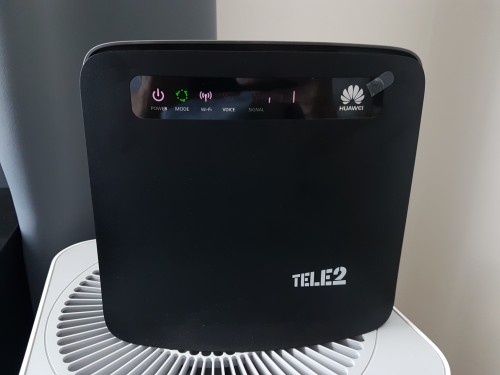 Here's how a successful firmware flash looks like. Edit: The LED will be green. This post has been edited by blacktubi: Jun 20 2017, 05:13 PM |
|
|
Jun 20 2017, 05:12 PM
Return to original view | Post
#58
|
|
Elite
8,408 posts Joined: Jul 2008
|
QUOTE(ajoi57 @ Jun 20 2017, 05:08 PM) what happen to your middle signal bar? go raya already? This is firmware flash indicator. Router is in flashing mode now.  QUOTE(r-care @ Jun 20 2017, 05:06 PM) succesfully flash firmware & ui using tutorial you shared. Can you show a printscreen of the firmware you successfully flashed? Before and after if available.How many attempt it takes? QUOTE(fruitie @ Jun 20 2017, 05:08 PM) From my initial reading, it seems quite difficult. Don't dare to try and leave me with no router to use. My way will not be much better. More or less the same. Maybe just better instruction on entering the flash mode. Is it difficult? I hope blacktubi can come out with a simpler version for us.  |
|
|
Jun 20 2017, 05:26 PM
Return to original view | Post
#59
|
|
Elite
8,408 posts Joined: Jul 2008
|
QUOTE(r-care @ Jun 20 2017, 05:21 PM) i dont have screenshot before . but here after flashed. took me 4-5 attempt. We have the same firmware. The guide only manage to flash web UI no matter how long I leave it to run. I guess you have a pretty old firmware previously. |
|
|
Jun 20 2017, 05:36 PM
Return to original view | Post
#60
|
|
Elite
8,408 posts Joined: Jul 2008
|
QUOTE(r-care @ Jun 20 2017, 05:31 PM) nope. previously i have 21.28x.xx.xx.xxx firmware. I pretty much have the same situation. I agree that the latest firmware is a lot more stable than the old one. first to third attempt only updated the web ui. and i dont really know how i managed to get to latest firmware. thought might be mistake from the info, so i restore factory setting, the latest firmware still there. guess its my lucky day. this latest firmware quite stable than previous. Do you have the same green LED show up in the end? That's how I got it to work. |
|
Topic ClosedOptions
|
| Change to: |  0.0803sec 0.0803sec
 0.28 0.28
 7 queries 7 queries
 GZIP Disabled GZIP Disabled
Time is now: 6th December 2025 - 11:58 AM |
 Quote
Quote