QUOTE(neoardi @ May 25 2007, 10:46 AM)
Sabar bro sniper.... 
Bulan 8 ada aper?

ada la skit2, side income..planning to take 2xps3s one for my house, one for my bro..360 satu..kuda lapan..yeehaw! Bulan 8 ada aper?
PlayStation 3 Community V2, Firmware 1.81 OUT NOW!
|
|
 May 25 2007, 11:04 AM May 25 2007, 11:04 AM
|
 
Senior Member
2,652 posts Joined: Jan 2003  
|
QUOTE(neoardi @ May 25 2007, 10:46 AM) Sabar bro sniper.... ada la skit2, side income..planning to take 2xps3s one for my house, one for my bro..360 satu..kuda lapan..yeehaw! Bulan 8 ada aper? |
|
|
|
|
|
May 25 2007, 11:05 AM
|

Junior Member
137 posts Joined: Jan 2006 From: The Other Side
|
QUOTE(rx330 @ May 25 2007, 11:52 AM) ok, heres how Can. You just need to download either Window Media Player 11 or the Nero mentioned in the link a few messages above. If Windows Media Player 11, just go to Library, just follow steps found heremy pc is connected to my wireless router thru ethernet cable, and the PS3, is connected to the router wirelessly so can? This post has been edited by ps360: May 25 2007, 11:14 AM |
|
|
May 25 2007, 11:05 AM
|

Junior Member
42 posts Joined: Nov 2004 
|
QUOTE(ps360 @ May 25 2007, 10:47 AM) According to that link, some commented that you can actually wirelessly access those movie, music and photos stored in your home PC via the PSP when the new firmware is available. That would be amazing! But problem is, you can only access all media stored in your My Documents / My Photos / My Music / My Movies directory. Is there a way to assign the PS3 to search for medias stored on a separate HDD instead? i can't wait using this method on PSP as well. Actually i'm sharing a folder where i keep all my movies & musics in my secondary Hard Disk. That means you can share whatever folder you want to share, and you can do this in one of the settings at Nero MediaHome.QUOTE(rx330 @ May 25 2007, 10:52 AM) ok, heres how then you are good to go. your ps3 should be able to detect your pc (if you have installed Nero MediaHome, or Windows Media Player 11). i believe we are using same setup, cuz im using wireless router with 4 ports ethernet cable. both my pc & ps3 connected through ethernet cable.my pc is connected to my wireless router thru ethernet cable, and the PS3, is connected to the router wirelessly so can? |
|
|
May 25 2007, 11:06 AM
|

Senior Member
1,711 posts Joined: Jan 2003 From: Gran Turismo Defence Force
|
QUOTE(snipersnake @ May 25 2007, 11:04 AM) ada la skit2, side income..planning to take 2xps3s one for my house, one for my bro..360 satu..kuda lapan..yeehaw! yea lar tuu  |
|
|
May 25 2007, 11:09 AM
|
|
Junior Member
137 posts Joined: Jan 2006 From: The Other Side
|
QUOTE(squiggles @ May 25 2007, 12:05 PM) i can't wait using this method on PSP as well. Actually i'm sharing a folder where i keep all my movies & musics in my secondary Hard Disk. That means you can share whatever folder you want to share, and you can do this in one of the settings at Nero MediaHome. Alrighty! Thanks to the tip Bro. Will try it out tonite.  |
|
|
May 25 2007, 11:09 AM
|
|
Senior Member
2,652 posts Joined: Jan 2003
|
shhhh..diam diam...ada org tuh dah nak angkat forza daaaaaahh...heheh!
|
|
|
|
|
|
May 25 2007, 11:13 AM
|

All Stars
11,809 posts Joined: Jun 2006
|
where to get this nero thingy.... or i need to update my windows media player....
wish me luck, guys |
|
|
May 25 2007, 11:21 AM
|
|
Junior Member
137 posts Joined: Jan 2006 From: The Other Side
|
QUOTE(rx330 @ May 25 2007, 12:13 PM) where to get this nero thingy.... or i need to update my windows media player.... You can try out with the Windows Media Player 11 first, its free anyway. Click here. As for Nero, you either go buy or ............. wish me luck, guys |
|
|
May 25 2007, 11:21 AM
|
 
VIP
1,764 posts Joined: Jan 2003 From: Helghan
|
QUOTE(ps360 @ May 25 2007, 10:47 AM) According to that link, some commented that you can actually wirelessly access those movie, music and photos stored in your home PC via the PSP when the new firmware is available. Yeah, imagine that you can access those files from anywhere, no need for high-capacity MemoryStick, just need to find Wi-Fi access point.  Some info regarding 'Remote Play' in fimware 1.80: QUOTE Using remote play outside the home (via the Internet) Using your PSP(R) system and a wireless access point (such as that found through a commercial wireless hotspot (wireless LAN) service), you can connect to the PS3(tm) system that is located within your home via the Internet. To use remote play from outside your home, the PS3(tm) system must be set in remote play connection standby mode. PS3(tm) system in remote play connection standby mode  Notes: * To use this function, the PSP(R) system software must be version 3.50 or later. The version 3.50 update is planned for release at the end of May. * To use remote play over the Internet, you must have a PLAYSTATION(R)Network account. * The method of using a commercial wireless hotspot (wireless LAN) service and the charges for such use vary depending on the service provider. For details, contact the service provider. Users are responsible for any connection fees. 1. Select (Sign In) under (Friends) in the PS3(tm) system's home menu. To use remote play over the Internet, you must sign in to PLAYSTATION(R)Network. 2. Select (Remote Play) under (Network) in the PS3(tm) system's home menu. The system will enter remote play connection standby mode and your sign-in ID will be displayed. 3. Select (Remote Play) under (Network) in the PSP(R) system's home menu. 4. Select [Connect via Internet] as the method of connecting to the PS3(tm) system. 5. From the list of connections, select the connection for the access point to be used for remote play. 6. Enter the PLAYSTATION(R)Network sign-in ID and password for the account in use on the PS3(tm) system.  If the connection is successful, the PS3(tm) system screen will be displayed on the PSP(R) system. Note: * To connect the PSP(R) system to a PS3(tm) system and use remote play from a location outside the home, the PS3(tm) system must be set in remote play connection standby mode in step 2. |
|
|
May 25 2007, 11:22 AM
|
|
All Stars
11,809 posts Joined: Jun 2006
|
kekekkeke....
wah today, the thread a lot of replies hor... keep it up braders and sistas |
|
|
May 25 2007, 11:30 AM
|

Junior Member
81 posts Joined: Dec 2005
|
thanks
 |
|
|
May 25 2007, 11:32 AM
|

Senior Member
645 posts Joined: Jul 2006 From: The future
|
QUOTE(snipersnake @ May 25 2007, 11:04 AM) ada la skit2, side income..planning to take 2xps3s one for my house, one for my bro..360 satu..kuda lapan..yeehaw! Kuda?  Hantar sini sekor, boleh buat kenduri doa selamat...... Hantar sini sekor, boleh buat kenduri doa selamat...... |
|
|
May 25 2007, 12:00 PM
|
|
All Stars
11,809 posts Joined: Jun 2006
|
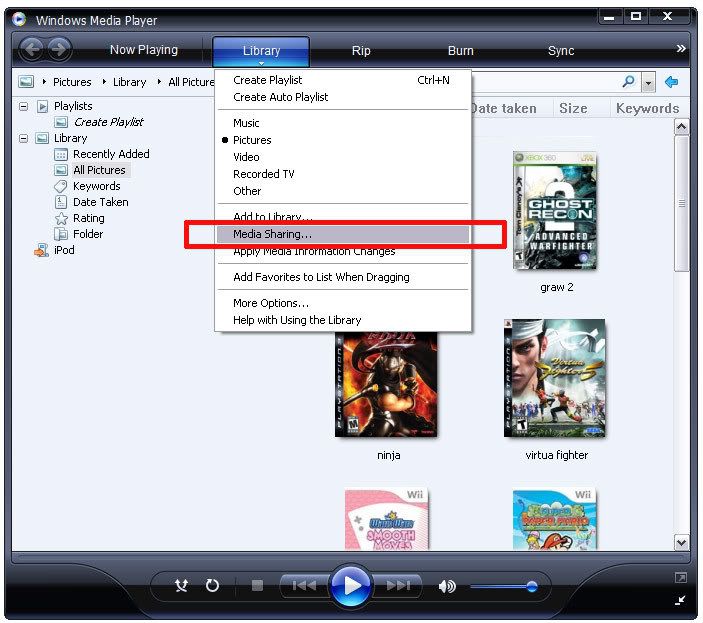
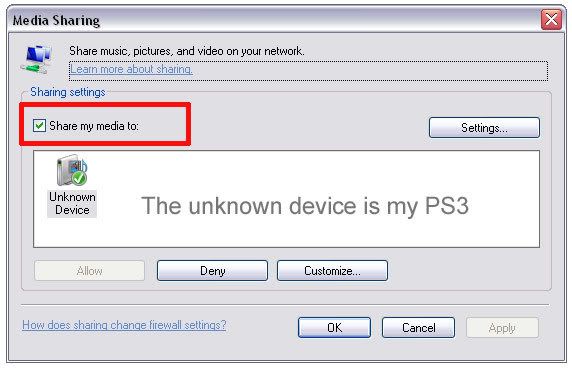
weird.... i launch my wmp 11, under library, no media sharing ler...
|
|
|
|
|
|
May 25 2007, 12:05 PM
|
|
Junior Member
137 posts Joined: Jan 2006 From: The Other Side
|
QUOTE(rx330 @ May 25 2007, 01:00 PM) weird.... i launch my wmp 11, under library, no media sharing ler... You gotta enable the Media Sharing option in WMP 11. Then go to your PS3:* To use a PS3(tm) system as a DLNA client, you must first enable [Media Server Connection] under (Settings) > (Network Settings). * You can connect, over the network, devices that support "Sony Room Link" and are compatible with DLNA, including products made by other companies. You can also connect a Microsoft(R) Windows(R) XP or Microsoft(R) Windows Vista(tm) personal computer that has Windows Media(R) Player 11 installed. Playing DLNA server content When you turn on the PS3(tm) system, DLNA servers on the same network are automatically detected and icons for the detected servers are displayed under (Photo), (Music), or (Video). If you select an icon, you can play content that is available for shared access on each DLNA server. *You cannot play copyright-protected content. |
|
|
May 25 2007, 12:09 PM
|
|
All Stars
11,809 posts Joined: Jun 2006
|
thanks ps360, i did read the link u gave me, which is exactly paste up there
but, the problem is, i kenot enable media sharing for hte wmp, or better said as, i cant find the option of enabling media sharing  |
|
|
May 25 2007, 12:18 PM
|
|
Junior Member
137 posts Joined: Jan 2006 From: The Other Side
|
QUOTE(rx330 @ May 25 2007, 01:09 PM) thanks ps360, i did read the link u gave me, which is exactly paste up there Got ah. Click on the images below.but, the problem is, i kenot enable media sharing for hte wmp, or better said as, i cant find the option of enabling media sharing » Click to show Spoiler - click again to hide... «
|
|
|
May 25 2007, 12:26 PM
|

Senior Member
2,261 posts Joined: Jun 2005 From: -H3AV3N-
|
QUOTE(rx330 @ May 25 2007, 09:44 AM) abt this media server thingy, so for the PS3 to access, my PC, ard the area of PS3 must be up and running, with windows player 11 enabled, then only can stream from it? yes.  Added on May 25, 2007, 12:32 pmguys,why my ps3 cannot play avi video? This post has been edited by crimsonhead: May 25 2007, 12:32 PM |
|
|
May 25 2007, 12:33 PM
|

Junior Member
64 posts Joined: Jul 2005
|
Anyone having problem to connect to PSNetwork after upgrade firmware to 1.8? When try to sign in, it always promoted me a DNS error, follows by serious of error code. although I still can browse the internet using build in internet Browser, funny.
|
|
|
May 25 2007, 12:41 PM
|

Junior Member
11 posts Joined: Feb 2007 From: Bandar Seri Putra, Bangi, Selangor
|
the dns error is from your modem bro cool..
not from the ps3.. i had the same problem earlier.. crimsonhead - my ps3 also cannot play .avi video |
|
|
May 25 2007, 12:44 PM
|
|
Senior Member
645 posts Joined: Jul 2006 From: The future
|
QUOTE(coolboy_kl @ May 25 2007, 12:33 PM) Anyone having problem to connect to PSNetwork after upgrade firmware to 1.8? When try to sign in, it always promoted me a DNS error, follows by serious of error code. although I still can browse the internet using build in internet Browser, funny. Ya, me too, just now dlding video from PS Store, all of sudden, auto sign out from PSN, then cannot log in anymore. HELP!!!!! |
|
Topic ClosedOptions
|
| Change to: |  0.0278sec 0.0278sec
 0.55 0.55
 6 queries 6 queries
 GZIP Disabled GZIP Disabled
Time is now: 10th December 2025 - 10:47 PM |
 Quote
Quote