

PlayStation 3 Community V2, Firmware 1.81 OUT NOW!
|
|
 May 25 2007, 10:08 AM May 25 2007, 10:08 AM
Return to original view | Post
#1
|
 
Junior Member
137 posts Joined: Jan 2006 From: The Other Side 
|
|
 Quote
Quote|
|
|
|
|
May 25 2007, 10:18 AM
Return to original view | Post
#2
|
|
Junior Member
137 posts Joined: Jan 2006 From: The Other Side
|
QUOTE(rx330 @ May 25 2007, 11:11 AM) ninja, i think divx have to play on YDL lar I managed to stream mp3 and movies - but because the MPG file was not HD quality, the picture was a little jaggy. But still cool that I can view photos, stream music and video without cables and watch them on my LCD tv. The only complaint I have, is my DVD support. Mine is a Japan set, so doesn't support all my R1 DVDs. Sucks! Can't tell how good the upscaling is. Tried on a PS2 game - can't tell much of a difference, maybe I gotta tweak the settings or something. Nevertheless, very impressed with Update 1.80. This post has been edited by ps360: May 25 2007, 10:19 AM |
|
|
May 25 2007, 10:47 AM
Return to original view | Post
#3
|
|
Junior Member
137 posts Joined: Jan 2006 From: The Other Side
|
QUOTE(squiggles @ May 25 2007, 11:43 AM) @ rx According to that link, some commented that you can actually wirelessly access those movie, music and photos stored in your home PC via the PSP when the new firmware is available. That would be amazing! But problem is, you can only access all media stored in your My Documents / My Photos / My Music / My Movies directory. Is there a way to assign the PS3 to search for medias stored on a separate / external HDD instead?you just need to download the latest NERO, and when you're gonna install it, dont forget to include 'MediaHome', while the rest of the applications is optional. then just follow the instruction given from the link i provided above. And make sure your PS3 is in the same network with your PC. This post has been edited by ps360: May 25 2007, 10:54 AM |
|
|
May 25 2007, 10:49 AM
Return to original view | Post
#4
|
|
Junior Member
137 posts Joined: Jan 2006 From: The Other Side
|
QUOTE(neoardi @ May 25 2007, 11:42 AM) Hey PS360, we live in the same postcode area, Beverly Hills, 90210, hahaha........ Howdy neighbor. How are u today?   |
|
|
May 25 2007, 11:05 AM
Return to original view | Post
#5
|
|
Junior Member
137 posts Joined: Jan 2006 From: The Other Side
|
QUOTE(rx330 @ May 25 2007, 11:52 AM) ok, heres how Can. You just need to download either Window Media Player 11 or the Nero mentioned in the link a few messages above. If Windows Media Player 11, just go to Library, just follow steps found heremy pc is connected to my wireless router thru ethernet cable, and the PS3, is connected to the router wirelessly so can? This post has been edited by ps360: May 25 2007, 11:14 AM |
|
|
May 25 2007, 11:09 AM
Return to original view | Post
#6
|
|
Junior Member
137 posts Joined: Jan 2006 From: The Other Side
|
QUOTE(squiggles @ May 25 2007, 12:05 PM) i can't wait using this method on PSP as well. Actually i'm sharing a folder where i keep all my movies & musics in my secondary Hard Disk. That means you can share whatever folder you want to share, and you can do this in one of the settings at Nero MediaHome. Alrighty! Thanks to the tip Bro. Will try it out tonite.  |
|
|
|
|
|
May 25 2007, 11:21 AM
Return to original view | Post
#7
|
|
Junior Member
137 posts Joined: Jan 2006 From: The Other Side
|
QUOTE(rx330 @ May 25 2007, 12:13 PM) where to get this nero thingy.... or i need to update my windows media player.... You can try out with the Windows Media Player 11 first, its free anyway. Click here. As for Nero, you either go buy or ............. wish me luck, guys  |
|
|
May 25 2007, 12:05 PM
Return to original view | Post
#8
|
|
Junior Member
137 posts Joined: Jan 2006 From: The Other Side
|
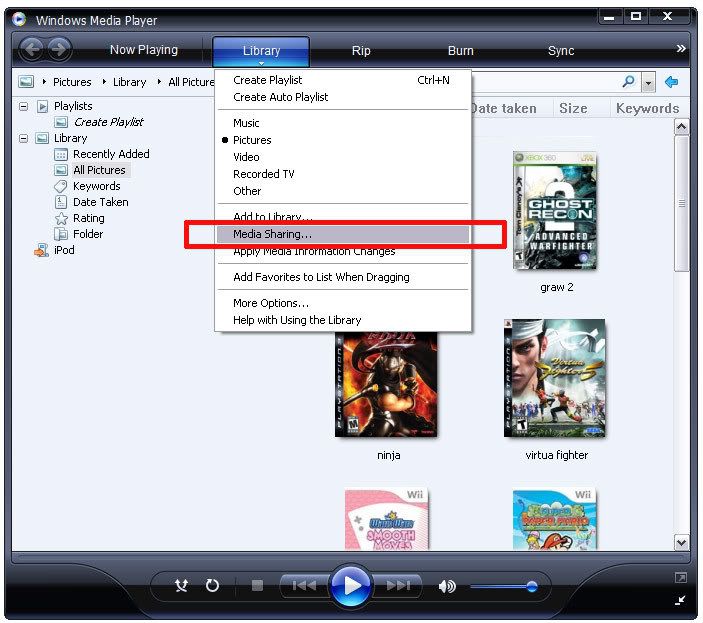
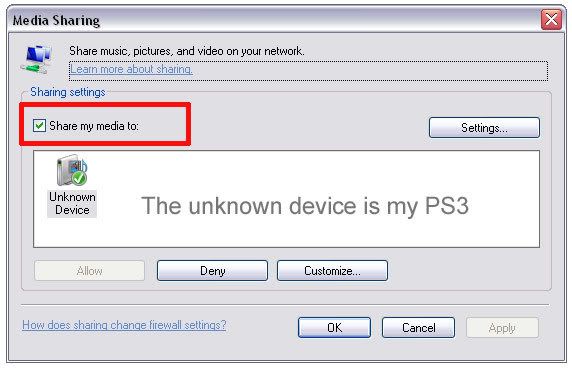
QUOTE(rx330 @ May 25 2007, 01:00 PM) weird.... i launch my wmp 11, under library, no media sharing ler... You gotta enable the Media Sharing option in WMP 11. Then go to your PS3:* To use a PS3(tm) system as a DLNA client, you must first enable [Media Server Connection] under (Settings) > (Network Settings). * You can connect, over the network, devices that support "Sony Room Link" and are compatible with DLNA, including products made by other companies. You can also connect a Microsoft(R) Windows(R) XP or Microsoft(R) Windows Vista(tm) personal computer that has Windows Media(R) Player 11 installed. Playing DLNA server content When you turn on the PS3(tm) system, DLNA servers on the same network are automatically detected and icons for the detected servers are displayed under (Photo), (Music), or (Video). If you select an icon, you can play content that is available for shared access on each DLNA server. *You cannot play copyright-protected content. |
|
|
May 25 2007, 12:18 PM
Return to original view | Post
#9
|
|
Junior Member
137 posts Joined: Jan 2006 From: The Other Side
|
QUOTE(rx330 @ May 25 2007, 01:09 PM) thanks ps360, i did read the link u gave me, which is exactly paste up there Got ah. Click on the images below.but, the problem is, i kenot enable media sharing for hte wmp, or better said as, i cant find the option of enabling media sharing » Click to show Spoiler - click again to hide... «
|
|
|
May 25 2007, 01:05 PM
Return to original view | Post
#10
|
|
Junior Member
137 posts Joined: Jan 2006 From: The Other Side
|
QUOTE(crimsonhead @ May 25 2007, 01:57 PM) ok i just dl'ed nero media home.trying it now.nero media home is free lol. Free????? From where? Nero's site for that product has a BUY NOW button wor. edit:access to the media bla bla bla has been denied   |
|
|
May 25 2007, 03:00 PM
Return to original view | Post
#11
|
|
Junior Member
137 posts Joined: Jan 2006 From: The Other Side
|
QUOTE(squiggles @ May 25 2007, 03:09 PM) a sample of impressive PS3 upscaling... Can I exchange my PS3 for yours? I'll even throw in my Nintendo Wii for it! |
|
|
May 26 2007, 10:05 AM
Return to original view | Post
#12
|
|
Junior Member
137 posts Joined: Jan 2006 From: The Other Side
|
QUOTE(lapaq @ May 26 2007, 10:51 AM) ...and not to mention Yr 2008 when all the bug names are out.. Anyway, 2008 is gonna be PS3 year (fanboy alert! NOT!!) I love all 3 consoles .... |
|
Topic ClosedOptions
|

| Change to: |  0.0407sec 0.0407sec
 0.48 0.48
 7 queries 7 queries
 GZIP Disabled GZIP Disabled
Time is now: 10th December 2025 - 03:37 AM |
All Rights Reserved © 2002- 2025 Vijandren Ramadass (~unite against racism~)
Powered by Invision Power Board © 2025 IPS, Inc.