can this be used with maxis home fibre? replace that lousy thomson
Review Xiaomi Wireless Router Pro, Budget yet with great performance
Review Xiaomi Wireless Router Pro, Budget yet with great performance
|
|
 Jun 21 2017, 12:52 AM Jun 21 2017, 12:52 AM
Return to original view | Post
#1
|
 
Senior Member
758 posts Joined: Aug 2008  
|
can this be used with maxis home fibre? replace that lousy thomson
|
|
|
|
|
|
Jun 22 2017, 03:26 AM
Return to original view | Post
#2
|
|
Senior Member
758 posts Joined: Aug 2008
|
QUOTE(muncheno @ Jun 21 2017, 04:56 PM) Don't think it will support Maxis as primary router. even if i dont want voip and iptv?On default Xiaomi does not support Vlan tagging right? If not mistaken Maxis is using Vlan 820 for internet. Then also another Vlan for IPTV and phone line.  fibre optic ---> maxis modem --> mi router wan port (use as ppoe dialer) |
|
|
Jun 22 2017, 10:12 AM
Return to original view | Post
#3
|
|
Senior Member
758 posts Joined: Aug 2008
|
QUOTE(JayceOoi @ Jun 22 2017, 09:38 AM) Can you use Maxis modem to dial directly? I do that on Streamyx modem. hrmmm let me look into thisfound it https://forum.lowyat.net/topic/2710206 thanks man This post has been edited by mousqy: Jun 22 2017, 10:21 AM |
|
|
Jul 20 2017, 11:33 AM
Return to original view | Post
#4
|
|
Senior Member
758 posts Joined: Aug 2008
|
QUOTE(nikobellic @ Jul 10 2017, 11:07 AM) Hi Jayce, thanks for sharingMy friend bought this Mi Router Pro (without hard disk) and was unable to use it for his Maxis Fibre. He passed to me to try it out on my Unifi. I tried set it up using Mi Wifi app on my Samsung phone as well as direct LAN connect to my PC following the steps in the manual and app (i can read Chinese). Both failed. Got wifi signal but no internet connection. It says has problem with DHCP. My friend said that is the same issue when he tried to set it up for his Maxis Fibre. What should i do? I am not tech savvy. Will appreciate your expert advise. Thanks. Regards Nikobellic |
|
|
Sep 7 2017, 11:02 PM
Return to original view | Post
#5
|
|
Senior Member
758 posts Joined: Aug 2008
|
QUOTE(qzplx @ Sep 6 2017, 01:43 PM) If you use only 1 WAN port from Xiaomi to VLAN switch, that means: good job on finding a work around You cannot use the other port on the VLAN switch to connect internet, why ? --> Because the WAN port connected through with PPPoe, this mean that port would have your dynamic IP Public assigned not your local LAN ip. --> This mean if Xiaomi has DHCP, and you plug some of the PC or host to the VLAN Switch it wont recognise and get the DHCP from Xiaomi. thankssss  |
|
|
Sep 8 2017, 12:11 AM
Return to original view | Post
#6
|
|
Senior Member
758 posts Joined: Aug 2008
|
QUOTE(qzplx @ Sep 7 2017, 11:45 PM) Cheers matey that vlan thing was my only obstacle » Click to show Spoiler - click again to hide... « This post has been edited by mousqy: Sep 8 2017, 12:12 AM |
|
|
|
|
|
Sep 8 2017, 11:52 AM
Return to original view | Post
#7
|
|
Senior Member
758 posts Joined: Aug 2008
|
QUOTE(zhihao4456 @ Sep 8 2017, 11:05 AM) how much did you bought it for? 360 use mdk10a in lazada app ...get 10% discount6 months local warranty This post has been edited by mousqy: Sep 8 2017, 11:52 AM |
|
|
Sep 10 2017, 11:04 AM
Return to original view | Post
#8
|
|
Senior Member
758 posts Joined: Aug 2008
|
QUOTE(zhihao4456 @ Sep 8 2017, 02:34 PM) mind sharing the link for the item? lazada linkQUOTE(kaizoku30 @ Sep 8 2017, 05:50 PM) xiaomi wan is not gigabit ? The larger Xiaomi router that includes the internal hard drive is gigabit, so keep that in mind ----- read it just dont share link https://imgur.com/a/XBbvx https://world.tmall.com/item/545858995315.h...919063:33030646 old post from reddit on different xiaomi router https://www.reddit.com/r/Xiaomi/comments/34...he_mini_router/ yeah this one no HD but got big ass heatsink This post has been edited by mousqy: Sep 10 2017, 11:07 AM |
|
|
Sep 10 2017, 12:21 PM
Return to original view | Post
#9
|
|
Senior Member
758 posts Joined: Aug 2008
|
QUOTE(zhihao4456 @ Sep 10 2017, 11:19 AM) thank you very much sharing is caring  u gonna use it on unifi/maxis/time? |
|
|
Sep 14 2017, 12:49 AM
Return to original view | Post
#10
|
|
Senior Member
758 posts Joined: Aug 2008
|
anyone knows how to assign public ip to lan device ie ps4
|
|
|
Sep 14 2017, 11:20 AM
Return to original view | Post
#11
|
|
Senior Member
758 posts Joined: Aug 2008
|
QUOTE(qzplx @ Sep 14 2017, 11:02 AM) On Xiaomi router you can create port forwarding. is range a valid input? Name of your port forwarding : PS4 IP address : Your PS4 LAN IP addr Port : Your PS4 Network port number Protocol : TCP & UDP Save and apply Goto: http://www.yougetsignal.com/tools/open-ports/ Type your port number there, and leave your ip public there. Make sure the answer is open. TCP: 80, 443, 1935, 3478-3480. UDP: 3478-3479. but this will only put me on NAT type 2 like thomson router it gave me an option of specifying certain mac to the public ip -- NAT 1 connection i did turn on DMZ for PS4 static (dhcp bind) ip and and how do i use Xunlei its like a very new thing for me ...but mandarin speaking people seems to have been using it for ages thanks btw _____________________________________ MAXIS FIBRE USERS ATTENTION vlan ID to 621 MTU 1480 or 1492 This post has been edited by mousqy: Sep 14 2017, 11:21 AM |
|
|
Oct 21 2017, 10:20 PM
Return to original view | Post
#12
|
|
Senior Member
758 posts Joined: Aug 2008
|
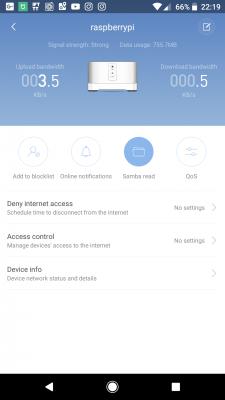
QUOTE(cosmicmeadow @ Oct 17 2017, 12:07 PM) Hi, does this have parental controls like Asus? i.e control the time blocks by MAC address got got » Click to show Spoiler - click again to hide... « |
| Change to: |  0.0273sec 0.0273sec
 0.49 0.49
 7 queries 7 queries
 GZIP Disabled GZIP Disabled
Time is now: 6th December 2025 - 01:16 PM |
 Quote
Quote