Welcome Guest ( Log In | Register )

76 Pages « < 2 3 4 5 6 > » Bottom

Outline · [ Standard ] · Linear+

 [OFFICIAL]Rig Suggestion Q&A Thread V13!

views
     
babylon52281
post Feb 26 2023, 10:03 AM

Look at all my stars!!
*******
Senior Member
2,673 posts

Joined: Apr 2017
QUOTE(minano0001 @ Feb 26 2023, 08:19 AM)
» Click to show Spoiler - click again to hide... «

*
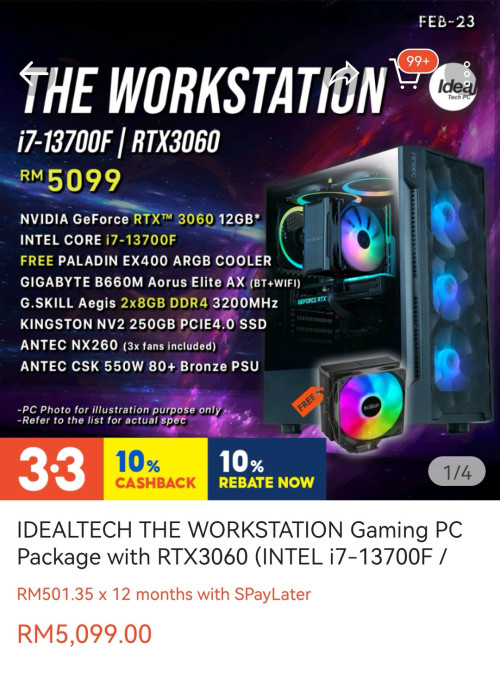
A 4 heatpipe cooler with a max 180W TDP for a CPU that can draw up to 220W at PL2 unlocked? Err nope. Give free oso will be Ewaste if want to max out the CPU as you will need to replace that insufficient cooler.

If one is lazy to research & do own study, these independent shop prebuilts arent too bad but like all prebuilds will sacrifice something and make a bit more compromises just to gain more profits.

This post has been edited by babylon52281: Feb 26 2023, 10:03 AM
babylon52281
post Feb 27 2023, 02:21 PM

Look at all my stars!!
*******
Senior Member
2,673 posts

Joined: Apr 2017
QUOTE(viktorherald @ Feb 26 2023, 03:12 PM)
I'm very new to PC build scene as I had custom build PC but that is 10 years ago, and did not actively participate In it. Any good direction for starters just to increase knowledge?
*
Me too have been out of the scene for 10 years before my new built but I did it the hardwork way. If you want to know how I went ahead, then read on.

1) Start with what ur looking to do with ur new system. Gaming? Applications? 50/50 of both? It will determine whether which Intel or AMD CPU.

2) IMPORTANT to take ur time and dont rush to start buying without knowing exactly what you want and how you'd expect it to perform.

3) Once you have that in mind to go Intel or AMD, then decide what budget ur gonna spend. 3k? 4k? 5k? 6k? How much +/- leeway given?

4) Then pair ur CPU with appropriate mobo & RAM that will able to support ur CPU and not thermal throttle or underperform. Oso try not to overspec ur RAM but keep in mind for some future upgradability. DDR5 will be expensive but ur gonna want 16GB 6000MHZ minimum if you want to add more RAM in future.

5) Next CPU cooling is a necessity BUT also optional cuz nonK(Intel) / nonX(AMD) has boxed coolers that will work at stock speed. But to unleash CPU full potential, you can alwiz upgrade to tower/AIO when you have money later. Just make sure cooler TDP is equal to or better than CPU max TDP. Like the one I pointed above, cooler with 180W TDP for a CPU that can max out 220W is a definite NO.

6) If not sure, just ask around and prepare to kena bambu. Have some thicc skin and be open minded as I did https://forum.lowyat.net/index.php?showtopic=5279514&hl= If you compared that with the system I eventually got I had changed just about everything.

7) Then pair which GPU together with PSU that has sufficient wattage, and at least in PSU Cultist list Tier C. You might be tempted to throw in more money to get a 4070Ti and paired with a 500W PSU. Just dont. These area you need to study more, get more reviews and balance the pairing so they arent overkill for each.

8) Casing is last, just get any airflow focused case you could afford with money still left, bling fans if you like ARGB unicorn vomit. If you going for 360/420 AIO make sure the case can support that. MATX or ATX? Get ATX for future upgradability and better compatibility.

9) IMPORTANT! Try to get a shop (online or physical) that can get you all those parts you need so they can issue you all in ONE invoice. It doesnt matter if you get them to assemble it or do urself. All in a single invoice will help make claim income tax easier.

For Point 1 to 9, you really have to spend time and effort to study each urself, make changes and compromises here n there. Which is why Point 2 is IMPORTANT!

It is oso important that you get from brands that you'd recognise and see prominently on store shelfs. Hard (or nowadays harder) to find brands like APACER or LEADTEK, etc, brands that you might have known 10 years ago but rare to see nowadays, is a red flag to stay away as there must be reasons why they losing marketshare. It could be parts quality, reliability or RMA dependability issues, so if ur willing to take the risk just to save money, be aware there are risks.
And dont let others persuade you otherwise unless they have convincing proof, mostly they are BS nonsense and its ur money at risk not theirs if you got burned.


In the end, there are no shortcuts if you want best bang for buck but if ur lazy of course you can ask here (but preferably if you ady have some idea what you want) or get something prebuilt from shops like Idealtech.

This post has been edited by babylon52281: Feb 28 2023, 08:36 AM

babylon52281
post Feb 28 2023, 04:18 PM

Look at all my stars!!
*******
Senior Member
2,673 posts

Joined: Apr 2017
QUOTE(TristanX @ Feb 27 2023, 07:11 PM)
Low budget wanna do 3D and Lumion...

How about these?

Core i5-12400 - 799
Deepcool AG400 - 100
MSI B660M-A Pro Wifi - 649
Kingston HyperX 32GB DDR4-3600 kit - 455
Asus RX 6600 (more powerful) or Manli RTX 3050 - 999 / 1025
Kingston KC3000 512GB - 279
Silverstone Viva Gold 750W - 328
Asus AP 201 or Fractal Pop Air case - 359

RM3968-3994 total (Shopee prices)

I don't know how good is AMD cards for apps these days though.
*
Content creator reviewers say their improving and more creation apps are getting better at utilising Radeon hardware but Nvidia are still the default option if you don't want to tinker stuff and just want it to work well out of the box. Nvidia oso has Studio drivers suited for content stuff so the pros knows which brand are giving them more focus.
babylon52281
post Mar 1 2023, 01:02 PM

Look at all my stars!!
*******
Senior Member
2,673 posts

Joined: Apr 2017
QUOTE(myway1985 @ Mar 1 2023, 10:31 AM)
Press for 3070... Work better with resizable bar
*
3060Ti is ok

Newer 3060Ti oso comes with ReBar https://pictr.com/image/EN9IKn

Older nonLHR version is without it but can VBios flash to enable ReBar too.
babylon52281
post Mar 3 2023, 01:01 PM

Look at all my stars!!
*******
Senior Member
2,673 posts

Joined: Apr 2017
QUOTE(minano0001 @ Mar 2 2023, 10:15 PM)
If u have time then assemble yourself. U won't save much but u will have the satisfaction. But if u want easy then buy straight from idealtech
*
You wont save much money since you'll be working on a budget cap after all. But what you can get is far more value for money.

As comparison between Idealtech 9k PC and TristanX 9k PC, you'll get 1) better CPU, An AIO, more RAM, a better built GPU (same series but Asus TUF vs Giga)

And some shops can build & test for free or just pay extra RM 50 only.
babylon52281
post Mar 3 2023, 01:03 PM

Look at all my stars!!
*******
Senior Member
2,673 posts

Joined: Apr 2017
QUOTE(corad @ Mar 3 2023, 11:43 AM)
been almost a decade since I looked at PC spec, last build and currently still using i5 4460, 970GT 16GB RAM. Only added a SSD and replaced a PSU since then. Otherwise been moving towards laptops.

but want to get back into gaming, budget around RM9k including monitor (currently Dell 2413). Looking for value so no need top end hardware.
*
TristanX 9k PC above is about as much value as you can get if build ur own. nod.gif

This post has been edited by babylon52281: Mar 3 2023, 01:05 PM
babylon52281
post Mar 7 2023, 06:36 PM

Look at all my stars!!
*******
Senior Member
2,673 posts

Joined: Apr 2017
QUOTE(chickenfats @ Mar 3 2023, 07:48 PM)
thanks for the reply... assuming i wana build my rig to be slightly future proof, do u recommend any modifications?
eg if im looking for a 3080ti, which type would be ideal, and should i change any other part to complement this?

in your opinion, which card do you think is the best value for performance?

thanks again
*
Slightly future proof?
Only need to change the PSU to 850W preferably this [Corsair RM 850W - 619] as future xx80 series GPU will predictably need a beefier PSU. Everything else is fine for the next few years.
babylon52281
post Mar 10 2023, 01:34 AM

Look at all my stars!!
*******
Senior Member
2,673 posts

Joined: Apr 2017
QUOTE(seanwms @ Mar 9 2023, 10:21 PM)
hi sifu, is it worth to swap a rtx 4080 over a rtx 4070 ti, initial planning was to pair a i7-13700k with a rtx 4070ti but now I'm thinking to downgrade to i5-13600k with rtx 4080, really need some advice is it worth to do so? pure gaming purpose, 1440p 144hz (4k in future) , try to get a best build that at least can last for 5 years. currently using gtx 1080 since 2017
*
Within 5 years time, it will still perform but it stands to be obsolete sooner than later that i7. Already AAA games like Hogwarts have 6Pcores CPU as recommended specs. That i7 has 8Pcores which will last longer.
babylon52281
post Mar 11 2023, 10:25 PM

Look at all my stars!!
*******
Senior Member
2,673 posts

Joined: Apr 2017
QUOTE(arrif826 @ Mar 11 2023, 08:47 PM)
Hi Sifus!

Appreciate it if someone could help suggest a list of PC Build and its components for a high-end 3D modeling and rendering purpose (from scratch).

The budget would be RM15-20k

Thank you! thumbup.gif
*
20k budget? Two words; Mac Pro
babylon52281
post Mar 12 2023, 10:24 AM

Look at all my stars!!
*******
Senior Member
2,673 posts

Joined: Apr 2017
QUOTE(TristanX @ Mar 12 2023, 12:24 AM)
And gets stomped by custom rigs. LOL
*
LOL Maybe in games but Macs are well established workstations for commercial content creation works. My company have dabbled in Windows & Android systems but lastly we went with a Mac to suit our creative works.

This post has been edited by babylon52281: Mar 12 2023, 10:24 AM
babylon52281
post Mar 12 2023, 04:27 PM

Look at all my stars!!
*******
Senior Member
2,673 posts

Joined: Apr 2017
QUOTE(lolzcalvin @ Mar 12 2023, 12:50 PM)
both Tristan and u are actually right...

Mac e.g. the new M2 (Max) chip performs stronger than RTX 4090 (laptop) in creative works, which are photo/image editing, design and video editing (lightroom, photoshop, after effects, davinci, splice, inshot). their M2 chip is highly optimised and strongly accelerated for these types of work, and lightroom can even utilise M2's NPU.

RTX 4090 kills M2 in 3D works, including blender, 3ds max, enscape, any render engine you can think of, and AI-accelerated works. now that's the GPU alone, we're not tapping into CPU+GPU.

we just need to know what platform is good on which type of system and that's all, nothing much to argue about since both have pros and cons. if I want to do video editing...I'd side with mac (even software development, I will also side with mac simply because of their kernel which natively supports a lot of dev tools including docker, and unix-style commands). but if I am a 3D artist, no brainer liow, NVIDIA is at its pinnacle that produces such pinnacle hardware to deal with those. AMD playing catch-up and straying further away, while Apple are not getting very close. Intel on the other hand, they have huge potentials.
*
Haha, not arguing or anything just raising a point that workstations are often configured differently than say a high end gaming PC. Of course you can game on one and work on the other, but workstation hardware are a niche by their own like why Quardros could justify their much higher pricetage vs equivalently specced Geforces.

They typically dont do all that well at gaming tho as Xeons are lowly clocked and Quadros are geared towards stability rather than performance. But as you pointed out more content creation apps are getting better optimised for standard desktop hardware mainly to cater for the booming youtubers and SI content creators which is a good thing as software that used to need 20k workstation hardware now can work just as well on 10k HEDT hardware.

TristanX selection isnt bad at all, just that PC will brute force their way vs Mac efficiencies.
babylon52281
post Mar 12 2023, 07:34 PM

Look at all my stars!!
*******
Senior Member
2,673 posts

Joined: Apr 2017
QUOTE(leo412 @ Mar 12 2023, 12:57 PM)
Hi Currently want to buy a desktop for gaming, consulted a few shops in digital malls, get below price
i5-13400F
RTX 3060TI
16GB RAM\
500GB SSD
1TB HDD

RM 4800

This is from C Zone. was it good?

Or there is another shop where I get 4300 but the processor is RYZEN 5600x 3.7GHz 6 Core
*
No motherboard? No PSU? No casing? Do u have the actual part names they quoted you?
babylon52281
post Mar 14 2023, 08:03 AM

Look at all my stars!!
*******
Senior Member
2,673 posts

Joined: Apr 2017
QUOTE(Duckies @ Mar 13 2023, 01:39 PM)
Eh, what is the differences between MSI Pro Z790-A WiFi DDR4 and P variant? Got wifi and no wifi only?
*
MSI mobo have a lot of subvarieties and you really have to look closely at the board VRM setup. -A version typically is the best (& most expensive of versions) and it would come with VRM that is sufficient to handle the entire family series of CPU from i3 to i9 and all the way up to PL2 unlocked. I'd be okay to put a 13900KS in a -A but only up to a 13700K for -P mobo.
babylon52281
post Mar 14 2023, 08:43 AM

Look at all my stars!!
*******
Senior Member
2,673 posts

Joined: Apr 2017
QUOTE(leo412 @ Mar 13 2023, 10:25 PM)
I am buying a package from idealtech , for the power supply I can upgrade to ANTEC CSK650 GB 80+BRONZE for RM100, or GIGABYTE P750 750W (80+ GOLD/FULL MODULAR for RM320, is it worth it?
*
In their listing, Giga UD750GM is at the higher tier and cheaper than P750 but I wouldnt want to get either as Giga PSU has bad rep.

If you willing to pay up to their P750 pricetag, it would be better to get MSI MPG A750GF as its Tier A rated. Antec list does have a Tier A rated PSU in the HCG Gold

Just be aware that prebuilds will always have compromises here & there that shops would guess less-savvy customers wont notice, mostly in order to keep prices attractive but oso to gain more profits. Idealtech's is AFAIK the best ones amongst many shop prebuilds I seen but not much by far.
babylon52281
post Mar 14 2023, 05:29 PM

Look at all my stars!!
*******
Senior Member
2,673 posts

Joined: Apr 2017
QUOTE(myway1985 @ Mar 14 2023, 12:26 PM)
U listen to Babylon u need eat some salts. At msi pro series p is lower than A.. n above Pro A got 3 more higher range.. he said halfway... N z790 pro A cannot house i9
*
https://youtu.be/7cZXKQL4EuQ?t=28

Erm... on surface it may look like minor increment of extra 2 VRM phases (vs Z690 Pro-A) but if look closely they are 16x of 80 Amp SPS vs 14x of 55 Amp SPS. This is ady in Aorus or ROG territory.

It will be sufficient to run a 13900K at its max PL2 state but Ocing headroom would be limited. Anyhow I doubt serious Ocers would use a office productivity mobo like Pro series for serious Ocing lah.
babylon52281
post Mar 14 2023, 06:05 PM

Look at all my stars!!
*******
Senior Member
2,673 posts

Joined: Apr 2017
QUOTE(Duckies @ Mar 14 2023, 01:52 PM)
Ohhh...but for my case I plan to get i7 13700k so A series is okay right? I don't think I will overclock also. What's the 3 higher range after A series?
*
For ur specs I cant find a review but you can do some inference, as the 13700K is equivalent to 12900K and the VRM setup for that Z790-A Pro is near equivalent to Z690 Tomahawk, so you can go look for these 2 combos https://www.techspot.com/review/2381-intel-...otherboard-vrm/

This post has been edited by babylon52281: Mar 14 2023, 06:06 PM
babylon52281
post Mar 14 2023, 06:10 PM

Look at all my stars!!
*******
Senior Member
2,673 posts

Joined: Apr 2017
QUOTE(myway1985 @ Mar 14 2023, 05:32 PM)
Who would use an alc897 if they wan to oc 13900k.. sound quality so bad
*
Haha, not sure laugh.gif ... but serious audiophiles would not rely on any built in audio and preferably get external DAC like this Creative https://my.creative.com/p/sound-blaster/sound-blaster-x4
babylon52281
post Mar 15 2023, 09:29 AM

Look at all my stars!!
*******
Senior Member
2,673 posts

Joined: Apr 2017
QUOTE(TristanX @ Mar 14 2023, 11:10 PM)
How about these?

Core i7-13700 - 1740
EK AIO 360 Basic + LGA 1700 kit - 498 - 19
MSI B760 Tomahawk DDR4 - 1035
Kingston HyperX 32GB DDR4-3600 kit - 455
Gigabyte RTX 3060 Gaming OC - 1449
Kingston KC3000 1TB - 383
Corsair RM 750W - 485
Lian Li Lancool III non-RGB case - 539

RM6603 total (Shopee prices)

A bit overbudget.... You can cut a bit with MSI B760M-A Pro Wifi at RM779 .
*
Lumion is more GPU intensive than a CPU reliant one

https://www.cgdirector.com/lumion-system-requirements/

So if only for that I'd sacrifice on CPU & mobo;
i5 12600K/13600K + MSI Pro-A B660M or B760M DDR4

and max out GPU budget, so from 3080 towards 4070Ti whichever can afford.

This post has been edited by babylon52281: Mar 15 2023, 09:30 AM
babylon52281
post Mar 16 2023, 11:53 AM

Look at all my stars!!
*******
Senior Member
2,673 posts

Joined: Apr 2017
QUOTE(asus_2g @ Mar 16 2023, 09:43 AM)
Hi sifu, can help me upgrade my pc from May 2020?
Can u recommend shop at KL as well

CODE

CPU: Ryzen 3 3300x

MOBO: MSI B450 Pro Max

RAM: PNY 8GB DDR4 3200MHZ

SSD: GALAX GAMER L 480GB

GPU: Nvidia GTX 1660

PSU: AEROCOOL LUX RGB 550W 80 PLUS

BRONZE

CASING: AIGO DLM 21 MESH BLACK


Budget RM 5.5K, prefer amd and ryzen, my aim to play latest games at 4k
*
Even for a limited upgrade, RM5.5k aint enuff for 4K.
CPU 5800X3D ady eat RM1.5k, leaving just RM4k for high end GPU and PSU to match. Playable 4k you'll need at least 6900xt. And you'll need 850W A tier PSU.
https://www.techspot.com/review/2627-hogwar...gacy-benchmark/
babylon52281
post Mar 16 2023, 06:17 PM

Look at all my stars!!
*******
Senior Member
2,673 posts

Joined: Apr 2017
QUOTE(myway1985 @ Mar 16 2023, 01:20 PM)
Used GPU.. n 5700x.. matx lo
*
AM4 is ady deadended platform so if OP still wants to upgrade keep this ecosystem, might as well spend that money and get the best AM4 gaming CPU.
GPU can still come later.

This post has been edited by babylon52281: Mar 16 2023, 06:19 PM

76 Pages « < 2 3 4 5 6 > » Top
 

Change to:
| Lo-Fi Version
0.0556sec    0.40    7 queries    GZIP Disabled
Time is now: 1st December 2025 - 11:38 AM