Welcome Guest ( Log In | Register )

76 Pages « < 16 17 18 19 20 > » Bottom

Outline · [ Standard ] · Linear+

 [OFFICIAL]Rig Suggestion Q&A Thread V13!

views
     
babylon52281
post Aug 25 2023, 09:07 AM

Look at all my stars!!
*******
Senior Member
2,680 posts

Joined: Apr 2017
QUOTE(bluemind @ Aug 24 2023, 08:50 PM)
Not OP but just curious, FSP Hydro G Pro 750W fan on official site says 135mm but some reviews show 120mm, wonder what is the actual size lol. The conformal coating seems nice for our humidty.

NZXT C750, there is still one seller have it but not sure is which year released model.

What about Cooler Master V750 Gold V2? Aris review seems pretty good.
*
Look at their reviews then.

When in doubt, crack it open. In which they did;
https://aphnetworks.com/reports/fsp-hydro-g-pro-750w/3

The fan model is MGA12012XF-O25

And finding further you can obviously see what size;
https://www.taobao.com/list/item/643684159996.htm

Some times these OEM supplier websites arent the most accurate, in that case see the actual part will remove all doubts.


NZXT C750 is from OEM Seasonic while Cooler Master V750 Gold V2 is from OEM Gospower, a not-so-well-known manufacturer. If performance & price comparable between these 3 brands I'd rather get direct from OEM which in this case is FSP as any part swapping issue will be onto their own brand image as the manufacturer.


*Not the mod, but imho this shd be in PSU tered to keep things focused*
babylon52281
post Aug 25 2023, 09:18 AM

Look at all my stars!!
*******
Senior Member
2,680 posts

Joined: Apr 2017
QUOTE(zioburosky13 @ Aug 24 2023, 09:10 PM)
Just in case, if the mobo takes too long to repair. the shop will give me a product voucher, so I can get a x570 mobo replacement.
*
Wow so good that shop is so generous! Like Microcenter USA warranty RMA can get new mobo for free! rclxm9.gif

If getting new one can refer this https://www.techspot.com/bestof/amd-x570-motherboards/

But as an all rounder, so far MSI Tomahawk series have never failed for both Intel & AMD and reviews have been "Possibly the Best $200 AMD X570 Motherboard"
https://www.techspot.com/review/2020-msi-x570-tomahawk/

So go with that if you can swap

The only downside is that chipset fan which would fail sooner than later.

This post has been edited by babylon52281: Aug 25 2023, 09:20 AM
babylon52281
post Aug 25 2023, 10:46 AM

Look at all my stars!!
*******
Senior Member
2,680 posts

Joined: Apr 2017
QUOTE(TristanX @ Aug 25 2023, 09:30 AM)
Budget too low. You can't have both.

Yeah, 2600k is low end for today.
*
Ada jalan if everything go 2nd hand bro.
babylon52281
post Aug 26 2023, 12:49 AM

Look at all my stars!!
*******
Senior Member
2,680 posts

Joined: Apr 2017
QUOTE(myway1985 @ Aug 25 2023, 11:46 PM)
i5-12600k  RM979.00
b660m msi a pro wifi  RM659.00
32gb 3600mhz kingston fury beast  RM370.00
1tb kc3000  RM325.00
colorful rtx 4070 12gb nb  RM2,950.00
1st player steampunk 850 gold  RM399.00
thermalright FC140 black  RM279.00
azza hive 450m  RM269.00
  RM6,230.00
*
That 6800XT would spank the 4070
babylon52281
post Aug 26 2023, 11:25 PM

Look at all my stars!!
*******
Senior Member
2,680 posts

Joined: Apr 2017
QUOTE(myway1985 @ Aug 26 2023, 08:36 PM)
i5-12600k RM979.00
b660m msi a pro wifi RM659.00
32gb 3600mhz kingston fury beast RM370.00
1tb kc3000 RM325.00
ASUS TUF-RX6800XT-O16G-GAMING RM2,800.00
1st player steampunk 850 gold RM399.00
thermalright notte 240 RM349
CM TD500 mesh v2 RM379

RM6260
*
Just make sure to tune up VCCSA once set XMP to make full use of that 3600MHZ RAM speeds
babylon52281
post Aug 28 2023, 12:38 AM

Look at all my stars!!
*******
Senior Member
2,680 posts

Joined: Apr 2017
QUOTE(AlexZai123 @ Aug 26 2023, 06:26 PM)
Do you suggest me in getting AIO? Understand that could probably overkill but I kinda like it for aesthetic especially for ML240 Illusion. At the same time I see many reported cases of leaking and that makes me worried.
*
Rather than leakages (not to say it wont happen but for AIO its rare), ur main concern is the pump sudden failure as it will fail sooner than later often after the warranty period. And when that happens ur better be watchful of ur system unless it cooks ur CPU.
babylon52281
post Aug 28 2023, 02:26 PM

Look at all my stars!!
*******
Senior Member
2,680 posts

Joined: Apr 2017
QUOTE(Christensen @ Aug 28 2023, 12:50 PM)
Hi guys, anyone has experience using Montech Air 903 Max? Reading online review it says this case is quite high CP
*
What is CP? hmm.gif
babylon52281
post Aug 29 2023, 04:52 PM

Look at all my stars!!
*******
Senior Member
2,680 posts

Joined: Apr 2017
QUOTE(Christensen @ Aug 29 2023, 01:34 PM)
sorry sorry, CP = cash power, means very valuable ><"
*
Without local markups & import costs its USD $80 or RM 370. When compared, a Corsair 4000D is only RM 400. So value proposition isnt quite there as Corsair is branded and that case is well received globally.
babylon52281
post Aug 30 2023, 12:30 AM

Look at all my stars!!
*******
Senior Member
2,680 posts

Joined: Apr 2017
QUOTE(myway1985 @ Aug 29 2023, 10:02 PM)
4000D RM339 got de
*
Just a quick & dirty search from Google gave me that. Haha

But basically for the pricing in USD, that Montech case too expensive compared to branded cases.
babylon52281
post Aug 30 2023, 10:34 AM

Look at all my stars!!
*******
Senior Member
2,680 posts

Joined: Apr 2017
QUOTE(myway1985 @ Aug 30 2023, 01:09 AM)
Montech quality n 1st player abang adik
*
B tier level, but price creep for Montech now reaching A tier brands. Their older case ie Air 1000, Sky one, used to price competitively at B tier levels but now they starting to up prices.
babylon52281
post Aug 30 2023, 06:43 PM

Look at all my stars!!
*******
Senior Member
2,680 posts

Joined: Apr 2017
QUOTE(GameFr3ak @ Aug 30 2023, 11:52 AM)
Not sure if this is the appropriate place to ask about a decent GPU upgrade.

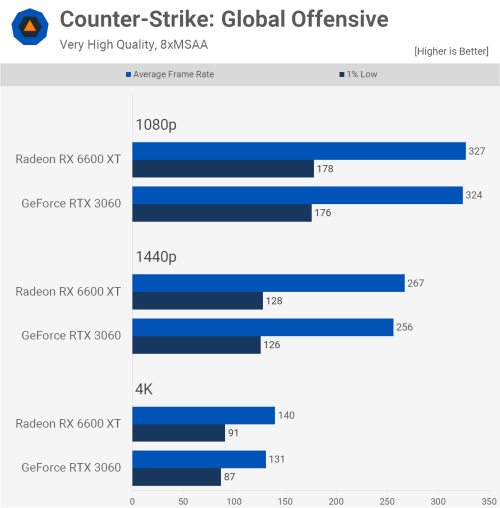
I've been using the Nvidia 1060 3gb graphics card for quite a while, I'm wondering if Palit RTX 3060 12GB is a solid upgrade for a budget of a bit over 1k?

EDIT: I do game every day on 1080p 165hz monitor and usually they're MMO or CSGO. Rarely AAA games but even if I do, I'm fine with Medium settings. I also do a bit of video editing in 4k but with 720p proxies. The editing is pretty rare and they're not the main priority, since I could make do with the 1060 3gb so it can't be worse after an upgrade.
*
Will be a solid upgrade if you can 'see' 300+ FPS as long as ur CPU isnt going to bottleneck ur GPU
user posted image
babylon52281
post Sep 2 2023, 11:48 PM

Look at all my stars!!
*******
Senior Member
2,680 posts

Joined: Apr 2017
QUOTE(MagnificM @ Sep 2 2023, 08:17 PM)
Hi, a friend of mine using Ryzen 5 1600 + Asus Prime B350M-A combo, if he were to upgrade his rig, is it okay to just get the Ryzen 5 5600 ? or just change platform to Intel ? He's using only for web browsing and light office work
*
The 5600 will do fine but if its just webbing & office work, does it even needs an upgrade. Or is it to ready for extra other usage? Otherwise can straight jump to 5800X, 5800X3D.
babylon52281
post Sep 11 2023, 12:51 PM

Look at all my stars!!
*******
Senior Member
2,680 posts

Joined: Apr 2017
QUOTE(GnarsAttack @ Sep 11 2023, 09:38 AM)
1- Let say i pull RX6600 from my rig into this build, what will be the good upgrade for the gpu on my own rig? Budget RM1500 max. And will the PSU handle the upgrade?
R5 3600
B450m DS3H
Super flower eco 500w silver
2*8GB Galax 3000mhz ram

2- Budget for the new build around 2k, for mobo, ram, cpu and flex/sfx psu.
*
With such low budget, ITX build will be a challenge. If you can consider going for MATX rig you can port over ur 6600 + PSU and use the money for a better GPU & PSU that can support it.

Actually for Rm 2k, you could do a budget build that will be even better than ur current rig tho not by a whole lot but still... sweat.gif

Rm1500 is real tight but if Rm1600-1800 can get new RX 6700XT which will last a lot longer than otherwise 3060Ti which shd be slightly cheaper. Both GPUS are running out of stock tho.

Try this:
Core i5-12400F + MSI B660M-E - 1034
Kingston HyperX 8GB DDR4-3200 X2 - 168
FSP Hydro G Pro 750W - 490
Tecware whatever case - 149
(Rm1850)

So left Rm150 which puts you around Rm1650 budget for GPU and that can gets you either one of these
https://www.lazada.com.my/products/sapphire....13be4659ntt1qa
https://www.lazada.com.my/products/powercol....13be4659ntt1qa


This post has been edited by babylon52281: Sep 11 2023, 01:16 PM
babylon52281
post Sep 12 2023, 04:19 PM

Look at all my stars!!
*******
Senior Member
2,680 posts

Joined: Apr 2017
QUOTE(sexysarah1992 @ Sep 12 2023, 02:19 PM)
Ok thanks. Will get it today. Hows the performance? Good?
*
You gotta see if ur mobo VRM will supports it or not else it will overheat and throttle performance. Then ur back to square one.

Just curious if its working condition why let go CPU only and not with mobo? Theres no more upgrade path for it after all.
babylon52281
post Sep 13 2023, 12:09 AM

Look at all my stars!!
*******
Senior Member
2,680 posts

Joined: Apr 2017
QUOTE(sexysarah1992 @ Sep 12 2023, 08:00 PM)
What board u recommend for that chip?
*
What is ur friend mobo? If it was working for him, might as well buy that along too. And yeah anything below 5xx series was not designed for X3D heat load, maybe exception is X470
babylon52281
post Sep 13 2023, 10:55 AM

Look at all my stars!!
*******
Senior Member
2,680 posts

Joined: Apr 2017
QUOTE(skzzi @ Sep 13 2023, 08:06 AM)
Noted. Thanks!
Noted, thanks! Yes seems like might need to top up the budget if necessary.
Dont mind a little aesthetic but not all important. Priority on the necessary parts first.
Noted. Thanks!!
*
I'd reckon TristanX specs but replace the 13900K with 13700K. Keeping the 420AIO you can OC the bejeezus out of it and still keep within ur budget (knock off RM 700 from that total)

At high 4K resolution ur more GPU limited than the CPU bottlenecking performance. In 4K games its nearly imperceptible vs 13900K
https://www.techpowerup.com/review/intel-co...-13700k/20.html
babylon52281
post Sep 13 2023, 11:19 AM

Look at all my stars!!
*******
Senior Member
2,680 posts

Joined: Apr 2017
QUOTE(myway1985 @ Sep 13 2023, 10:46 AM)
https://youtu.be/Qa4A12gQTHw?si=w_-G5kX9zv6khnYJ

read this review ya

i9-13900KF
z790 tomahawk wifi D5  RM4,099.00
32gb 6600mhz colorful cvn  RM579.00
1tb kc3000  RM310.00
iGame GeForce RTX 4090 VULCAN OC-V (RM100 rebate until 30 sept)  RM8,699.00
1st player NGDP 1300 Platinum (10yr warranty)  RM919.00
thermalright notte black 360 argb  RM469.00
1st player SP9 (with 7 fans)  RM450.00


  RM15,525.00

aquarium.. frameless type
*
If OP is not going for extreme GPU OCing, spending extra RM 1000 over the PNY Verto 4090 doesnt make much sense. For 13900K uncapped even a 360AIO would thermal throttle, so spend that extra money on a 420AIO like H170i or Artic Freezer 420.
babylon52281
post Sep 13 2023, 06:28 PM

Look at all my stars!!
*******
Senior Member
2,680 posts

Joined: Apr 2017
QUOTE(skzzi @ Sep 13 2023, 11:52 AM)
Noted, thanks!!
Thanks for the inputs.  I wont be OCing at all. Dont have the mind for it 😆. Just need it to function as it is.
*
Even if not gonna OC the CPU, Id still reco going 13700K as once you uncap power limits it will turbo as much as ur cooling can take and a 420AIO will be sufficient. In contrast a 13900K will be near impossible to cool even with such a huge rad due to our higher ambient temps unless ur running in room with AC on.

Also going Ksku has better memory stability as it can pump more voltage to flog that DDR5 RAM unlike locked VCCSA nonK. This is moreso if you want to run 4x sticks of RAM in future.
babylon52281
post Sep 15 2023, 12:49 AM

Look at all my stars!!
*******
Senior Member
2,680 posts

Joined: Apr 2017
QUOTE(jvilous @ Sep 15 2023, 12:09 AM)
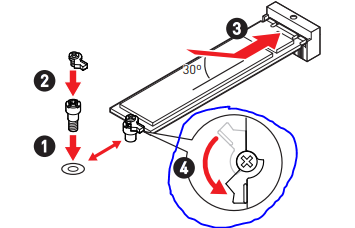
Reseat meaning taking it out and putting it back in right? I did try after I read your message, but to no avail, I noticed there's something like this on the M.2 nut?

» Click to show Spoiler - click again to hide... «


I tried installing as per manuals instruction too, but to no avail...
Nope, I made sure to ground myself before touching the pc parts, sadly I do not have any extra SATA disk laying around... Should I consider asking for a refund or continue fixing it....

To add on, when i booted the pc, and it went to the Bios, the M.2 drive itself is warm to the touch hmm.gif
*
A few things can do:
1) Try switch the M2 SSD to the other M2 port and see what happens.
2) Try boot into a Windows on SATA SSD if you have one spare around, make sure its not important. Do the appropriate settings so it can boot to SATA. Try see if Windows will later detect the M2
3) Put that M2 SSD into an enclosure and connect to a working Windows PC and see what happens.

The key here is to try get Windows to detect the M2 drive. If yes, do a zero wipe and start all over.

Win 10/11 updates have a quirky nature to sometimes BSOD crash and kill the bootloader. There are ways to save the Windows if you can just restore the bootloader but so far I tried all and failed which is why now I do a disk image before I go for an update. Saved me plenty during a couple of failed updates since.

If none of these works and still cannot detect the M2 SSD, then ur f--ked.
babylon52281
post Sep 15 2023, 06:48 PM

Look at all my stars!!
*******
Senior Member
2,680 posts

Joined: Apr 2017
QUOTE(jvilous @ Sep 15 2023, 12:56 PM)
Yah, I said I'll ask MSI support and see whether my mobo supports gen4 m.2 drives or not, if can support, then I'll send it back to him to check liao

The drive doesn't come with a heatsink, it's packaged like a hotwheels car? if that make sense
Thanks!!I'll try it later and give an update here

**Update, I tried change the M.2 mode from auto to Gen3 but it still does not work... Have already returned the drive to seller and see what they say...
*
At least you can still return and let them make good. Next time do a system backup b4 update.

76 Pages « < 16 17 18 19 20 > » Top
 

Change to:
| Lo-Fi Version
0.0569sec    0.68    7 queries    GZIP Disabled
Time is now: 5th December 2025 - 09:30 AM