Welcome Guest ( Log In | Register )

76 Pages « < 14 15 16 17 18 > » Bottom

Outline · [ Standard ] · Linear+

 [OFFICIAL]Rig Suggestion Q&A Thread V13!

views
     
babylon52281
post Jul 19 2023, 10:49 AM

Look at all my stars!!
*******
Senior Member
2,673 posts

Joined: Apr 2017
QUOTE(myway1985 @ Jul 19 2023, 08:19 AM)
Pls understand tat tecware fan very low.pressure. like 10-16...

Thermalright pa120 .. better u buy pa120 se argb . Rm169
*
Case fans typically are flow bias than static pressure bias no matter which cases. Want high pressure, replace with Arctic P12
babylon52281
post Jul 20 2023, 12:25 AM

Look at all my stars!!
*******
Senior Member
2,673 posts

Joined: Apr 2017
QUOTE(Christensen @ Jul 19 2023, 12:47 PM)
wah Artic P12 RM39 each on Shopee.. not sure amateur like me needs these bo..
*
Unless ur Ocing or the case surrounds are restricted, where every single oC reduction will help, no you dont need P12 as a necessity. Imho you could also get better airflow by swapping to 140mm fans, or even use P14 to have the best if you want it.

Aside that ur recent buy PA120 will defo fit in the Nexus Air.
babylon52281
post Jul 20 2023, 04:05 PM

Look at all my stars!!
*******
Senior Member
2,673 posts

Joined: Apr 2017
QUOTE(Christensen @ Jul 20 2023, 10:43 AM)
I never overclock.. but I do reconsider to slightly increase my budget (maybe RM300 +/- ?) to allow myself a few more options on casing, after all I hope my pc can last longer, (my last pc lasted for 7 years and still working until I sold it), perhaps topping up a bit can get type-c port or a casing with better air flow.. better material..
the reason i skip rgb fans are because based on forum ppl are saying rgb fans just look cool without performance impact..
but i reckon with rgb fans definitely will have better resell value..
another question, do u guys upgrade to ur own fans or usually just stick to the stock fans & monitor temperature when necessary?
maybe I need to find out how easy is replacing fans..
my current usage quite minimal, daily after work just 1-2hrs gaming, or weekend up to 4hrs gaming..
maybe after getting this build will extend gaming hours a little..
*
Still in the realm of budget brands which offers a lot of value money, if ur looking for something a bit more than basic unfortunately Tecware lags in case development and coming out with newer features, you could try for newer Montech cases like 903 Base/Max as it comes with Type C and reviews seem positive


babylon52281
post Jul 21 2023, 04:56 PM

Look at all my stars!!
*******
Senior Member
2,673 posts

Joined: Apr 2017
Antec has also recently came out with above budget cases which has all the features you need (inc Type C USB)


Price wise could be at near ur budget limit but Antec is a veteran in cases and these were known to be solidly built, not sure how is it now.
babylon52281
post Jul 21 2023, 10:37 PM

Look at all my stars!!
*******
Senior Member
2,673 posts

Joined: Apr 2017
QUOTE(adamtayy @ Jul 21 2023, 07:37 PM)
something like above..
*
A much better recommendation from you compared to previously but there is still niggling selection
a) why a single stick of 16GB ram when 2x8GB in dual channel mode gives much better performance?
b) PSU on cultist list appears between Tier B & Tier C speculative, indicating a very flexible source for the same model which could be worse, we dont know, so better to stick with more well known brands.
c) Still DRAMless SSD for OS drive? You might as well put in cheaper NV2 then. Come on!

QUOTE(viktorherald @ Jul 21 2023, 07:43 PM)
RTX 4070 can get in a RM5k rig? Thought at least need 7k or sorts..

Really out of desktop scene for a long time
*
Anything can be done, you could even get a 4070Ti rig for the same price... paired with i3 CPU + H610 mobo. But this would CPU bottleneck like heck.

Look closely his specs, to maximise budget for that 4070, he is giving older 12 gen i5 + B660M mobo, which would be a solid reco last year, but its ady long in the teeth by now.

RM 5.5k is a lot but not a whole lot of money for hardware these days, so lets see what the sifus here will propose their ideas.

babylon52281
post Jul 22 2023, 06:53 PM

Look at all my stars!!
*******
Senior Member
2,673 posts

Joined: Apr 2017
QUOTE(seanwms @ Jul 22 2023, 04:26 PM)
user posted image

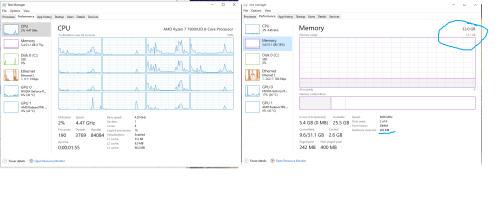
Hi Sifu, possible to make all ram usable?  I searched some youtube and followed the method but nothing has been changed ?
currently rocking ryzen 7 7800x3d and ddr 5 32gb 6000mhz
*
Use memory test programs like memtest86, MemtestPro. This will stress test all ur usable RAM memory.
babylon52281
post Jul 22 2023, 06:56 PM

Look at all my stars!!
*******
Senior Member
2,673 posts

Joined: Apr 2017
QUOTE(phoenixxx @ Jul 22 2023, 06:27 PM)
In BIOS showing 6600 with XMP, but in L-Connect showing 4800, a bit blur.
Didn't really have much time recently to play long sessions, but whatever I throw at it max graphics, RT etc all run smooth. Albeit still using old monitor (60Hz) while finding a better one to upgrade to.

*
Right click windows taskbar - task manager - performance - memory (see what is the Speed reported)

This post has been edited by babylon52281: Jul 22 2023, 07:01 PM
babylon52281
post Jul 22 2023, 10:07 PM

Look at all my stars!!
*******
Senior Member
2,673 posts

Joined: Apr 2017
QUOTE(PJng @ Jul 22 2023, 08:24 PM)
Don see why my old pc windows use HDD, but SSD not in use on task manager
Tried different clone program, pc cannot boot with SSD, i give up
*
Once you cloned the bootdrive into ur SSD, you need to remove or reformat ur HDD that had the Windows to wipe out the boot partition, otherwise the boot priority will still be the default which is ur HDD.
babylon52281
post Jul 23 2023, 01:02 AM

Look at all my stars!!
*******
Senior Member
2,673 posts

Joined: Apr 2017
QUOTE(XeactorZ @ Jul 22 2023, 11:30 PM)
Then should I update bios?

Saw my bios date is 30/3, got latest version around mid July laugh.gif

Saw few articles mentioned if no issue better don't update it hmm.gif
*
CL32 is refer to ur CAS #Latency in CPUZ. As long as you set to XMP auto, it will run the XMP speed at the rated CL speed.
Dont try to update bios if you dont know what ur doing.
babylon52281
post Jul 23 2023, 05:55 PM

Look at all my stars!!
*******
Senior Member
2,673 posts

Joined: Apr 2017
QUOTE(ssxxcool @ Jul 23 2023, 05:17 PM)
Hi Sifu,

I want to move my pc to a SFF/Mini ITX build

these are my current specs:
Intel i7-12700k
BE QUIET! Dark Rock Pro 4 CPU cooler
Asus TUF Z690 DDR4 Motherboard
Kingston Fury Beast DDR4 2 x 8GB
Kingston KC3000 1tb + 2tb SSD
Asus Tuf RTX 3080 10gb GPU
Corsair RM850 PSU
Lian Li Meshify 2

How much and what parts do i need to buy? is RM2K+- enough?

i want to change because i bring my pc to my new home on weekends and  back to my old home on weekdays. Sudah sakit belakang.
*
Moving from ATX down to ITX is a huge jump, needing at lot of part changes. You might as well sell ur current system and get a high end gaming laptop which is far more portable if ur gonna be shuffling to & fro every week. Just my 2cents.

Mind you gaming lappies are a compromise so it might not perform as fast as ur rig above. The same goes with any ITX in a suffocating build anyhow.
babylon52281
post Jul 23 2023, 10:11 PM

Look at all my stars!!
*******
Senior Member
2,673 posts

Joined: Apr 2017
QUOTE(TristanX @ Jul 23 2023, 06:05 PM)
Not even close. Try

Asus TUF 240 - 399
Gigabyte Z690i Aorus Ultra Plus DDR4 - 1599
Cooler Master V 850W SFX - 619
Lian Li A4-H2O (about PS5 size) - 619

You can find other ITX casing but it won't be this small.
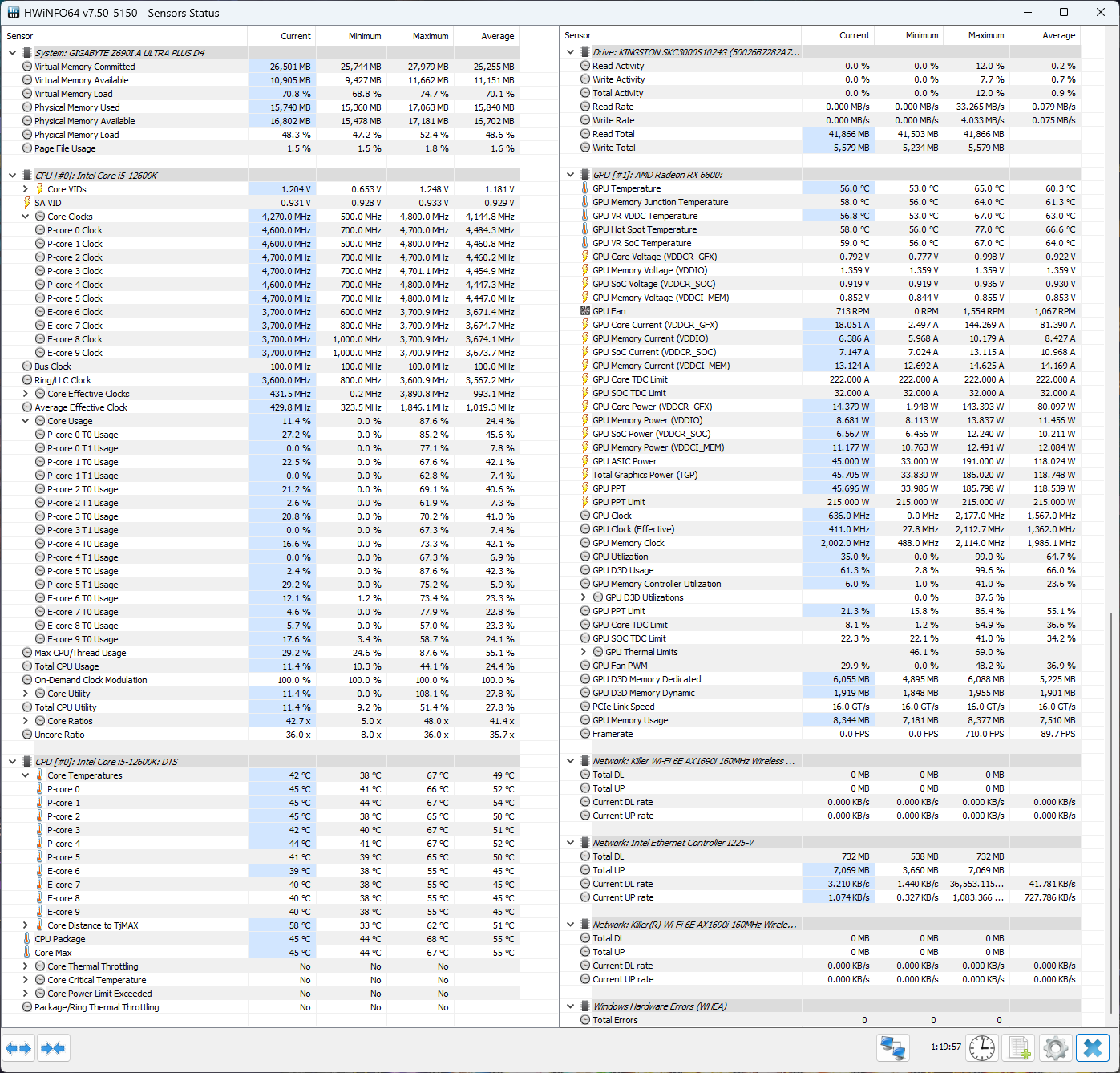
ITX isn't suffocating. Depends on casing and cooler. i5-12600K, EK AIO 240 Basic, RX 6800 on Lian Li A4-H2O
» Click to show Spoiler - click again to hide... «

*
The casing ur recommend is considered a tad too big to be portable.

For ITX build on the go, you will want something like these about 10L max
https://www.amazon.com/KXRORS-S400-Mini-ITX...d/dp/B0BWDD9GPX

If OP wants to reuse his 12700K, cooling without throttling will be a challenge
babylon52281
post Jul 26 2023, 08:28 AM

Look at all my stars!!
*******
Senior Member
2,673 posts

Joined: Apr 2017
QUOTE(darksider @ Jul 25 2023, 09:16 PM)
Hi sifu i plan to upgrade my gpu from gtx1080ti
To either
Rtx 4090 or rtx 4090ti
Do you think I should wait 4090 ti?

I will pair it with the new Samsung g9 neo 240hz

Psu how much needed, my current one corsair 750w
*
This should be in Nvidia tered https://forum.lowyat.net/topic/4547881 but to ur question, I ask you; Do you think AMD will come out with a 4090 fighter? If not, then there is no incentive for NV to come out an even better GPU. Simple as that. So if you need it now there is "no better option".
babylon52281
post Jul 26 2023, 01:09 PM

Look at all my stars!!
*******
Senior Member
2,673 posts

Joined: Apr 2017
QUOTE(targon @ Jul 26 2023, 09:56 AM)
Usually the ti model is not worth buying.
Get a 1.2 kW psu. Hx1200, fsp hydro ptm pro, even better seasonic prime tx
U may as well go straight to top tier psu since u gonna change psu anyway
*
1080Ti & 3060Ti would digress. They are some of the best value for money vs generational performance jump.
babylon52281
post Jul 26 2023, 03:17 PM

Look at all my stars!!
*******
Senior Member
2,673 posts

Joined: Apr 2017
QUOTE(wizoxt @ Jul 26 2023, 12:57 PM)
Hi, need help building a rig only setup, main purpose is for some programming, photo and video editting and gaming (triple a title, gta 5, apex, dota 2, naraka bladepoint etc)

[Budget]4k+

[Purpose] gaming, work

[Hardwares that will be re-use] none

[Monitor resolution] 3840x1080

[Personal preferences] 6750 xt or 4060 ti

[Location] KL

Thanks in advance
*
Want 4K gaming AAA titles but only have RM4k? Bro at least double that (yes RM 8k!) for minimum 4K gaming rig.
babylon52281
post Jul 26 2023, 03:24 PM

Look at all my stars!!
*******
Senior Member
2,673 posts

Joined: Apr 2017
QUOTE(tky0414 @ Jul 26 2023, 01:52 PM)
I am thinking of upgrading my old PC with ryzen 3600 + gtx 1060 6gb. I have a 1440p monitor but i never seems to be able to utilize the high resolution, gpu just too old and weak for 1440p. I normally just play ARPG like D4, path of exile. Not really AAA title. Any recommendation?

1. Whats the best gpu for 1440p max setting game ?
RTX 4070, 4070 TI, 4080? Do u think 4080 is too overpowered and expensive for 1440p? Some one said RTX 4070 is good for 1080p only? I can afford 4080 just not sure is it worth or not.

2. AMD vs intel CPU
Which one is better ya? Ryzen 7 5800x3D vs intel i7 13700?
Is it worth to get AM5 ryzen 7800x3d?
I only consider to upgrade pc every 4-5 years or more. By then is AM5 mobo still relevant?

Sifu please help
*
Firstly whats ur budget cap ya.

If you can afford it, just a minimum upgrade to RTX 4080 / 6900XT / 7900XT and 5800X3D will last for many years playing 1440p with potential to do 4K Min settings.
babylon52281
post Jul 27 2023, 12:57 PM

Look at all my stars!!
*******
Senior Member
2,673 posts

Joined: Apr 2017
QUOTE(wizoxt @ Jul 26 2023, 07:46 PM)
Lets say if just ignore the 4k requirement, what be would the build for this budget?
*
The above 2 builds by sifus here are solid, if slightly outdated, rigs for 1080P high/ultra to 1440P low/mid settings. Hardware cost a lot more money these days.
babylon52281
post Jul 27 2023, 04:20 PM

Look at all my stars!!
*******
Senior Member
2,673 posts

Joined: Apr 2017
QUOTE(myway1985 @ Jul 27 2023, 03:45 PM)
or get a old pc?
*
Better get a NUC. Old PC will be power inefficient (as it is PC) and will output more heat than needed (as it is a PC).
babylon52281
post Jul 28 2023, 06:53 PM

Look at all my stars!!
*******
Senior Member
2,673 posts

Joined: Apr 2017
QUOTE(ssxxcool @ Jul 28 2023, 03:58 PM)
1. MSI MPG B760I EDGE WIFI DDR4 mITX Intel Motherboard - RM973.00
2. Cooler Master NR200P MAX - RM1,335.00

Total RM2,308

price from dotatech.

is this good enough? if using "B" motherboard, do i lose anything else other than overclocking? because i dont oc

the main thing i want is the full speed of my two gen4 ssd
*
If portability is a necessity for you, just make sure you can lug that thing as NR max case is 18L sized.

Using Ksku on B mobo still got advantages as you can up VCCSA for better RAM stability at XMP (esp if ur running 3600@G1) and importantly you can undervolt it to control temps.

This post has been edited by babylon52281: Jul 28 2023, 06:56 PM
babylon52281
post Aug 3 2023, 08:16 PM

Look at all my stars!!
*******
Senior Member
2,673 posts

Joined: Apr 2017
QUOTE(KTCY @ Aug 2 2023, 03:16 PM)
Hi. Would like to know if using 4090 with i7 will it cause bottleneck?
Also, let's say I don't do OC for processor, do I still need z790? If not, any recommendations?
*
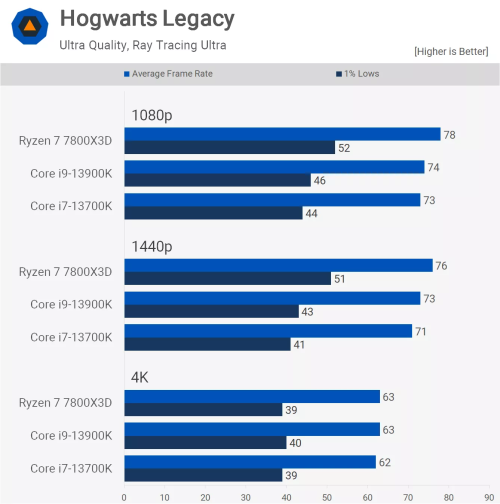
At 4K (which I assume ur gonna be playing at with such a rig), even with a monster 4090 ur still be GPU bound so whether i7 or i9 is mostly the same.
user posted image

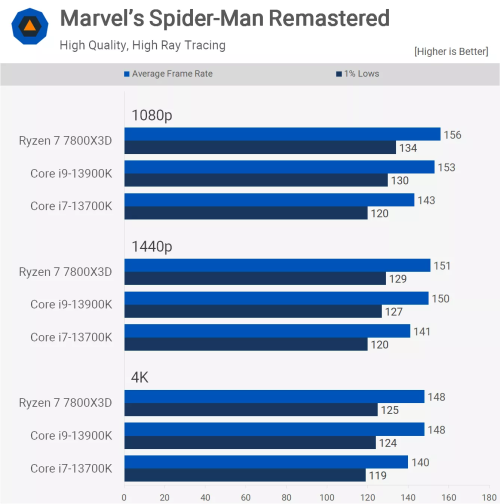
But there are some games which can draw out a few more FPS
user posted image

And since ur spending that much money, going down i7 doesnt save a whole lot of money and if every FPS counts then even more so.

babylon52281
post Aug 9 2023, 08:24 AM

Look at all my stars!!
*******
Senior Member
2,673 posts

Joined: Apr 2017
QUOTE(KTCY @ Aug 8 2023, 08:44 PM)
I triggered and bought majority of items but with some crazy impulsive buy i.e change mobo to edge wifi, 2x kc3000 2tb etc.

I'm now left with 4090. Besides Asus ROG white color, any other 4090. I know zotac. How about colorful Neptune 4090? Any comments? Or suggestions open for white 4090
*
All white? Galax HOF nuff said!

76 Pages « < 14 15 16 17 18 > » Top
 

Change to:
| Lo-Fi Version
0.0568sec    0.40    7 queries    GZIP Disabled
Time is now: 3rd December 2025 - 02:52 PM