Welcome Guest ( Log In | Register )

369 Pages « < 342 343 344 345 346 > » Bottom

Outline · [ Standard ] · Linear+

 Android / Other TV Box, see Page 1 first... V2

views
     
dun_panic
post Apr 1 2021, 03:13 PM

Casual
***
Junior Member
433 posts

Joined: Nov 2008
From: Kay Bee~Kay Eyy


QUOTE(C2KBAS2005 @ Apr 1 2021, 10:29 AM)
too late, for old man to understand this modern tv setting up and using.....just bought tanix tx6s to try.......doesn't seem to be user friendly for old man sad.gif  sad.gif  sad.gif

anyone can guide me to any information or videos on how to watch local tv stations in my andriod tv?

being doing a lot of searching......ended up very bad head-acne and confusing
*
just connect the antenna(better digital one) at the back..then tuning/searching channel for digital tv
coolguy99
post Apr 2 2021, 08:21 AM

Look at all my stars!!
*******
Senior Member
7,350 posts

Joined: Aug 2015


what app do you guys use for china live tv? i tried some of the apps recommended here but none seems to be working for me.
C2KBAS2005
post Apr 2 2021, 11:31 AM

Getting Started
**
Junior Member
185 posts

Joined: May 2009
QUOTE(dun_panic @ Apr 1 2021, 03:13 PM)
just connect the antenna(better digital one) at the back..then tuning/searching channel for digital tv
*
disconnected and removed my old antenna at the roof after fried by lightning......found the apps to watch local tv programmed from the tv box.....only problem need to use a mouse instead of the remote to control......still learning.......cheers
szecheng
post Apr 2 2021, 03:46 PM

Casual
***
Junior Member
460 posts

Joined: Jun 2008


QUOTE(coolguy99 @ Apr 2 2021, 08:21 AM)
what app do you guys use for china live tv? i tried some of the apps recommended here but none seems to be working for me.
*
SKY 4k
dun_panic
post Apr 2 2021, 10:35 PM

Casual
***
Junior Member
433 posts

Joined: Nov 2008
From: Kay Bee~Kay Eyy


QUOTE(C2KBAS2005 @ Apr 2 2021, 11:31 AM)
disconnected and removed my old antenna at the roof after fried by lightning......found the apps to watch local tv programmed from the tv box.....only problem need to use a mouse instead of the remote to control......still learning.......cheers
*
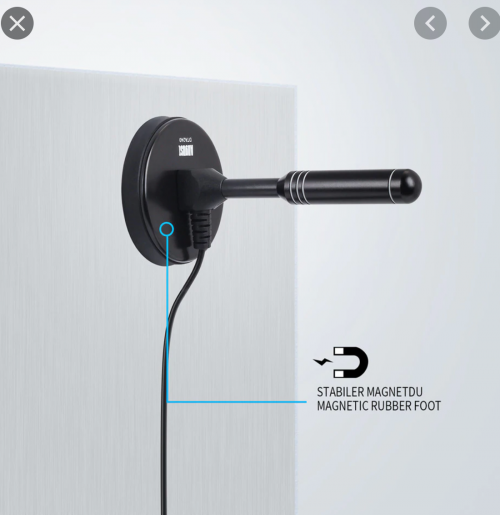
i use this one, indoor unit cost around rm20

user posted image
voncrane
post Apr 3 2021, 10:03 AM

Noir et fier!
*******
Senior Member
7,118 posts

Joined: Oct 2011
From: Wakanda


QUOTE(C2KBAS2005 @ Mar 26 2021, 10:37 AM)
voncrane.....really appreciate for your info.....if ur free or anyone can help or guide an oldman on this.....

situation : tv and njoi fried by lightning....so now i even taken off the antenna at roof to prevent this from happening again (had many issues with lightning at my home in puchong....tv....njoi....modem changed 3 times....lights.....even the the roof kena few year back)

available : just bought sony (kd55x7500h) tv and home unifi 100mbps (with unifitv in the package but never know how to use this as decoder not provided)

problem : the shop say if want to watch local TV stations needs a TV box if without roof antenna

planning : to get a android TV box....was looking at mi TV stick or mi TV box (saw in youtube as easy to operate)  but shopee seller re-commandeered tanix tx6s 4gb+64gb with 10k+ programmes installed also because bigger ram, bigger memory, easy to use......my idea on mi TV stick was getting cheap TV box to try and learn as i read around there's many issues on cannot watch tv or movies after certain time rendering the TV box not usable, installing apks/softwares also looks difficult....if end of the day this tv box cant work, i will go back to install roof antenna again

note : most properly i will get this tx6s tomorrow during sales in either shopee or lazada, hopefully it works for me

sorry for long wall of texts.....any information will be very helpful and appreciated........thanks a million and have a great day.....cheers
*
QUOTE(C2KBAS2005 @ Apr 1 2021, 10:29 AM)
too late, for old man to understand this modern tv setting up and using.....just bought tanix tx6s to try.......doesn't seem to be user friendly for old man sad.gif  sad.gif  sad.gif

anyone can guide me to any information or videos on how to watch local tv stations in my andriod tv?

being doing a lot of searching......ended up very bad head-acne and confusing
*
No surprises there... The moment I read seller recommended the TX6s as easy to use, 10k+ programs, etc.. I'm already turned off d.. It's a decent box, no doubt. But I also believe you need to understand that Android TV boxes are a different experience than Astro box. This is also why we here ALWAYS recommend older folks to simply stick to Astro and cough up that monthly sub as nothing.. literally nothing available matches their offerings, reliability, and ease of use. It's either that or adjust your expectations accordingly and be willing to learn the cord-cutting life's way. It's not an easy one in the beginning, but once you get the hang of it, it becomes a breeze.

As other forummer pointed out, your TV already has a DVB-T/T2 built-in tuner with support for free-to-air digital TV (about 15 channels), so you can get a decent antenna, a Belkin or etc surge n lightning strikes protector. But seeing as you've already suffered one too many strikes, perhaps skip this route? sweat.gif

The Unifi TV package in your plan should come with login details that allow you to watch Unifitv using the Android playtv@unifi app..Since you already bought the Sony kd55x7500h TV, I would suggest you install the unifitv app on it and logon.. if it works? Then at minimum, you have some live TV channels covered. I believe your Sony should be running ATV OS and there's a dedicated UnifiTV app too. If you watch my Mecool KM1 2020 review video, around the 21:09 mark, you should see me try the app in question. Whether it works for you, depends on your TV. Should you need more? Then you can look at alternative "ehem" sources.. I give an example in the link below.. Watch it to see what the service offers. Installation is pretty standard and I show how. I don't sell the service or care, for obvious reasons. But you can purchase directly from them or from sellers on Shopee/Lazada. usual disclaimer applies.

Should you find your TV insuffcicient. You must focus on getting a good box first and then addon services you need or want. ATV OS comes with some drawbacks, but as I've shown... It's the easier UI to use and master. Regardless, we tend to only run one app at a time. So UI is not as important to me as actual performance.

QUOTE(coolguy99 @ Apr 2 2021, 08:21 AM)
what app do you guys use for china live tv? i tried some of the apps recommended here but none seems to be working for me.
*
Tried SyberTV? Here's my review and demo.

lowdensity
post Apr 3 2021, 01:27 PM

Casual
***
Junior Member
454 posts

Joined: Nov 2010
From: SEA
QUOTE(dun_panic @ Apr 2 2021, 10:35 PM)
i use this one, indoor unit cost around rm20

user posted image
*
ini boleh dapat signal?

dia guna apa mode untuk dapat signal?
tvcat
post Apr 4 2021, 01:44 PM

Mr. Dumb Dumb
*******
Senior Member
2,893 posts

Joined: Nov 2004


QUOTE(coolguy99 @ Apr 2 2021, 08:21 AM)
what app do you guys use for china live tv? i tried some of the apps recommended here but none seems to be working for me.
*
If you want I can PM you the APK later.
Just so you know that i scanned the APK with online antivirus scanner and the result is not good.
I only install on my tv box with different gmail account use only for tv box.
dun_panic
post Apr 4 2021, 10:53 PM

Casual
***
Junior Member
433 posts

Joined: Nov 2008
From: Kay Bee~Kay Eyy


QUOTE(lowdensity @ Apr 3 2021, 01:27 PM)
ini boleh dapat signal?

dia guna apa mode untuk dapat signal?
*
boleh..digital
C2KBAS2005
post Apr 5 2021, 12:31 PM

Getting Started
**
Junior Member
185 posts

Joined: May 2009
QUOTE(dun_panic @ Apr 2 2021, 10:35 PM)
i use this one, indoor unit cost around rm20

user posted image
*
thanks........will look into this product......
C2KBAS2005
post Apr 5 2021, 12:39 PM

Getting Started
**
Junior Member
185 posts

Joined: May 2009
QUOTE(voncrane @ Apr 3 2021, 10:03 AM)
No surprises there... The moment I read seller recommended the TX6s as easy to use, 10k+ programs, etc.. I'm already turned off d.. It's a decent box, no doubt. But I also believe you need to understand that Android TV boxes are a different experience than Astro box. This is also why we here ALWAYS recommend older folks to simply stick to Astro and cough up that monthly sub as nothing.. literally nothing available matches their offerings, reliability, and ease of use. It's either that or adjust your expectations accordingly and be willing to learn the cord-cutting life's way. It's not an easy one in the beginning, but once you get the hang of it, it becomes a breeze.

As other forummer pointed out, your TV already has a DVB-T/T2 built-in tuner with support for free-to-air digital TV (about 15 channels), so you can get a decent antenna, a Belkin or etc surge n lightning strikes protector. But seeing as you've already suffered one too many strikes, perhaps skip this route?  sweat.gif

The Unifi TV package in your plan should come with login details that allow you to watch Unifitv using the Android playtv@unifi app..Since you already bought the Sony kd55x7500h TV, I would suggest you install the unifitv app on it and logon.. if it works? Then at minimum, you have some live TV channels covered. I believe your Sony should be running ATV OS and there's a dedicated UnifiTV app too. If you watch my Mecool KM1 2020 review video, around the 21:09 mark, you should see me try the app in question. Whether it works for you, depends on your TV. Should you need more? Then you can look at alternative "ehem" sources.. I give an example in the link below.. Watch it to see what the service offers. Installation is pretty standard and I show how. I don't sell the service or care, for obvious reasons. But you can purchase directly from them or from sellers on Shopee/Lazada. usual disclaimer applies.

Should you find your TV insuffcicient. You must focus on getting a good box first and then addon services you need or want. ATV OS comes with some drawbacks, but as I've shown... It's the easier UI to use and master. Regardless, we tend to only run one app at a time. So UI is not as important to me as actual performance.
Tried SyberTV? Here's my review and demo.
*
thanks.....slowly but surely picking up this android tv thingy.....have tried install playtv@unifi into the tv.....it works rclxms.gif rclxms.gif rclxms.gif

will look into your recommendation......anyway the tv box seems to bit slower then running apps in the tv.......just my personal opinion

really appreciate all you guys and gals here for the help for my journey into android tv .......thanks a million notworthy.gif notworthy.gif notworthy.gif

This post has been edited by C2KBAS2005: Apr 5 2021, 12:39 PM
lowdensity
post Apr 5 2021, 09:03 PM

Casual
***
Junior Member
454 posts

Joined: Nov 2010
From: SEA
QUOTE(dun_panic @ Apr 4 2021, 10:53 PM)
boleh..digital
*
best.

Apa masalah jika tidak dapat signal?
Antenna perlu letak di luar bangunan?
dun_panic
post Apr 6 2021, 01:22 AM

Casual
***
Junior Member
433 posts

Joined: Nov 2008
From: Kay Bee~Kay Eyy


QUOTE(lowdensity @ Apr 5 2021, 09:03 PM)
best.

Apa masalah jika tidak dapat signal?
Antenna perlu letak di luar bangunan?
*
mungkin coverage kurang, kena pki booster
voncrane
post Apr 6 2021, 10:30 AM

Noir et fier!
*******
Senior Member
7,118 posts

Joined: Oct 2011
From: Wakanda


QUOTE(C2KBAS2005 @ Apr 5 2021, 12:39 PM)
thanks.....slowly but surely picking up this android tv thingy.....have tried install playtv@unifi into the tv.....it works rclxms.gif  rclxms.gif  rclxms.gif

will look into your recommendation......anyway the tv box seems to bit slower then running apps in the tv.......just my personal opinion

really appreciate all you guys and gals here for the help for my journey into android tv .......thanks a million notworthy.gif  notworthy.gif  notworthy.gif
*
Glad to hear that the playtv@unifi app works directly on your TV. thumbup.gif

Regarding speeds. It's box-dependent. Some are faster than others. But yeah, just waking the TV up from sleep and selecting the playtv@unifi app on the screen would be faster than most boxes. Plus its just one device vs 2. So yeah, try to explore more on just using the TV alone and you might just find its sufficient for your needs. Later should you find it can't do much that you'd like to? Then sure...seek out a box that will supplement it. nod.gif
lowdensity
post Apr 6 2021, 09:20 PM

Casual
***
Junior Member
454 posts

Joined: Nov 2010
From: SEA
QUOTE(dun_panic @ Apr 6 2021, 01:22 AM)
mungkin coverage kurang, kena pki booster
*
faham.
TQ.
dave99021
post Apr 7 2021, 12:20 PM

Getting Started
**
Junior Member
63 posts

Joined: Aug 2020
Hi, Long time lurker here in this forum, First time posting in this section as I have some thoughts on
upgrading the tv box.

Not that long ago my parents acquired a "Global TV Max" tv boxes from a local supermarket store that comes preloaded with
Live TV apps and Movie apps for them. But now the TV box seems to be acting up as it's getting ridiculously slow and suffers from constant
crashes on app as well (Though not the proprietary app that the TV box used).

So I was just wondering if I could get a decent TV box, and transfer the APK into the new TV box, Would that be possible ?

Or It's better for me to just replicate the setup by findings those APK and set it up for my parents?


C2KBAS2005
post Apr 8 2021, 10:21 AM

Getting Started
**
Junior Member
185 posts

Joined: May 2009
QUOTE(voncrane @ Apr 6 2021, 10:30 AM)
Glad to hear that the playtv@unifi app works directly on your TV.  thumbup.gif

Regarding speeds. It's box-dependent. Some are faster than others. But yeah, just waking the TV up from sleep and selecting the playtv@unifi app on the screen would be faster than most boxes. Plus its just one device vs 2. So yeah, try to explore more on just using the TV alone and you might just find its sufficient for your needs. Later should you find it can't do much that you'd like to? Then sure...seek out a box that will supplement it.  nod.gif
*
wish to thanks......voncrane, steven and the rest here for the information, guidance and tips given......really helping me to jump into android TV and android TV box bandwagon, really different type animal from the TV of my time......i needed few days only to find out how to link my modem to my TV and TV box after reading around stating faster internet connect if use lan connection......showing how newbies and blur of me........lol


StevenL
post Apr 8 2021, 09:56 PM

Enthusiast
*****
Junior Member
732 posts

Joined: Jul 2010
QUOTE(C2KBAS2005 @ Apr 8 2021, 10:21 AM)
wish to thanks......voncrane, steven and the rest here for the information, guidance and tips given......really helping me to jump into android TV and android TV box bandwagon, really different type animal from the TV of my time......i needed few days only to find out how to link my modem to my TV and TV box after reading around stating faster internet connect if use lan connection......showing how newbies and blur of me........lol
*
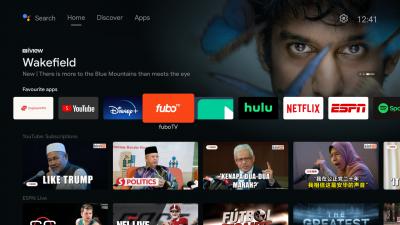
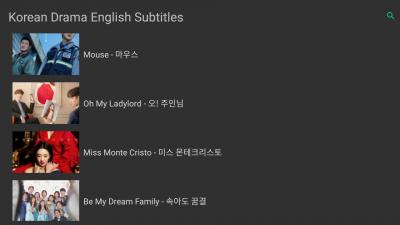
Now that you have atv TV, you may want to try another level, click the link to download the apk/app into USB. Then plug your USB and install this in your Sony TV.
http://www.mediafire.com/file/885170z6yvrs...TV_100.apk/file

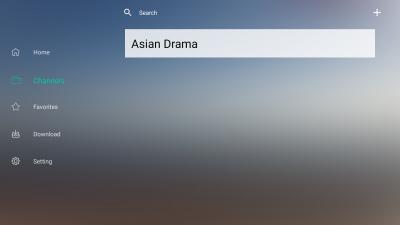
Go to File in your TV, find the apk/app to install it, launch the app and go to channel. Upper right screen you have + sign, click and input the following into the link box & click OK.
http://allrss.se/dramas
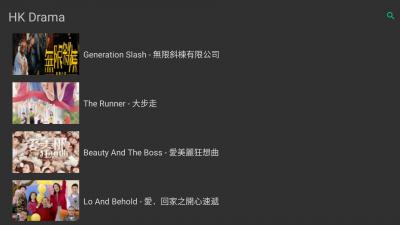
Then close the app and open the app again, go to HOME & click that..
You should now be able to scroll and view various Asian drama free of charge that is if you are into drama.

Other app you can install from Play Store in your TV ie Iqiyi, iFlix which are free
All da best

P/S: Screenshot added below for clearer guidance

This post has been edited by StevenL: Apr 9 2021, 01:01 PM


Attached thumbnail(s)
Attached Image Attached Image Attached Image Attached Image Attached Image Attached Image
voncrane
post Apr 8 2021, 11:14 PM

Noir et fier!
*******
Senior Member
7,118 posts

Joined: Oct 2011
From: Wakanda


QUOTE(dave99021 @ Apr 7 2021, 12:20 PM)
Hi, Long time lurker here in this forum, First time posting in this section as I have some thoughts on
upgrading the tv box.

Not that long ago my parents acquired a "Global TV Max" tv boxes from a local supermarket store that comes preloaded with
Live TV apps and Movie apps for them. But now the TV box seems to be acting up as it's getting ridiculously slow and suffers from constant
crashes on app as well (Though not the proprietary app that the TV box used).

So I was just wondering if I could get a decent TV box, and transfer the APK into the new TV box, Would that be possible ?

Or It's better for me to just replicate the setup by findings those APK and set it up for my parents?
*
I'm unfamiliar with this "Global TV Max" TV box, and it's not unsurprising that it gets bogged down after some time, and or that some services simply stop working. I suggest you first try factory resetting the box. It won't get abandoned apps and or services to magically start working, but it'll clear some junk and "refresh" the software. You may have to re-login some stuff.

Yep, I guess you can always rip out the apk. But whether it works on another box depends on the apk and service itself. Some ehem box providers build their software to only run on their own devices and nowhere else. Only one way to find out if it'll work.

I very much prefer option 2. Get a good box, find decent services (free & paid).. Sub as needed and setup.. At least now you know exactly what you installed and if any issues? You can just uninstall and install a new app and or config new service.

QUOTE(C2KBAS2005 @ Apr 8 2021, 10:21 AM)
wish to thanks......voncrane, steven and the rest here for the information, guidance and tips given......really helping me to jump into android TV and android TV box bandwagon, really different type animal from the TV of my time......i needed few days only to find out how to link my modem to my TV and TV box after reading around stating faster internet connect if use lan connection......showing how newbies and blur of me........lol
*
You are welcome... Yeah, going wired typically offers better stability than wireless. Enjoy.. thumbup.gif
C2KBAS2005
post Apr 9 2021, 09:27 AM

Getting Started
**
Junior Member
185 posts

Joined: May 2009
QUOTE(StevenL @ Apr 8 2021, 09:56 PM)
Now that you have atv TV, you may want to try another level, click the link to download the apk/app into USB. Then plug your USB and install this in your Sony TV.
http://www.mediafire.com/file/885170z6yvrs...TV_100.apk/file

Once installed, launch the app and go to channel. Upper right screen you have + sign, click and input the following into the link box & click OK.
http://allrss.se/dramas
Then close the app and open the app again..
You should now be able to scroll and view various Asian drama free of charge that is if you are into drama.

Other app you can install from Play Store in your TV ie Iqiyi, iFlix which are free
All da best
*
million thanks sifu Steven......will try this soon after i finished trying to install my Xioami Soundbar this weekend, my home minister will be very happy to have access to Chinese dramas


369 Pages « < 342 343 344 345 346 > » Top
 

Change to:
| Lo-Fi Version
0.0312sec    0.22    6 queries    GZIP Disabled
Time is now: 4th December 2025 - 03:08 AM